Hi, this problem makes me nuts.
My HP 280 G1, x64, Win7 Pro SP1 has no built in BT, so I bought the BT820 from Laird and it is built on the csr8510a10 chipset. It is said to not require any additional driver, but uses the native in Win7.
Well, I connect it and yes, it installs. I Power my BT server using the Laird BT730 board (also csr8510a10 chipset).
When seraching for it, it is found, I connect and is asked for the pariring code which is entered. However, this procedure is unusually slow, each step takes abt 10 seconds! When code is entered, it start to install the server and finally reports that it has found the Serial Port and its user name correctly. It has then assigned the COM5 for me as an outgoing port to connect to the server in my app.
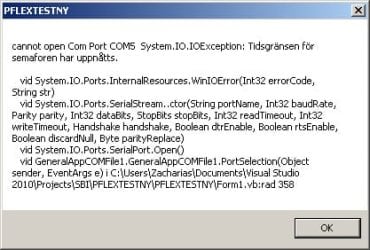
Yes, I open my app and selects the COM5. Nothing happens. After a while it times out and Connection is not established. Since I wrote the app myself I could debug it and see that it is the COMPort.Open() that is the offending statement.
Now, come the funny part. When I switch to BT400 from ASUS and a specially developed driver, then BINGO! All works Lightning fast. COM port is opened and I can talk to the BT server.
Asking around no one seems to know why the native MS BT driver will not work. BUT, BUT, it does work flawlessly in Win XP SP3.. How about that?
Now, how to solve this? To make the BT820 work with Win7?
Yes, I have the same problem with Android, variousp hones and PDAs. The won't open the COM-port.
Moreover, I installed the latest driver stack from CSR which totally ruined my computer. It prevented the ASUS BT400 from working, it could not be uninstalled properly, not even using a reset Point would work. I had to make use of the HDD backup I had taken Before this experiment. Warning for the CSR driver, then!
Solution anyone, since I'm stuck?
Thanks in advance.
My HP 280 G1, x64, Win7 Pro SP1 has no built in BT, so I bought the BT820 from Laird and it is built on the csr8510a10 chipset. It is said to not require any additional driver, but uses the native in Win7.
Well, I connect it and yes, it installs. I Power my BT server using the Laird BT730 board (also csr8510a10 chipset).
When seraching for it, it is found, I connect and is asked for the pariring code which is entered. However, this procedure is unusually slow, each step takes abt 10 seconds! When code is entered, it start to install the server and finally reports that it has found the Serial Port and its user name correctly. It has then assigned the COM5 for me as an outgoing port to connect to the server in my app.
Yes, I open my app and selects the COM5. Nothing happens. After a while it times out and Connection is not established. Since I wrote the app myself I could debug it and see that it is the COMPort.Open() that is the offending statement.
Now, come the funny part. When I switch to BT400 from ASUS and a specially developed driver, then BINGO! All works Lightning fast. COM port is opened and I can talk to the BT server.
Asking around no one seems to know why the native MS BT driver will not work. BUT, BUT, it does work flawlessly in Win XP SP3.. How about that?
Now, how to solve this? To make the BT820 work with Win7?
Yes, I have the same problem with Android, variousp hones and PDAs. The won't open the COM-port.
Moreover, I installed the latest driver stack from CSR which totally ruined my computer. It prevented the ASUS BT400 from working, it could not be uninstalled properly, not even using a reset Point would work. I had to make use of the HDD backup I had taken Before this experiment. Warning for the CSR driver, then!
Solution anyone, since I'm stuck?
Thanks in advance.
My Computer
At a glance
Win7 Pro SP1 x64Core i516GB
- Computer type
- PC/Desktop
- Computer Manufacturer/Model Number
- HP 280 G1
- OS
- Win7 Pro SP1 x64
- CPU
- Core i5
- Motherboard
- hp
- Memory
- 16GB
- Hard Drives
- 2
- Antivirus
- MSE
- Browser
- firefox