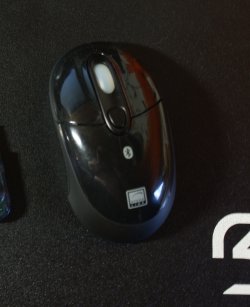
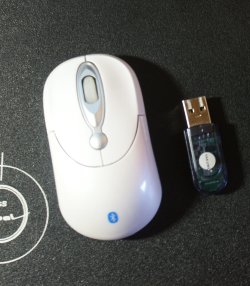
Bluetooth optical mouse / BT usb dongle

K4mM3

New member
Local time
11:27 AM
Messages
9
Hi !

Problem is that the white BT mouse is not working with BT usb dongle.
- It is working with laptop where BT is intregrated.

That other mouse (speedlink) is working fine with that BT usb dongle.

Mouse seems to be fine and, usb dongle works too but why it doesn't work together ?
Any ideas?

-Kaimar-
 

Attachments
  • 1.jpg
    1.jpg
    304.5 KB · Views: 238
  • 2.jpg
    2.jpg
    245.8 KB · Views: 40

My Computer My Computer

At a glance

windows 7
OS
windows 7
Well, it seems I don't get any help from here...
 

My Computer My Computer

At a glance

windows 7
OS
windows 7
Have you paired them correctly?
 

My Computer My Computer

At a glance

Windows 7 Ultimate x64 ®™Intel Core 2 Duo (2.2 GHz)2x 2GB Corsair (667 MHz)NVIDIA 8600M GS (256MB)
Computer Manufacturer/Model Number
Sony Vaio FZ21Z
OS
Windows 7 Ultimate x64 ®™
CPU
Intel Core 2 Duo (2.2 GHz)
Motherboard
Sony (Intel Chipset)
Memory
2x 2GB Corsair (667 MHz)
Graphics Card(s)
NVIDIA 8600M GS (256MB)
Sound Card
Sigmatel
Monitor(s) Displays
15.4" TFT X-Black
Screen Resolution
1280x800
Hard Drives
Western Digital 300GB Scorpio Black (7200rpm)
Mouse
Logitech Anywhere MX
Internet Speed
Sky 5MB
I had a BT USB dongle a while ago and had several problems with it, including disconnection at seemingly random times and canceling out some other peripherals. Eventually I sold it and bought a different brand, but I never found out why that happened. Although, from the picture, you haven't got the same model as I had, I'd like to see how this turns out.
 

My Computer My Computer

At a glance

Windows 7 Home Premium x64
OS
Windows 7 Home Premium x64
Does the "speedlink" mice works with the laptop? And was the dongle provided with the "speedlink" mice?

So you're connecting the dongle to another laptop/desktop...not on the mentionned laptop?
 

My Computer My Computer

At a glance

Windows 7 Professional SP1 - x64 [Non-UEFI Boot]Ivy Bridge Core i5 3570K (Delidded)G.Skill "Ares" DDR3 PC3-12800 - 1600MHz (16Gb)Asus Dual-RX480-O4G
Computer type
PC/Desktop
Computer Manufacturer/Model Number
Custom Build
OS
Windows 7 Professional SP1 - x64 [Non-UEFI Boot]
CPU
Ivy Bridge Core i5 3570K (Delidded)
Motherboard
Asus P8Z77-V LE PLUS
Memory
G.Skill "Ares" DDR3 PC3-12800 - 1600MHz (16Gb)
Graphics Card(s)
Asus Dual-RX480-O4G
Sound Card
Creative Sound Blaster Z w/5.1 sound system
Monitor(s) Displays
Asus IPS 23"
Screen Resolution
16/9
Hard Drives
Internal:
500Go Sata 6Gb/s (x2)
500Go Sata 3Gb/s (x2)
SSD 60Go Sata 6Gb/s
PSU
In Win C 900W Series 80+ Platinum
Case
Thermaltake Chaser A71
Cooling
Custom Water Cooling Loop
Keyboard
Cooler Master QuickFire XTi
Mouse
Razer Imperator 2012 (4G)
Antivirus
MSE
Browser
IE 11.0.xxx Rtm
Other Info
"Raid0" with Intel Smart Response Technology (HDD/SSD)
Speedlink is working well everywhere, but that China mouse is working only with intregrated bluetooth. I'm pretty sure that I paired them correctly.

Connecting China mouse with dongle---
- I connect dongle
- I turn on mouse
- Add new device
- Computer finds it
- then it automatically finds drivers and install them
- Bluetooth mouse is installed successfully and is ready to use.
- Mouse light goes off after installing
- China mouse is not working

Same thing with intregrated Bluetooth then --- Mouse lights doesn't go off after install and mouse is working.

-Kaimar-
 

My Computer My Computer

At a glance

windows 7
OS
windows 7
Speedlink is working well everywhere, but that China mouse is working only with intregrated bluetooth. I'm pretty sure that I paired them correctly.

Connecting China mouse with dongle---
- I connect dongle
- I turn on mouse
- Add new device
- Computer finds it
- then it automatically finds drivers and install them
- Bluetooth mouse is installed successfully and is ready to use.
- Mouse light goes off after installing
- China mouse is not working

Same thing with intregrated Bluetooth then --- Mouse lights doesn't go off after install and mouse is working.

-Kaimar-

Well, seems the china made mice don't connect to the dongle...could from serial.
Or it had been locked in the hardware to connect with only a specific BTdongle.
 
Last edited:

My Computer My Computer

At a glance

Windows 7 Professional SP1 - x64 [Non-UEFI Boot]Ivy Bridge Core i5 3570K (Delidded)G.Skill "Ares" DDR3 PC3-12800 - 1600MHz (16Gb)Asus Dual-RX480-O4G
Computer type
PC/Desktop
Computer Manufacturer/Model Number
Custom Build
OS
Windows 7 Professional SP1 - x64 [Non-UEFI Boot]
CPU
Ivy Bridge Core i5 3570K (Delidded)
Motherboard
Asus P8Z77-V LE PLUS
Memory
G.Skill "Ares" DDR3 PC3-12800 - 1600MHz (16Gb)
Graphics Card(s)
Asus Dual-RX480-O4G
Sound Card
Creative Sound Blaster Z w/5.1 sound system
Monitor(s) Displays
Asus IPS 23"
Screen Resolution
16/9
Hard Drives
Internal:
500Go Sata 6Gb/s (x2)
500Go Sata 3Gb/s (x2)
SSD 60Go Sata 6Gb/s
PSU
In Win C 900W Series 80+ Platinum
Case
Thermaltake Chaser A71
Cooling
Custom Water Cooling Loop
Keyboard
Cooler Master QuickFire XTi
Mouse
Razer Imperator 2012 (4G)
Antivirus
MSE
Browser
IE 11.0.xxx Rtm
Other Info
"Raid0" with Intel Smart Response Technology (HDD/SSD)
Then I use it with intregrated bluetooth only.
Big thanks to all of you for reply !

-Kaimar-
 

My Computer My Computer

At a glance

windows 7
OS
windows 7
Back
Top