Solved Bluetooth Peripheral Device - No driver found

kathy025

New member
Pro User
VIP
Local time
1:57 AM
Messages
310
Hi guys,

I downloaded the latest btooth driver available from the support site and proceeded with the installation:

btooth_driver.png


I still proceeded to pair my XPERIA arc S (LT18i) with my N45SF and encountered the following error:

btooth_conn.png


Both devices paired successfully though.
I was able to btooth a file to my phone and playback music from my phone with my laptop as the audio device/speaker.

Despite the seemingly successful pairing (I'm confused why they appear to work), what can be done to get rid of the errors? I have tried automatic driver detection/installation via Windows Update to no avail.
 

My Computer

Computer type
Laptop
Computer Manufacturer/Model Number
ASUS N45SF
OS
Windows 7 Professional SP1 x64 (OEM)
CPU
Intel® Core™ i5 2430M/2410M Processor
Motherboard
Intel® HM65 Express Chipset
Memory
DDR3 1333 SODIMM (8GB)
Graphics Card(s)
NVIDIA® GeForce® GT 555M (2GB)
Sound Card
Realtek High Definition Audio
Monitor(s) Displays
14.0" LED Backlight
Screen Resolution
16:9 HD (1366x768)
Hard Drives
640GB Seagate (internal), 1TB Toshiba Canvio Portable, 2TB x 2 WD My Book Essential (external)
Antivirus
Malwarebytes Anti-Malware Home (Premium)
Browser
Waterfox
Other Info
Optical Drive: Slimtype DVD A DS8A5SH (Super-Multi DVD);
Audio: Bang & Olufsen ICEpower®, SonicMaster
Hi maxie,

Unfortunately, installing PC Companion (and updating all its sub-components) did not solve the issue.

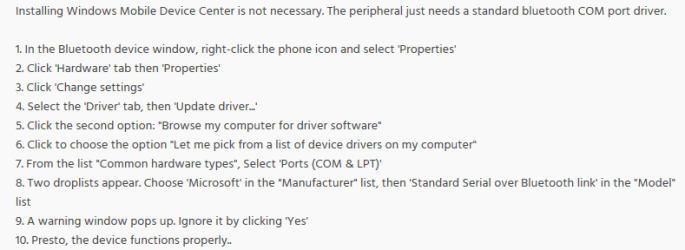
However, I found a post from xda-developers that solved the problem.

btooth.png

Solution:
  1. Start > Search > Device Manager > Other Devices > Bluetooth Peripheral Device > Update Driver Software
  2. Continue from Step 5 to Step 9
Results:
The generic driver was installed and I was able to get rid of that annoying yellow exclamation mark.

btooth_com.png

Device Manager

device_lt18i.png

Show Bluetooth Devices

Again, I tested sending a video and playback music with my laptop as the audio device with successful results.

Since this is a generic driver, the solution can possibly work on any bluetooth device, regardless of brand. If anyone else encounters this, it may be worth a shot.

Thanks for reminding me to install PC Companion though, I have been meaning to try it anyway.

Hopefully, other members can also find this useful. Thread marked solved. :geek:
 

Attachments

  • bluetooth_peripheral_device.png
    bluetooth_peripheral_device.png
    16.7 KB · Views: 11
Last edited:

My Computer

Computer type
Laptop
Computer Manufacturer/Model Number
ASUS N45SF
OS
Windows 7 Professional SP1 x64 (OEM)
CPU
Intel® Core™ i5 2430M/2410M Processor
Motherboard
Intel® HM65 Express Chipset
Memory
DDR3 1333 SODIMM (8GB)
Graphics Card(s)
NVIDIA® GeForce® GT 555M (2GB)
Sound Card
Realtek High Definition Audio
Monitor(s) Displays
14.0" LED Backlight
Screen Resolution
16:9 HD (1366x768)
Hard Drives
640GB Seagate (internal), 1TB Toshiba Canvio Portable, 2TB x 2 WD My Book Essential (external)
Antivirus
Malwarebytes Anti-Malware Home (Premium)
Browser
Waterfox
Other Info
Optical Drive: Slimtype DVD A DS8A5SH (Super-Multi DVD);
Audio: Bang & Olufsen ICEpower®, SonicMaster
Nice find there Kathy glad you got the issue sorted
 

My Computer

Computer Manufacturer/Model Number
W530-3630QM1
OS
windows 7 home 64bit
CPU
INTEL-CORE I7
Memory
16GB
Hard Drives
750GB
Browser
Chrome
Reason why I love forums. Useful knowledge everywhere. ;)
 

My Computer

Computer type
Laptop
Computer Manufacturer/Model Number
ASUS N45SF
OS
Windows 7 Professional SP1 x64 (OEM)
CPU
Intel® Core™ i5 2430M/2410M Processor
Motherboard
Intel® HM65 Express Chipset
Memory
DDR3 1333 SODIMM (8GB)
Graphics Card(s)
NVIDIA® GeForce® GT 555M (2GB)
Sound Card
Realtek High Definition Audio
Monitor(s) Displays
14.0" LED Backlight
Screen Resolution
16:9 HD (1366x768)
Hard Drives
640GB Seagate (internal), 1TB Toshiba Canvio Portable, 2TB x 2 WD My Book Essential (external)
Antivirus
Malwarebytes Anti-Malware Home (Premium)
Browser
Waterfox
Other Info
Optical Drive: Slimtype DVD A DS8A5SH (Super-Multi DVD);
Audio: Bang & Olufsen ICEpower®, SonicMaster
My post directly relates to this discussion: THANKS KATHY! Can I click somewhere and thank you? For years I tried to solve my Bluetooth exclamation point problem--your directions solved it for this Windows 7 user. Thanks! For what it is worth your 'find' deserves a wide audience...searching dozens of other threads, for the past several months, was fruitless. Thanks again!
 

My Computer

Computer type
PC/Desktop
OS
Windows 7 32bit
I find myself referring to my old threads haha. Updated solution to be more concise and added screenshots for better guide.
 

My Computer

Computer type
Laptop
Computer Manufacturer/Model Number
ASUS N45SF
OS
Windows 7 Professional SP1 x64 (OEM)
CPU
Intel® Core™ i5 2430M/2410M Processor
Motherboard
Intel® HM65 Express Chipset
Memory
DDR3 1333 SODIMM (8GB)
Graphics Card(s)
NVIDIA® GeForce® GT 555M (2GB)
Sound Card
Realtek High Definition Audio
Monitor(s) Displays
14.0" LED Backlight
Screen Resolution
16:9 HD (1366x768)
Hard Drives
640GB Seagate (internal), 1TB Toshiba Canvio Portable, 2TB x 2 WD My Book Essential (external)
Antivirus
Malwarebytes Anti-Malware Home (Premium)
Browser
Waterfox
Other Info
Optical Drive: Slimtype DVD A DS8A5SH (Super-Multi DVD);
Audio: Bang & Olufsen ICEpower®, SonicMaster
kathy025 You are awesome!

Got my bluetooth headphones working for audio on my win7 pc,
apparently not the same steps for my other win8.1 machine!

Many many thanks!
 

My Computer

Computer type
PC/Desktop
OS
Win 8.1 64bit
jacob9

Unfortunately I do not have Step 7 "Common hardware types" ??:(
 

My Computer

Computer type
Laptop
Computer Manufacturer/Model Number
HP
OS
Windows 7 Home Premium 64bit.
CPU
AMD Turion IIP540 Duel-Core Processor 2.40 GHz
Memory
4.00 GB
Hard Drives
500 GB
Antivirus
Norton 360
Browser
Firefox, Internet Exploree
Bluetooth peripheral device error for speakers

Hi,
I had a similar driver error for my bluetooth speaker( fenda w130x ).It started working properly after i installed the Realtek hd audio driver which enabled the bluetooth hands free audio option.
 

My Computer

Computer type
Laptop
Computer Manufacturer/Model Number
Lenovo
OS
windows7
CPU
i5
Graphics Card(s)
intel hd
Browser
chrome
Hi Kathy.

I don't nor have ever used Bluetooth very much. But just recently purchased an Epson Label Printer which as an alternative to USB only has Bluetooth. Nice little printer but no luck connecting it to my ThinkPad ultimately, due singularly to the 'no driver found for Bluetooth Peripheral Device' issue.

And I found no problem until I found this post. The solution worked for me so, well done and thanks also from me.

Hi maxie,

.......... I found a post from xda-developers that solved the problem.

btooth.png

Solution:
  1. Start > Search > Device Manager > Other Devices > Bluetooth Peripheral Device > Update Driver Software
  2. Continue from Step 5 to Step 9
Results:
The generic driver was installed and I was able to get rid of that annoying yellow exclamation mark.
 

My Computer

Computer type
Laptop
Computer Manufacturer/Model Number
Lenovo ThinkPas T61p
OS
Windows XP SP3
Hello everyone,

Glad to know this thread is serving its purpose. Thank you for your reports about other devices (aside from smartphones). That's great to know. ;)

EDIT:
I have attached a screenshot of the instructions from XDA-Developers in case you don't want to be redirected to another site.
 

My Computer

Computer type
Laptop
Computer Manufacturer/Model Number
ASUS N45SF
OS
Windows 7 Professional SP1 x64 (OEM)
CPU
Intel® Core™ i5 2430M/2410M Processor
Motherboard
Intel® HM65 Express Chipset
Memory
DDR3 1333 SODIMM (8GB)
Graphics Card(s)
NVIDIA® GeForce® GT 555M (2GB)
Sound Card
Realtek High Definition Audio
Monitor(s) Displays
14.0" LED Backlight
Screen Resolution
16:9 HD (1366x768)
Hard Drives
640GB Seagate (internal), 1TB Toshiba Canvio Portable, 2TB x 2 WD My Book Essential (external)
Antivirus
Malwarebytes Anti-Malware Home (Premium)
Browser
Waterfox
Other Info
Optical Drive: Slimtype DVD A DS8A5SH (Super-Multi DVD);
Audio: Bang & Olufsen ICEpower®, SonicMaster
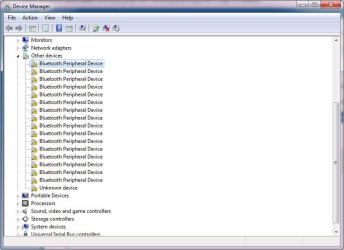
hello, what if you find this many bluetooth peripheral device problem?

i tried to apply the step from kathy but it didnt work
 

Attachments

  • Bluetooth error.jpg
    Bluetooth error.jpg
    53.3 KB · Views: 4

My Computer

Computer type
PC/Desktop
Computer Manufacturer/Model Number
Asus
OS
7 Ultimate x64
CPU
Intel i3
Graphics Card(s)
geforce gt520m
Antivirus
avira
Browser
chrome
@kathy025 -- I have Windows 7 Home Premium and wanted to make a Bluetooth connection with my ZTE-Z222 phone so I could download pictures from the phone to my computer. I kept running into that "caution icon" next to the phone in my "Devices And Printers" area. And in my Device Manager, it showed FIVE "Bluetooth Peripheral Device" items. I uninstalled 4 of them and performed your 10-step fix on the last one remaining. And:
selfie.jpg


SUCCESS !!! OK, no laughing (grin). It's my first selfie.

One thing I wanted to point out about Windows 7 Home Premium ... which may also be true of other Windows 7 versions. The instructions for "pairing" are pretty outdated. It says users only have 30 seconds to successfully enter the Windows-assigned pairing code on the phone before Windows will no longer accept it. Problem? Since Windows 7 came out, computers have gotten much much faster. Mine has an i7 processor, 16GB RAM, and an SSD drive that speeds up access to the regular 1TB hard drive. Consequently, my system only gave me about 6 seconds to enter the 7-digit pairing code on my phone and press the "pair" button. It took me a few tries ... but I finally did it within that narrow window of opportunity.

Still, I was left with that "caution icon" and 5 Bluetooth Peripheral Devices. But following your instructions saved the day. Thank you so very very much.
 

My Computer

Computer type
PC/Desktop
OS
Windows 7 Home Premium 64bit and Windows 7 Pro 64bit
This one really works! Ang galing mo kathy025! =)

God bless!
 

My Computer

Computer type
PC/Desktop
OS
Windows 7 Ultimate x64
CPU
Intel(R) Core(TM) i3-4170 CPU @ 3.70GHz (4 CPUs), ~3.7GHz
Antivirus
AVG Free
Browser
Chrome
bluetooth peripheral device

Kathy ... thanks for the step by step solution. As of today, 7/14/17, the last post was 201 days ago. I wonder why MSFT has not built your fix, or something like it, into an update. :sarc:
Enjoy your summer! :cool:
 

My Computer

Computer type
PC/Desktop
Computer Manufacturer/Model Number
custom build
OS
windows 7 pro, x64
Graphics Card(s)
nvidia
Antivirus
Iolo, Malwarebytes, Anonymizer
Browser
Firefox
Hello, I want to thank Kathy025 for posting the solution for my problem. I search over many sites and finally I found the fix here!
I follow step by step solution and voilá! It works.
 

My Computer

Computer type
Laptop
Computer Manufacturer/Model Number
Asus n53sm
OS
Windows 7 home premium x64
CPU
Intel i7 2670qm
Motherboard
Asus n53sm series notebook
Memory
14 gb
Graphics Card(s)
Nvidia Geforce gt 630
Hard Drives
ST9750420AS (750 GB, 7200 RPM, SATA-II)
Antivirus
Avira
Browser
Firefox
Back
Top