
prekittiya
New member
- Local time
- 10:05 AM
- Messages
- 2
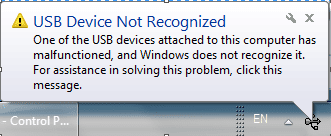
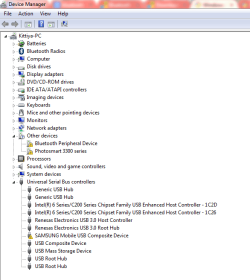
I've been trying to connect my Bluetooth-Enabled smartphone (Samsung Galaxy Note 2) to my laptop, but a small message "USB Device Not Recognized" pops up (screenshot 1). When click on the message, a window appears (screenshot 2). The device manager shows that the Bluetooth Peripheral Device isn't working properly (screenshot 3). What can I do to get this fixed? Please help.
Thank you in advance.
Thank you in advance.
Attachments

My Computer
- Computer type
- PC/Desktop
- Computer Manufacturer/Model Number
- Dell N5110
- OS
- Windows 7 Home Premium 64 Bit
- CPU
- Intel(R) Core(TM) i5-2410M CPU @ 2.30GHz
- Motherboard
- Dell Inc. 034W60
- Memory
- 8.00 GB
- Graphics Card(s)
- Intel(R) HD Graphics Family
- Sound Card
- (1) IDT High Definition Audio CODEC (2) Intel(R) Display A
- Screen Resolution
- 1366 x 768
- Antivirus
- Microsoft Security Essentials
- Browser
- Chrome


