Solved Bluetooth problem

radorn

New member
Local time
1:28 AM
Messages
9
I have a small cheap bluetooth usb adapter. It works under Linux and it used to work under my main Windows 7 intallation, but not anymore.
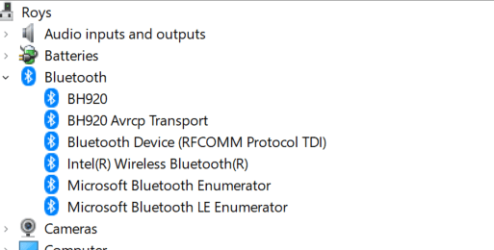
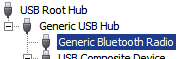
The "Generic Bluetooth Radio" device shows up in the device manager, but it used to have sub-devices and there was a BT logo somewhere before.
Of course the BlueTooth functionality doesn't show up anywhere.

Other than a clean reinstall (or upgrade), any suggestions on how to fix this?
 

Attachments
  • BTbad.png
    BTbad.png
    2.6 KB · Views: 4

My Computers

System One System Two

  • Computer type
    PC/Desktop
    Computer Manufacturer/Model Number
    custom
    OS
    Windows 7 Ultimate x64 SP1
  • Computer type
    PC/Desktop
Hi

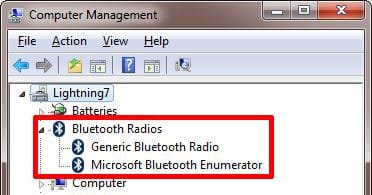
is there anything at the top of device manager??
 

Attachments

  • bth.png
    bth.png
    49.4 KB · Views: 3

My Computer

Computer type
PC/Desktop
Computer Manufacturer/Model Number
medionl/Aspire 6930G/acer x55a
OS
W7 home premium 32bit/W7HP 64bit/w10 tp insider ring
CPU
E5300 dual core
Motherboard
medion MS7366
Memory
3gb
Graphics Card(s)
Nvidia Geforce 7100 Nforce 630i
Monitor(s) Displays
avixc
Internet Speed
n (isp resticted to 72)
Antivirus
mse/pands
Browser
palemoon
Other Info
Belkin Fd7050 n USB using Railink RT2870 drivers, more upto date
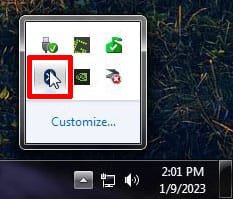
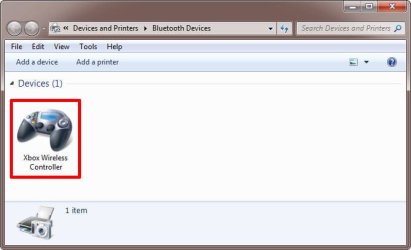
This is what I see in the Device Manager. I can access Bluetooth from the system tray. If I click on it, it shows already paired devices and allows me to add new ones.

How to Turn On Bluetooth in Windows 7
 

Attachments

  • bt1.jpg
    bt1.jpg
    51.4 KB · Views: 4
  • bt2.jpg
    bt2.jpg
    46.7 KB · Views: 4
  • bt3.jpg
    bt3.jpg
    64.4 KB · Views: 5

My Computers

System One System Two

  • Computer type
    PC/Desktop
    Computer Manufacturer/Model Number
    Custom build
    OS
    Windows 7 Home Premium 64-bits
    CPU
    AMD FX-8350
    Motherboard
    Gigabyte GA-990FXA-UD3 (AM3+)
    Memory
    GSKILL Ripjaw-X PC3 12800 8GB (2x4GB)
    Graphics Card(s)
    ASUS ROG STRIX GTX 1060 6GB
    Sound Card
    Integrated
    Monitor(s) Displays
    Asus VE228H (21.5-in)
    Screen Resolution
    1920x1080 60Hz
    Hard Drives
    SAMSUNG 870 EVO 2.5 Inch SATA SSD (1TB)
    SAMSUNG 870 EVO 2.5 Inch SATA SSD (1TB)
    SAMSUNG 870 EVO 2.5 Inch SATA SSD (1TB)
    PSU
    Corsair RM750x (750 watts)
    Case
    Corsair Carbide Series 200R
    Cooling
    Corsair Hydro Series H60 (CWCH60)
    Keyboard
    Logitech Elite
    Mouse
    Logitech M510 Wireless Mouse
    Internet Speed
    Comcast Gigabit Extra (1200Mbps down / 35Mbps up)
    Antivirus
    Malwarebytes
    Browser
    Firefox, Edge, Chrome
    Other Info
    ASUS DRW-24B1ST DVD-RW (24X) optical drive
    Seagate Expansion Desk (5TB) external SATA/USB HDD
    Comcast XB8 Internet Gateway
  • Computer type
    PC/Desktop
    System Manufacturer/Model Number
    Custom
    OS
    Windows 7 Pro (64-bit)
    CPU
    AMD Phenom II 960T X4
    Motherboard
    ASUS M4N82 Deluxe
    Memory
    Corsair XMS2 DDR2-800 8GB (4x2GB)
    Graphics Card(s)
    ASUS ENGTX560 DCII OC/2DI/1GD5 1GB
    Monitor(s) Displays
    Samsung 930B 19-inch LCD
    Screen Resolution
    1280x1024
    Hard Drives
    Samsung SSD 870 EVO 1000 GB (Windows 10)
    Seagate ST1000DM003 1000 GB (Windows 7)
    PSU
    Antec TruePower (new) TP-650
    Case
    Antec Three Hundred
    Cooling
    AMD stock cooler from FX8350
    Mouse
    Logitech M100
    Internet Speed
    Xfinity Gigabit Extra 1200/35 Mbps
Yes, I used to see something similar to what you two are showing. But, as I said, it just doesn't work anymore. Something is clearly broken. I just don't know what and how to fix it.

The picture I showed is from the device manager in with the "View > Devices by connection" option.
In the normal "Devices by type" mode, as you showed, I have the same "Generic Bluetooth Radio" with an USB plug icon but under the group "Universal Serial Bus Devices" group.

The point is: The device is somehow detected and somehow recognized as bluetooth, but that's where it all stops, and won't go any further. I don't get any bluetooth services like you show in your screenshots and which is also what I used to see.
Something went wrong at some point and it has stayed broken.

I tried a couple of linux distros in live mode, and they did detect the adapter and I could connect stuff through it, but not anymore under my W7 install.

I guess it's an unusual problem, but that's how things are.

- - - Updated - - -

OK this is absolutely idiotic.
I just used the "uninstall" function on the "generic bluetooth radio", with the "uninstall driver" checkbox checked, exactly as I must have done a hundred times before, and, then, unplugged and replugged the usb dongle, and suddenly everything works again...
I guess the thing that was missing was bothering someone else on the internet about it, THEN it decides to work again!
What in the world!

Anyway, thank you for taking the time to answer.
 
Last edited:

My Computers

System One System Two

  • Computer type
    PC/Desktop
    Computer Manufacturer/Model Number
    custom
    OS
    Windows 7 Ultimate x64 SP1
  • Computer type
    PC/Desktop
Back
Top