
chigwells
New member
Hello!
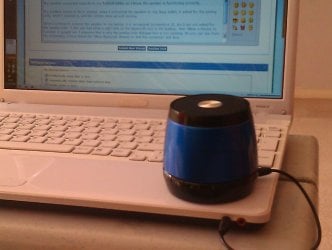
I have searched through Bluetooth articles and couldn't find any relevant answers. I have a HMDX Jam bluetooth speaker and cannot connect it to my Sony Vaio W7 HP (2012) laptop via Bluetooth, although it connects with the line-in cable no prob (screenshot 1).
The speaker connected instantly to my Android tablet, so I know the speaker is functioning correctly.
The problem seems to be in 'pairing'. When I connected the speaker to my Asus tablet, it asked for the pairing code, which I entered in, and the combo were up and running.
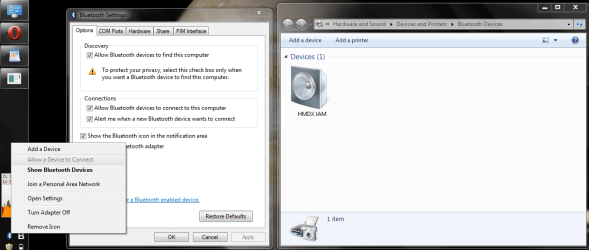
When I attempt to connect the speaker to my laptop, it is recognized but I am not asked for the 'pairing code'. I also see that when I right-click on the bluetooth icon in the taskbar, that 'Allow a Device to Connect' is greyed out (screenshot 2). I presume that is why the pairing code dialogue box is not opening. As you can see from the screenshot, I have ticked the 'Allow Bluetooth devices to find this computer' tick-box.
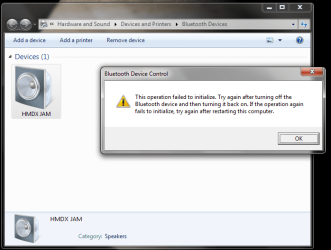
When I double-click on the speaker icon in Devices, I get the message that the operation failed to initialize (screenshot 3).
Also, when I took screenshot 1, I firstly tried to send it via bluetooth from my phone to the laptop, it failed. The devices are 'paired but not connected' and after three attempts I gave up and got the cable out.
I have attempted to put as much relevant info here as I can think of. I would also like to add that I have virus troubles at the momernt and am in the process of posting a thread in an Anti-Malware forum, although I haven't started that yet.
Many thanks in advance.
Forum rules read and agreed to!
System Spec panel completed.
I have searched through Bluetooth articles and couldn't find any relevant answers. I have a HMDX Jam bluetooth speaker and cannot connect it to my Sony Vaio W7 HP (2012) laptop via Bluetooth, although it connects with the line-in cable no prob (screenshot 1).
The speaker connected instantly to my Android tablet, so I know the speaker is functioning correctly.
The problem seems to be in 'pairing'. When I connected the speaker to my Asus tablet, it asked for the pairing code, which I entered in, and the combo were up and running.
When I attempt to connect the speaker to my laptop, it is recognized but I am not asked for the 'pairing code'. I also see that when I right-click on the bluetooth icon in the taskbar, that 'Allow a Device to Connect' is greyed out (screenshot 2). I presume that is why the pairing code dialogue box is not opening. As you can see from the screenshot, I have ticked the 'Allow Bluetooth devices to find this computer' tick-box.
When I double-click on the speaker icon in Devices, I get the message that the operation failed to initialize (screenshot 3).
Also, when I took screenshot 1, I firstly tried to send it via bluetooth from my phone to the laptop, it failed. The devices are 'paired but not connected' and after three attempts I gave up and got the cable out.
I have attempted to put as much relevant info here as I can think of. I would also like to add that I have virus troubles at the momernt and am in the process of posting a thread in an Anti-Malware forum, although I haven't started that yet.
Many thanks in advance.
Forum rules read and agreed to!
System Spec panel completed.
Attachments
My Computer
At a glance
W8.1 Pro, x64Intel Core i78GB
- Computer type
- Laptop
- Computer Manufacturer/Model Number
- Lenovo Thinkpad T440s
- OS
- W8.1 Pro, x64
- CPU
- Intel Core i7
- Memory
- 8GB
- Monitor(s) Displays
- Built-in, nice matt job
- Hard Drives
- 250GB SSD
- Mouse
- built-in track-pad
- Antivirus
- Panda Dome free
- Browser
- Firefox
- Other Info
- Binisoft WFC Windows Firewall Control, MBAM on-demand, SandboxIE


