Solved Bookmarks bar getting crowded

lindum

New member
Local time
9:38 PM
Messages
6
Location
In Lincoln
I have a lot of bookmark as I like going back to places of interest to see how they have change over time. Therefore I get a lot of bookmarks and keep making folders for this, that and everything else.

A couple of days ago I saw a video on another table in a local cafe and the video showed a guy explaining something or other, but when he went to the bookmarks toolbar it was three lines and not the one that I'm stuck with at present. (And it was on Windows 7 as well)

How can I do the same thing so I don't get so congested all the time.

Thanks a lot.
 

My Computer

Computer type
PC/Desktop
Computer Manufacturer/Model Number
HP
OS
Windows 7 Premium 64bit
CPU
AMD A8-3820 Llano 32nm Technology
Motherboard
Pegatron Corps 2ACF (PO)
Memory
8.00GB DDR3 @ 798MHZ (11-11-11-28)
Graphics Card(s)
HP 3211x (1920x1080@60Hz)
Sound Card
Realtek High Definition Audio
Hard Drives
2
browser bookmark toolbars

Welcome lindum to 7 forums.

I do not know which browser you are using but below this sight gives detailed instructions to add extra

toolbar bookmark lines for Firefox and Google Chrome.

small business.chron.com/add-another-line-bookmarks-toolbar-72623.html :D
 

My Computer

Computer type
PC/Desktop
Computer Manufacturer/Model Number
ASUS A85XM-A custom build
OS
Windows 10 Pro 64 bit
CPU
AMD A4-5300 APU with Radeon(tm) HD Graphics
Motherboard
ASUSTeK COMPUTER INC. A85XM-A
Memory
8.00 GB
Graphics Card(s)
AMD Radeon HD 7480D
Sound Card
(1) High Definition Audio Device (2) Realtek High Definiti
Monitor(s) Displays
HP W2072a 20 inch Led Backlit Monitor
Screen Resolution
1600 x 900 x 32 bits (4294967296 colors) @ 60 Hz
Hard Drives
TOSHIBA DT01ACA100 SATA Disk Device
Keyboard
Acer
Mouse
Acer
Internet Speed
varies
Antivirus
Windows Defender Antivirus
Browser
Waterfox, Edge
I'm using Firefox and would have been satisfide with just two lines in the Bookmarks toolbar but kept getting the same add-on and it wasn't the one I wanted. I don't want everything in tiny folders at one end of the toolbar. I wanted another line or two instead of an overflow that vanishes off to the right. I'm just strange like that, I want to see all the bookmarks in front of me and not have to sort through folders looking for the one bookmark I want.

Don't get me wrong, there are folders on my toolbar as the number of sites began to overwelm firefox which started me looking for an alternative.

I'll keep looking out for a solution.

Thanks a lot.

Michael.
 

My Computer

Computer type
PC/Desktop
Computer Manufacturer/Model Number
HP
OS
Windows 7 Premium 64bit
CPU
AMD A8-3820 Llano 32nm Technology
Motherboard
Pegatron Corps 2ACF (PO)
Memory
8.00GB DDR3 @ 798MHZ (11-11-11-28)
Graphics Card(s)
HP 3211x (1920x1080@60Hz)
Sound Card
Realtek High Definition Audio
Hard Drives
2
oh man! I didn't know you could put a folder on the bm toolbar.
g600616996_zpsnkbne0rf.gif

(... all these years, sheesh, I am such a nimrod!)
 

My Computer

Computer type
PC/Desktop
Computer Manufacturer/Model Number
HP (HP-P6212F)
OS
Microsoft Windows 7 Home Premium 64-bit 7601 Multiprocessor Free Service Pack 1
CPU
Pentium(R) Dual-Core CPU E5300 @ 2.60GHz
Motherboard
PEGATRON CORPORATION Benicia
Memory
6.00 GB
Graphics Card(s)
Intel(R) G33/G31 Express Chipset Family
Sound Card
Realtek High Definition Audio
Monitor(s) Displays
24'' HP WS LCD
Screen Resolution
1920 x 1080 x 32 bits (4294967296 colors) @ 60 Hz
Hard Drives
(1) ATA Hitachi HDT72106 SCSI Disk Device (2) Generic- Compact Flash USB Device (3) Generic- MS/MS-Pro USB Device (4) Generic- SD/MMC USB Device (5) Generic- SM/xD-Picture USB Device (6) Verbatim STORE N GO USB Device
Keyboard
Logitech G510s
Mouse
Logitech Trackball M570
Antivirus
Microsoft Security Essentials / Malwarebytes
Browser
IE / Firefox / Chrome
Everyone has their own preference for bookmark handling. This is probably not what you are looking for but may be of use anyway. Personally I use:

Bookmark Sorter 0.2 for Firefox released

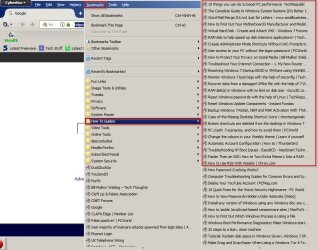
For me it offers a way to easily sort bookmarks into folders by category. Click "Bookmarks" in the toolbar to navigate.

Bookmark Sorter.jpg

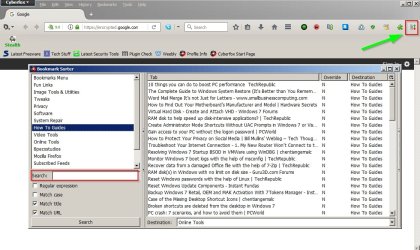
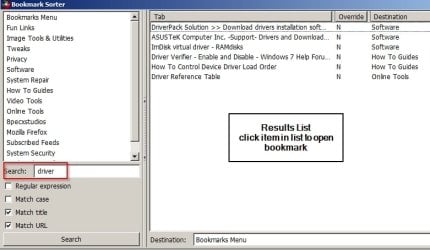
Alternatively click the Bookmarks Sorter icon for more options including searchable bookmarks - click one to open it.

Bookmark Sorter 2.jpg

Bookmark Sorter 3.jpg
 

My Computer

Computer type
Laptop
Computer Manufacturer/Model Number
ASUS
OS
Microsoft Windows 7 Home Premium 64-bit 7601 Multiprocessor Free Service Pack 1
CPU
AMD C-60 APU with Radeon(tm) HD Graphics
Motherboard
ASUSTeK COMPUTER INC. X501U
Memory
4.00 GB
Graphics Card(s)
AMD Radeon HD 6290 Graphics
Sound Card
(1) AMD High Definition Audio Device (2) Realtek High Defi
Screen Resolution
1366 x 768 x 32 bits (4294967296 colors) @ 60 Hz
Hard Drives
Hitachi HTS545050A7E380 SATA Disk Device
Antivirus
Comodo CIS & FW, SecureAplus App Whitelisting, Threatfire
Browser
Cyberfox 64bit, Opera 64bit, Airfox
Other Info
Spy-The-Spy, HitmanPro.Alert, Norton Connect Safe, MJRegWatcher, BitDefender TrafficLight, Voodoo Shield, Zemana AntiMalware

My Computer

Computer type
Laptop
Computer Manufacturer/Model Number
ASUS
OS
Microsoft Windows 7 Home Premium 64-bit 7601 Multiprocessor Free Service Pack 1
CPU
AMD C-60 APU with Radeon(tm) HD Graphics
Motherboard
ASUSTeK COMPUTER INC. X501U
Memory
4.00 GB
Graphics Card(s)
AMD Radeon HD 6290 Graphics
Sound Card
(1) AMD High Definition Audio Device (2) Realtek High Defi
Screen Resolution
1366 x 768 x 32 bits (4294967296 colors) @ 60 Hz
Hard Drives
Hitachi HTS545050A7E380 SATA Disk Device
Antivirus
Comodo CIS & FW, SecureAplus App Whitelisting, Threatfire
Browser
Cyberfox 64bit, Opera 64bit, Airfox
Other Info
Spy-The-Spy, HitmanPro.Alert, Norton Connect Safe, MJRegWatcher, BitDefender TrafficLight, Voodoo Shield, Zemana AntiMalware
bookmark toolbar

Hello Lindum, Have you tried Roomy Bookmarks Toolbar, it states that it gives you the extra lines.:D
 

My Computer

Computer type
PC/Desktop
Computer Manufacturer/Model Number
ASUS A85XM-A custom build
OS
Windows 10 Pro 64 bit
CPU
AMD A4-5300 APU with Radeon(tm) HD Graphics
Motherboard
ASUSTeK COMPUTER INC. A85XM-A
Memory
8.00 GB
Graphics Card(s)
AMD Radeon HD 7480D
Sound Card
(1) High Definition Audio Device (2) Realtek High Definiti
Monitor(s) Displays
HP W2072a 20 inch Led Backlit Monitor
Screen Resolution
1600 x 900 x 32 bits (4294967296 colors) @ 60 Hz
Hard Drives
TOSHIBA DT01ACA100 SATA Disk Device
Keyboard
Acer
Mouse
Acer
Internet Speed
varies
Antivirus
Windows Defender Antivirus
Browser
Waterfox, Edge
bookmarks toolbar

Thank you Callender, Sorry I did not post it correctly.
 

My Computer

Computer type
PC/Desktop
Computer Manufacturer/Model Number
ASUS A85XM-A custom build
OS
Windows 10 Pro 64 bit
CPU
AMD A4-5300 APU with Radeon(tm) HD Graphics
Motherboard
ASUSTeK COMPUTER INC. A85XM-A
Memory
8.00 GB
Graphics Card(s)
AMD Radeon HD 7480D
Sound Card
(1) High Definition Audio Device (2) Realtek High Definiti
Monitor(s) Displays
HP W2072a 20 inch Led Backlit Monitor
Screen Resolution
1600 x 900 x 32 bits (4294967296 colors) @ 60 Hz
Hard Drives
TOSHIBA DT01ACA100 SATA Disk Device
Keyboard
Acer
Mouse
Acer
Internet Speed
varies
Antivirus
Windows Defender Antivirus
Browser
Waterfox, Edge
Back
Top