Solved \Boot\BCD corrupted, won't boot despite several efforts

So,
I understand your discomfort but a few questions before attempting any rescue!

You have two HDD, One with Ubuntu which is on 'SATA to USB' & one Internal with not booting windows 7, No more HDDs connected. Am i right ?
 

My Computer My Computer

Computer type
Laptop
Computer Manufacturer/Model Number
hp compaq presario c795VU notebook pc
OS
Windows 7 Ultimate x32 With Sp1 + Vista Ultimate x32 with Sp1 & Sp2 !!
CPU
Intel Mobile Core 2 Duo T5750 @ 2.00GHz Merom 65nm Technolog
Motherboard
Hewlett-Packard 30D9 (CPU)
Memory
2.00GB Dual-Channel DDR2 @ 332MHz (5-5-5-15)
Graphics Card(s)
Mobile Intel(R) 965 Express Chipset Family
Sound Card
High Definition Audio Device
Monitor(s) Displays
LP154WX4-TLCB on Mobile Intel 965 Express Chipset Family
Screen Resolution
1280x800 @ 60Hz
Hard Drives
149GB Western Digital WDC WD1600BEVS-60VAT0 ATA Device (SATA)
Keyboard
Standard 101/102-Key or Microsoft Natural PS/2 Key + HP QLB
Mouse
ALPS pointing device
Antivirus
Kaspersky AV 2017(Win 7) & AVG AntiVirus Free 2016 (VISTA)
Browser
google chrome
Yes! exactly like that.
 

My Computer My Computer

Computer type
Laptop
Computer Manufacturer/Model Number
Toshiba
OS
Windows 7 64-bit
CPU
Intel i3 -2330M
So,
I got it all! Do as per new instructions :

1) Detach internal Windows 7 hard disk & just check whether you can boot into Ubuntu without that.

2) If you can boot into Ubuntu without that internal hard disk, Shut down & detach Ubuntu Hard disk.

3) Attach Win 7 Hard Disk & leave Ubuntu drive unplugged.

4) Now Sir SIW 2's ISO : Be a little careful!
(a) Boot into SIW 2's 17514x64-v10.iso
(b) Let it get stable : A few things may appear/disappear, you don't need to do anything.
(c) Once it gets stable & calm, click the Colourful Disk Icon from the Task Bar, It will launch AOMEI Partition Assistant.
(d) Enlarge the AOMEI Partition Assistant window & make sure all the disks are showing properly.
(e) Now you have to take a snap of the window, To do so :
Click the Camera Icon in the Task Bar. It will open a small window of Screen RIP32. Click Capture Image > Grab Screen > Screen shot.
Then Select File Menu > Save as > Bit Map & save it to a known location.
Close the Screen Rip & AOMEI window.
Click & make sure : the Bitmap file is accessible & of good quality.
Shut Down the PC.
(f) Plugin Ubuntu disk. Boot into it & share with me the Bitmap file.

Let me know. Rest for Tomorrow!

Thanks & Regards. ...
 

My Computer My Computer

Computer type
Laptop
Computer Manufacturer/Model Number
hp compaq presario c795VU notebook pc
OS
Windows 7 Ultimate x32 With Sp1 + Vista Ultimate x32 with Sp1 & Sp2 !!
CPU
Intel Mobile Core 2 Duo T5750 @ 2.00GHz Merom 65nm Technolog
Motherboard
Hewlett-Packard 30D9 (CPU)
Memory
2.00GB Dual-Channel DDR2 @ 332MHz (5-5-5-15)
Graphics Card(s)
Mobile Intel(R) 965 Express Chipset Family
Sound Card
High Definition Audio Device
Monitor(s) Displays
LP154WX4-TLCB on Mobile Intel 965 Express Chipset Family
Screen Resolution
1280x800 @ 60Hz
Hard Drives
149GB Western Digital WDC WD1600BEVS-60VAT0 ATA Device (SATA)
Keyboard
Standard 101/102-Key or Microsoft Natural PS/2 Key + HP QLB
Mouse
ALPS pointing device
Antivirus
Kaspersky AV 2017(Win 7) & AVG AntiVirus Free 2016 (VISTA)
Browser
google chrome
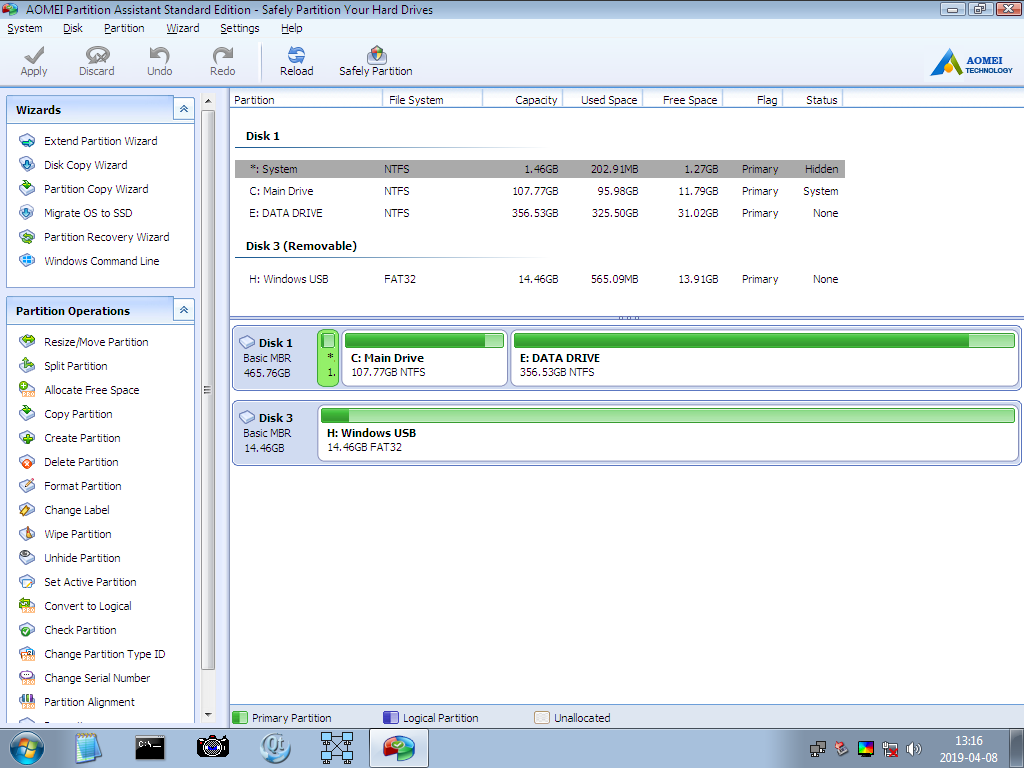
Here is the screenshot


Iqp4t.png
 

My Computer My Computer

Computer type
Laptop
Computer Manufacturer/Model Number
Toshiba
OS
Windows 7 64-bit
CPU
Intel i3 -2330M
Hi Isoya,

1. You did not answer : Detach internal Windows 7 hard disk & just check whether you can boot into Ubuntu without that ?

Its very important. why ?

(a) When we have two OSs on two hard drives, Its ideal to make sure that each OS can boot independently from its own drive & does not depend on other hard disks for boot. Therefore its recommended to detach all the other hard drives while installing/recovering OS on a hard disk.

(b) Once we make sure that ubuntu is independent & can boot without Win 7 hard disk, we can go ahead with windows recovery operations on win 7 disk. We should not endanger Ubuntu installation & boot capability. So, we will always keep Ubuntu disk detached while performing recovery efforts on win 7 disk. We should always be able to boot into Ubuntu!

2. Also try to detach Ubuntu hard disk & then boot into Win 7. While trying to establish multiboot between Ubuntu & windows, one boot loader may offer resistance to the boot & recovery of the other.

3. There are surely some problems on your win 7 hard disk. We will be able to go ahead once you try & answer the above two.

Let me know.

Thanks & Regards. ...
 

My Computer My Computer

Computer type
Laptop
Computer Manufacturer/Model Number
hp compaq presario c795VU notebook pc
OS
Windows 7 Ultimate x32 With Sp1 + Vista Ultimate x32 with Sp1 & Sp2 !!
CPU
Intel Mobile Core 2 Duo T5750 @ 2.00GHz Merom 65nm Technolog
Motherboard
Hewlett-Packard 30D9 (CPU)
Memory
2.00GB Dual-Channel DDR2 @ 332MHz (5-5-5-15)
Graphics Card(s)
Mobile Intel(R) 965 Express Chipset Family
Sound Card
High Definition Audio Device
Monitor(s) Displays
LP154WX4-TLCB on Mobile Intel 965 Express Chipset Family
Screen Resolution
1280x800 @ 60Hz
Hard Drives
149GB Western Digital WDC WD1600BEVS-60VAT0 ATA Device (SATA)
Keyboard
Standard 101/102-Key or Microsoft Natural PS/2 Key + HP QLB
Mouse
ALPS pointing device
Antivirus
Kaspersky AV 2017(Win 7) & AVG AntiVirus Free 2016 (VISTA)
Browser
google chrome
Okay, clarification:

I have two HD's one with ubuntu and one with windows 7. The Ubuntu HD boots fine, while the windows one doesn't. Ubuntu boots idependently. The windows one also boots idependently albeit it crashes at the starting windows screen.
 

My Computer My Computer

Computer type
Laptop
Computer Manufacturer/Model Number
Toshiba
OS
Windows 7 64-bit
CPU
Intel i3 -2330M
Hi Isoya,

1. Thanks for all the information, quite useful. I know you are quite smart so I take/believe your words as it is.

Take care that during all troubleshooting, Ubuntu disk is disconnected. We need to plugin Ubuntu disk & boot into it only when we need to communicate.

2. To make sure & update myself : What is the exact error, etc. on the crashing of starting windows screen.

3. The ODD : Your C: is 90% occupied. For the best, it should be occupied only 40% & for OK it can be occupied upto 60%. In the near future, take care of that. It may land you in different hardware & software problems. I don't see it as a problem right now!

4. The definite problem is *: System partition.

I will be back with the final instructions till evening.

Let me know.

Thanks & Regards. ...
 

My Computer My Computer

Computer type
Laptop
Computer Manufacturer/Model Number
hp compaq presario c795VU notebook pc
OS
Windows 7 Ultimate x32 With Sp1 + Vista Ultimate x32 with Sp1 & Sp2 !!
CPU
Intel Mobile Core 2 Duo T5750 @ 2.00GHz Merom 65nm Technolog
Motherboard
Hewlett-Packard 30D9 (CPU)
Memory
2.00GB Dual-Channel DDR2 @ 332MHz (5-5-5-15)
Graphics Card(s)
Mobile Intel(R) 965 Express Chipset Family
Sound Card
High Definition Audio Device
Monitor(s) Displays
LP154WX4-TLCB on Mobile Intel 965 Express Chipset Family
Screen Resolution
1280x800 @ 60Hz
Hard Drives
149GB Western Digital WDC WD1600BEVS-60VAT0 ATA Device (SATA)
Keyboard
Standard 101/102-Key or Microsoft Natural PS/2 Key + HP QLB
Mouse
ALPS pointing device
Antivirus
Kaspersky AV 2017(Win 7) & AVG AntiVirus Free 2016 (VISTA)
Browser
google chrome
Here is the flashing error during startup:
 

My Computer My Computer

Computer type
Laptop
Computer Manufacturer/Model Number
Toshiba
OS
Windows 7 64-bit
CPU
Intel i3 -2330M
So,
Its a BSOD as of now!

Now, Next instructions. Go thoroughly & make sure everything is crystal clear & then only proceed.

1) Shut Down your pc & detach Ubuntu hard drive.

2) boot into SIW 2 iso. There are multiple Disk Management apps but AOMEI Partition Assistant is a good one.

3) First we have to check whether that * : system partition sector on disk is good enough or we have to sacrifice it!
So, what you have to do is :

(i) Delete the * : System partition to get it as unallocated space.
(ii) Make a new partition with default settings. Make sure you use all the unallocated space. All means all not a bit left here or there! & give it a drive letter.
(iii) Then check this new partition for bad blocks/errors for two three times. If it does not report any problems, it is good enough & can be used.

4. Proceed only if the * : System Partition comes all good!
&
Do it carefully : I have seen people losing there important / other partitions
So,
(i) shrink the New partition from right in such a way that it is reduced to 200 MB size partition only.
(ii) Now expand C: from left to fill all the space available
(iii) Now again delete the new partition of 200 MB size to give it as unallocated space.
(iv) Now use that 200 MB unallocated space to make a new partition with a drive letter using full space


5. Once done successfully as in the 4th point above, simply close all the opened apps/Windows & Shut Down the computer.

6. Now boot into your old windows 7 installation DVD & Run Startup Repair for 3 times.

Let us know about the results of Startup Repair, new status & outcomes of the Win 7 Installation.

Thanks & Regards. ...
 

My Computer My Computer

Computer type
Laptop
Computer Manufacturer/Model Number
hp compaq presario c795VU notebook pc
OS
Windows 7 Ultimate x32 With Sp1 + Vista Ultimate x32 with Sp1 & Sp2 !!
CPU
Intel Mobile Core 2 Duo T5750 @ 2.00GHz Merom 65nm Technolog
Motherboard
Hewlett-Packard 30D9 (CPU)
Memory
2.00GB Dual-Channel DDR2 @ 332MHz (5-5-5-15)
Graphics Card(s)
Mobile Intel(R) 965 Express Chipset Family
Sound Card
High Definition Audio Device
Monitor(s) Displays
LP154WX4-TLCB on Mobile Intel 965 Express Chipset Family
Screen Resolution
1280x800 @ 60Hz
Hard Drives
149GB Western Digital WDC WD1600BEVS-60VAT0 ATA Device (SATA)
Keyboard
Standard 101/102-Key or Microsoft Natural PS/2 Key + HP QLB
Mouse
ALPS pointing device
Antivirus
Kaspersky AV 2017(Win 7) & AVG AntiVirus Free 2016 (VISTA)
Browser
google chrome
It Works!! Thank you!! Definitely the problem with the system partition!

Question: I have now an empty 200mb partition on the Windows HDD, can I delete it and move the windows partition to get that partition, and do a startup repair again, since it is basically unused right now. I am having second thoughts doing this, and I can do with the random 200mb partition ( I can probably just hide the partition using diskpart ), but if it is possible I might do it.


Again Thanks :)
 

My Computer My Computer

Computer type
Laptop
Computer Manufacturer/Model Number
Toshiba
OS
Windows 7 64-bit
CPU
Intel i3 -2330M
Hi Isoya,
Glad to know that your problem is resolved! I just answered your questions / suggestions & the result is positive.
All thanks to SIW 2. It was not possible without his WinRE iso.

1. I have purposefully made that 200 MB unused because i have some plan for that. I would suggest using it the way it should be used ideally.

I would also brief the cause of the original problem & its solution.

Please wait for the next instructions today evening or tomorrow.

Thanks & Regards. ...
 

My Computer My Computer

Computer type
Laptop
Computer Manufacturer/Model Number
hp compaq presario c795VU notebook pc
OS
Windows 7 Ultimate x32 With Sp1 + Vista Ultimate x32 with Sp1 & Sp2 !!
CPU
Intel Mobile Core 2 Duo T5750 @ 2.00GHz Merom 65nm Technolog
Motherboard
Hewlett-Packard 30D9 (CPU)
Memory
2.00GB Dual-Channel DDR2 @ 332MHz (5-5-5-15)
Graphics Card(s)
Mobile Intel(R) 965 Express Chipset Family
Sound Card
High Definition Audio Device
Monitor(s) Displays
LP154WX4-TLCB on Mobile Intel 965 Express Chipset Family
Screen Resolution
1280x800 @ 60Hz
Hard Drives
149GB Western Digital WDC WD1600BEVS-60VAT0 ATA Device (SATA)
Keyboard
Standard 101/102-Key or Microsoft Natural PS/2 Key + HP QLB
Mouse
ALPS pointing device
Antivirus
Kaspersky AV 2017(Win 7) & AVG AntiVirus Free 2016 (VISTA)
Browser
google chrome
Hi Isoya,
Greets,

1) Keep this free 3rd party Portable Partition Manager on your PC.

MiniTool Portable Partition Magic Brings Easier Disk/Partition Management

It's very powerful, accurate, fast & easy!
For eg.
It lists all the partitions on the disk. Also the hidden once which are not shown/mentioned in default Disk Management.
It gives options which are not available with the default one.
And it's easy to use.

2. A few things to check, Need not fear anything or do anything, Just watch & report :
Shut down your pc, connect both the disks : Ubuntu & win 7 & start it.
you don't have to choose anything, you have to just start the power on pc & just tell what are the things that happens automatically during the process :
(i) What are the choices provided ? Are you offered Ubuntu & win 7 boot options ? I think you will not see a nice looking multiboot choice screen.
(ii) Which is the OS you finally land into by default ?
(iii) With both the disks attached, can you boot in both of them one by one ?
(iv) What options are provided when you choose to boot into win 7 disk & When you choose to boot into Ubuntu disk ? Anytime any problems, any ODDS and / or issues /errors ? Anytime you get a multiboot choice screen ?

3. Keep both the disks connected, boot into win 7, launch 'Minitool Partiton' program, take a screen shot & share it with me.
Take care that the partition wizard window is enlarged , it shows both the disks & the quality of the screen shot is good enough.
Disk Management - Post a Screen Capture Image
I am giving this link only for points 5th & 6th. So that you can manage a good screen shot with the win 7 in-built Snipping Tool. You have to use Minitool Partition Wizard & not the inbuilt win 7 Disk Management.

Let me know.

Thanks & Regards. ...
 

My Computer My Computer

Computer type
Laptop
Computer Manufacturer/Model Number
hp compaq presario c795VU notebook pc
OS
Windows 7 Ultimate x32 With Sp1 + Vista Ultimate x32 with Sp1 & Sp2 !!
CPU
Intel Mobile Core 2 Duo T5750 @ 2.00GHz Merom 65nm Technolog
Motherboard
Hewlett-Packard 30D9 (CPU)
Memory
2.00GB Dual-Channel DDR2 @ 332MHz (5-5-5-15)
Graphics Card(s)
Mobile Intel(R) 965 Express Chipset Family
Sound Card
High Definition Audio Device
Monitor(s) Displays
LP154WX4-TLCB on Mobile Intel 965 Express Chipset Family
Screen Resolution
1280x800 @ 60Hz
Hard Drives
149GB Western Digital WDC WD1600BEVS-60VAT0 ATA Device (SATA)
Keyboard
Standard 101/102-Key or Microsoft Natural PS/2 Key + HP QLB
Mouse
ALPS pointing device
Antivirus
Kaspersky AV 2017(Win 7) & AVG AntiVirus Free 2016 (VISTA)
Browser
google chrome
It boots whatever HD I set first in the boot order, One HD is connected to the main internal SATA connection and the other is using a SATA to USB line and is plugged into USB.


Booth GRUB (for ubuntu) and the windows bootmanager does not recognize (or isn't set with) the other drives. (i.e. when setting the laptop to boot first from the internal HD, it loads windows directly without reading the ubuntu HD, as it normally does and when setting the laptop to boot first from USB (i.e. the ubuntu HD connected via SATA to USB) it loads GRUB without any option for windows {i.e. I have not yet run update-grub whilst the windows HDD was connected})


I just swap between which HD to boot first from the bios, no boot manager knows about the other OS. As I have no other way of more permanently add another HD to the harddrive.


Both the unidentified partitions/disks in the attached image are ext4 partitions for the ubuntu installation.
 

My Computer My Computer

Computer type
Laptop
Computer Manufacturer/Model Number
Toshiba
OS
Windows 7 64-bit
CPU
Intel i3 -2330M
Hi Isoya,
This is not the desired Snapshot!
1. Keep both the disks : Ubuntu & Win 7 connected, Boot into win 7, Launch PartitonWizard.exe > Disk & Partiton Management
2. Make sure the Window is enlarged & showing all the disks. Then take the snapshot.
3. Make sure the Snapshot is of good quality.

( It seems you are hesitating to say something ? Bring that out. I will take it positively. )

Thanks & Regards. ...
 

My Computer My Computer

Computer type
Laptop
Computer Manufacturer/Model Number
hp compaq presario c795VU notebook pc
OS
Windows 7 Ultimate x32 With Sp1 + Vista Ultimate x32 with Sp1 & Sp2 !!
CPU
Intel Mobile Core 2 Duo T5750 @ 2.00GHz Merom 65nm Technolog
Motherboard
Hewlett-Packard 30D9 (CPU)
Memory
2.00GB Dual-Channel DDR2 @ 332MHz (5-5-5-15)
Graphics Card(s)
Mobile Intel(R) 965 Express Chipset Family
Sound Card
High Definition Audio Device
Monitor(s) Displays
LP154WX4-TLCB on Mobile Intel 965 Express Chipset Family
Screen Resolution
1280x800 @ 60Hz
Hard Drives
149GB Western Digital WDC WD1600BEVS-60VAT0 ATA Device (SATA)
Keyboard
Standard 101/102-Key or Microsoft Natural PS/2 Key + HP QLB
Mouse
ALPS pointing device
Antivirus
Kaspersky AV 2017(Win 7) & AVG AntiVirus Free 2016 (VISTA)
Browser
google chrome
Back
Top