boot\bcd error help

bajanboy

New member
Local time
6:13 PM
Messages
7
hi all i need some help or advice with my computer getting error boot\bcd
the hard drive came from a different computer of which the gigbyte mother board had gone bad so i put the drive in a new Biostar mother board computer, so i am trying to get this drive to work with out formating it and have not gotten the boot\bcd error, I have tryed some info i found online but no luck, i have tryed this--> bcdboot d:\windows /s d: and get this message,, Failure when attempting to copy boot files.
thanks for any advice in advance.
 

My Computer

OS
Microsoft Windows 7 (6.1) Ultimate Edition (Build 7600)
CPU
Intel Core2 Duo E7400
Motherboard
gigabyte EP45-UD3LR
Memory
4G DDR2-800 G-skill
Graphics Card(s)
MSI R4830
Sound Card
onboard
Monitor(s) Displays
ADC 17'
Screen Resolution
1024x768
Hard Drives
Seagate sata 250G
Cooling
Fans
Keyboard
dell usb
Mouse
logitech usb lazer
Where are you running that command from.

Do you already have working os you can boot into, and the extra HD has been added?
 

My Computers

System One System Two

  • Computer type
    PC/Desktop
    OS
    7 X64
    CPU
    i5 8400
    Motherboard
    gigabyte b365m ds3h
    Memory
    2x8gb 3200mhz
    Hard Drives
    various
    PSU
    pure power 11 400w cm
    Case
    Coolermaster
    Cooling
    cryorig m9i
  • Computer type
    PC/Desktop
    OS
    7x64
    CPU
    g5400
    Motherboard
    ga b365m ds3h
    Memory
    8gb ddr4 2400
    PSU
    xfx pro 450w
the hard drive has windows 7 installed on it but i cant boot in to it and i use the windows cd to get the command prompt to do the commands
 

My Computer

OS
Microsoft Windows 7 (6.1) Ultimate Edition (Build 7600)
CPU
Intel Core2 Duo E7400
Motherboard
gigabyte EP45-UD3LR
Memory
4G DDR2-800 G-skill
Graphics Card(s)
MSI R4830
Sound Card
onboard
Monitor(s) Displays
ADC 17'
Screen Resolution
1024x768
Hard Drives
Seagate sata 250G
Cooling
Fans
Keyboard
dell usb
Mouse
logitech usb lazer
I assume you checked the windows partition is shown as D from winpe?

Destination should be the active partition - not necessarily D - you will need to look.

See if that helps.
 

My Computers

System One System Two

  • Computer type
    PC/Desktop
    OS
    7 X64
    CPU
    i5 8400
    Motherboard
    gigabyte b365m ds3h
    Memory
    2x8gb 3200mhz
    Hard Drives
    various
    PSU
    pure power 11 400w cm
    Case
    Coolermaster
    Cooling
    cryorig m9i
  • Computer type
    PC/Desktop
    OS
    7x64
    CPU
    g5400
    Motherboard
    ga b365m ds3h
    Memory
    8gb ddr4 2400
    PSU
    xfx pro 450w
C: is system reserved and D: is windows so which do i set as active ?
 

My Computer

OS
Microsoft Windows 7 (6.1) Ultimate Edition (Build 7600)
CPU
Intel Core2 Duo E7400
Motherboard
gigabyte EP45-UD3LR
Memory
4G DDR2-800 G-skill
Graphics Card(s)
MSI R4830
Sound Card
onboard
Monitor(s) Displays
ADC 17'
Screen Resolution
1024x768
Hard Drives
Seagate sata 250G
Cooling
Fans
Keyboard
dell usb
Mouse
logitech usb lazer
You need to boot winpe.

Use diskpart to find the drive letters.

The system reserved is the one you would usually have as active.

Just use diskpart to set it active .

Diskpart

lis vol

( have a look and see which drive letters have been assigned from winpe - they are might not be the same as they are in windows. If c is system reserved, mark it active )

sel vol c

act

exi


If your windows partition is D ( as seen from winpe ),

Then the first part is bcdboot D:\windows

If the active partition is C ( as seen from winpe ) the second bit goes /s c:

bcdboot d:\windows /s c:
 

My Computers

System One System Two

  • Computer type
    PC/Desktop
    OS
    7 X64
    CPU
    i5 8400
    Motherboard
    gigabyte b365m ds3h
    Memory
    2x8gb 3200mhz
    Hard Drives
    various
    PSU
    pure power 11 400w cm
    Case
    Coolermaster
    Cooling
    cryorig m9i
  • Computer type
    PC/Desktop
    OS
    7x64
    CPU
    g5400
    Motherboard
    ga b365m ds3h
    Memory
    8gb ddr4 2400
    PSU
    xfx pro 450w
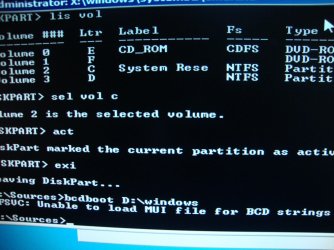
ok did the first part and got this --> BFSVC: Unable to load MUI file for BCD strings (2)
 

My Computer

OS
Microsoft Windows 7 (6.1) Ultimate Edition (Build 7600)
CPU
Intel Core2 Duo E7400
Motherboard
gigabyte EP45-UD3LR
Memory
4G DDR2-800 G-skill
Graphics Card(s)
MSI R4830
Sound Card
onboard
Monitor(s) Displays
ADC 17'
Screen Resolution
1024x768
Hard Drives
Seagate sata 250G
Cooling
Fans
Keyboard
dell usb
Mouse
logitech usb lazer

My Computer

Computer type
PC/Desktop
Computer Manufacturer/Model Number
Skylake Special #666
OS
Windows 10 Pro x64
CPU
Intel Core i7 6700K
Motherboard
Asus Sabertooth Z170 Mark 1
Memory
GSkill TridentZ RGB 16GB 3600 16-16-16-36
Graphics Card(s)
EVGA GTX 980 Ti SC x2
Sound Card
Realtek High Definition
Monitor(s) Displays
AOC G2460PG
Screen Resolution
1920 x 1080 144Hz
Hard Drives
Samsung 860 Pro 256GB, Seagate Barracuda 4TB x2
PSU
EVGA 1000 P2, EVGA White Custom Braided Cables
Case
Corsair Vengeance C70 Gunmetal Black
Cooling
Corsair H100i v2, Corsair ML120 x2, Thermal Grizzly Kryonaut
Keyboard
Logitech G910 Orion Spectrum
Mouse
Logitech G700s
Internet Speed
Verizon Fios Quantum Gateway 75/75
Antivirus
Windows Defender, Malwarebytes Free 3.8.3
Browser
Chrome
Other Info
Corsair SP120 x4, LG Blu-ray Drive, Durabrand HT-395 100 Watt Dolby Digital Amp, Corsair H2100 Wireless 7.1 Headset
DSC01009.jpg
 

My Computer

OS
Microsoft Windows 7 (6.1) Ultimate Edition (Build 7600)
CPU
Intel Core2 Duo E7400
Motherboard
gigabyte EP45-UD3LR
Memory
4G DDR2-800 G-skill
Graphics Card(s)
MSI R4830
Sound Card
onboard
Monitor(s) Displays
ADC 17'
Screen Resolution
1024x768
Hard Drives
Seagate sata 250G
Cooling
Fans
Keyboard
dell usb
Mouse
logitech usb lazer
Back
Top