Boot from a VHD using Windows 7

How to Boot from a VHD using Windows 7 and Windows 8

   Information
Windows 7 and Windows 8 includes support for creating, mounting and booting from VHD images but not many seem to know how to use this functionality to boot VHDs at boot time... I will detail the steps required to have another OS bootable using Windows 7...

This tutorial will show you how to setup Windows 7 or Windows 8 to boot from an existing VHD (Virtual Hard Disk).

All Vista, Windows 7, and Windows 8 (except Windows 8 RT) editions support booting from a VHD.

You must have either Windows 7 Ultimate, Windows 7 Enterprise, Windows 8 Pro, or Windows 8 Enterprise installed on the VHD to be able to boot from the VHD.


   Warning
If you do not have a good knowledge of how to reset your VirtualOS configuration like HAL type and driver configuration then your VHD will fail to boot. It must be cleaned of VirtualOS configuration correctly before Windows can boot your VHD!!


Step 1: If you have not already, create or attach an existing a VHD using the tutorial below.
http://www.sevenforums.com/tutorials/566-virtual-hard-disk-create-attach-vhd.html


Step 2: Open an elevated command prompt.


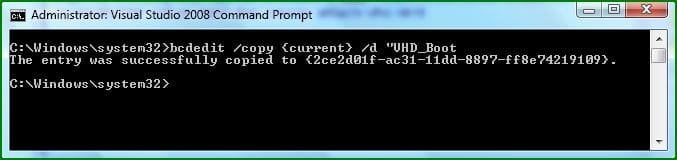
Step 3: Copy and Paste this command below and press Enter.
NOTE: Substitute VHD_Boot in the command below for what you want to be displayed as the name in Windows Boot Manager.
bcdedit /copy {current} /d "VHD_Boot"

If the command succeeds, BCDEdit displays a message similar to the following:


The entry was successfully copied to {CLSID_Number}
832d1227210633-boot-vhds-using-windows-7-step1.jpg

Take note of the CLSID number as you will need this during the next step ;)

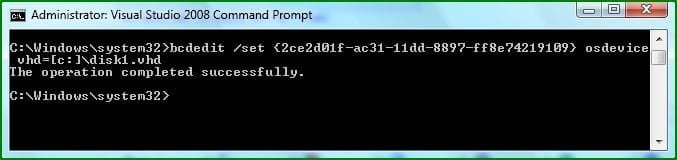
Step 4: Then type this command below and press Enter.
NOTE: Substitute C with the drive letter your VHD is on, and substitute disk1 with the name of your VHD file.
bcdedit /set {CLSID_Number} osdevice vhd=[C:]\disk1.vhd

833d1227210633-boot-vhds-using-windows-7-step2.jpg


Step 5: Thats it, You can now boot VHDs using Windows 7 :geek:
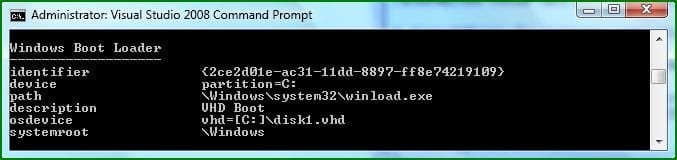
To confirm the settings simply type bcdedit
834d1227210633-boot-vhds-using-windows-7-step3.jpg

If your VHD is configured correctly You can reboot and select the extra boot-option to boot from your VHD :party:
   Warning
VirtualPC VHDs can not be used for booting with Windows because VirtualPC uses a Pentium 3 HAL and this prevents them from being used as boot media, You can however use this Tutorial: http://www.sevenforums.com/tutorials/566-virtual-hard-disk-create-attach-vhd.html and create then mount a VHD for use with VMWare Workstation....

You simply set VMWare workstation to use a Physical Disk, you can then Install a separate OS onto this mounted VHD for use with Windows.​


   Tip
You Must reset your VHD VirtualOS configuration like HAL type and driver configuration or your VHD will fail to boot!!! It must be cleaned of VirtualOS configuration correctly before windows 7 can boot your VHD!! ;)


   Note
There are still many bugs associated with VHD booting with Windows 7 at this time, I suspect Microsoft will be releasing a new Version of VirtualPC that's able to manage this entire process of creating, installing and booting separate VHDs at boot-time easily and without so many problems ;)


Attachments

  • Step1.JPG
    Step1.JPG
    22.2 KB · Views: 128,601
  • Step2.JPG
    Step2.JPG
    23.5 KB · Views: 128,208
  • Step3.JPG
    Step3.JPG
    24.9 KB · Views: 126,286
Last edited by a moderator:
Network boot VHD's?

Is it possible set a path inside the boot manager to a VHD located on another computer?
 

My Computer

OS
Win 7
Welcome to SF! Flex

I seriously doubt anyone will be answering that question so I'll make this brief. Any VHD first has to be attached in the Disk Management tool on the local machine it will be booted from before the BCD entry for it is made.

For a vhd located on a totally separate machine from a host you would some other networking configuration in order to start up a virtual machine on the second machine itself by remote access.

One other question regarding booting 7 from a vhd regards the change of editions from the Ultimate 32/64bit beta at the time this guide was first written until now where one blog points out a problem when trying something like this with the Professional not Ultimate edition.

The blog at the link shows this limited to the Ultimate and Enterprise editions only unless making a few changes? Windows 7 – Booting from a VHD – Gotcha
 

My Computers

System One System Two

  • Computer type
    PC/Desktop
    Computer Manufacturer/Model Number
    Custom builds = 2
    OS
    W7 Ultimate x64/W10 Pro x64/W11 Pro Triple Boot - Main PC W7 Remote PC Micro ATX W7 Pro x64/W11 Pro
    CPU
    AMD Phenom II X4 975 Deneb 3.6ghz - 965 2nd remote pc
    Motherboard
    Gigabyte GA-790XTA-UD4-Gigabyte GA-880GM-D2H remote pc
    Memory
    Kingston Hyper X DDR3 1600 1.5v 16gb - Hyper X Fury 8gb 2nd
    Graphics Card(s)
    MSI HD Radeon 5750 1gb - MSI HD Radeon 6450 on mini tower
    Sound Card
    Creative Labs X-Fi Xtreme Audio P - Realtek onooard 2nd case
    Monitor(s) Displays
    ASUS VW199T-P 19" HP 2082a Main-HP 2082a 20" remote pc
    Screen Resolution
    Asus 1440x900 - HP 1600x900
    Hard Drives
    WD Black 1TB HD per OS W7, W10, and pending W11 presently on 500gb OS Drive - Pending Triple 1TB HDs for Spanned Storage/backup volume
    Single 2TB external USB enclosure, single 1TB System 7 Host/Boot drive, Pending 8TB external HD for system image b
    PSU
    Corsair 750TX - primary / Corsair CX600 - second
    Case
    Antec 900-2 - SSD compatible / NZXT Vulcan mini tower
    Cooling
    Zalman CNPS9900A
    Keyboard
    AZIO L70 Backlit Letters Gaming - ONN Cordless/USB
    Mouse
    MSI DS200 Programmable, Logitech Cordless
    Internet Speed
    30mbps upgrade - primary hard wired - mini tower usb WiFi
    Antivirus
    GFI VIPRE Internet Security 2014 on W7 2016 beta on W10,
    Browser
    Cyberfox, WaterFox 64bit FF variants, FireFox x64, Pale Moon
    Other Info
    Accomdata fan cooled usb 2.0 PIDE/Sata II, III external enclosure.
    Sambient usb/eSata PATA/Sata II, III external enclosure.
  • Computer type
    PC/Desktop
    System Manufacturer/Model Number
    CUSTOM ASSEMBLY
    OS
    W7 Pro x64/W11 Pro
    CPU
    AMD Deneb 3.6ghz - 965
    Motherboard
    Gigabyte GA-880GM-D2H remote pc
    Memory
    Kingston Hyper X Fury 8gb
    Graphics Card(s)
    MSI HD Radeon 6450 DVI Output
    Sound Card
    Realtek onooard Creative or Other separate PENDING
    Monitor(s) Displays
    VIZIO 32" LCD TV Separate LCD Pending
    Screen Resolution
    1600x1080
    Hard Drives
    WD 500GB OS Host/Boot WD Green 1TB Storage/Backup
    PSU
    Corsair 600W - THERMALTAKE 600W spare case
    Case
    NZXT Vulcan mini tower
    Cooling
    Twin 120mm Top Fans - 240mm Side Cover
    Keyboard
    ONN Cordless/USB Logitech Cordless
    Mouse
    ONN USB/Cordless - Logitech Cordless
    Internet Speed
    DSL 5G
    Browser
    MS Edge, FireFox, WaterFox x64, FireFox Nightly
    Other Info
    OS Testing-Remote Access to Main TeamViewer
Thanks for going out of your way to answer that. I've been looking into other methods. Experimenting with MDOP 2009 on XP and waiting for MDOP 2009 R2 to be released to start experimenting on 7. Appreciate the info. Thanks again.
 

My Computer

OS
Win 7
Upgrading XP to Windows 7 on Fusion 3

I am running 32-bit XP as a virtual machine through Fusion 3. As a student I purchased 64-bit Windows 7 upgrade download and hard disk copy. I am unable to open the disk in XP because it is 64-bit. If I create a new 64-bit virtual machine then the disk boots but then tells me that I must install from a valid existing copy of windows (which makes sense since I only purchase the upgrade, not a full copy?). I didn't get far with the download because of the error you mentioned "We are unable to create or save new files in the folder in which this application was downloaded. Please check the folder properties to make sure that you have security permission on the folder to write files and that the folder is not read-only."

Can you help me?
 

My Computer

OS
XP on Fusion 3 on Snow Leopard
just got this going in 30 min

I followed the tutorial .....and was lost, because I named my vhd something other than disk1

Step 4: Then type this command bcdedit /set {CLSID_Number} osdevice vhd=[C:]\disk1.vhd

that was my mistake...I was in a hurry and didnt read

but how I got this sytem to boot so quick is I opened the windows install dvd's .wim file with 7zip and extracted it to the drive, rebooted ..........voila , setup takes over (rather quickly) and with one reboot.....windows 7 running on a file in a file

oops did I mention I'm on a linux computer running virtualbox windows 7,windows7
 

My Computer

Computer Manufacturer/Model Number
which one
OS
linux windows 7 vhd within a vhd
CPU
6 to pick from
Motherboard
yes sometimes
Memory
lost it
Graphics Card(s)
axis of evil
Sound Card
it was
Monitor(s) Displays
sometimes it does
Hard Drives
thats a tough one,20 of them all different
PSU
nope, went to bgvt
Case
no john deer
Cooling
yes please
Has MS given other versions of Win7 the ability to boot from VHD besides Ultimate and Server? I have professional.
 

My Computer

OS
Windows 7
What is native VHD boot?

Native VHD boot enables a physical computer to be booted directly from a virtual hard disk (VHD) with no requirement for virtualization software (such as Microsoft® Virtual PC or Hyper-V™). Native VHD boot is made possible with the addition of a mini-port driver that is responsible for all input/output (IO) operations to and from the disk. Earlier versions of Windows (such as Windows Vista®, Windows XP, and Windows 2000) do not support native VHD boot, and therefore, you cannot use them to implement the functionality described in this document.

Source: http://technet.microsoft.com/en-us/library/gg318048(v=ws.10).aspx

So no VISTA I assume(?) In tutorial you say VISTA is possible, but is it?
 

My Computer

Computer type
Laptop
Computer Manufacturer/Model Number
ACER ASPIRE 5742G
OS
Microsoft Windows 7 Home Premium 64-bits 7601 Multiprocessor Free Service Pack 1
CPU
Intel(R) Core(TM) i3 CPU M 370 @ 2.40GHz
Motherboard
Acer Aspire 5742G
Memory
4,00 GB
Graphics Card(s)
ATI Mobility Radeon HD 5400 Series
Sound Card
(1) AMD High Definition Audio Device (2) Realtek High Defi
Screen Resolution
1366 x 768 x 32 bits (4294967296 colors) @ 60 Hz
Hard Drives
WDC WD5000BEVT-22ZAT0
Hello Ron,

Yes, you could can boot from a Vista VHD since Windows 7 Ultimate or Enterprise supports booting from a VHD. You just cannot boot from a VHD if your installed OS is anything other than Windows 7 Ultimate or Enterprise.

Since you have Windows 7 Home Premium, you will not be able to boot from a VHD though. :(
 

My Computer

Computer type
PC/Desktop
Computer Manufacturer/Model Number
Self built custom
OS
64-bit Windows 11 Pro for Workstations
CPU
Intel i7-8700K OC'd to 5 GHz
Motherboard
ASUS ROG Maximus XI Formula Z390
Memory
64 GB (4x16GB) G.SKILL TridentZ RGB DDR4 3600 MHz
Graphics Card(s)
ASUS ROG-STRIX-GTX1080TI-O11G-GAMING
Sound Card
Integrated
Monitor(s) Displays
2 x Samsung Odyssey G7 27"
Screen Resolution
2560x1440
Hard Drives
1TB Samsung 990 PRO M.2,
4TB Samsung 990 PRO PRO M.2,
TerraMaster F8 SSD Plus NAS
PSU
Seasonic Prime Titanium 850W
Case
Thermaltake Core P3
Cooling
Corsair Hydro H115i
Keyboard
Logitech wireless K800
Mouse
Logitech MX Master 4
Internet Speed
2 Gb/s Download and 100 Mb/s Upload
Antivirus
Malwarebyte Anti-Malware Premium
Browser
Google Chrome
Other Info
Logitech Z625 speaker system,
Logitech BRIO 4K Pro webcam,
HP Color LaserJet Pro MFP M477fdn,
APC SMART-UPS RT 1000 XL - SURT1000XLI,
Galaxy S23 Plus phone
Hello Ron,

Yes, you could can boot from a Vista VHD since Windows 7 Ultimate or Enterprise supports booting from a VHD. You just cannot boot from a VHD if your installed OS is anything other than Windows 7 Ultimate or Enterprise.

Since you have Windows 7 Home Premium, you will not be able to boot from a VHD though. :(
I already knew it wasn't working in WIN7 HP. So website I referred to is wrong?
 

My Computer

Computer type
Laptop
Computer Manufacturer/Model Number
ACER ASPIRE 5742G
OS
Microsoft Windows 7 Home Premium 64-bits 7601 Multiprocessor Free Service Pack 1
CPU
Intel(R) Core(TM) i3 CPU M 370 @ 2.40GHz
Motherboard
Acer Aspire 5742G
Memory
4,00 GB
Graphics Card(s)
ATI Mobility Radeon HD 5400 Series
Sound Card
(1) AMD High Definition Audio Device (2) Realtek High Defi
Screen Resolution
1366 x 768 x 32 bits (4294967296 colors) @ 60 Hz
Hard Drives
WDC WD5000BEVT-22ZAT0
No, it's not wrong. It doesn't matter what OS the VHD file is. What matters is what OS you have installed to be able to boot from the VHD. That's all it's saying. :)
 

My Computer

Computer type
PC/Desktop
Computer Manufacturer/Model Number
Self built custom
OS
64-bit Windows 11 Pro for Workstations
CPU
Intel i7-8700K OC'd to 5 GHz
Motherboard
ASUS ROG Maximus XI Formula Z390
Memory
64 GB (4x16GB) G.SKILL TridentZ RGB DDR4 3600 MHz
Graphics Card(s)
ASUS ROG-STRIX-GTX1080TI-O11G-GAMING
Sound Card
Integrated
Monitor(s) Displays
2 x Samsung Odyssey G7 27"
Screen Resolution
2560x1440
Hard Drives
1TB Samsung 990 PRO M.2,
4TB Samsung 990 PRO PRO M.2,
TerraMaster F8 SSD Plus NAS
PSU
Seasonic Prime Titanium 850W
Case
Thermaltake Core P3
Cooling
Corsair Hydro H115i
Keyboard
Logitech wireless K800
Mouse
Logitech MX Master 4
Internet Speed
2 Gb/s Download and 100 Mb/s Upload
Antivirus
Malwarebyte Anti-Malware Premium
Browser
Google Chrome
Other Info
Logitech Z625 speaker system,
Logitech BRIO 4K Pro webcam,
HP Color LaserJet Pro MFP M477fdn,
APC SMART-UPS RT 1000 XL - SURT1000XLI,
Galaxy S23 Plus phone
While all Windows 7 editions can create and attach a VHD, only the Windows 7 Ultimate and Enterprise editions support booting from a VHD.

What if I have a windows 7 Home Premium but I use EasyBCD to boot into VHD?
Is it going to work?
 

My Computer

OS
Windows 7 Home Premium 32bit
Hello ShellExecutor, and welcome to Seven Forums.

Sorry, but no. Only the Windows 7 Ultimate and Enterprise editions support booting from a VHD. :(
 

My Computer

Computer type
PC/Desktop
Computer Manufacturer/Model Number
Self built custom
OS
64-bit Windows 11 Pro for Workstations
CPU
Intel i7-8700K OC'd to 5 GHz
Motherboard
ASUS ROG Maximus XI Formula Z390
Memory
64 GB (4x16GB) G.SKILL TridentZ RGB DDR4 3600 MHz
Graphics Card(s)
ASUS ROG-STRIX-GTX1080TI-O11G-GAMING
Sound Card
Integrated
Monitor(s) Displays
2 x Samsung Odyssey G7 27"
Screen Resolution
2560x1440
Hard Drives
1TB Samsung 990 PRO M.2,
4TB Samsung 990 PRO PRO M.2,
TerraMaster F8 SSD Plus NAS
PSU
Seasonic Prime Titanium 850W
Case
Thermaltake Core P3
Cooling
Corsair Hydro H115i
Keyboard
Logitech wireless K800
Mouse
Logitech MX Master 4
Internet Speed
2 Gb/s Download and 100 Mb/s Upload
Antivirus
Malwarebyte Anti-Malware Premium
Browser
Google Chrome
Other Info
Logitech Z625 speaker system,
Logitech BRIO 4K Pro webcam,
HP Color LaserJet Pro MFP M477fdn,
APC SMART-UPS RT 1000 XL - SURT1000XLI,
Galaxy S23 Plus phone
Hi guys,

I'm running Windows 7 (native VHD :D) Ultimate x64 on Dell l502x (currently 1 internal drive)
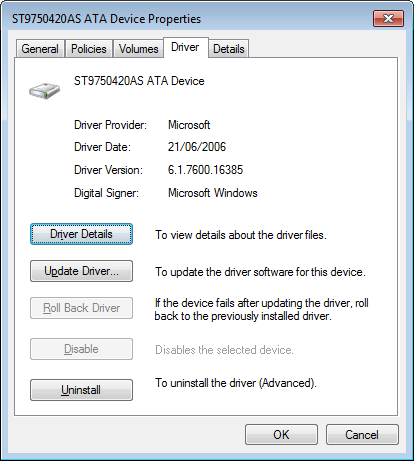
It looks like the MS VHD HBA (Storage Controller) and the HD - ST9750420AS ATA Device (Disk Drive) use the same driver, but the version# is the OS version...

IS THIS NORMAL?

vpW3uGH.png


Attempts to update the driver fail (not sure if it's cause the drive is in use, being natively virtualised, or if it's the wrong one...)

Is there a way of updating this driver?

Thanks
 

My Computer

Computer type
Laptop
Computer Manufacturer/Model Number
Dell
OS
Windows 7 Ultimate 64bit
CPU
2.2
Memory
8Gb
Graphics Card(s)
NVIDIA
Screen Resolution
1280/762
Mouse
built in pad || iphone || MS wireless
Internet Speed
100MB
Antivirus
Avast
Browser
Chrome, Chrome portable
Hi,
i have used VirtualBox to install Windows 7 Ultimate on VHD, then i have created Boot menu with EasyBCD.

So i have Copied \boot folder and bootmgr and Windows7.vhd on a new PC with a formatted NTFS harddisk
Then i make it bootable with Bootsect /nt60 i.e C:

Voilà !! A virtualized Windows7 Ultimate on a cleaned and real PC.:)

PRO
I have a small footprint of Bootmanager
Backup is copy VHD on another Disk
if some goes wrong i can restore /copy the VHD back.
All is inside a fixed/dinamic VHD
I can access my data on real partition NTFS
i Can create/attach another VHD for data

CONS
i cannot easily change the size of VHD
If i want change the pc which is hosting my VHD , i have to reset HAL layer inside VHD to get new hardware updated.

Cheers

PippoX0
 
Last edited:

My Computer

Computer type
PC/Desktop
Computer Manufacturer/Model Number
Dell Optiplex 760
OS
Windows7 Pro
CPU
Intel Core Duo
Motherboard
Dell
Memory
4 Gb
Graphics Card(s)
ATI Radeon Hd 6450
Hard Drives
250 Gb Sata
Antivirus
Avast ! Free
Browser
Firefox 25.0
Back
Top