Boot from a VHD using Windows 7

How to Boot from a VHD using Windows 7 and Windows 8

   Information
Windows 7 and Windows 8 includes support for creating, mounting and booting from VHD images but not many seem to know how to use this functionality to boot VHDs at boot time... I will detail the steps required to have another OS bootable using Windows 7...

This tutorial will show you how to setup Windows 7 or Windows 8 to boot from an existing VHD (Virtual Hard Disk).

All Vista, Windows 7, and Windows 8 (except Windows 8 RT) editions support booting from a VHD.

You must have either Windows 7 Ultimate, Windows 7 Enterprise, Windows 8 Pro, or Windows 8 Enterprise installed on the VHD to be able to boot from the VHD.


   Warning
If you do not have a good knowledge of how to reset your VirtualOS configuration like HAL type and driver configuration then your VHD will fail to boot. It must be cleaned of VirtualOS configuration correctly before Windows can boot your VHD!!


Step 1: If you have not already, create or attach an existing a VHD using the tutorial below.
http://www.sevenforums.com/tutorials/566-virtual-hard-disk-create-attach-vhd.html


Step 2: Open an elevated command prompt.


Step 3: Copy and Paste this command below and press Enter.
NOTE: Substitute VHD_Boot in the command below for what you want to be displayed as the name in Windows Boot Manager.
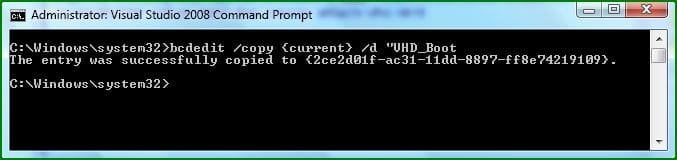
bcdedit /copy {current} /d "VHD_Boot"

If the command succeeds, BCDEdit displays a message similar to the following:


The entry was successfully copied to {CLSID_Number}
832d1227210633-boot-vhds-using-windows-7-step1.jpg

Take note of the CLSID number as you will need this during the next step ;)

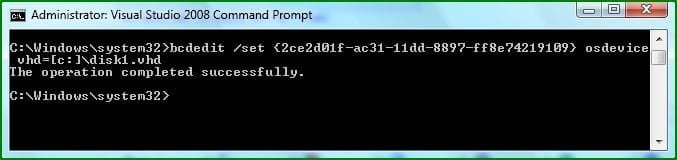
Step 4: Then type this command below and press Enter.
NOTE: Substitute C with the drive letter your VHD is on, and substitute disk1 with the name of your VHD file.
bcdedit /set {CLSID_Number} osdevice vhd=[C:]\disk1.vhd

833d1227210633-boot-vhds-using-windows-7-step2.jpg


Step 5: Thats it, You can now boot VHDs using Windows 7 :geek:
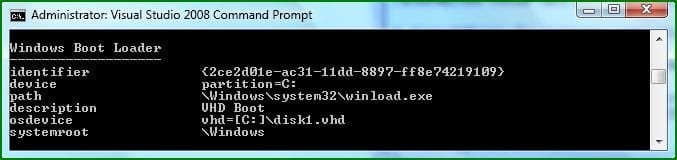
To confirm the settings simply type bcdedit
834d1227210633-boot-vhds-using-windows-7-step3.jpg

If your VHD is configured correctly You can reboot and select the extra boot-option to boot from your VHD :party:
   Warning
VirtualPC VHDs can not be used for booting with Windows because VirtualPC uses a Pentium 3 HAL and this prevents them from being used as boot media, You can however use this Tutorial: http://www.sevenforums.com/tutorials/566-virtual-hard-disk-create-attach-vhd.html and create then mount a VHD for use with VMWare Workstation....

You simply set VMWare workstation to use a Physical Disk, you can then Install a separate OS onto this mounted VHD for use with Windows.​


   Tip
You Must reset your VHD VirtualOS configuration like HAL type and driver configuration or your VHD will fail to boot!!! It must be cleaned of VirtualOS configuration correctly before windows 7 can boot your VHD!! ;)


   Note
There are still many bugs associated with VHD booting with Windows 7 at this time, I suspect Microsoft will be releasing a new Version of VirtualPC that's able to manage this entire process of creating, installing and booting separate VHDs at boot-time easily and without so many problems ;)


Attachments

  • Step1.JPG
    Step1.JPG
    22.2 KB · Views: 128,601
  • Step2.JPG
    Step2.JPG
    23.5 KB · Views: 128,208
  • Step3.JPG
    Step3.JPG
    24.9 KB · Views: 126,286
Last edited by a moderator:
There's nothing special involved. Just start setup as usual and follow the instructions. Although I haven't tried it with XP, Windows 7 should take care of the boot menu.
 

My Computer

Computer Manufacturer/Model Number
IBM T42
OS
Windows Vista and Windows 7 Beta
CPU
Intel Pentium 3 Centrino
Memory
1.5 GB
Graphics Card(s)
ATI Radeon Mobility 7500
Hi guys can i use this method of booting if i currently am running Win7?
Also can i use this method for using the VHD I downloaded for build 7231?
And if i can use the downloaded VHD 7231 where does it need to be located?
Do i just need to follow this http://www.sevenforums.com/tutorials/566-virtual-hard-disk-create-attach-vhd.html Tutorial to attach it and thats it or does the original VHD need to be somewhere spacific?
 

My Computer

Computer Manufacturer/Model Number
Handy manny
OS
Windows 7 (x64)
CPU
i7 870
Motherboard
Evga P55 FTW
Memory
G.Skill Trident (F3-17066CL9D-4GBTDS 2x2GB) - 2133MHz
Graphics Card(s)
Evga GTX 460 EE 1GB
Sound Card
On Board
Monitor(s) Displays
Samsung P2350
Screen Resolution
1920x1080
Hard Drives
1 x 64GB G-Skill Falcon SSD
1 x 60GB Corsair Force Series SSD
1 x 1TB WD Caviar Black
2 x 640GB WD Caviar Black
1 x 1TB Samsung Spinpoint F3
PSU
Corsair 620w
Case
Corsair 800D
Cooling
Corsair H50
Keyboard
Logitech MX5500 Revolution
Mouse
Logitech MX5500 Revolution
Internet Speed
http://www.speedtest.net/result/939062765.png
Other Info
http://www.sevenforums.com/overclocking-case-mods/104136-show-us-your-rig-2-a-4.html#post937213
Hello Cashis,

Yes, you can use this tutorial to boot your 7231 VHD with. Just start with step 2 instead since you already have a VHD file. It does not matter where you save the VHD file at.

Hope this helps,
Shawn
 

My Computer

Computer type
PC/Desktop
Computer Manufacturer/Model Number
Self built custom
OS
64-bit Windows 11 Pro for Workstations
CPU
Intel i7-8700K OC'd to 5 GHz
Motherboard
ASUS ROG Maximus XI Formula Z390
Memory
64 GB (4x16GB) G.SKILL TridentZ RGB DDR4 3600 MHz
Graphics Card(s)
ASUS ROG-STRIX-GTX1080TI-O11G-GAMING
Sound Card
Integrated
Monitor(s) Displays
2 x Samsung Odyssey G7 27"
Screen Resolution
2560x1440
Hard Drives
1TB Samsung 990 PRO M.2,
4TB Samsung 990 PRO PRO M.2,
TerraMaster F8 SSD Plus NAS
PSU
Seasonic Prime Titanium 850W
Case
Thermaltake Core P3
Cooling
Corsair Hydro H115i
Keyboard
Logitech wireless K800
Mouse
Logitech MX Master 4
Internet Speed
2 Gb/s Download and 100 Mb/s Upload
Antivirus
Malwarebyte Anti-Malware Premium
Browser
Google Chrome
Other Info
Logitech Z625 speaker system,
Logitech BRIO 4K Pro webcam,
HP Color LaserJet Pro MFP M477fdn,
APC SMART-UPS RT 1000 XL - SURT1000XLI,
Galaxy S23 Plus phone
Hello Cashis,

Yes, you can use this tutorial to boot your 7231 VHD with. Just start with step 2 instead since you already have a VHD file. It does not matter where you save the VHD file at.

Hope this helps,
Shawn

Great thanks for the Reply/Help/Tutorial much appreciated. :D
 

My Computer

Computer Manufacturer/Model Number
Handy manny
OS
Windows 7 (x64)
CPU
i7 870
Motherboard
Evga P55 FTW
Memory
G.Skill Trident (F3-17066CL9D-4GBTDS 2x2GB) - 2133MHz
Graphics Card(s)
Evga GTX 460 EE 1GB
Sound Card
On Board
Monitor(s) Displays
Samsung P2350
Screen Resolution
1920x1080
Hard Drives
1 x 64GB G-Skill Falcon SSD
1 x 60GB Corsair Force Series SSD
1 x 1TB WD Caviar Black
2 x 640GB WD Caviar Black
1 x 1TB Samsung Spinpoint F3
PSU
Corsair 620w
Case
Corsair 800D
Cooling
Corsair H50
Keyboard
Logitech MX5500 Revolution
Mouse
Logitech MX5500 Revolution
Internet Speed
http://www.speedtest.net/result/939062765.png
Other Info
http://www.sevenforums.com/overclocking-case-mods/104136-show-us-your-rig-2-a-4.html#post937213
You're welcome Cashis. :)
 

My Computer

Computer type
PC/Desktop
Computer Manufacturer/Model Number
Self built custom
OS
64-bit Windows 11 Pro for Workstations
CPU
Intel i7-8700K OC'd to 5 GHz
Motherboard
ASUS ROG Maximus XI Formula Z390
Memory
64 GB (4x16GB) G.SKILL TridentZ RGB DDR4 3600 MHz
Graphics Card(s)
ASUS ROG-STRIX-GTX1080TI-O11G-GAMING
Sound Card
Integrated
Monitor(s) Displays
2 x Samsung Odyssey G7 27"
Screen Resolution
2560x1440
Hard Drives
1TB Samsung 990 PRO M.2,
4TB Samsung 990 PRO PRO M.2,
TerraMaster F8 SSD Plus NAS
PSU
Seasonic Prime Titanium 850W
Case
Thermaltake Core P3
Cooling
Corsair Hydro H115i
Keyboard
Logitech wireless K800
Mouse
Logitech MX Master 4
Internet Speed
2 Gb/s Download and 100 Mb/s Upload
Antivirus
Malwarebyte Anti-Malware Premium
Browser
Google Chrome
Other Info
Logitech Z625 speaker system,
Logitech BRIO 4K Pro webcam,
HP Color LaserJet Pro MFP M477fdn,
APC SMART-UPS RT 1000 XL - SURT1000XLI,
Galaxy S23 Plus phone
I got a question =O!

Will the OS boot like a normal OS. supports video card, loads hardware drivers and everything! or will it be like OS in a visualization software? (sorry haven't tested it :P)

Thanks
Mercurial~
 

My Computer

OS
Windows 7 32bit RTM
Hello Mercurial,

It will operate just like a normal OS. :)

Shawn
 

My Computer

Computer type
PC/Desktop
Computer Manufacturer/Model Number
Self built custom
OS
64-bit Windows 11 Pro for Workstations
CPU
Intel i7-8700K OC'd to 5 GHz
Motherboard
ASUS ROG Maximus XI Formula Z390
Memory
64 GB (4x16GB) G.SKILL TridentZ RGB DDR4 3600 MHz
Graphics Card(s)
ASUS ROG-STRIX-GTX1080TI-O11G-GAMING
Sound Card
Integrated
Monitor(s) Displays
2 x Samsung Odyssey G7 27"
Screen Resolution
2560x1440
Hard Drives
1TB Samsung 990 PRO M.2,
4TB Samsung 990 PRO PRO M.2,
TerraMaster F8 SSD Plus NAS
PSU
Seasonic Prime Titanium 850W
Case
Thermaltake Core P3
Cooling
Corsair Hydro H115i
Keyboard
Logitech wireless K800
Mouse
Logitech MX Master 4
Internet Speed
2 Gb/s Download and 100 Mb/s Upload
Antivirus
Malwarebyte Anti-Malware Premium
Browser
Google Chrome
Other Info
Logitech Z625 speaker system,
Logitech BRIO 4K Pro webcam,
HP Color LaserJet Pro MFP M477fdn,
APC SMART-UPS RT 1000 XL - SURT1000XLI,
Galaxy S23 Plus phone
Win 7 boot from USB HDD

Hi Steven,

Great Job. Could you throw some light as to how to move this vhd to a bootable primary partition on a USB HDD and subsequently create a BCD entry for it.

I created a vhd on my laptop (on another partition), used imagex to capture an image of Win7 installed on the same partition, applied the image to the vhd. I then created a bootable / system partition on the USB HDD (also contains Ubuntu Jaunty) and modified grub to point to the correct partition for the Windows entry. I copied the vhd to the partition, however, when I edit the bcd, it edits my existing BCD on the local disk, does not create / edit the BCD on the USB HDD. On booting from the USB HDD and selecting Win7, i get the message "No Loader".

Any ideas as to where I am going wrong ? I will try to install Win7 as you have suggested, copy this to the USB partition and modify the BCD. What would the drive mapping be in this case for the VHD ?

Thanks,
Sandy
 

My Computer

OS
Vista HP SP1
Does anyone know what retail version of Windows 7 will be required to utilize the Boot from VHD option ?

Windows 7 Professional ?

Windows 7 Ultimate ?
 

My Computer

OS
Windows 7 Pro x64 & Vista x64 (Dual boot)
CPU
I7-920
Motherboard
Gigabyte GA-EX58-UD5 Motherboard
Memory
6 gb Kingston Hyperx memory PC-12800 DDRIII
Graphics Card(s)
eVGA NVIDIA GeForce 250 GTS 1gb DDR3
Hard Drives
2x120 gb SSD OCZ Vertex MLC
2x1 tb Western Digital Caviar Black WD1001FALS
Hello BNC,

You can do so from either one of those versions. :)
 

My Computer

Computer type
PC/Desktop
Computer Manufacturer/Model Number
Self built custom
OS
64-bit Windows 11 Pro for Workstations
CPU
Intel i7-8700K OC'd to 5 GHz
Motherboard
ASUS ROG Maximus XI Formula Z390
Memory
64 GB (4x16GB) G.SKILL TridentZ RGB DDR4 3600 MHz
Graphics Card(s)
ASUS ROG-STRIX-GTX1080TI-O11G-GAMING
Sound Card
Integrated
Monitor(s) Displays
2 x Samsung Odyssey G7 27"
Screen Resolution
2560x1440
Hard Drives
1TB Samsung 990 PRO M.2,
4TB Samsung 990 PRO PRO M.2,
TerraMaster F8 SSD Plus NAS
PSU
Seasonic Prime Titanium 850W
Case
Thermaltake Core P3
Cooling
Corsair Hydro H115i
Keyboard
Logitech wireless K800
Mouse
Logitech MX Master 4
Internet Speed
2 Gb/s Download and 100 Mb/s Upload
Antivirus
Malwarebyte Anti-Malware Premium
Browser
Google Chrome
Other Info
Logitech Z625 speaker system,
Logitech BRIO 4K Pro webcam,
HP Color LaserJet Pro MFP M477fdn,
APC SMART-UPS RT 1000 XL - SURT1000XLI,
Galaxy S23 Plus phone
Thanks Brink

However I just got some info from a technet user which disagrees with your advice.

Check out http://www.winsupersite.com/win7/win7_skus_compare.asp

If this site is correct, I need Ultimate for VHD boot, however VHD Create/Attach works on all versions ??
 

My Computer

OS
Windows 7 Pro x64 & Vista x64 (Dual boot)
CPU
I7-920
Motherboard
Gigabyte GA-EX58-UD5 Motherboard
Memory
6 gb Kingston Hyperx memory PC-12800 DDRIII
Graphics Card(s)
eVGA NVIDIA GeForce 250 GTS 1gb DDR3
Hard Drives
2x120 gb SSD OCZ Vertex MLC
2x1 tb Western Digital Caviar Black WD1001FALS
It looks like I may have been mistaken on that. It does appear that you will need W7 Ultimate to boot from a VHD instead. I had thought that it would to with being able to create and attach a VHD in the Pro version as well. Sorry for the mistake. :(
 

My Computer

Computer type
PC/Desktop
Computer Manufacturer/Model Number
Self built custom
OS
64-bit Windows 11 Pro for Workstations
CPU
Intel i7-8700K OC'd to 5 GHz
Motherboard
ASUS ROG Maximus XI Formula Z390
Memory
64 GB (4x16GB) G.SKILL TridentZ RGB DDR4 3600 MHz
Graphics Card(s)
ASUS ROG-STRIX-GTX1080TI-O11G-GAMING
Sound Card
Integrated
Monitor(s) Displays
2 x Samsung Odyssey G7 27"
Screen Resolution
2560x1440
Hard Drives
1TB Samsung 990 PRO M.2,
4TB Samsung 990 PRO PRO M.2,
TerraMaster F8 SSD Plus NAS
PSU
Seasonic Prime Titanium 850W
Case
Thermaltake Core P3
Cooling
Corsair Hydro H115i
Keyboard
Logitech wireless K800
Mouse
Logitech MX Master 4
Internet Speed
2 Gb/s Download and 100 Mb/s Upload
Antivirus
Malwarebyte Anti-Malware Premium
Browser
Google Chrome
Other Info
Logitech Z625 speaker system,
Logitech BRIO 4K Pro webcam,
HP Color LaserJet Pro MFP M477fdn,
APC SMART-UPS RT 1000 XL - SURT1000XLI,
Galaxy S23 Plus phone
Win 7 USB Boot

Hi,

I tried the tutorial method to clean, make two partitions on my Seagate 250GB HDD (ST3250310AS) in a Spire GigaPod III SATA-USB enclosure, then installed Win7 from the DVD (7100) onto the first partition. It gave me an error message saying that my computer would have boot problems with this configuration but did the installation on confirmation. It also creates the appropriate entries in the BCD (and adds a "Windows 7" entry ).

When I set boot from USB, the laptop displays the Starting Windows screen for a second, then a blue screen with errors momentarily, then reboots. This process keeps repeating on each reboot.

Can someone point out where I am going wrong ?

My laptop is a standard Dell Inspiron 1525 (T5800) with Vista HP SP1 preloaded, having 3 GB RAM, 250 GB HDD. I have created another partition in it other than the pre-configured ones (one for OS, one for recovery, one for OEM) and have installed Win 7 RC1 on this partition with a dual boot with Win Vista. This setup works fine, however all my USB boot experiments have failed till date.
 

My Computer

OS
Vista HP SP1
Hi,

When I set boot from USB, the laptop displays the Starting Windows screen for a second, then a blue screen with errors momentarily, then reboots. This process keeps repeating on each reboot.

Can someone point out where I am going wrong ?

Hi Sandy,

Unfortunately we really need the BCCode or Bug Check Code to be able to diagnose installation failure at that stage of the Windows Setup, If you able to provide the digits Ive highlighted Red then we can give you a more specific cause ;)

0x0000123 (0x000000, 0x000000, 0x000000, 0x000000)

If your unable to view the BCCode before your system restarts can you upload the Minidump file located here: C:\Windows\Minidump\Minidump.dmp

Cheers

Steven
 
Thanks for the tip Steven. Unfortunately, I ran into problems with jaunty and grub. I had to clean the disk of existing software. I shall attempt th re-install in a while, I shall upload the minidump file then.

Sandy
 

My Computer

OS
Vista HP SP1
Virtual PC VHDs can boot too!

Well ,I'm not sure if I have read the whole thread carefully enough to not repeat something, but dmex states at his warning in the beginning of the tutorial , that you cannot boot a Virtual PC VHD, due to different HAL configuration (Pentium III) , so you will need to use VMWARE...

Well, I just booted one (VIRTUAL PC made) and I'm actually running it now... and if nobody else has posted it, I wanted to share it with the rest here.

Here's the case:

1. I'm running Windows 7 RC 7100.
2. I installed Virtual PC 2007 SP1.
3. I made a VHD and installed Windows 7 7600 on it.
4. I even installed a language pack from the ones leaked on the net.
5. Then I ran sysprep from within the virtual machine and shut down the virtual machine.
6. I added the VHD boot entry on my host OS in order to boot from my newly created VHD.
7. I added the command bcdedit /set {my_vhd_CLSID} detecthal yes
8. I restarted, selected my VHD boot option and here I am...fully operational.

Again, I apologize if someone else has already posted this, but I still saw the warning up there so I had to say it's been overcome.

Cheers
 

My Computer

Computer Manufacturer/Model Number
ENIAC
OS
Windows 7 RC 7100 32bit/64bit
CPU
Intel Core2Duo E4500 2.20 GHz
Motherboard
ASUS P5LD2-X/1333
Memory
2x1GB Kinsgston DDR2 800MHz
Graphics Card(s)
Nvidia 8500GT
Sound Card
Onboard High Definition Audio Device
Monitor(s) Displays
Sony Bravia 42"
Case
LINKW 2222
Cooling
Standard Intel
Keyboard
Some cheap one
Mouse
Microsoft Intellimouse something
Internet Speed
24MBps ADSL
If you sysprep it, then that removes the HAL.

It's still "cleaner" to install it fresh then to use a virtual pc vhd.
 

My Computer

Computer Manufacturer/Model Number
IBM T42
OS
Windows Vista and Windows 7 Beta
CPU
Intel Pentium 3 Centrino
Memory
1.5 GB
Graphics Card(s)
ATI Radeon Mobility 7500
Thanks, limneos.

Do you see any advantage of booting a 'Virtual PC .vhd',
versus having installed Win 7 'directly' into a newly created .vhd (as in the tutorial)?
(ie, No emulated NIC, faster running w/o emulation, no core-memory limits, etc.)

Thank you for the post.
Sounds interesting, since I have Win 7 installed both ways... :thumbsup:
 

My Computer

Computer Manufacturer/Model Number
Gateway GT5056
OS
XP_Pro, W7_7201, W7RC.vhd, SciLinux5.3, Fedora12, Fedora9_2x, OpenSolaris_09-06
CPU
AMD 64x2
Motherboard
Yes
Memory
1 gig
Graphics Card(s)
Dunno
Sound Card
Realtek something
Monitor(s) Displays
Samsung SyncMaster 940MW w/TV
Screen Resolution
1280x1024
Hard Drives
250 GB WD, USB Seagate Freedesk 1.5 T
Internet Speed
Cable modem
Other Info
1 + 1 = 10b,
7 + 7 = 16o,
a + b = 15h.
Thanks, limneos.

Do you see any advantage of booting a 'Virtual PC .vhd',
versus having installed Win 7 'directly' into a newly created .vhd (as in the tutorial)?
(ie, No emulated NIC, faster running w/o emulation, no core-memory limits, etc.)

Thank you for the post.
Sounds interesting, since I have Win 7 installed both ways... :thumbsup:

Well, I don't think there's an actual advantage, it's always better to use a clean installed OS, either in VHD or in any other medium ;)

The thing is that, if you already have a Virtual PC VHD with which you've been working with, you can boot with it too.It's just good to know you can also boot this already setup OS.

Cheers
 

My Computer

Computer Manufacturer/Model Number
ENIAC
OS
Windows 7 RC 7100 32bit/64bit
CPU
Intel Core2Duo E4500 2.20 GHz
Motherboard
ASUS P5LD2-X/1333
Memory
2x1GB Kinsgston DDR2 800MHz
Graphics Card(s)
Nvidia 8500GT
Sound Card
Onboard High Definition Audio Device
Monitor(s) Displays
Sony Bravia 42"
Case
LINKW 2222
Cooling
Standard Intel
Keyboard
Some cheap one
Mouse
Microsoft Intellimouse something
Internet Speed
24MBps ADSL
Back
Top