Boot time

bagavan

New member
Pro User
Local time
11:22 AM
Messages
831
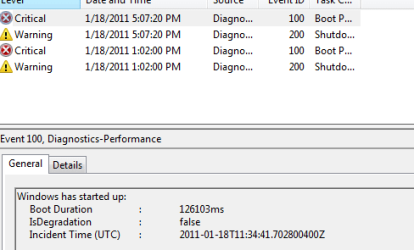
Is the boot normal or is it excess?
 

Attachments

  • boot up.PNG
    boot up.PNG
    6.7 KB · Views: 18

My Computer

Computer Manufacturer/Model Number
aspire 5920
OS
Windows 8 Professional x64
CPU
core 2 duo T5550
Memory
4 GB
Graphics Card(s)
GMA X3100
Hard Drives
160 GB + 320 GB
Internet Speed
2 mbps
126103ms = just over two minutes to boot?

i would say it's in excess.

what have you got loading at startup?

post an msconfig screenshot - it looks like you need to trim some things off.
 

My Computer

Computer Manufacturer/Model Number
mickey megabyte 1234
OS
ultimate 64 sp1
CPU
i5 2500K [email protected]
Motherboard
MSI P67A-GD53
Memory
8 gigs GSkill Ripjaws 1600
Graphics Card(s)
amd hd6950
Sound Card
creative x-fi gamer
Monitor(s) Displays
samsung 24"
Screen Resolution
1920x1080
Hard Drives
ocz vertex 2e 60 gig, samsung f3 1tb, buffalo 2tb ext
PSU
antec 550
Case
antec three hundred
Cooling
i'm a cooling fan
Keyboard
saitek eclipse ii
Mouse
logitech g3
Internet Speed
about 4 Mbps
Other Info
i love win7
126103ms = just over two minutes to boot?

i would say it's in excess.

what have you got loading at startup?

post an msconfig screenshot - it looks like you need to trim some things off.

Here you go.
 

Attachments

  • s3.PNG
    s3.PNG
    9.6 KB · Views: 23

My Computer

Computer Manufacturer/Model Number
aspire 5920
OS
Windows 8 Professional x64
CPU
core 2 duo T5550
Memory
4 GB
Graphics Card(s)
GMA X3100
Hard Drives
160 GB + 320 GB
Internet Speed
2 mbps
..and the rest please. :)
 

My Computer

Computer Manufacturer/Model Number
mickey megabyte 1234
OS
ultimate 64 sp1
CPU
i5 2500K [email protected]
Motherboard
MSI P67A-GD53
Memory
8 gigs GSkill Ripjaws 1600
Graphics Card(s)
amd hd6950
Sound Card
creative x-fi gamer
Monitor(s) Displays
samsung 24"
Screen Resolution
1920x1080
Hard Drives
ocz vertex 2e 60 gig, samsung f3 1tb, buffalo 2tb ext
PSU
antec 550
Case
antec three hundred
Cooling
i'm a cooling fan
Keyboard
saitek eclipse ii
Mouse
logitech g3
Internet Speed
about 4 Mbps
Other Info
i love win7

Attachments

  • s5.PNG
    s5.PNG
    6.7 KB · Views: 11

My Computer

Computer Manufacturer/Model Number
aspire 5920
OS
Windows 8 Professional x64
CPU
core 2 duo T5550
Memory
4 GB
Graphics Card(s)
GMA X3100
Hard Drives
160 GB + 320 GB
Internet Speed
2 mbps
it looks like there's still more...

all these programs are being started every time you boot your computer. that's why it takes so long.

most of these are not needed at every boot.

some of them go online to check for program updates - you can do this manually. some of them insist on starting the program straight away, even if you don't need it. for instance do you need bittorrent and skype to start up every time you boot? just run it when you want to. the software should still work with the startup entry removed - but do test.

you'll have to go through the list disabling a few at a time, rebooting, and make sure everything still works.

it'll take a while, but you will eventually notice much quicker booting.
 

My Computer

Computer Manufacturer/Model Number
mickey megabyte 1234
OS
ultimate 64 sp1
CPU
i5 2500K [email protected]
Motherboard
MSI P67A-GD53
Memory
8 gigs GSkill Ripjaws 1600
Graphics Card(s)
amd hd6950
Sound Card
creative x-fi gamer
Monitor(s) Displays
samsung 24"
Screen Resolution
1920x1080
Hard Drives
ocz vertex 2e 60 gig, samsung f3 1tb, buffalo 2tb ext
PSU
antec 550
Case
antec three hundred
Cooling
i'm a cooling fan
Keyboard
saitek eclipse ii
Mouse
logitech g3
Internet Speed
about 4 Mbps
Other Info
i love win7
it looks like there's still more...

all these programs are being started every time you boot your computer. that's why it takes so long.

most of these are not needed at every boot.

you'll have to go through the list disabling a few at a time, rebooting, and make sure everything still works.

it'll take a while, but you will eventually notice much quicker booting.

Should I disable all?
 

My Computer

Computer Manufacturer/Model Number
aspire 5920
OS
Windows 8 Professional x64
CPU
core 2 duo T5550
Memory
4 GB
Graphics Card(s)
GMA X3100
Hard Drives
160 GB + 320 GB
Internet Speed
2 mbps
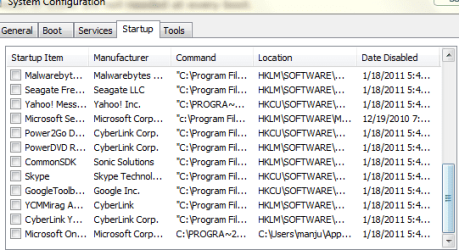
Mickey I disabled many and really the boot up time improved..Have a look at msconfig snip
 

Attachments

  • s11.PNG
    s11.PNG
    12.1 KB · Views: 15
  • s12.PNG
    s12.PNG
    10.9 KB · Views: 11

My Computer

Computer Manufacturer/Model Number
aspire 5920
OS
Windows 8 Professional x64
CPU
core 2 duo T5550
Memory
4 GB
Graphics Card(s)
GMA X3100
Hard Drives
160 GB + 320 GB
Internet Speed
2 mbps
that's better - now you need to test your software to make sure it still works. if it doesn't it's easy to re-enable the startup entry.

personally, i like to be ruthless with these and like to eliminate as many as possible without damaging my system.

i can't see all the text and names, as the columns are too narrow, so i'm guessing a bit here.

the hd audio can possibly be disabled - check that your sound (and control panel) still works after doing so!

the 'default settings' ive never seen before - column too narrow to read

the three intel entries - i think these are to do with the intel graphics - i've always disabled these in the past with no bad consequences.

the first microsfot one looks like microsoft security essentials - obviously do not disable this one!

second microsoft one, i can't see.

finally does poweriso still work after disabling? or do you need iso's auto-mounted at startup.


as for the ones you've already disabled - a lot of them are just updaters, which check for new versions of software at each boot time.

make sure everything still works - if not, it's really easy to re-enable.


*edit* looks like you've disabled a microsoft security essentials - 4th one down right-hand side - you may want to enable this one again. not sure why you have two entries for this. did you update without uninstalling or something? enable the malware bytes again too!


*edit2* also - don't forget that you've done this! in 6 months time, when something isn;t working as expected, it could be that you've disabled the wrong thing.

happy tweaking!
 

My Computer

Computer Manufacturer/Model Number
mickey megabyte 1234
OS
ultimate 64 sp1
CPU
i5 2500K [email protected]
Motherboard
MSI P67A-GD53
Memory
8 gigs GSkill Ripjaws 1600
Graphics Card(s)
amd hd6950
Sound Card
creative x-fi gamer
Monitor(s) Displays
samsung 24"
Screen Resolution
1920x1080
Hard Drives
ocz vertex 2e 60 gig, samsung f3 1tb, buffalo 2tb ext
PSU
antec 550
Case
antec three hundred
Cooling
i'm a cooling fan
Keyboard
saitek eclipse ii
Mouse
logitech g3
Internet Speed
about 4 Mbps
Other Info
i love win7
in the case of bitorrent ,users may wish their download to continue without remembering to start it . the number of times i have sat around for a day or so only to find i had forgotten.startup is the best soloution for me ,i can exit it if im not using it .
 

My Computer

Computer Manufacturer/Model Number
Hewlett packard/p6512uk
OS
Microsoft Windows 7 Home Premium 64-bit 7600
CPU
IIx4 amd athelon 635 processor
Motherboard
FOXCONN 2AA9
Memory
2x2gb
Graphics Card(s)
ati radeon HD 5450
Sound Card
(1) Realtek High Definition Audio (2) AMD High Definition
Monitor(s) Displays
samsung lcd tv 32"
Screen Resolution
1360x 768
Hard Drives
(1) WDC WD10 01FAES-60Z2A0 SATA Disk Device (2) Maxtor OneTouch USB Device (3) ST310003 33AS USB Device (4) WD My Book 1111 USB Device
PSU
?
Cooling
air!
Keyboard
wireless hp
Mouse
wireless Hp,optical
Internet Speed
1.10mb/s
Antivirus
MSE
Browser
Firefox
me, i like software to run when i want it to.

we're all different - it's just that some are more different that others. :)
 

My Computer

Computer Manufacturer/Model Number
mickey megabyte 1234
OS
ultimate 64 sp1
CPU
i5 2500K [email protected]
Motherboard
MSI P67A-GD53
Memory
8 gigs GSkill Ripjaws 1600
Graphics Card(s)
amd hd6950
Sound Card
creative x-fi gamer
Monitor(s) Displays
samsung 24"
Screen Resolution
1920x1080
Hard Drives
ocz vertex 2e 60 gig, samsung f3 1tb, buffalo 2tb ext
PSU
antec 550
Case
antec three hundred
Cooling
i'm a cooling fan
Keyboard
saitek eclipse ii
Mouse
logitech g3
Internet Speed
about 4 Mbps
Other Info
i love win7
can't agree more mickey! :D
 

My Computer

Computer Manufacturer/Model Number
Hewlett packard/p6512uk
OS
Microsoft Windows 7 Home Premium 64-bit 7600
CPU
IIx4 amd athelon 635 processor
Motherboard
FOXCONN 2AA9
Memory
2x2gb
Graphics Card(s)
ati radeon HD 5450
Sound Card
(1) Realtek High Definition Audio (2) AMD High Definition
Monitor(s) Displays
samsung lcd tv 32"
Screen Resolution
1360x 768
Hard Drives
(1) WDC WD10 01FAES-60Z2A0 SATA Disk Device (2) Maxtor OneTouch USB Device (3) ST310003 33AS USB Device (4) WD My Book 1111 USB Device
PSU
?
Cooling
air!
Keyboard
wireless hp
Mouse
wireless Hp,optical
Internet Speed
1.10mb/s
Antivirus
MSE
Browser
Firefox
...
*edit* looks like you've disabled a microsoft security essentials - 4th one down right-hand side - you may want to enable this one again. not sure why you have two entries for this. did you update without uninstalling or something? enable the malware bytes again too!


*edit2* also - don't forget that you've done this! in 6 months time, when something isn;t working as expected, it could be that you've disabled the wrong thing.

happy tweaking!

bagavan - i really hope you have seen these edits that i made to my post!
 

My Computer

Computer Manufacturer/Model Number
mickey megabyte 1234
OS
ultimate 64 sp1
CPU
i5 2500K [email protected]
Motherboard
MSI P67A-GD53
Memory
8 gigs GSkill Ripjaws 1600
Graphics Card(s)
amd hd6950
Sound Card
creative x-fi gamer
Monitor(s) Displays
samsung 24"
Screen Resolution
1920x1080
Hard Drives
ocz vertex 2e 60 gig, samsung f3 1tb, buffalo 2tb ext
PSU
antec 550
Case
antec three hundred
Cooling
i'm a cooling fan
Keyboard
saitek eclipse ii
Mouse
logitech g3
Internet Speed
about 4 Mbps
Other Info
i love win7
if you are unsure of what processes to stop, this piece of software is a must it will postpone start up of certain utilities and disable others its up to you but it will not let you stop important things , it will knock time of your boot have a go let us know how you get on.
Soluto
 

My Computer

Computer Manufacturer/Model Number
Hewlett packard/p6512uk
OS
Microsoft Windows 7 Home Premium 64-bit 7600
CPU
IIx4 amd athelon 635 processor
Motherboard
FOXCONN 2AA9
Memory
2x2gb
Graphics Card(s)
ati radeon HD 5450
Sound Card
(1) Realtek High Definition Audio (2) AMD High Definition
Monitor(s) Displays
samsung lcd tv 32"
Screen Resolution
1360x 768
Hard Drives
(1) WDC WD10 01FAES-60Z2A0 SATA Disk Device (2) Maxtor OneTouch USB Device (3) ST310003 33AS USB Device (4) WD My Book 1111 USB Device
PSU
?
Cooling
air!
Keyboard
wireless hp
Mouse
wireless Hp,optical
Internet Speed
1.10mb/s
Antivirus
MSE
Browser
Firefox
I disable all Startup Items except AV, MS Sidebar (gadgets) and StikyNotes. Everything else can wait to startup when I open the program.

Those other listings you have are not needed unless you are running a mounted drive on PowerISO, have overclocked the Intel, have special surround or other audio effects on HD Audio.

Please the cursor on the file extension for Default Settings to google for what it is. It looks suspicious and is likely not needed.

After XP and Vista SP2 there are no startup items listed in msconfig that can be unchecked which will cause grief with the OS. Most are updaters spying on you to gather data which pays for freeware.
 
...
*edit* looks like you've disabled a microsoft security essentials - 4th one down right-hand side - you may want to enable this one again. not sure why you have two entries for this. did you update without uninstalling or something? enable the malware bytes again too!


*edit2* also - don't forget that you've done this! in 6 months time, when something isn;t working as expected, it could be that you've disabled the wrong thing.

happy tweaking!

bagavan - i really hope you have seen these edits that i made to my post!

Thank u very much mickey..have a look at the boot time now.
 

Attachments

  • boot up1.PNG
    boot up1.PNG
    8.2 KB · Views: 22

My Computer

Computer Manufacturer/Model Number
aspire 5920
OS
Windows 8 Professional x64
CPU
core 2 duo T5550
Memory
4 GB
Graphics Card(s)
GMA X3100
Hard Drives
160 GB + 320 GB
Internet Speed
2 mbps
that's better - now you need to test your software to make sure it still works. if it doesn't it's easy to re-enable the startup entry.

personally, i like to be ruthless with these and like to eliminate as many as possible without damaging my system.

i can't see all the text and names, as the columns are too narrow, so i'm guessing a bit here.

the hd audio can possibly be disabled - check that your sound (and control panel) still works after doing so!

the 'default settings' ive never seen before - column too narrow to read

the three intel entries - i think these are to do with the intel graphics - i've always disabled these in the past with no bad consequences.

the first microsfot one looks like microsoft security essentials - obviously do not disable this one!

second microsoft one, i can't see.

finally does poweriso still work after disabling? or do you need iso's auto-mounted at startup.


as for the ones you've already disabled - a lot of them are just updaters, which check for new versions of software at each boot time.

make sure everything still works - if not, it's really easy to re-enable.


*edit* looks like you've disabled a microsoft security essentials - 4th one down right-hand side - you may want to enable this one again. not sure why you have two entries for this. did you update without uninstalling or something? enable the malware bytes again too!


*edit2* also - don't forget that you've done this! in 6 months time, when something isn;t working as expected, it could be that you've disabled the wrong thing.

happy tweaking!

IF i disable the HD audio microphone did not work So i should enable it..
 

My Computer

Computer Manufacturer/Model Number
aspire 5920
OS
Windows 8 Professional x64
CPU
core 2 duo T5550
Memory
4 GB
Graphics Card(s)
GMA X3100
Hard Drives
160 GB + 320 GB
Internet Speed
2 mbps
Depending on hardware, 87 seconds is pretty darn good. That's a Core2Duo with 5400 RPM drives from 2007 if this is the system in your specs we're talking about, so with that in mind anything under about 90 seconds from boot to usable (it's worth noting that time includes everything from the initial load of the kernel immediately after the POST to completing loading the post-boot items that start from the Run keys in the registry, startup items in the start menu, and items in the notification area - 87 seconds from POST to post-boot complete is quite good on that sort of hardware. The only thing you might want to do if you haven't recently is to clear out your prefetch cache (c:\windows\prefetch) of all *.pf files, defragment data on the OS disk (defrag C: /U /V), then defrag free space on the OS disk (defrag C: /X), then lastly reboot 5 or 6 times *completely* (this is actually necessary) and check again. Assuming you haven't disabled Superfetch or the prefetcher, this should give you a bit better time as well.
 

My Computer

Computer type
PC/Desktop
Computer Manufacturer/Model Number
Custom
OS
Windows 10 Pro x64
CPU
Intel Core i7 4790K @ 4.5GHz
Motherboard
Asus Maximus Hero VII
Memory
32GB DDR3
Graphics Card(s)
Nvidia GeForce GTX970
Sound Card
Realtek HD Audio
Screen Resolution
1920x1200
Hard Drives
1x Samsung 250GB SSD
4x WD RE 2TB (RAIDZ)
PSU
Corsair AX760i
Case
Fractal Design Define R4
Cooling
Noctua NH-D15
Depending on hardware, 87 seconds is pretty darn good. That's a Core2Duo with 5400 RPM drives from 2007 if this is the system in your specs we're talking about, so with that in mind anything under about 90 seconds from boot to usable (it's worth noting that time includes everything from the initial load of the kernel immediately after the POST to completing loading the post-boot items that start from the Run keys in the registry, startup items in the start menu, and items in the notification area - 87 seconds from POST to post-boot complete is quite good on that sort of hardware. The only thing you might want to do if you haven't recently is to clear out your prefetch cache (c:\windows\prefetch) of all *.pf files, defragment data on the OS disk (defrag C: /U /V), then defrag free space on the OS disk (defrag C: /X), then lastly reboot 5 or 6 times *completely* (this is actually necessary) and check again. Assuming you haven't disabled Superfetch or the prefetcher, this should give you a bit better time as well.

Thank u very much.I have cleared the prefetch cache and I have started to defragment..any other suggestion?Note-I have installed sp1
 

My Computer

Computer Manufacturer/Model Number
aspire 5920
OS
Windows 8 Professional x64
CPU
core 2 duo T5550
Memory
4 GB
Graphics Card(s)
GMA X3100
Hard Drives
160 GB + 320 GB
Internet Speed
2 mbps
I disable all Startup Items except AV, MS Sidebar (gadgets) and StikyNotes. Everything else can wait to startup when I open the program.

Those other listings you have are not needed unless you are running a mounted drive on PowerISO, have overclocked the Intel, have special surround or other audio effects on HD Audio.

Please the cursor on the file extension for Default Settings to google for what it is. It looks suspicious and is likely not needed.

After XP and Vista SP2 there are no startup items listed in msconfig that can be unchecked which will cause grief with the OS. Most are updaters spying on you to gather data which pays for freeware.

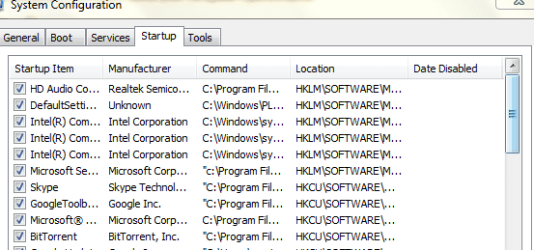
I googled it and found out that default is settings is to do something about acer webcam
 

My Computer

Computer Manufacturer/Model Number
aspire 5920
OS
Windows 8 Professional x64
CPU
core 2 duo T5550
Memory
4 GB
Graphics Card(s)
GMA X3100
Hard Drives
160 GB + 320 GB
Internet Speed
2 mbps
Back
Top