Bootable ISO - Create from Installation Files

How to Create a Bootable ISO from Windows 7 Installation Files


   Information
How to EASILY make a bootable .iso file from Windows 7 or Vista Installation files with the FREE vlite.

Vlite can be installed on 32 and 64 bit versions of XP, Vista and Windows 7.

Homepage and Information:
   Tip
If you got the student d/l and have 3 files :

* Windows 7-HP-Retail-en-us-x64.exe
* setup1.box * setup2.box

1. Rt click each file, Properties > Unblock>Apply>OK. NOTE: Make sure read only boxes are clear

2. Rt click and run as admin on the .exe. You will get a folder called expandedSetup on your dektop.

If you receive this error:
We are unable to create or save new files in the folder in which this application was downloaded. Please check the folder properties to make sure that you have security permission on the folder to write files and that the folder is not read-only.

Continue with the tutorial to make the .iso


Here's How:

1. Download and Install vlite.

   Note
vlite v1.1.6 is self contained and needs no additional applications.

vlite v1.2 requires the large WAIK download from MS.

It is possible to install v1.2 over the top of v1.1.6 if you wish

2. Rt click vlite shortcut and Run as Admin. Click Install Wimfilter.

3. Click Browse and browse to Windows Installation Files folder:
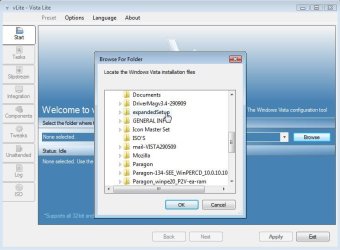
1-BROWSE-2009-10-26_064124.jpg
4. Select your Edition:
2-EDITION-2009-10-26_064516.jpg
It takes a few seconds to load the files - then click Next.

5. Tick Bootable .iso and click Next:
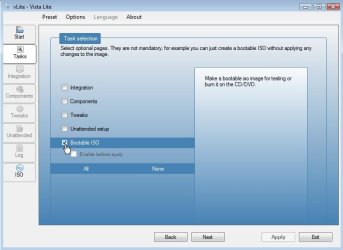
3-Bootable.iso-2009-10-26_064643.jpg
6. Make sure it says Create Image - and type a label if you wish. Then Click Make .iso:
4-CREATE-IMAGE-2009-10-26_065018.jpg
7. Select where to Save the .iso
5-SAVE-ISO-2009-10-26_065105.jpg
After you click the Save button, vlite starts making the .iso
6-CREATEISO-2009-10-26_065140.jpg
When done, click Next

8. EITHER - TO MAKE A BOOTABLE DVD - put an unformatted recordable dvd inthe drive and select Burn Image.
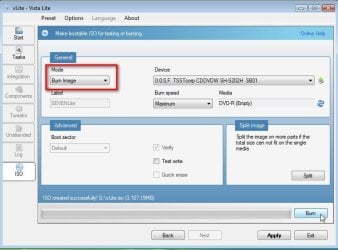
7-BURN-IMAGE-2009-10-26_065614.jpg
OR-TO MAKE A BOOTABLE FLASH DRIVE- click Exit and confirm - the .iso will be in the location you selected in Step 7.
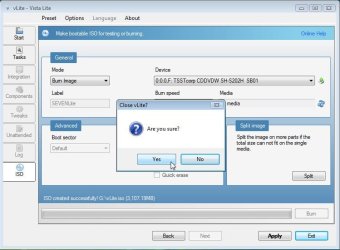
8-CLOSE-VLITE-2009-10-26_065817.jpg


Last edited by a moderator:
Technically it may be possible to use the key off the side of the laptop to activate any installation. However, it is only supposed to be used on that machine.
 

My Computers

System One System Two

  • Computer type
    PC/Desktop
    OS
    7 X64
    CPU
    i5 8400
    Motherboard
    gigabyte b365m ds3h
    Memory
    2x8gb 3200mhz
    Hard Drives
    various
    PSU
    pure power 11 400w cm
    Case
    Coolermaster
    Cooling
    cryorig m9i
  • Computer type
    PC/Desktop
    OS
    7x64
    CPU
    g5400
    Motherboard
    ga b365m ds3h
    Memory
    8gb ddr4 2400
    PSU
    xfx pro 450w
so what do you mean by technically? do i have to call microsoft or something? what im trying to do is make installation cd from the recovery partition files. or the pqservice files.
 

My Computer

Computer Manufacturer/Model Number
Manufacturer ASUSTeK Computer INC. Model M3N78-VM Version System Version Chipset Vendor NVIDIA Chips
OS
windows vista and 7 ultimate
CPU
amd athlon 7750 dual core black edition 2700
Motherboard
asus m3n78-vm
Memory
Memory Type DDR2 Size 8192 MBytes Channels # Dual DRAM F
Graphics Card(s)
geforce9800gt/ NVIDIA GeForce GT 220 GeForce 9800 GT GPU G
Sound Card
on board
Monitor(s) Displays
envision
Screen Resolution
Current Resolution 1440x900 pixels
Hard Drives
Manufacturer Western Digital
Form Factor TB/3.5-inch (new format)
Business Unit/Brand Desktop/WD Caviar®
RPM/Buffer Size or Attribute 7200 RPM with 32 MB cache
Interface/Connector SATA 3 Gb/s with 22-pin SATA connector/SATA 1.5 Gb/s with 22-
Keyboard
razar
Mouse
razar deathadder

My Computers

System One System Two

  • Computer type
    PC/Desktop
    OS
    7 X64
    CPU
    i5 8400
    Motherboard
    gigabyte b365m ds3h
    Memory
    2x8gb 3200mhz
    Hard Drives
    various
    PSU
    pure power 11 400w cm
    Case
    Coolermaster
    Cooling
    cryorig m9i
  • Computer type
    PC/Desktop
    OS
    7x64
    CPU
    g5400
    Motherboard
    ga b365m ds3h
    Memory
    8gb ddr4 2400
    PSU
    xfx pro 450w
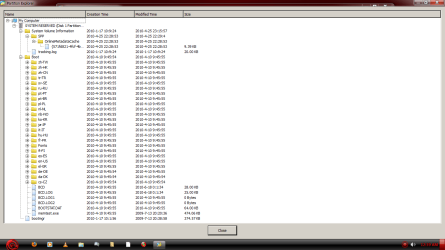
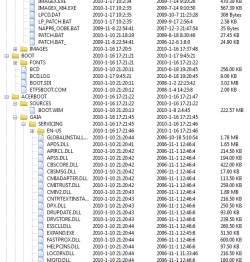
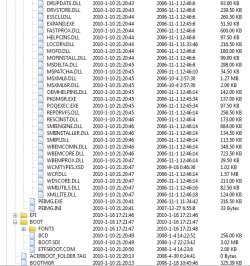
hey, thanks for all the help. i uploaded two screensshots one for each of the hidden partitions on the laptop. you wouldnt happen to know what the deal is witrh the pq service part? that sucker is 12G.
 

Attachments

  • systemreserved.png
    systemreserved.png
    99 KB · Views: 420
  • pqservice.png
    pqservice.png
    115.8 KB · Views: 539

My Computer

Computer Manufacturer/Model Number
Manufacturer ASUSTeK Computer INC. Model M3N78-VM Version System Version Chipset Vendor NVIDIA Chips
OS
windows vista and 7 ultimate
CPU
amd athlon 7750 dual core black edition 2700
Motherboard
asus m3n78-vm
Memory
Memory Type DDR2 Size 8192 MBytes Channels # Dual DRAM F
Graphics Card(s)
geforce9800gt/ NVIDIA GeForce GT 220 GeForce 9800 GT GPU G
Sound Card
on board
Monitor(s) Displays
envision
Screen Resolution
Current Resolution 1440x900 pixels
Hard Drives
Manufacturer Western Digital
Form Factor TB/3.5-inch (new format)
Business Unit/Brand Desktop/WD Caviar®
RPM/Buffer Size or Attribute 7200 RPM with 32 MB cache
Interface/Connector SATA 3 Gb/s with 22-pin SATA connector/SATA 1.5 Gb/s with 22-
Keyboard
razar
Mouse
razar deathadder
Pqservice contains all the files needed for recovery to factory condition.

Have a look in folder called ACERBOOT\sources you should find "install.wim".

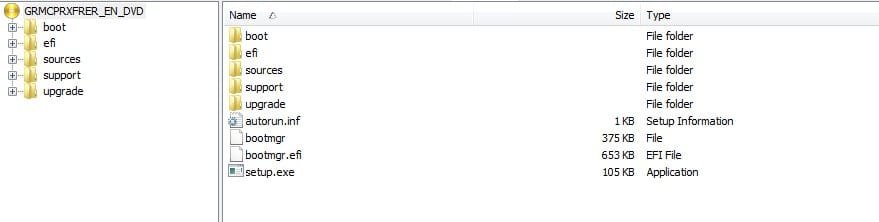
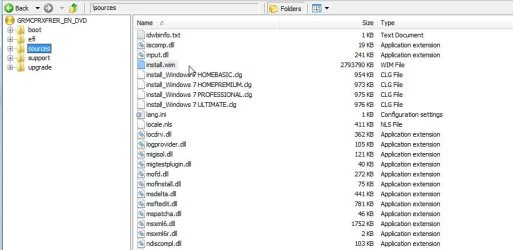
This is what the regular installation dvd looks like:


Install dvd -1.jpg

Installdvd-2-.jpg
 

My Computers

System One System Two

  • Computer type
    PC/Desktop
    OS
    7 X64
    CPU
    i5 8400
    Motherboard
    gigabyte b365m ds3h
    Memory
    2x8gb 3200mhz
    Hard Drives
    various
    PSU
    pure power 11 400w cm
    Case
    Coolermaster
    Cooling
    cryorig m9i
  • Computer type
    PC/Desktop
    OS
    7x64
    CPU
    g5400
    Motherboard
    ga b365m ds3h
    Memory
    8gb ddr4 2400
    PSU
    xfx pro 450w
cant thank you enough, +rep!
 

My Computer

Computer Manufacturer/Model Number
Manufacturer ASUSTeK Computer INC. Model M3N78-VM Version System Version Chipset Vendor NVIDIA Chips
OS
windows vista and 7 ultimate
CPU
amd athlon 7750 dual core black edition 2700
Motherboard
asus m3n78-vm
Memory
Memory Type DDR2 Size 8192 MBytes Channels # Dual DRAM F
Graphics Card(s)
geforce9800gt/ NVIDIA GeForce GT 220 GeForce 9800 GT GPU G
Sound Card
on board
Monitor(s) Displays
envision
Screen Resolution
Current Resolution 1440x900 pixels
Hard Drives
Manufacturer Western Digital
Form Factor TB/3.5-inch (new format)
Business Unit/Brand Desktop/WD Caviar®
RPM/Buffer Size or Attribute 7200 RPM with 32 MB cache
Interface/Connector SATA 3 Gb/s with 22-pin SATA connector/SATA 1.5 Gb/s with 22-
Keyboard
razar
Mouse
razar deathadder
What have you done so far?

Is the Acerboot folder the same as the regular install dvd ?

You will need boot .wim as well , of course, - is there one in Acerboot\sources ?
 

My Computers

System One System Two

  • Computer type
    PC/Desktop
    OS
    7 X64
    CPU
    i5 8400
    Motherboard
    gigabyte b365m ds3h
    Memory
    2x8gb 3200mhz
    Hard Drives
    various
    PSU
    pure power 11 400w cm
    Case
    Coolermaster
    Cooling
    cryorig m9i
  • Computer type
    PC/Desktop
    OS
    7x64
    CPU
    g5400
    Motherboard
    ga b365m ds3h
    Memory
    8gb ddr4 2400
    PSU
    xfx pro 450w
no install.wim so far have seen boot.wim. posting screens in a bit.

1d.png

2d.png

3d.png
 
Last edited:

My Computer

Computer Manufacturer/Model Number
Manufacturer ASUSTeK Computer INC. Model M3N78-VM Version System Version Chipset Vendor NVIDIA Chips
OS
windows vista and 7 ultimate
CPU
amd athlon 7750 dual core black edition 2700
Motherboard
asus m3n78-vm
Memory
Memory Type DDR2 Size 8192 MBytes Channels # Dual DRAM F
Graphics Card(s)
geforce9800gt/ NVIDIA GeForce GT 220 GeForce 9800 GT GPU G
Sound Card
on board
Monitor(s) Displays
envision
Screen Resolution
Current Resolution 1440x900 pixels
Hard Drives
Manufacturer Western Digital
Form Factor TB/3.5-inch (new format)
Business Unit/Brand Desktop/WD Caviar®
RPM/Buffer Size or Attribute 7200 RPM with 32 MB cache
Interface/Connector SATA 3 Gb/s with 22-pin SATA connector/SATA 1.5 Gb/s with 22-
Keyboard
razar
Mouse
razar deathadder
We can make a bootable DVD with nero as well, if its ok with you guys I can make a tutorial as well.
 

My Computer

OS
Windows 7 Ultimate
Hi all,

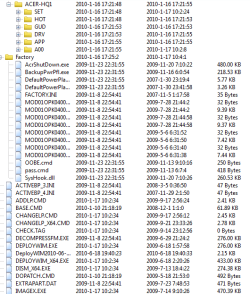
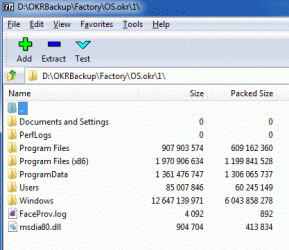
Thanks SIW2 for this tutorial. I am very interested in getting this working, but haven't figured out how to translate this to the lenovo recovery scheme. There is a OS.okr file (One Key Recovery, which is a port of Power Recover by CyberLink), which is a zip file of the Win7 install, but all it has is the end result Windows folder structure. It seems all the installation is handled extrinsically by the OKR engine. I'm attaching a screen shot of the OKR source folder.

Thanks,
p.
 

Attachments

  • okr.gif
    okr.gif
    19.7 KB · Views: 4,214

My Computer

Computer type
PC/Desktop
Computer Manufacturer/Model Number
dell precision t3400 tower
OS
Linux Lite 3.2 x64; Windows 7, 8.1
CPU
Core2Duo 2.4
Memory
6GB ddr2
Graphics Card(s)
nVidia
Hard Drives
120gb SSD, 1TB HD, 2TB HD; sata II
Internet Speed
12/2
Browser
Vivaldi, Slimjet (Chromium) x64
From the look of it - you need to capture the parent folder as a wim file.

You will have to extract it first - 7-zip will probably do that.

Use something easy like Gimagex, select the Capture tab, browse to the extracted \OKRBackup\Factory\OS.okr\1 folder and capture it.

Select maximum compression and create wim file called install.wim

We can the create the necessary folder structure and a small bootable wim of some kind - (the recovery wim somewhere on your drive will do )

Then create an iso.

download zip GImageX


It's worth taking allok inside those folders in your screenie and see if you think everything is there.

Oem'ss sometimes have their own proprietary stored elsewhere , often in split wim format.
 

My Computers

System One System Two

  • Computer type
    PC/Desktop
    OS
    7 X64
    CPU
    i5 8400
    Motherboard
    gigabyte b365m ds3h
    Memory
    2x8gb 3200mhz
    Hard Drives
    various
    PSU
    pure power 11 400w cm
    Case
    Coolermaster
    Cooling
    cryorig m9i
  • Computer type
    PC/Desktop
    OS
    7x64
    CPU
    g5400
    Motherboard
    ga b365m ds3h
    Memory
    8gb ddr4 2400
    PSU
    xfx pro 450w
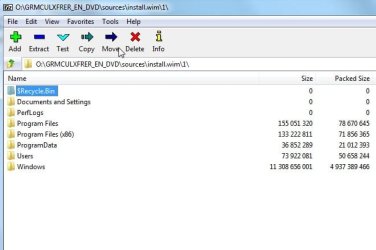
This is what Install.wim looks like:

install.wim.jpg


Your.okr file might actually be a .wim already - you could try changing the extension to .wim and see if 7-zip recognizes it -if so- you already have that.

Becuase your directories are larger the oem software is likely already in there.

Sometimes the proprietary file is a .wim under a different name - unfortunately, oem's will sometimes change the headers - doesn't seem they have here because 7-zip is picking it up fine.
 

My Computers

System One System Two

  • Computer type
    PC/Desktop
    OS
    7 X64
    CPU
    i5 8400
    Motherboard
    gigabyte b365m ds3h
    Memory
    2x8gb 3200mhz
    Hard Drives
    various
    PSU
    pure power 11 400w cm
    Case
    Coolermaster
    Cooling
    cryorig m9i
  • Computer type
    PC/Desktop
    OS
    7x64
    CPU
    g5400
    Motherboard
    ga b365m ds3h
    Memory
    8gb ddr4 2400
    PSU
    xfx pro 450w
Is this making any sense so far?
 

My Computers

System One System Two

  • Computer type
    PC/Desktop
    OS
    7 X64
    CPU
    i5 8400
    Motherboard
    gigabyte b365m ds3h
    Memory
    2x8gb 3200mhz
    Hard Drives
    various
    PSU
    pure power 11 400w cm
    Case
    Coolermaster
    Cooling
    cryorig m9i
  • Computer type
    PC/Desktop
    OS
    7x64
    CPU
    g5400
    Motherboard
    ga b365m ds3h
    Memory
    8gb ddr4 2400
    PSU
    xfx pro 450w
Yes - thanks very much. It has to be in .wim format so the file can be processed correctly?

Those first directions made conceptual sense, but actually executing them probably would have been another matter.

I've now changed .okr to .wim, and 7 zip is reading it fine. I guess the next step is to see if vlite will process the file.

BTW, the original vlite link seems to have been hijacked. It's now found at vLite - Windows Vista configuration tool.

I'll get back with the vlite results. I'm thinking that if it works I would like to reduce the iso size, to get it on a dvd. Goodness knows there's a bunch of bloat that could be thrown out. But I don't want to introduce fatal installation errors. Is there a script that I could edit while doing the folder deletions?

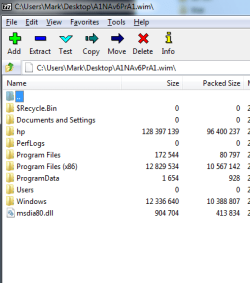
I also am checking out an HP machine to see if working with it would be any easier. I've got a folder with maybe two dozen .wim files. The first one, named A1NAv6PrA1, has the Windows folder structure in it, so i guess that's it. It's also larger than your Win7 disk pic here.

Thanks,
p.
 

My Computer

Computer type
PC/Desktop
Computer Manufacturer/Model Number
dell precision t3400 tower
OS
Linux Lite 3.2 x64; Windows 7, 8.1
CPU
Core2Duo 2.4
Memory
6GB ddr2
Graphics Card(s)
nVidia
Hard Drives
120gb SSD, 1TB HD, 2TB HD; sata II
Internet Speed
12/2
Browser
Vivaldi, Slimjet (Chromium) x64
Yes, the other wim's on the HP are probabaly trial software and the like.

To make an iso for dvd ( or to put the files on a usb stick ), you need a bootable wim as well.

The bootable wim ( usually called boot.wim ) loads into memory and from there you run the installation program - which extracts the image from the install.wim onto your selected partition. It also creates the necessary boot critical files.

You will already have boot.wim somewhere about 165-170mb probabaly- it might be called something else.

You can always use winre.wim instead - you will find that in windows\system32 recovery folder - or on your Win7 partition in a hidden folder called Recovery. Have a look and let me know where it is.


You can use vlite for windows 7 - to remove components - usually stuff like parental controls and speech support if you don't ned them.

Getting rid of the oem bloatware is something else.

EDIT - From memory, vlite won't pick up just an install.wim -it expects the entire dvd structure - which you don't have.
 

My Computers

System One System Two

  • Computer type
    PC/Desktop
    OS
    7 X64
    CPU
    i5 8400
    Motherboard
    gigabyte b365m ds3h
    Memory
    2x8gb 3200mhz
    Hard Drives
    various
    PSU
    pure power 11 400w cm
    Case
    Coolermaster
    Cooling
    cryorig m9i
  • Computer type
    PC/Desktop
    OS
    7x64
    CPU
    g5400
    Motherboard
    ga b365m ds3h
    Memory
    8gb ddr4 2400
    PSU
    xfx pro 450w
Amazing gift you have for this stuff.

I found the recovery folder and the winRE.wim, at 164MB, in the Win7 installation.

I've switched to the HP machine, as it seems it might be easier to deal with. I'm able to browse the recovery partition using 7zip, with kudos to them.

The .wim I mentioned that seems to be the prime candidate only weighs about 100MB in .wim form. That couldn't be it, could it? I'm attaching a screen cap.

And if vlite won't make sense of all this, how does one proceed? That's where I thought this whole thing was going.

Thanks,
p.
 

Attachments

  • install.wim.png
    install.wim.png
    34.2 KB · Views: 4,247

My Computer

Computer type
PC/Desktop
Computer Manufacturer/Model Number
dell precision t3400 tower
OS
Linux Lite 3.2 x64; Windows 7, 8.1
CPU
Core2Duo 2.4
Memory
6GB ddr2
Graphics Card(s)
nVidia
Hard Drives
120gb SSD, 1TB HD, 2TB HD; sata II
Internet Speed
12/2
Browser
Vivaldi, Slimjet (Chromium) x64
Install.wim will be close to 3gb.

I would make the correct folder structure for an iso - into that you put your bootable.wim ( you can use winre.wim you found for that ) and your install.wim.

You would need to add an installer program into winre.wim.

I have a little app. somewhere I made a little while that will do the whole job for you - I just need to find it.
 

My Computers

System One System Two

  • Computer type
    PC/Desktop
    OS
    7 X64
    CPU
    i5 8400
    Motherboard
    gigabyte b365m ds3h
    Memory
    2x8gb 3200mhz
    Hard Drives
    various
    PSU
    pure power 11 400w cm
    Case
    Coolermaster
    Cooling
    cryorig m9i
  • Computer type
    PC/Desktop
    OS
    7x64
    CPU
    g5400
    Motherboard
    ga b365m ds3h
    Memory
    8gb ddr4 2400
    PSU
    xfx pro 450w
That would be great. I frankly don't know how to put this whole package together.
 

My Computer

Computer type
PC/Desktop
Computer Manufacturer/Model Number
dell precision t3400 tower
OS
Linux Lite 3.2 x64; Windows 7, 8.1
CPU
Core2Duo 2.4
Memory
6GB ddr2
Graphics Card(s)
nVidia
Hard Drives
120gb SSD, 1TB HD, 2TB HD; sata II
Internet Speed
12/2
Browser
Vivaldi, Slimjet (Chromium) x64
D/L these two zip files.


Inside each is a 7-zip file.

Extract the zip files intro the same directory.

Then extract the 7-zip files directly onto your C drive.

You will have a folder C:\EASYPE-31x64

Inside that is a folder called ISO - in there is another folder called sources.

Copy your Install.wim into the sources folder.

Then rt click and run as admin on RunMeAsAdminPE3v3x64.exe

It will do the whole job for you.

( It asks if you want to include Macrium v5 - if you don't have it, just say no )
 
Last edited by a moderator:

My Computers

System One System Two

  • Computer type
    PC/Desktop
    OS
    7 X64
    CPU
    i5 8400
    Motherboard
    gigabyte b365m ds3h
    Memory
    2x8gb 3200mhz
    Hard Drives
    various
    PSU
    pure power 11 400w cm
    Case
    Coolermaster
    Cooling
    cryorig m9i
  • Computer type
    PC/Desktop
    OS
    7x64
    CPU
    g5400
    Motherboard
    ga b365m ds3h
    Memory
    8gb ddr4 2400
    PSU
    xfx pro 450w
Back
Top