Bootable ISO - Create from Installation Files

How to Create a Bootable ISO from Windows 7 Installation Files


   Information
How to EASILY make a bootable .iso file from Windows 7 or Vista Installation files with the FREE vlite.

Vlite can be installed on 32 and 64 bit versions of XP, Vista and Windows 7.

Homepage and Information:
   Tip
If you got the student d/l and have 3 files :

* Windows 7-HP-Retail-en-us-x64.exe
* setup1.box * setup2.box

1. Rt click each file, Properties > Unblock>Apply>OK. NOTE: Make sure read only boxes are clear

2. Rt click and run as admin on the .exe. You will get a folder called expandedSetup on your dektop.

If you receive this error:
We are unable to create or save new files in the folder in which this application was downloaded. Please check the folder properties to make sure that you have security permission on the folder to write files and that the folder is not read-only.

Continue with the tutorial to make the .iso


Here's How:

1. Download and Install vlite.

   Note
vlite v1.1.6 is self contained and needs no additional applications.

vlite v1.2 requires the large WAIK download from MS.

It is possible to install v1.2 over the top of v1.1.6 if you wish

2. Rt click vlite shortcut and Run as Admin. Click Install Wimfilter.

3. Click Browse and browse to Windows Installation Files folder:
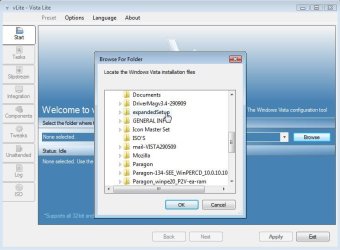
1-BROWSE-2009-10-26_064124.jpg
4. Select your Edition:
2-EDITION-2009-10-26_064516.jpg
It takes a few seconds to load the files - then click Next.

5. Tick Bootable .iso and click Next:
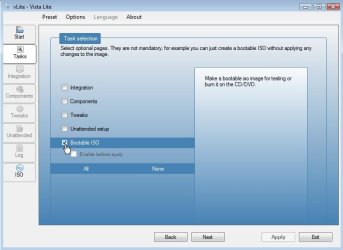
3-Bootable.iso-2009-10-26_064643.jpg
6. Make sure it says Create Image - and type a label if you wish. Then Click Make .iso:
4-CREATE-IMAGE-2009-10-26_065018.jpg
7. Select where to Save the .iso
5-SAVE-ISO-2009-10-26_065105.jpg
After you click the Save button, vlite starts making the .iso
6-CREATEISO-2009-10-26_065140.jpg
When done, click Next

8. EITHER - TO MAKE A BOOTABLE DVD - put an unformatted recordable dvd inthe drive and select Burn Image.
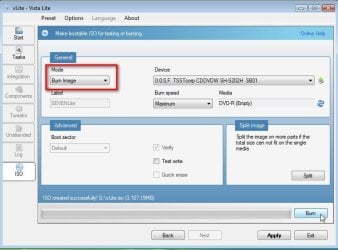
7-BURN-IMAGE-2009-10-26_065614.jpg
OR-TO MAKE A BOOTABLE FLASH DRIVE- click Exit and confirm - the .iso will be in the location you selected in Step 7.
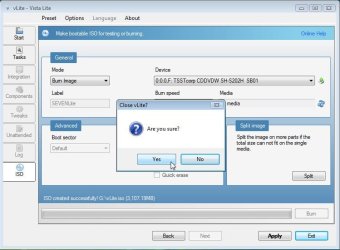
8-CLOSE-VLITE-2009-10-26_065817.jpg


Last edited by a moderator:
1.jpg

2.jpg

Try it with the Lenovo machjne as that install.wim seems to be complete.
 

My Computers

System One System Two

  • Computer type
    PC/Desktop
    OS
    7 X64
    CPU
    i5 8400
    Motherboard
    gigabyte b365m ds3h
    Memory
    2x8gb 3200mhz
    Hard Drives
    various
    PSU
    pure power 11 400w cm
    Case
    Coolermaster
    Cooling
    cryorig m9i
  • Computer type
    PC/Desktop
    OS
    7x64
    CPU
    g5400
    Motherboard
    ga b365m ds3h
    Memory
    8gb ddr4 2400
    PSU
    xfx pro 450w
I've run into several problems, not sure if I've done something wrong.

I had to open 7zip as admin in order to extract the runasadminPE3x64.exe file. No problem. But extracting that first archive to C: did not create a folder, it placed the three items directly on C. So I created the c:\EASYPE-31x64 folder and moved them there. But then 7zip returned an error trying to extract the second archive: "cannot open file as archive".

I'm on the HP machine, because I re-hid the utility partition on the Lenovo machine. So trying to translate, would the winRE.wim, at 164.5MB, be the install.wim you're pointing to? Or should I go back to the Lenovo machine?

Thanks,
p.
 

My Computer

Computer type
PC/Desktop
Computer Manufacturer/Model Number
dell precision t3400 tower
OS
Linux Lite 3.2 x64; Windows 7, 8.1
CPU
Core2Duo 2.4
Memory
6GB ddr2
Graphics Card(s)
nVidia
Hard Drives
120gb SSD, 1TB HD, 2TB HD; sata II
Internet Speed
12/2
Browser
Vivaldi, Slimjet (Chromium) x64
Woah - that link earlier is the actual install disk? Somehow I missed that.
 

My Computer

Computer type
PC/Desktop
Computer Manufacturer/Model Number
dell precision t3400 tower
OS
Linux Lite 3.2 x64; Windows 7, 8.1
CPU
Core2Duo 2.4
Memory
6GB ddr2
Graphics Card(s)
nVidia
Hard Drives
120gb SSD, 1TB HD, 2TB HD; sata II
Internet Speed
12/2
Browser
Vivaldi, Slimjet (Chromium) x64
1. rt click the .zip files and extract them both into the same folder ( downloads folder is fine )

2. You now have 2 7-zip files in the downloads folder

3. You rt click .001 of the 7-files and extract it ( with 7-zip of course - windows zip function cannot 7-zip files ).

7-zip program automatically finds the other 7-zip file if it is in the same folder - it will automatically extract them both - they are a split file. ( It looks for .002, 003 etc depending how many there are )


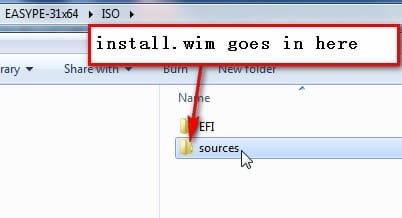
4. You copy your install.wim into the sources folder.

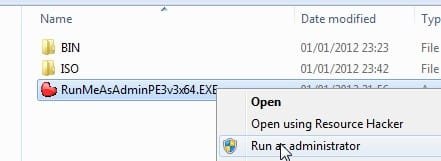
5.You do not extract the runasadminPE3x64.exe - you simply run it as administrator -exactly as in the photo posted above- that is the executable program which does the work.

You had better do it on the Lenovo - the HP wim is far too small to be any use.
 

My Computers

System One System Two

  • Computer type
    PC/Desktop
    OS
    7 X64
    CPU
    i5 8400
    Motherboard
    gigabyte b365m ds3h
    Memory
    2x8gb 3200mhz
    Hard Drives
    various
    PSU
    pure power 11 400w cm
    Case
    Coolermaster
    Cooling
    cryorig m9i
  • Computer type
    PC/Desktop
    OS
    7x64
    CPU
    g5400
    Motherboard
    ga b365m ds3h
    Memory
    8gb ddr4 2400
    PSU
    xfx pro 450w
Yes, I understand that. It was the second download -EASYPE31x64.7z.002 - that was reported as a file rather than a compressed archive.
 

My Computer

Computer type
PC/Desktop
Computer Manufacturer/Model Number
dell precision t3400 tower
OS
Linux Lite 3.2 x64; Windows 7, 8.1
CPU
Core2Duo 2.4
Memory
6GB ddr2
Graphics Card(s)
nVidia
Hard Drives
120gb SSD, 1TB HD, 2TB HD; sata II
Internet Speed
12/2
Browser
Vivaldi, Slimjet (Chromium) x64
It looks like I have a working installation disk, via that download link. I had no idea they had released it. I think that's the right thing to do, since this isn't about getting around the proper use of keys, but rather making the OEM scheme more practical. The other thing is very interesting, and I'd like to crack it sometime, but it seems beyond my abilities at the moment.

Thanks a bunch for all your help, SIW2. Reps.
 

My Computer

Computer type
PC/Desktop
Computer Manufacturer/Model Number
dell precision t3400 tower
OS
Linux Lite 3.2 x64; Windows 7, 8.1
CPU
Core2Duo 2.4
Memory
6GB ddr2
Graphics Card(s)
nVidia
Hard Drives
120gb SSD, 1TB HD, 2TB HD; sata II
Internet Speed
12/2
Browser
Vivaldi, Slimjet (Chromium) x64
You're welcome.
 

My Computers

System One System Two

  • Computer type
    PC/Desktop
    OS
    7 X64
    CPU
    i5 8400
    Motherboard
    gigabyte b365m ds3h
    Memory
    2x8gb 3200mhz
    Hard Drives
    various
    PSU
    pure power 11 400w cm
    Case
    Coolermaster
    Cooling
    cryorig m9i
  • Computer type
    PC/Desktop
    OS
    7x64
    CPU
    g5400
    Motherboard
    ga b365m ds3h
    Memory
    8gb ddr4 2400
    PSU
    xfx pro 450w
Great tutorial ...... Was looking for this and finally found in sevenforums.
Thanks SIW2 :thumbsup:
 

My Computer

Computer Manufacturer/Model Number
Custom self assembled
OS
Windows 7 Ultimate x64
CPU
Intel Core i7 930
Motherboard
Gigabyte GA X58A UD7
Memory
Gskill 2x3 GB Ram
Graphics Card(s)
Sapphire ATI Radeon HD 5870
Monitor(s) Displays
LG 24MP88 24" LED Monitor
Screen Resolution
1920 X 1080
Hard Drives
Seagate barracuda 1 TB
PSU
Corsair GS 600W
Case
Cooler Master 690 II Plus
Cooling
Cooler Master Hyper 212X
Keyboard
Logitech G15 Gaming keyboard
Mouse
Logitech MX518 Gaming Mouse
Internet Speed
Broadband 50 Mbps speed [Hathway]
Other Info
Xbox 360 Wired Controller (x2)
AverMedia TV tuner Card [Internal]
Logitech HD C110 Web Camera
Netgear WGR614 Wireless-N 150 Router
Razer Goliathus Fragged Alpha Control Edition Mouse Pad
dead links !!! please help

D/L these two zip files.

Inside each is a 7-zip file.

Extract the zip files intro the same directory.

Then extract the 7-zip files directly onto your C drive.

You will have a folder C:\EASYPE-31x64

Inside that is a folder called ISO - in there is another folder called sources.

Copy your Install.wim into the sources folder.

Then rt click and run as admin on RunMeAsAdminPE3v3x64.exe

It will do the whole job for you.

( It asks if you want to include Macrium v5 - if you don't have it, just say no )


The both links are dead and i need the links please. Who has the files and can upload again? please
 
Last edited by a moderator:

My Computer

Computer type
Laptop
Computer Manufacturer/Model Number
Toshiba
OS
Windows 7 Pro x64
CPU
i5 3rd
Hello Dercncplaner, and welcome to Seven Forums.

The tutorial has been updated. Please try again.

The links in that post are gone now, and cannot be added back..
 
Last edited:

My Computer

Computer type
PC/Desktop
Computer Manufacturer/Model Number
Self built custom
OS
64-bit Windows 11 Pro for Workstations
CPU
Intel i7-8700K OC'd to 5 GHz
Motherboard
ASUS ROG Maximus XI Formula Z390
Memory
64 GB (4x16GB) G.SKILL TridentZ RGB DDR4 3600 MHz
Graphics Card(s)
ASUS ROG-STRIX-GTX1080TI-O11G-GAMING
Sound Card
Integrated
Monitor(s) Displays
2 x Samsung Odyssey G7 27"
Screen Resolution
2560x1440
Hard Drives
1TB Samsung 990 PRO M.2,
4TB Samsung 990 PRO PRO M.2,
TerraMaster F8 SSD Plus NAS
PSU
Seasonic Prime Titanium 850W
Case
Thermaltake Core P3
Cooling
Corsair Hydro H115i
Keyboard
Logitech wireless K800
Mouse
Logitech MX Master 4
Internet Speed
2 Gb/s Download and 100 Mb/s Upload
Antivirus
Malwarebyte Anti-Malware Premium
Browser
Google Chrome
Other Info
Logitech Z625 speaker system,
Logitech BRIO 4K Pro webcam,
HP Color LaserJet Pro MFP M477fdn,
APC SMART-UPS RT 1000 XL - SURT1000XLI,
Galaxy S23 Plus phone
Its little technical for me, could there be a video tutorial for this, i too have a laptop that has hidden partition.
Where the source files resides, i could use to make it a Win7 64 bit iso file.
 

My Computer

Computer type
PC/Desktop
Computer Manufacturer/Model Number
ECS: G31T-M7
OS
Dual boot: Win Xp and Win7 Pro
CPU
Intel
Motherboard
EliteGroup
Memory
2GB
Graphics Card(s)
Nvidia Geforece 210
Sound Card
Advik 6-Channel
Hard Drives
WD-320GB
Back
Top