Bootmgr file located in different hard disk

Thinksloth

New member
Local time
12:26 AM
Messages
13
Hello i am new to this forum and seek for help.

I have 2 physical disk, when fresh install windows 7 both disk are connected to computer. Today i find that the "bootmgr" is placed on second drive, while the system installed on first drive.

I am afraid if i remove second drive, it cant boot the windows. Do any way to solve this? Please give me an advice.

Thanks
 

My Computer

Computer type
PC/Desktop
OS
Windows 7 ultimate x64

My Computer

Computer Manufacturer/Model Number
Custom Built
OS
Windows 7 Ultimate 32-Bit & Windows 7 Ultimate 64-Bit
CPU
Intel Core i7 CPU 950 @ 3.07GHz
Motherboard
ASUS P6T DELUXE V2
Memory
OCZ 6GB (3 x 2GB) 240-Pin DDR3 SDRAM DDR3 1600 OCZ3X1600R2
Graphics Card(s)
ATI Radeon HD 5700 Series
Sound Card
OnBoard
Hard Drives
WD6400AACS-00M3B0 (640GB SATA )
PSU
CORSAIR 850w
Case
NZXT LEXA
Cooling
Intel Stock Heatsink Fan
Keyboard
Microsoft Wireless Laser Keyboard 7000
Mouse
Microsoft Wireless Laser Mouse 7000

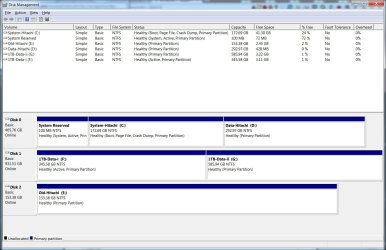
I run disk management, and have the following informations:

1st physical drive (installed windows 7)
- System Reserved, Healthy(System, Active, Primary Partition)
- C:, Healthy(Boot, Page File, Crash Dump, Primary Partition)

2nd physical drive (bootmgr file located)
- D:, Healthy(Active, Primary Partition)

or actually winodws 7 store boot information from the "hidden drive" "System Reserved"?

thanks for reply.
 

My Computer

Computer type
PC/Desktop
OS
Windows 7 ultimate x64
The 2nd hard drive which is ( D:\ ) is there anything inside besides the boot files ? If its just the boot files we could format the D:\ drive then either move over the boot files from System Reserved partition which is hidden . We would have to unhide it first then give it a letter .
 

My Computer

Computer Manufacturer/Model Number
Custom Built
OS
Windows 7 Ultimate 32-Bit & Windows 7 Ultimate 64-Bit
CPU
Intel Core i7 CPU 950 @ 3.07GHz
Motherboard
ASUS P6T DELUXE V2
Memory
OCZ 6GB (3 x 2GB) 240-Pin DDR3 SDRAM DDR3 1600 OCZ3X1600R2
Graphics Card(s)
ATI Radeon HD 5700 Series
Sound Card
OnBoard
Hard Drives
WD6400AACS-00M3B0 (640GB SATA )
PSU
CORSAIR 850w
Case
NZXT LEXA
Cooling
Intel Stock Heatsink Fan
Keyboard
Microsoft Wireless Laser Keyboard 7000
Mouse
Microsoft Wireless Laser Mouse 7000
The 2nd hard drive which is ( D:\ ) is there anything inside besides the boot files ? If its just the boot files we could format the D:\ drive then either move over the boot files from System Reserved partition which is hidden . We would have to unhide it first then give it a letter .

The D:\ is used to store my back files. Besides bootmgr, it also have a file "BOOTSECT.BAK" and a folder "Boot"


And i "msconfig" -> boot, it shows:

Windows 7 (C:\Windows): Current OS; Default OS

is that mean boot file is inside C:\?
 

My Computer

Computer type
PC/Desktop
OS
Windows 7 ultimate x64
Your C drive is your boot drive but its not set to active .
 

My Computer

Computer Manufacturer/Model Number
Custom Built
OS
Windows 7 Ultimate 32-Bit & Windows 7 Ultimate 64-Bit
CPU
Intel Core i7 CPU 950 @ 3.07GHz
Motherboard
ASUS P6T DELUXE V2
Memory
OCZ 6GB (3 x 2GB) 240-Pin DDR3 SDRAM DDR3 1600 OCZ3X1600R2
Graphics Card(s)
ATI Radeon HD 5700 Series
Sound Card
OnBoard
Hard Drives
WD6400AACS-00M3B0 (640GB SATA )
PSU
CORSAIR 850w
Case
NZXT LEXA
Cooling
Intel Stock Heatsink Fan
Keyboard
Microsoft Wireless Laser Keyboard 7000
Mouse
Microsoft Wireless Laser Mouse 7000
Your C drive is your boot drive but its not set to active .

In Disk Management, can I right click in C:\, right click "Mark Partition as Active", then the problem solved?
 

My Computer

Computer type
PC/Desktop
OS
Windows 7 ultimate x64

My Computer

Computer type
PC/Desktop
Computer Manufacturer/Model Number
Skylake Special #666
OS
Windows 10 Pro x64
CPU
Intel Core i7 6700K
Motherboard
Asus Sabertooth Z170 Mark 1
Memory
GSkill TridentZ RGB 16GB 3600 16-16-16-36
Graphics Card(s)
EVGA GTX 980 Ti SC x2
Sound Card
Realtek High Definition
Monitor(s) Displays
AOC G2460PG
Screen Resolution
1920 x 1080 144Hz
Hard Drives
Samsung 860 Pro 256GB, Seagate Barracuda 4TB x2
PSU
EVGA 1000 P2, EVGA White Custom Braided Cables
Case
Corsair Vengeance C70 Gunmetal Black
Cooling
Corsair H100i v2, Corsair ML120 x2, Thermal Grizzly Kryonaut
Keyboard
Logitech G910 Orion Spectrum
Mouse
Logitech G700s
Internet Speed
Verizon Fios Quantum Gateway 75/75
Antivirus
Windows Defender, Malwarebytes Free 3.8.3
Browser
Chrome
Other Info
Corsair SP120 x4, LG Blu-ray Drive, Durabrand HT-395 100 Watt Dolby Digital Amp, Corsair H2100 Wireless 7.1 Headset

My Computer

Computer type
PC/Desktop
OS
Windows 7 ultimate x64

My Computer

Computer type
PC/Desktop
Computer Manufacturer/Model Number
Skylake Special #666
OS
Windows 10 Pro x64
CPU
Intel Core i7 6700K
Motherboard
Asus Sabertooth Z170 Mark 1
Memory
GSkill TridentZ RGB 16GB 3600 16-16-16-36
Graphics Card(s)
EVGA GTX 980 Ti SC x2
Sound Card
Realtek High Definition
Monitor(s) Displays
AOC G2460PG
Screen Resolution
1920 x 1080 144Hz
Hard Drives
Samsung 860 Pro 256GB, Seagate Barracuda 4TB x2
PSU
EVGA 1000 P2, EVGA White Custom Braided Cables
Case
Corsair Vengeance C70 Gunmetal Black
Cooling
Corsair H100i v2, Corsair ML120 x2, Thermal Grizzly Kryonaut
Keyboard
Logitech G910 Orion Spectrum
Mouse
Logitech G700s
Internet Speed
Verizon Fios Quantum Gateway 75/75
Antivirus
Windows Defender, Malwarebytes Free 3.8.3
Browser
Chrome
Other Info
Corsair SP120 x4, LG Blu-ray Drive, Durabrand HT-395 100 Watt Dolby Digital Amp, Corsair H2100 Wireless 7.1 Headset
Mark F inactive.

How in the... did it get marked active ???:huh:

You can`t throw the wrong letters around for convenience.

sorry for inconvenient.

but if i mark F:\ inactive and mark C:\ active, will the "bootmgr" move to c:\?
 

My Computer

Computer type
PC/Desktop
OS
Windows 7 ultimate x64
You shouldn`t have to mark C active as you already have a system reserved partition on that hard drive.

I ask again, do you have a Windows 7 disc or a startup repair disc ?

Vistaking told you exactly what to do in his 1st reply.

Mark F inactive, unplug disk 1 and 2 then boot the machine. It should boot to windows, if it doesn`t, run startup repair.

System Repair Disc - Create
 

My Computer

Computer type
PC/Desktop
Computer Manufacturer/Model Number
Skylake Special #666
OS
Windows 10 Pro x64
CPU
Intel Core i7 6700K
Motherboard
Asus Sabertooth Z170 Mark 1
Memory
GSkill TridentZ RGB 16GB 3600 16-16-16-36
Graphics Card(s)
EVGA GTX 980 Ti SC x2
Sound Card
Realtek High Definition
Monitor(s) Displays
AOC G2460PG
Screen Resolution
1920 x 1080 144Hz
Hard Drives
Samsung 860 Pro 256GB, Seagate Barracuda 4TB x2
PSU
EVGA 1000 P2, EVGA White Custom Braided Cables
Case
Corsair Vengeance C70 Gunmetal Black
Cooling
Corsair H100i v2, Corsair ML120 x2, Thermal Grizzly Kryonaut
Keyboard
Logitech G910 Orion Spectrum
Mouse
Logitech G700s
Internet Speed
Verizon Fios Quantum Gateway 75/75
Antivirus
Windows Defender, Malwarebytes Free 3.8.3
Browser
Chrome
Other Info
Corsair SP120 x4, LG Blu-ray Drive, Durabrand HT-395 100 Watt Dolby Digital Amp, Corsair H2100 Wireless 7.1 Headset
You could do this

. Click :orb:
2. In search box, type cmd
3. Right-click on cmd.exe, and choose 'Run as Administrator'

In the elevated command prompt type in the following commands:-

Diskpart
LIST DISK
SELECT DISK n (where n is the number of the HDD in question)
LIST PARTITION
SELECT PARTITION n (where n is the number of the Partition that holds F )
INACTIVE


 IF you want to move the bootmgr to C:\ try this

Click on :orb: type in CMD then right click on CMD and click on run as administrator click on yes on the UAC window

reg unload HKLM\BCD00000000

robocopy x:\ c:\ bootmgr

x:\ is the letter that you assigned to system reserved partition

robocopy x:\Boot C:\Boot /s

dir c:\ /ah
( this just to check to see If the files got copied over to the C:\ drive )

bcdedit /store c:\boot\bcd /set {bootmgr} device partition=C:

bcdedit /store c:\boot\bcd /set {memdiag} device partition=C:
 

My Computer

Computer Manufacturer/Model Number
Custom Built
OS
Windows 7 Ultimate 32-Bit & Windows 7 Ultimate 64-Bit
CPU
Intel Core i7 CPU 950 @ 3.07GHz
Motherboard
ASUS P6T DELUXE V2
Memory
OCZ 6GB (3 x 2GB) 240-Pin DDR3 SDRAM DDR3 1600 OCZ3X1600R2
Graphics Card(s)
ATI Radeon HD 5700 Series
Sound Card
OnBoard
Hard Drives
WD6400AACS-00M3B0 (640GB SATA )
PSU
CORSAIR 850w
Case
NZXT LEXA
Cooling
Intel Stock Heatsink Fan
Keyboard
Microsoft Wireless Laser Keyboard 7000
Mouse
Microsoft Wireless Laser Mouse 7000
You shouldn`t have to mark C active as you already have a system reserved partition on that hard drive.

I ask again, do you have a Windows 7 disc or a startup repair disc ?

Vistaking told you exactly what to do in his 1st reply.

i have a windows 7 installation usb
 

My Computer

Computer type
PC/Desktop
OS
Windows 7 ultimate x64
I`ve never used a usb drive to run startup repair, never had to, but I would think it would work just the same.

If you have a blank cd, you should make a system ( startup ) repair disc. ( for the future )

System Repair Disc - Create
 

My Computer

Computer type
PC/Desktop
Computer Manufacturer/Model Number
Skylake Special #666
OS
Windows 10 Pro x64
CPU
Intel Core i7 6700K
Motherboard
Asus Sabertooth Z170 Mark 1
Memory
GSkill TridentZ RGB 16GB 3600 16-16-16-36
Graphics Card(s)
EVGA GTX 980 Ti SC x2
Sound Card
Realtek High Definition
Monitor(s) Displays
AOC G2460PG
Screen Resolution
1920 x 1080 144Hz
Hard Drives
Samsung 860 Pro 256GB, Seagate Barracuda 4TB x2
PSU
EVGA 1000 P2, EVGA White Custom Braided Cables
Case
Corsair Vengeance C70 Gunmetal Black
Cooling
Corsair H100i v2, Corsair ML120 x2, Thermal Grizzly Kryonaut
Keyboard
Logitech G910 Orion Spectrum
Mouse
Logitech G700s
Internet Speed
Verizon Fios Quantum Gateway 75/75
Antivirus
Windows Defender, Malwarebytes Free 3.8.3
Browser
Chrome
Other Info
Corsair SP120 x4, LG Blu-ray Drive, Durabrand HT-395 100 Watt Dolby Digital Amp, Corsair H2100 Wireless 7.1 Headset
You could do this

. Click :orb:
2. In search box, type cmd
3. Right-click on cmd.exe, and choose 'Run as Administrator'

In the elevated command prompt type in the following commands:-

Diskpart
LIST DISK
SELECT DISK n (where n is the number of the HDD in question)
LIST PARTITION
SELECT PARTITION n (where n is the number of the Partition that holds F )
INACTIVE


 IF you want to move the bootmgr to C:\ try this

Click on :orb : type in CMD then right click on CMD and click on run as administrator click on yes on the UAC window

reg unload HKLM\BCD00000000

robocopy x:\ c:\ bootmgr

x:\ is the letter that you assigned to system reserved partition

robocopy x:\Boot C:\Boot /s

dir c:\ /ah
( this just to check to see If the files got copied over to the C:\ drive )

bcdedit /store c:\boot\bcd /set {bootmgr} device partition=C:

bcdedit /store c:\boot\bcd /set {memdiag} device partition=C:

May i ask what the worst case scenario if i do sth wrong and my F:\ not plug to the computer?
 

My Computer

Computer type
PC/Desktop
OS
Windows 7 ultimate x64
Windows would not boot.

You have a system reserved partition marked active already, if you unplug F, windows SHOULD boot.
 

My Computer

Computer type
PC/Desktop
Computer Manufacturer/Model Number
Skylake Special #666
OS
Windows 10 Pro x64
CPU
Intel Core i7 6700K
Motherboard
Asus Sabertooth Z170 Mark 1
Memory
GSkill TridentZ RGB 16GB 3600 16-16-16-36
Graphics Card(s)
EVGA GTX 980 Ti SC x2
Sound Card
Realtek High Definition
Monitor(s) Displays
AOC G2460PG
Screen Resolution
1920 x 1080 144Hz
Hard Drives
Samsung 860 Pro 256GB, Seagate Barracuda 4TB x2
PSU
EVGA 1000 P2, EVGA White Custom Braided Cables
Case
Corsair Vengeance C70 Gunmetal Black
Cooling
Corsair H100i v2, Corsair ML120 x2, Thermal Grizzly Kryonaut
Keyboard
Logitech G910 Orion Spectrum
Mouse
Logitech G700s
Internet Speed
Verizon Fios Quantum Gateway 75/75
Antivirus
Windows Defender, Malwarebytes Free 3.8.3
Browser
Chrome
Other Info
Corsair SP120 x4, LG Blu-ray Drive, Durabrand HT-395 100 Watt Dolby Digital Amp, Corsair H2100 Wireless 7.1 Headset
Windows would not boot.

You have a system reserved partition marked active already, if you unplug F, windows SHOULD boot.

Out of curiosity, why i install windows 7 in C:\, but windows put the bootmgr in F:\, and

is that system reserved partition also have the bootmgr file?
 

My Computer

Computer type
PC/Desktop
OS
Windows 7 ultimate x64
You shouldn`t have to mark C active as you already have a system reserved partition on that hard drive.

I ask again, do you have a Windows 7 disc or a startup repair disc ?

Vistaking told you exactly what to do in his 1st reply.

i have a windows 7 installation usb

It works the same way a DVD would . Don't click on Install choose Repair your computer on the bottom left
 

My Computer

Computer Manufacturer/Model Number
Custom Built
OS
Windows 7 Ultimate 32-Bit & Windows 7 Ultimate 64-Bit
CPU
Intel Core i7 CPU 950 @ 3.07GHz
Motherboard
ASUS P6T DELUXE V2
Memory
OCZ 6GB (3 x 2GB) 240-Pin DDR3 SDRAM DDR3 1600 OCZ3X1600R2
Graphics Card(s)
ATI Radeon HD 5700 Series
Sound Card
OnBoard
Hard Drives
WD6400AACS-00M3B0 (640GB SATA )
PSU
CORSAIR 850w
Case
NZXT LEXA
Cooling
Intel Stock Heatsink Fan
Keyboard
Microsoft Wireless Laser Keyboard 7000
Mouse
Microsoft Wireless Laser Mouse 7000
Who knows and Yes.

If you didn`t have the other drives plugged in when you installed windows, you would not have this problem.
 

My Computer

Computer type
PC/Desktop
Computer Manufacturer/Model Number
Skylake Special #666
OS
Windows 10 Pro x64
CPU
Intel Core i7 6700K
Motherboard
Asus Sabertooth Z170 Mark 1
Memory
GSkill TridentZ RGB 16GB 3600 16-16-16-36
Graphics Card(s)
EVGA GTX 980 Ti SC x2
Sound Card
Realtek High Definition
Monitor(s) Displays
AOC G2460PG
Screen Resolution
1920 x 1080 144Hz
Hard Drives
Samsung 860 Pro 256GB, Seagate Barracuda 4TB x2
PSU
EVGA 1000 P2, EVGA White Custom Braided Cables
Case
Corsair Vengeance C70 Gunmetal Black
Cooling
Corsair H100i v2, Corsair ML120 x2, Thermal Grizzly Kryonaut
Keyboard
Logitech G910 Orion Spectrum
Mouse
Logitech G700s
Internet Speed
Verizon Fios Quantum Gateway 75/75
Antivirus
Windows Defender, Malwarebytes Free 3.8.3
Browser
Chrome
Other Info
Corsair SP120 x4, LG Blu-ray Drive, Durabrand HT-395 100 Watt Dolby Digital Amp, Corsair H2100 Wireless 7.1 Headset
Back
Top