Bootmgr - Move to C:\ with EasyBCD

Bootmgr - Copy to C:\ with EasyBCD

   Information
Copying the bootmgr from the 100MB active partition or the recovery partition to C:\ is extremely simple with EasyBCD. You can download a free EasyBCD from this website.

The bootmgr will not be moved from the original location - it will only be copied to the C:\ partition. The C:\ partition will be activated and the 100MB partition will be deactivated.

NOTE: The free version download of EasyBCD is at the bottom under "Download free for limited, non-commercial use". Registration is not required to download.


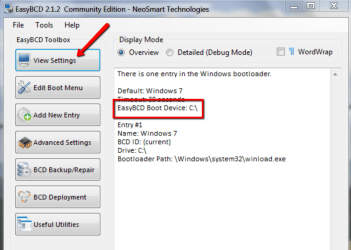
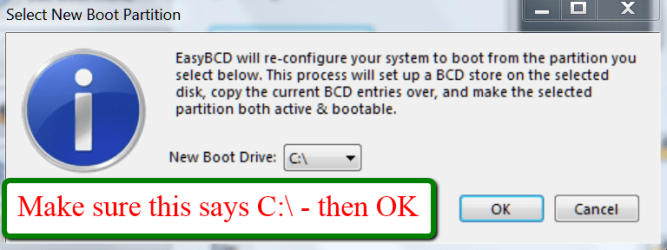
The steps to take are very simple and explained in the 2 pictures. The first screen you get after starting EasyBCD and the second screen after step3 of the first screen. That is really all you need to know.

2012-01-21_2344.png

2012-01-21_2348.png
 
Last edited:
Before you do anything, check which partition is the active partition. It can be C or D. If it is D, no need to move the bootmgr.

For any further discussion I suggest you post a picture of your Disk Management.

Other than that, your logic sounds OK. Just make sure you image the XP and data partitions before you do anything. Losing a partition is easy and has happened to the best of us.
 

My Computer My Computer

At a glance

Vista, Windows7, Mint Mate, Zorin, Windows 8from 1.6GHz Duo to i7
Computer Manufacturer/Model Number
HP, Dell, Gateway, Toshiba - 4 laptops and 2 desktops
OS
Vista, Windows7, Mint Mate, Zorin, Windows 8
CPU
from 1.6GHz Duo to i7
Monitor(s) Displays
2x HP w2207
Hard Drives
5x HDD, 7x SSD, 12x Externals
Keyboard
with trackball - no mices
Mouse
Trackball mice
Internet Speed
DSL 6000
Thanks for the reply.

What program do you think is best for imaging a partition? Possibly free.

Thanks again.
 

My Computer My Computer

At a glance

Windows 7 Ultimate x64
OS
Windows 7 Ultimate x64
Most people here use free Macrium. I have made a tutorial which also comprises a download link of the WinPE CD (saves you at least 2 hours) and a tutorial by Keith (Kado) that shows the recovery procedure. http://www.sevenforums.com/tutorials/73828-imaging-free-macrium.html?ltr=I

Note that free Macrium can be used for XP, Vista and Windows7 - and any data partition. There is no real difference.
 

My Computer My Computer

At a glance

Vista, Windows7, Mint Mate, Zorin, Windows 8from 1.6GHz Duo to i7
Computer Manufacturer/Model Number
HP, Dell, Gateway, Toshiba - 4 laptops and 2 desktops
OS
Vista, Windows7, Mint Mate, Zorin, Windows 8
CPU
from 1.6GHz Duo to i7
Monitor(s) Displays
2x HP w2207
Hard Drives
5x HDD, 7x SSD, 12x Externals
Keyboard
with trackball - no mices
Mouse
Trackball mice
Internet Speed
DSL 6000
Thanks for the reply. I'll a post an image of Disk Management as soon as I have it, to be sure about the whole thing.
 

My Computer My Computer

At a glance

Windows 7 Ultimate x64
OS
Windows 7 Ultimate x64
Another question: after formatting C, the change of drive letter from D to C will mess up the OS? I mean, links, programs, etc...?
 

My Computer My Computer

At a glance

Windows 7 Ultimate x64
OS
Windows 7 Ultimate x64
Another question: after formatting C, the change of drive letter from D to C will mess up the OS? I mean, links, programs, etc...?

There is no problem as long as you do not change the drive letters yourself. Normally, the active system will always assume the letter 'C' automatically.
 

My Computer My Computer

At a glance

Vista, Windows7, Mint Mate, Zorin, Windows 8from 1.6GHz Duo to i7
Computer Manufacturer/Model Number
HP, Dell, Gateway, Toshiba - 4 laptops and 2 desktops
OS
Vista, Windows7, Mint Mate, Zorin, Windows 8
CPU
from 1.6GHz Duo to i7
Monitor(s) Displays
2x HP w2207
Hard Drives
5x HDD, 7x SSD, 12x Externals
Keyboard
with trackball - no mices
Mouse
Trackball mice
Internet Speed
DSL 6000
Here's the Disk Management screenshot.

The screenshot is in italian, but I can translate it to you.

- Hard Drive G (DATA) is marked as Healthy.
- PQSERVICE is marked as Healthy and Unknown Partition: I don't know what this partition is.
- Hard Drive C (VISTA) is marked as Healthy and System
- Hard Drive D (WINXP) is marked as Healthy and Boot
 

My Computer My Computer

At a glance

Windows 7 Ultimate x64
OS
Windows 7 Ultimate x64
Hmm, hard to tell.

PQSERVICE seems to be the recovery partition.

What is not clear whether C or D is the 'active' partition. 'Active' means that it contains the bootmgr.
 

My Computer My Computer

At a glance

Vista, Windows7, Mint Mate, Zorin, Windows 8from 1.6GHz Duo to i7
Computer Manufacturer/Model Number
HP, Dell, Gateway, Toshiba - 4 laptops and 2 desktops
OS
Vista, Windows7, Mint Mate, Zorin, Windows 8
CPU
from 1.6GHz Duo to i7
Monitor(s) Displays
2x HP w2207
Hard Drives
5x HDD, 7x SSD, 12x Externals
Keyboard
with trackball - no mices
Mouse
Trackball mice
Internet Speed
DSL 6000
Thanks for your answer. I know what you're saying and I don't know why there isn't "Active".
I just can remember you that this screenshot was made with WinXP: maybe in that OS "Active" wasn't used... Or it has been mis-translated (very common). Any other program can make us sure of which is the active partition? Maybe I can use Vista Disk Management tool?
 

My Computer My Computer

At a glance

Windows 7 Ultimate x64
OS
Windows 7 Ultimate x64
You could use the bootable CD of Partition Wizard (last entry on the page). That is anyhow a very useful program to have around. Just burn it to CD and run it from CD (change the BIOS boot sequence).
 

My Computer My Computer

At a glance

Vista, Windows7, Mint Mate, Zorin, Windows 8from 1.6GHz Duo to i7
Computer Manufacturer/Model Number
HP, Dell, Gateway, Toshiba - 4 laptops and 2 desktops
OS
Vista, Windows7, Mint Mate, Zorin, Windows 8
CPU
from 1.6GHz Duo to i7
Monitor(s) Displays
2x HP w2207
Hard Drives
5x HDD, 7x SSD, 12x Externals
Keyboard
with trackball - no mices
Mouse
Trackball mice
Internet Speed
DSL 6000
Thanks for the tip. I won't have the PC in my hands until Friday, so now I'm just telling my girl what se has to do... Partition Wizard, boot, etc. is too much for her... I'll just ask her to make me a screenshot of Vista Disk Management and see if it's more accurate than XP. If it's not, I'll check it up on Friday.

Just for my curiosity, I've always used GParted. This Partition Wizard seems very similar to it: are there any differences? Should I use PW instead of GP?
 

My Computer My Computer

At a glance

Windows 7 Ultimate x64
OS
Windows 7 Ultimate x64
That is a matter of taste and what you are used to. If you know how to operate GParted, you may want to continue using that.

I have never made a functional comparison of the two programs. I use PW because it has some nifty functions - but if you make a mistake, you can easily lose stuff. Has happened to me when I lost all partitions on a disk - but I had the images so it was no big deal. Since then I always advise to make images before one manipulates partitions.
 

My Computer My Computer

At a glance

Vista, Windows7, Mint Mate, Zorin, Windows 8from 1.6GHz Duo to i7
Computer Manufacturer/Model Number
HP, Dell, Gateway, Toshiba - 4 laptops and 2 desktops
OS
Vista, Windows7, Mint Mate, Zorin, Windows 8
CPU
from 1.6GHz Duo to i7
Monitor(s) Displays
2x HP w2207
Hard Drives
5x HDD, 7x SSD, 12x Externals
Keyboard
with trackball - no mices
Mouse
Trackball mice
Internet Speed
DSL 6000
Thanks for your reply.

We can't have any other more infos about the partitions, a part from the screenshot I made.

You said me that 'Active' means that it contains the bootmgr. We don't know what partition is actually active. But if I use EasyBCD, would it be a nice way to know? I mean, if it says that the bootmgr is on D, it's all ok, let's format C. If it says that it's on C, I'll move it using EasyBCD and then format C.

Am I wrong or is it correct? Thanks again for your nice help.
 

My Computer My Computer

At a glance

Windows 7 Ultimate x64
OS
Windows 7 Ultimate x64
Yes, in EasyBCD you should be able to id the bootpartition in the 'View Settings' tab like the example in my picture.
 

Attachments

  • 2012-06-13_1853.png
    2012-06-13_1853.png
    57.7 KB · Views: 242

My Computer My Computer

At a glance

Vista, Windows7, Mint Mate, Zorin, Windows 8from 1.6GHz Duo to i7
Computer Manufacturer/Model Number
HP, Dell, Gateway, Toshiba - 4 laptops and 2 desktops
OS
Vista, Windows7, Mint Mate, Zorin, Windows 8
CPU
from 1.6GHz Duo to i7
Monitor(s) Displays
2x HP w2207
Hard Drives
5x HDD, 7x SSD, 12x Externals
Keyboard
with trackball - no mices
Mouse
Trackball mice
Internet Speed
DSL 6000
Thank you again, this was exactly what I was thinking. So:

- Make an image of the drive
- Check and, if needed, change the default boot drive with EasyBCD
- Partition job with Gparted

If this is all correct, I'll let you know if all went OK.
 

My Computer My Computer

At a glance

Windows 7 Ultimate x64
OS
Windows 7 Ultimate x64
Looks good, except when you make images you make an image for each partition individually. Else it would be a 'clone' (whole drive) which I do not recommend for many reasons.
 

My Computer My Computer

At a glance

Vista, Windows7, Mint Mate, Zorin, Windows 8from 1.6GHz Duo to i7
Computer Manufacturer/Model Number
HP, Dell, Gateway, Toshiba - 4 laptops and 2 desktops
OS
Vista, Windows7, Mint Mate, Zorin, Windows 8
CPU
from 1.6GHz Duo to i7
Monitor(s) Displays
2x HP w2207
Hard Drives
5x HDD, 7x SSD, 12x Externals
Keyboard
with trackball - no mices
Mouse
Trackball mice
Internet Speed
DSL 6000
Yes, of course, I was intending an image of each partition ;)
 

My Computer My Computer

At a glance

Windows 7 Ultimate x64
OS
Windows 7 Ultimate x64
I wish you lots of luck.
 

My Computer My Computer

At a glance

Vista, Windows7, Mint Mate, Zorin, Windows 8from 1.6GHz Duo to i7
Computer Manufacturer/Model Number
HP, Dell, Gateway, Toshiba - 4 laptops and 2 desktops
OS
Vista, Windows7, Mint Mate, Zorin, Windows 8
CPU
from 1.6GHz Duo to i7
Monitor(s) Displays
2x HP w2207
Hard Drives
5x HDD, 7x SSD, 12x Externals
Keyboard
with trackball - no mices
Mouse
Trackball mice
Internet Speed
DSL 6000
Thanks again for all ;)
 

My Computer My Computer

At a glance

Windows 7 Ultimate x64
OS
Windows 7 Ultimate x64
Thanks...

Very helpful and informative. Thanks.
 

My Computer My Computer

At a glance

Ontario
OS
Ontario
Back
Top