Bootmgr - Move to C:\ with EasyBCD

Bootmgr - Copy to C:\ with EasyBCD

   Information
Copying the bootmgr from the 100MB active partition or the recovery partition to C:\ is extremely simple with EasyBCD. You can download a free EasyBCD from this website.

The bootmgr will not be moved from the original location - it will only be copied to the C:\ partition. The C:\ partition will be activated and the 100MB partition will be deactivated.

NOTE: The free version download of EasyBCD is at the bottom under "Download free for limited, non-commercial use". Registration is not required to download.


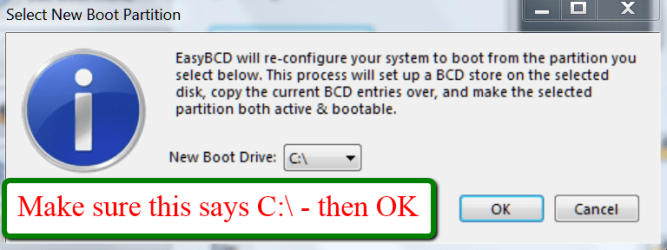
The steps to take are very simple and explained in the 2 pictures. The first screen you get after starting EasyBCD and the second screen after step3 of the first screen. That is really all you need to know.

2012-01-21_2344.png

2012-01-21_2348.png
 
Last edited:
Hello, here is my situation.
I just purchased a refurbished laptop and when I turn it on the 'Windows Boot Manager' screen comes on with two choices to boot into:

Windows 7
System Restore

It seems to boot into Windows 7 ok.

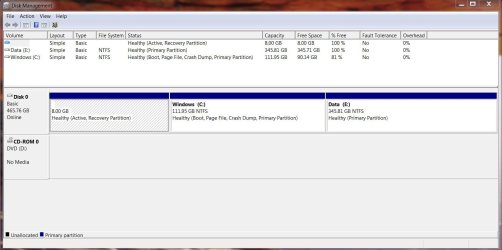
Here is what the Windows Disk Management looks like right now:

disk management.JPG

When I boot into the Minitool Partition Wizard CD it shows that the System Partition has:

Capacity of 8 GB

Used Space of 192.28 MB

Unused Space of 7.81 GB

My first concern is that I would like to be able to boot directly into Windows without having to go through the Windows Boot Manager

and secondly, I would like to get rid of the 8 GB partition and possibly add it to the Windows partition.

Is this the right plan to get this done?

1) Move the Bootmgr to C:\ with Easy BCD

2) Using Partition Wizard format the 8 GB partition and then extend C into the unallocated space.

Will doing the above allow me to boot directly into Windows without having to go through the Windows Boot Manager screen?

Is there anything else I need to do?

TIA.
 

My Computer My Computer

OS
Windows 7 Home Premium 64 bit
In theory your plan is OK. What is strange though is that Disk Management shows the 8GB partition as 100% free and PW shows 192MB of data which could be the bootmgr (it's a bit big though).
 

My Computer My Computer

Computer Manufacturer/Model Number
HP, Dell, Gateway, Toshiba - 4 laptops and 2 desktops
OS
Vista, Windows7, Mint Mate, Zorin, Windows 8
CPU
from 1.6GHz Duo to i7
Monitor(s) Displays
2x HP w2207
Hard Drives
5x HDD, 7x SSD, 12x Externals
Keyboard
with trackball - no mices
Mouse
Trackball mice
Internet Speed
DSL 6000
Thank you for your quick response to my post.

Yeah, I am not sure what is going on here.

I used EasyBCD to move the bootmgr over to the Windows drive and now it is the active drive.
However, when I deleted the 8 GB partition and tried to move the Windows partition in to the new unallocated space, PW would not let me move into all of the 8 GB.
8 MB of the unallocated space was left. No matter what I tried it would not budge so I made a partition of it.

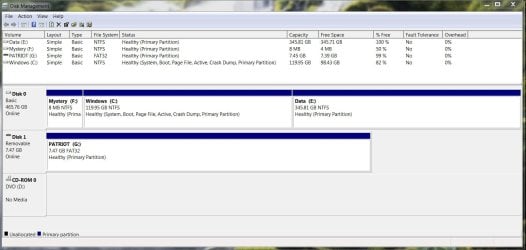
Here is what my hard disk looks like currently in Disk Management:

disk management1.JPG

(ignore Patriot (G:) drive, it is a removable USB drive I had connected when this screen shot was taken.)
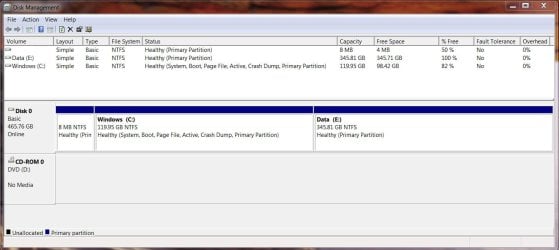
Now that I can see the Mystery drive in Computer I opened it up to see what was on there and the window is empty! Even after I enabled 'show hidden files and folders'.

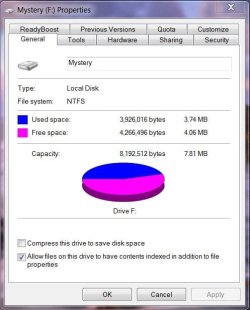
Here are the Mystery drives Properties:

mystery props.JPG

Oh, and one last thing… when the laptop is booting up, it still boots into the Windows Boot Manager with the same 2 options to boot into as before.

Any suggestions for me?
 

My Computer My Computer

OS
Windows 7 Home Premium 64 bit

My Computer My Computer

Computer Manufacturer/Model Number
HP, Dell, Gateway, Toshiba - 4 laptops and 2 desktops
OS
Vista, Windows7, Mint Mate, Zorin, Windows 8
CPU
from 1.6GHz Duo to i7
Monitor(s) Displays
2x HP w2207
Hard Drives
5x HDD, 7x SSD, 12x Externals
Keyboard
with trackball - no mices
Mouse
Trackball mice
Internet Speed
DSL 6000
Thanks again!
That solved the issue of the Windows Boot Manager coming on-screen.
The computer now boots directly into the Windows 7 login screen.

However, I still have not been able to move the Windows partition into that 8 MB partition.
When I delete that partition in PW it is automatically converted into a logical drive (from a primary).
Not sure if that means anything.
Is there a way of finding out what is on that 3.74 MB of used space on that partititon?

Any suggestions for this issue would be great appreciated.
 

My Computer My Computer

OS
Windows 7 Home Premium 64 bit

My Computer My Computer

Computer Manufacturer/Model Number
HP, Dell, Gateway, Toshiba - 4 laptops and 2 desktops
OS
Vista, Windows7, Mint Mate, Zorin, Windows 8
CPU
from 1.6GHz Duo to i7
Monitor(s) Displays
2x HP w2207
Hard Drives
5x HDD, 7x SSD, 12x Externals
Keyboard
with trackball - no mices
Mouse
Trackball mice
Internet Speed
DSL 6000
I followed those steps and the only folder visible on that drive is called System Volume Information with one file visible in it called MountPointManagerRemoteDatabase.
A quick online search shows that the folder has something to do with the Restore Point feature in Windows.
When that drive was still visible on my system I tried to delete the file but it did not work.
As of now my Disk Management Window looks like this:

disk management2.JPG

Is there anything I can do to get those files off that partition?
I know it seems kind of silly to do all this work for an extra 8 MB but since this is a new to me computer I would prefer to get it set up just right.
Thanks again.
 

My Computer My Computer

OS
Windows 7 Home Premium 64 bit
I'd rather you left the 8MB alone. It is too much of a risc to muck around with it.
 

My Computer My Computer

Computer Manufacturer/Model Number
HP, Dell, Gateway, Toshiba - 4 laptops and 2 desktops
OS
Vista, Windows7, Mint Mate, Zorin, Windows 8
CPU
from 1.6GHz Duo to i7
Monitor(s) Displays
2x HP w2207
Hard Drives
5x HDD, 7x SSD, 12x Externals
Keyboard
with trackball - no mices
Mouse
Trackball mice
Internet Speed
DSL 6000
So if I leave the partitions as they are shown in the screenshot from my last message do I have any reason to worry that the hidden partition will cause any issues to crop up in the future?
 

My Computer My Computer

OS
Windows 7 Home Premium 64 bit
Nah, that little partition won't bother you.
 

My Computer My Computer

Computer Manufacturer/Model Number
HP, Dell, Gateway, Toshiba - 4 laptops and 2 desktops
OS
Vista, Windows7, Mint Mate, Zorin, Windows 8
CPU
from 1.6GHz Duo to i7
Monitor(s) Displays
2x HP w2207
Hard Drives
5x HDD, 7x SSD, 12x Externals
Keyboard
with trackball - no mices
Mouse
Trackball mice
Internet Speed
DSL 6000
Well done Wolfgang.
 

My Computer My Computer

Computer Manufacturer/Model Number
* BFK Customs *
OS
W 7 64-bit Ultimate
CPU
Intel Q9550 Yorkfield
Motherboard
ASUS P5Q Pro
Memory
8GB Dominator 8500C5D
Graphics Card(s)
ATI : XFX 5870
Sound Card
Realtek HD Audio 7-1
Monitor(s) Displays
1x 47" LCD HDMI & 3x 26" LCD HDMI
Screen Resolution
1920x1080P & 1920x1200
Hard Drives
1x 80GB Intel X25-M G2 SSD : 1x 500GB & 1x 640GB WD Caviar Black(s)
PSU
Corsair 620HX
Case
Cooler Master RC-690
Cooling
Tuniq Tower 120, 2x 140mm and 3x 120mm case fans
Keyboard
Microsoft 500
Mouse
Razer Diamondback 3G
Internet Speed
14 Mb/s
Other Info
1x Koutech 3Gb/s SATA HDD Hot Swap Rack
Thanks Ted.
 

My Computer My Computer

Computer Manufacturer/Model Number
HP, Dell, Gateway, Toshiba - 4 laptops and 2 desktops
OS
Vista, Windows7, Mint Mate, Zorin, Windows 8
CPU
from 1.6GHz Duo to i7
Monitor(s) Displays
2x HP w2207
Hard Drives
5x HDD, 7x SSD, 12x Externals
Keyboard
with trackball - no mices
Mouse
Trackball mice
Internet Speed
DSL 6000
Thanks. It helped.:D
 

My Computer My Computer

Computer type
PC/Desktop
Computer Manufacturer/Model Number
Custom
OS
Win 7 Ultimate x64
CPU
AMD FX4100
Motherboard
ASUS M5A97 R2.0
Memory
8 GB 1600MHz
Graphics Card(s)
Nvidia gForce GT9600
Hard Drives
Seagate 2TB 7400RPM
WD 2TB 7400RPM
WD 1TB 7400RPM
Antivirus
Norton Internet Security 2014
Browser
Firefox, Chrome
Awesome! You fixed my computer - been working on it for 5 hours now lol!!
 

My Computer My Computer

Computer type
PC/Desktop
Computer Manufacturer/Model Number
Dell
OS
Windows 7 64-bit (home?)
Hi Wolfgang,
I guess the boot file has been copied over to C after doing this tutorial but what can we do with the first or original partition it's on
I really don't like the it being on dual boot anymore with this 400mg partition :/
Yikes now it's listed as E :confused:
Accessing it says it's empty ?
View attachment 338697
 
Last edited:

My Computer My Computer

Computer type
PC/Desktop
Computer Manufacturer/Model Number
Custom assembled by me :}
OS
Win-7-Pro64bit 7-H-Prem-64bit
CPU
i7-5930K 2nd i9-9940x both water blocked VRM's too
Motherboard
ASUS SABERTOOTH X99 2nd ASUS x299 Apex
Memory
Trident-z 3200C14 2nd Trident-z 3600C16
Graphics Card(s)
EVGA 1080ti ftw3 2nd Titan Xp both water blocked
Sound Card
Built-in Realtek
Monitor(s) Displays
1-AOC G2460PG 24"G-Sync 144Hz/ 2nd 1-ASUS VG248QE 24" 144Hz
Screen Resolution
1920 x 1080 144Hz
Hard Drives
2-Samsung M.2 Evo & Evo Plus
2-Samsung 850 EVO 500GB SSD's/ 3-2.5 W.D. Black 1tb-&3-1tb/3-3.5 WD Black 1tb hdd's
PSU
EVGA SuperNOVA 1000-P2 2nd 1200-P2
Case
2-Corsair Obsidian Series 450D Black ATX Mid Tower
Cooling
Custom water loops
Keyboard
Logitech G710+/ 2nd Logitech G910
Mouse
2-RedDragon M901 Perdition 16400 dpi Gaming mouse = wired
Internet Speed
Comcast Ping 19ms 89.31mbps download speed 6.12mbps upload
Antivirus
Malwarebytes Pro/ Superantispyware Pro
Browser
FireFox & Pale moon
Other Info
2nd ASUS X299 Apex/Intel i9-9940x with Custom water loop/7H-Prem-x64/Corsair 450D case/Ram Trident-z 3600C16 4x8gb / Samsung970Evo plus 500gb SSD/Dual ssd EZ swap evo/PSU EVGA SuperNova 1200w-P2 80+Platinum/GPU Titan Xp /8-ML-140 on push-pull on 2-280GTX rads
Delete E in Disk Mgmt, boot Partition Wizard disk, rightclick C to Resize, drag left border all the way to left, click OK, Apply.
 
Thanks Greg,
Looking at the free space on E it does seem to have something on it ?
Can I delete with mini tool ?
 

My Computer My Computer

Computer type
PC/Desktop
Computer Manufacturer/Model Number
Custom assembled by me :}
OS
Win-7-Pro64bit 7-H-Prem-64bit
CPU
i7-5930K 2nd i9-9940x both water blocked VRM's too
Motherboard
ASUS SABERTOOTH X99 2nd ASUS x299 Apex
Memory
Trident-z 3200C14 2nd Trident-z 3600C16
Graphics Card(s)
EVGA 1080ti ftw3 2nd Titan Xp both water blocked
Sound Card
Built-in Realtek
Monitor(s) Displays
1-AOC G2460PG 24"G-Sync 144Hz/ 2nd 1-ASUS VG248QE 24" 144Hz
Screen Resolution
1920 x 1080 144Hz
Hard Drives
2-Samsung M.2 Evo & Evo Plus
2-Samsung 850 EVO 500GB SSD's/ 3-2.5 W.D. Black 1tb-&3-1tb/3-3.5 WD Black 1tb hdd's
PSU
EVGA SuperNOVA 1000-P2 2nd 1200-P2
Case
2-Corsair Obsidian Series 450D Black ATX Mid Tower
Cooling
Custom water loops
Keyboard
Logitech G710+/ 2nd Logitech G910
Mouse
2-RedDragon M901 Perdition 16400 dpi Gaming mouse = wired
Internet Speed
Comcast Ping 19ms 89.31mbps download speed 6.12mbps upload
Antivirus
Malwarebytes Pro/ Superantispyware Pro
Browser
FireFox & Pale moon
Other Info
2nd ASUS X299 Apex/Intel i9-9940x with Custom water loop/7H-Prem-x64/Corsair 450D case/Ram Trident-z 3600C16 4x8gb / Samsung970Evo plus 500gb SSD/Dual ssd EZ swap evo/PSU EVGA SuperNova 1200w-P2 80+Platinum/GPU Titan Xp /8-ML-140 on push-pull on 2-280GTX rads
I thought we created that partition a few weeks ago to be the System Reserved partition? Did you change it to C recently? Why?

If you want the 400mb onboard C then resize otherwise you can just delete it as it is useless now that the System Active flags are moved to C.
 
Back
Top