Bootmgr - Move to C:\ with EasyBCD

Bootmgr - Copy to C:\ with EasyBCD

   Information
Copying the bootmgr from the 100MB active partition or the recovery partition to C:\ is extremely simple with EasyBCD. You can download a free EasyBCD from this website.

The bootmgr will not be moved from the original location - it will only be copied to the C:\ partition. The C:\ partition will be activated and the 100MB partition will be deactivated.

NOTE: The free version download of EasyBCD is at the bottom under "Download free for limited, non-commercial use". Registration is not required to download.


The steps to take are very simple and explained in the 2 pictures. The first screen you get after starting EasyBCD and the second screen after step3 of the first screen. That is really all you need to know.

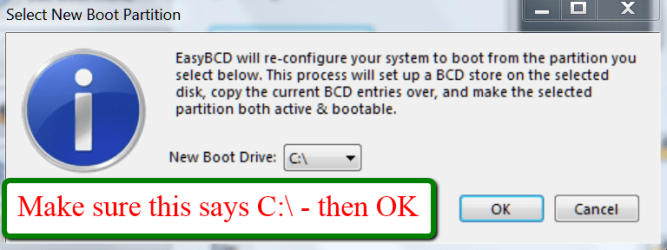
2012-01-21_2344.png

2012-01-21_2348.png
 
Last edited:
whs this is a reply back to you asking to see my desktop management
sorry about not getting back, had to get to work! now here is snip:
snip.JPG

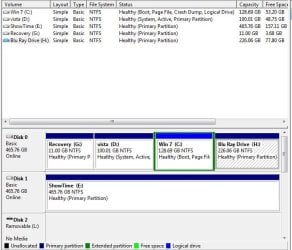
I'm thinking maybe delete the "recovery" partition, then there will only be 3 partitions on the disk 0, then we can change the win 7 drive to primary,what you think?
 

My Computer My Computer

Computer Manufacturer/Model Number
self built and Gateway GM5664, 2 toshiba laptops XP&Win 7
OS
windows 7 ultimate 64bit, Win 7 Ul x86, XP
CPU
Phenom 955BE 3.2 C3
Motherboard
GA-MA790GPT-UD3H
Memory
8GBs corsair DDR3 1600 805mhz
Graphics Card(s)
ATI XFX HD6950
Sound Card
Realtek ALC889A HD Audio ATI HDMI Audio
Monitor(s) Displays
Samsung LN46A650 & LN46C630 & syncMaster 23.5
Screen Resolution
1920 1080
Hard Drives
5 1tb Seagate 7200rpms
PSU
BFG 650
Case
Antec 900II
Cooling
ZalmanLED9900A
Keyboard
logitech , Gateway
Mouse
same
Internet Speed
50.0 Cable service
So the Vista partition has your bootmgr. You have to move that to the Win7 partition before you can delete the Vista partition. But there is a little problem.

Your Vista partition is not a primary partition. That"s why I would tremporarily move it to one of the other primary pasrtitions. Then delete the Vista partition and convert the Win7 partition to a primary (e.g. with the bootable CD of Partition Wizard). Now you can move the bootmgr to the Win7 partition.

The reason why I take this detour: because I would not want to have more than 3 primary partitions on the same disk.
 

My Computer My Computer

Computer Manufacturer/Model Number
HP, Dell, Gateway, Toshiba - 4 laptops and 2 desktops
OS
Vista, Windows7, Mint Mate, Zorin, Windows 8
CPU
from 1.6GHz Duo to i7
Monitor(s) Displays
2x HP w2207
Hard Drives
5x HDD, 7x SSD, 12x Externals
Keyboard
with trackball - no mices
Mouse
Trackball mice
Internet Speed
DSL 6000
yes vist partition has bootmgr. OK, that's what I thought to,what is the problem as you see it

I see what you are saying, Long ago I took the bluray drive out and put it in another PC I built.The PC we are talking about does not have a dvd\cd drive at all.I know silly to not put one in, just never needed it till now :D. That's why I got the usb boot thing from them.

I will see what I can do to get a drive in there or use the usb 4 GB stick I have.I shall post back later my findings. Thank you again and be back in a few hours to tell you what I've done!
 
Last edited:

My Computer My Computer

Computer Manufacturer/Model Number
self built and Gateway GM5664, 2 toshiba laptops XP&Win 7
OS
windows 7 ultimate 64bit, Win 7 Ul x86, XP
CPU
Phenom 955BE 3.2 C3
Motherboard
GA-MA790GPT-UD3H
Memory
8GBs corsair DDR3 1600 805mhz
Graphics Card(s)
ATI XFX HD6950
Sound Card
Realtek ALC889A HD Audio ATI HDMI Audio
Monitor(s) Displays
Samsung LN46A650 & LN46C630 & syncMaster 23.5
Screen Resolution
1920 1080
Hard Drives
5 1tb Seagate 7200rpms
PSU
BFG 650
Case
Antec 900II
Cooling
ZalmanLED9900A
Keyboard
logitech , Gateway
Mouse
same
Internet Speed
50.0 Cable service
OK, I'll be here.
 

My Computer My Computer

Computer Manufacturer/Model Number
HP, Dell, Gateway, Toshiba - 4 laptops and 2 desktops
OS
Vista, Windows7, Mint Mate, Zorin, Windows 8
CPU
from 1.6GHz Duo to i7
Monitor(s) Displays
2x HP w2207
Hard Drives
5x HDD, 7x SSD, 12x Externals
Keyboard
with trackball - no mices
Mouse
Trackball mice
Internet Speed
DSL 6000
All right in your last post I believe you meant to say that Win 7 is not a primary partition and Vista is. So I can just cut and paste the bootmgr and temporarily put it on "Bluray partition" if I wanted to, correct? Then go thru the steps of deleting the recovery and the Vista partition.Change the Win 7 to primary with partition wizard bootable usb drive. UltraISO can also find the bootmgr from Vista to can't it, and back it up to another drive.that way you know you got the right file. How ever I get there, this is what needs to be done, I believe! If all goes well, and if not I will re-format and re-install windows 7 Ultimate. Let you know later on how it goes! Thanks again!
 

My Computer My Computer

Computer Manufacturer/Model Number
self built and Gateway GM5664, 2 toshiba laptops XP&Win 7
OS
windows 7 ultimate 64bit, Win 7 Ul x86, XP
CPU
Phenom 955BE 3.2 C3
Motherboard
GA-MA790GPT-UD3H
Memory
8GBs corsair DDR3 1600 805mhz
Graphics Card(s)
ATI XFX HD6950
Sound Card
Realtek ALC889A HD Audio ATI HDMI Audio
Monitor(s) Displays
Samsung LN46A650 & LN46C630 & syncMaster 23.5
Screen Resolution
1920 1080
Hard Drives
5 1tb Seagate 7200rpms
PSU
BFG 650
Case
Antec 900II
Cooling
ZalmanLED9900A
Keyboard
logitech , Gateway
Mouse
same
Internet Speed
50.0 Cable service
All right in your last post I believe you meant to say that Win 7 is not a primary partition and Vista is. So I can just cut and paste the bootmgr and temporarily put it on "Bluray partition" if I wanted to, correct? Then go thru the steps of deleting the recovery and the Vista partition.Change the Win 7 to primary with partition wizard bootable usb drive. UltraISO can also find the bootmgr from Vista to can't it, and back it up to another drive.that way you know you got the right file. How ever I get there, this is what needs to be done, I believe! If all goes well, and if not I will re-format and re-install windows 7 Ultimate. Let you know later on how it goes! Thanks again!
NOT cut and paste - use EasyBCD to move it.
 

My Computer My Computer

Computer Manufacturer/Model Number
HP, Dell, Gateway, Toshiba - 4 laptops and 2 desktops
OS
Vista, Windows7, Mint Mate, Zorin, Windows 8
CPU
from 1.6GHz Duo to i7
Monitor(s) Displays
2x HP w2207
Hard Drives
5x HDD, 7x SSD, 12x Externals
Keyboard
with trackball - no mices
Mouse
Trackball mice
Internet Speed
DSL 6000
Well no mater how I set the bios to boot from "removable", which is the only option for the mcp61pm-gm mobo, it hasn't worked.It's a nvidia based chipset mcp61 A3 revision,southbridge is nvidia mcp61 revision A2. Made by Phoenix technologies for Gateway I would assume.Not much in the way of special configuring.It does say can boot from removable device. I wonder if that means a removable HDD.Who knows?

Anyway I'm back on the case, I thought of just installing x64 Win 7 Ultimate on it but get mixed answers on the Phenom 9600 Agena 65nm x4 95wt AM2+ (940) processor supporting 64bit operating system. The instructions (in cpuz 159) say - mmx(+), SSE(1,2,3,4A), x86-64, AMD-V. Seems it should, I know this is different than what's under the topic, just saying what I might do, but first I must get the mobo to boot from usb or get a optical drive.

I got a old ide optical drive lite-on shw-160p6s. It was in XP Pro desktop I retired. The usb boot mini partition wizard is only available in the professional version, not sure if they have a trial version.Have to look in to that or find another program that will do this to see.
 

My Computer My Computer

Computer Manufacturer/Model Number
self built and Gateway GM5664, 2 toshiba laptops XP&Win 7
OS
windows 7 ultimate 64bit, Win 7 Ul x86, XP
CPU
Phenom 955BE 3.2 C3
Motherboard
GA-MA790GPT-UD3H
Memory
8GBs corsair DDR3 1600 805mhz
Graphics Card(s)
ATI XFX HD6950
Sound Card
Realtek ALC889A HD Audio ATI HDMI Audio
Monitor(s) Displays
Samsung LN46A650 & LN46C630 & syncMaster 23.5
Screen Resolution
1920 1080
Hard Drives
5 1tb Seagate 7200rpms
PSU
BFG 650
Case
Antec 900II
Cooling
ZalmanLED9900A
Keyboard
logitech , Gateway
Mouse
same
Internet Speed
50.0 Cable service
got it!

Ok I finally got the Windows 7 C: partition logical to primary, deleted the recovery first, then used minitool to change it to primary. I switched the mbr from Vista to Windows 7 with EasyBCD. I have to delete the Vista partition now. Thanks for your help.It took a few times but minitool finially worked.
 

My Computer My Computer

Computer Manufacturer/Model Number
self built and Gateway GM5664, 2 toshiba laptops XP&Win 7
OS
windows 7 ultimate 64bit, Win 7 Ul x86, XP
CPU
Phenom 955BE 3.2 C3
Motherboard
GA-MA790GPT-UD3H
Memory
8GBs corsair DDR3 1600 805mhz
Graphics Card(s)
ATI XFX HD6950
Sound Card
Realtek ALC889A HD Audio ATI HDMI Audio
Monitor(s) Displays
Samsung LN46A650 & LN46C630 & syncMaster 23.5
Screen Resolution
1920 1080
Hard Drives
5 1tb Seagate 7200rpms
PSU
BFG 650
Case
Antec 900II
Cooling
ZalmanLED9900A
Keyboard
logitech , Gateway
Mouse
same
Internet Speed
50.0 Cable service
Good deal. I am glad you got it sorted.
 

My Computer My Computer

Computer Manufacturer/Model Number
HP, Dell, Gateway, Toshiba - 4 laptops and 2 desktops
OS
Vista, Windows7, Mint Mate, Zorin, Windows 8
CPU
from 1.6GHz Duo to i7
Monitor(s) Displays
2x HP w2207
Hard Drives
5x HDD, 7x SSD, 12x Externals
Keyboard
with trackball - no mices
Mouse
Trackball mice
Internet Speed
DSL 6000
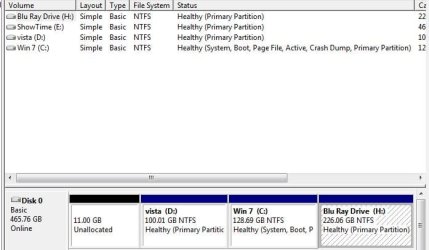
haven't deleted vista yet,paranoid with no dvd\cd drive! :) here is the snip I would think it is OK now to just delete the vista partition and merge in the space to H Bluray drive.
 

Attachments

  • snip 2.JPG
    snip 2.JPG
    39.8 KB · Views: 3,033

My Computer My Computer

Computer Manufacturer/Model Number
self built and Gateway GM5664, 2 toshiba laptops XP&Win 7
OS
windows 7 ultimate 64bit, Win 7 Ul x86, XP
CPU
Phenom 955BE 3.2 C3
Motherboard
GA-MA790GPT-UD3H
Memory
8GBs corsair DDR3 1600 805mhz
Graphics Card(s)
ATI XFX HD6950
Sound Card
Realtek ALC889A HD Audio ATI HDMI Audio
Monitor(s) Displays
Samsung LN46A650 & LN46C630 & syncMaster 23.5
Screen Resolution
1920 1080
Hard Drives
5 1tb Seagate 7200rpms
PSU
BFG 650
Case
Antec 900II
Cooling
ZalmanLED9900A
Keyboard
logitech , Gateway
Mouse
same
Internet Speed
50.0 Cable service
You cn delete the Vista partition. But merging it with the blue ray will require some gymnastics you can only do with the bootable CD of Partition Wizard.

1. you delete the vista volume and partition with Disk Management to obtain unallocated space.

2. you extend the C partition to the left with Partition Wizard bootable CD

3. you shrink that larger C (with Disk Management or PW depending how much you want to shrink it).

4. you extend the blue ray to the left to the unallocated space from the shrinking of C.
 

My Computer My Computer

Computer Manufacturer/Model Number
HP, Dell, Gateway, Toshiba - 4 laptops and 2 desktops
OS
Vista, Windows7, Mint Mate, Zorin, Windows 8
CPU
from 1.6GHz Duo to i7
Monitor(s) Displays
2x HP w2207
Hard Drives
5x HDD, 7x SSD, 12x Externals
Keyboard
with trackball - no mices
Mouse
Trackball mice
Internet Speed
DSL 6000
I used EasyBCD 2.1.2 as mentioned by WHS (thx) After a reboot I changed the boot settings of my BIOS. F10 exit/save and the start up stays at a black screen with a white blinking cursor at the left site of my screen. Returned back to BIOS and reset boot settings. After F10 PC started W7.

I snaged my diskmanagement
4097972656DiskManagement.png


What do I have to do that newly installed W7 on the SSD to be C partition instead of the K it is now? If needed I have PartitionMagic805.

If any info is missing. Please ask.
 

My Computer My Computer

OS
Windows 7 Ultimate 32bit
1. Normally the SSD should become C when you boot from it.

2. Do you know that the bootmgr is still on your old C. I don't know how you moved the OS to the SSD, but it did not move/copy the bootmgr. And if you made a new installation, you need to disconnect disks 0 and 1 during the installation.
 

My Computer My Computer

Computer Manufacturer/Model Number
HP, Dell, Gateway, Toshiba - 4 laptops and 2 desktops
OS
Vista, Windows7, Mint Mate, Zorin, Windows 8
CPU
from 1.6GHz Duo to i7
Monitor(s) Displays
2x HP w2207
Hard Drives
5x HDD, 7x SSD, 12x Externals
Keyboard
with trackball - no mices
Mouse
Trackball mice
Internet Speed
DSL 6000
I didnot know what went wrong, but I Secure erased the SSD; disconnected disks 0 and 1 and re-installed a clean version of W7. Problem solved!
 

My Computer My Computer

OS
Windows 7 Ultimate 32bit
That was the thorough way of solving the problem - LOL.
 

My Computer My Computer

Computer Manufacturer/Model Number
HP, Dell, Gateway, Toshiba - 4 laptops and 2 desktops
OS
Vista, Windows7, Mint Mate, Zorin, Windows 8
CPU
from 1.6GHz Duo to i7
Monitor(s) Displays
2x HP w2207
Hard Drives
5x HDD, 7x SSD, 12x Externals
Keyboard
with trackball - no mices
Mouse
Trackball mice
Internet Speed
DSL 6000
What about the System Recovery Options in the F8 menu after moving the bootmgr .?

It won't work right .?
 

My Computer My Computer

OS
Windows 7 Ultimate 32-bit
What about the System Recovery Options in the F8 menu after moving the bootmgr .?

It won't work right .?
I see no reason why it would not work. But I am not 100% sure because I never use it. I rely on my images.
 

My Computer My Computer

Computer Manufacturer/Model Number
HP, Dell, Gateway, Toshiba - 4 laptops and 2 desktops
OS
Vista, Windows7, Mint Mate, Zorin, Windows 8
CPU
from 1.6GHz Duo to i7
Monitor(s) Displays
2x HP w2207
Hard Drives
5x HDD, 7x SSD, 12x Externals
Keyboard
with trackball - no mices
Mouse
Trackball mice
Internet Speed
DSL 6000
When i tried to do as what you showed in the picture and when i clicked PERFORM ACTION AND CLICKED NEW BOOT DRIVE AS C:\ it says..

An attempt was made to change the boot partition into a logical drive which is not allowed. The boot partition must be a primary partition.
Please either select a different drive or convert the selected partition to primary first, then try again.

Please help me to do this...:confused:
 

My Computer My Computer

OS
Windows 7 Ultimate 32bit

My Computer My Computer

Computer Manufacturer/Model Number
HP, Dell, Gateway, Toshiba - 4 laptops and 2 desktops
OS
Vista, Windows7, Mint Mate, Zorin, Windows 8
CPU
from 1.6GHz Duo to i7
Monitor(s) Displays
2x HP w2207
Hard Drives
5x HDD, 7x SSD, 12x Externals
Keyboard
with trackball - no mices
Mouse
Trackball mice
Internet Speed
DSL 6000
Hi guys! I'm new here. I'm a user of Windows 7 but my question is not about 7... So sorry if I'm out of thread.

My girl's PC has these configuration: 1 Primary Partition with WinVista (C), 1 partition with XP (D) and 1 only data partition (G).

I'd like to format C, add this unallocated space to D and change drive letter of D to C: is it possibile?
If I'm not wrong, first I have to use EasyBCD to move the Primary Boot to D, than I can do all I said. I think I'll use GParted for all the next tasks, as I always gone well with it.

Am I doing something wrong? Thank you very much for your help.
 
Last edited:

My Computer My Computer

OS
Windows 7 Ultimate x64
Back
Top