Bootmgr - Move to C:\ with EasyBCD

Bootmgr - Copy to C:\ with EasyBCD

   Information
Copying the bootmgr from the 100MB active partition or the recovery partition to C:\ is extremely simple with EasyBCD. You can download a free EasyBCD from this website.

The bootmgr will not be moved from the original location - it will only be copied to the C:\ partition. The C:\ partition will be activated and the 100MB partition will be deactivated.

NOTE: The free version download of EasyBCD is at the bottom under "Download free for limited, non-commercial use". Registration is not required to download.


The steps to take are very simple and explained in the 2 pictures. The first screen you get after starting EasyBCD and the second screen after step3 of the first screen. That is really all you need to know.

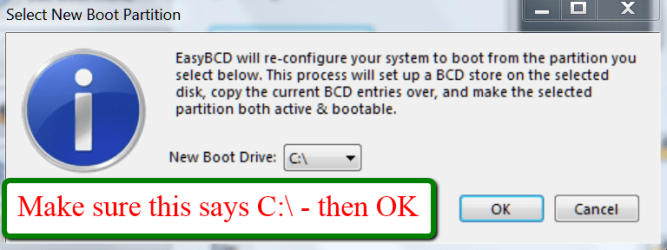
2012-01-21_2344.png

2012-01-21_2348.png
 
Last edited:
Hello, here is my situation.
I just purchased a refurbished laptop and when I turn it on the 'Windows Boot Manager' screen comes on with two choices to boot into:

Windows 7
System Restore

It seems to boot into Windows 7 ok.

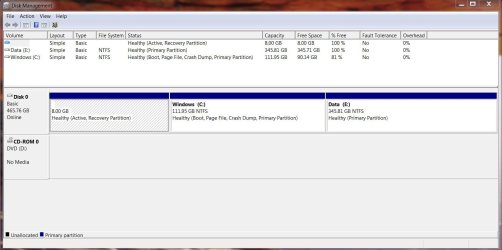
Here is what the Windows Disk Management looks like right now:

disk management.JPG

When I boot into the Minitool Partition Wizard CD it shows that the System Partition has:

Capacity of 8 GB

Used Space of 192.28 MB

Unused Space of 7.81 GB

My first concern is that I would like to be able to boot directly into Windows without having to go through the Windows Boot Manager

and secondly, I would like to get rid of the 8 GB partition and possibly add it to the Windows partition.

Is this the right plan to get this done?

1) Move the Bootmgr to C:\ with Easy BCD

2) Using Partition Wizard format the 8 GB partition and then extend C into the unallocated space.

Will doing the above allow me to boot directly into Windows without having to go through the Windows Boot Manager screen?

Is there anything else I need to do?

TIA.
 

My Computer My Computer

At a glance

Windows 7 Home Premium 64 bit
OS
Windows 7 Home Premium 64 bit
In theory your plan is OK. What is strange though is that Disk Management shows the 8GB partition as 100% free and PW shows 192MB of data which could be the bootmgr (it's a bit big though).
 

My Computer My Computer

At a glance

Vista, Windows7, Mint Mate, Zorin, Windows 8from 1.6GHz Duo to i7
Computer Manufacturer/Model Number
HP, Dell, Gateway, Toshiba - 4 laptops and 2 desktops
OS
Vista, Windows7, Mint Mate, Zorin, Windows 8
CPU
from 1.6GHz Duo to i7
Monitor(s) Displays
2x HP w2207
Hard Drives
5x HDD, 7x SSD, 12x Externals
Keyboard
with trackball - no mices
Mouse
Trackball mice
Internet Speed
DSL 6000
Thank you for your quick response to my post.

Yeah, I am not sure what is going on here.

I used EasyBCD to move the bootmgr over to the Windows drive and now it is the active drive.
However, when I deleted the 8 GB partition and tried to move the Windows partition in to the new unallocated space, PW would not let me move into all of the 8 GB.
8 MB of the unallocated space was left. No matter what I tried it would not budge so I made a partition of it.

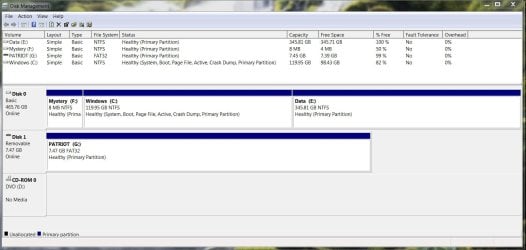
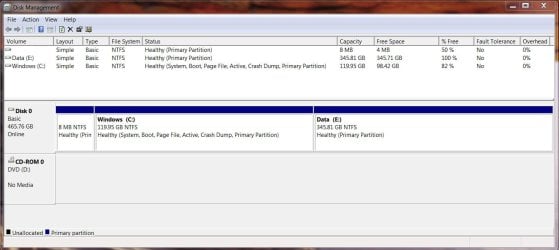
Here is what my hard disk looks like currently in Disk Management:

disk management1.JPG

(ignore Patriot (G:) drive, it is a removable USB drive I had connected when this screen shot was taken.)
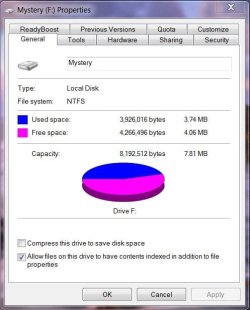
Now that I can see the Mystery drive in Computer I opened it up to see what was on there and the window is empty! Even after I enabled 'show hidden files and folders'.

Here are the Mystery drives Properties:

mystery props.JPG

Oh, and one last thing… when the laptop is booting up, it still boots into the Windows Boot Manager with the same 2 options to boot into as before.

Any suggestions for me?
 

My Computer My Computer

At a glance

Windows 7 Home Premium 64 bit
OS
Windows 7 Home Premium 64 bit

My Computer My Computer

At a glance

Vista, Windows7, Mint Mate, Zorin, Windows 8from 1.6GHz Duo to i7
Computer Manufacturer/Model Number
HP, Dell, Gateway, Toshiba - 4 laptops and 2 desktops
OS
Vista, Windows7, Mint Mate, Zorin, Windows 8
CPU
from 1.6GHz Duo to i7
Monitor(s) Displays
2x HP w2207
Hard Drives
5x HDD, 7x SSD, 12x Externals
Keyboard
with trackball - no mices
Mouse
Trackball mice
Internet Speed
DSL 6000
Thanks again!
That solved the issue of the Windows Boot Manager coming on-screen.
The computer now boots directly into the Windows 7 login screen.

However, I still have not been able to move the Windows partition into that 8 MB partition.
When I delete that partition in PW it is automatically converted into a logical drive (from a primary).
Not sure if that means anything.
Is there a way of finding out what is on that 3.74 MB of used space on that partititon?

Any suggestions for this issue would be great appreciated.
 

My Computer My Computer

At a glance

Windows 7 Home Premium 64 bit
OS
Windows 7 Home Premium 64 bit

My Computer My Computer

At a glance

Vista, Windows7, Mint Mate, Zorin, Windows 8from 1.6GHz Duo to i7
Computer Manufacturer/Model Number
HP, Dell, Gateway, Toshiba - 4 laptops and 2 desktops
OS
Vista, Windows7, Mint Mate, Zorin, Windows 8
CPU
from 1.6GHz Duo to i7
Monitor(s) Displays
2x HP w2207
Hard Drives
5x HDD, 7x SSD, 12x Externals
Keyboard
with trackball - no mices
Mouse
Trackball mice
Internet Speed
DSL 6000
I followed those steps and the only folder visible on that drive is called System Volume Information with one file visible in it called MountPointManagerRemoteDatabase.
A quick online search shows that the folder has something to do with the Restore Point feature in Windows.
When that drive was still visible on my system I tried to delete the file but it did not work.
As of now my Disk Management Window looks like this:

disk management2.JPG

Is there anything I can do to get those files off that partition?
I know it seems kind of silly to do all this work for an extra 8 MB but since this is a new to me computer I would prefer to get it set up just right.
Thanks again.
 

My Computer My Computer

At a glance

Windows 7 Home Premium 64 bit
OS
Windows 7 Home Premium 64 bit
I'd rather you left the 8MB alone. It is too much of a risc to muck around with it.
 

My Computer My Computer

At a glance

Vista, Windows7, Mint Mate, Zorin, Windows 8from 1.6GHz Duo to i7
Computer Manufacturer/Model Number
HP, Dell, Gateway, Toshiba - 4 laptops and 2 desktops
OS
Vista, Windows7, Mint Mate, Zorin, Windows 8
CPU
from 1.6GHz Duo to i7
Monitor(s) Displays
2x HP w2207
Hard Drives
5x HDD, 7x SSD, 12x Externals
Keyboard
with trackball - no mices
Mouse
Trackball mice
Internet Speed
DSL 6000
So if I leave the partitions as they are shown in the screenshot from my last message do I have any reason to worry that the hidden partition will cause any issues to crop up in the future?
 

My Computer My Computer

At a glance

Windows 7 Home Premium 64 bit
OS
Windows 7 Home Premium 64 bit
Nah, that little partition won't bother you.
 

My Computer My Computer

At a glance

Vista, Windows7, Mint Mate, Zorin, Windows 8from 1.6GHz Duo to i7
Computer Manufacturer/Model Number
HP, Dell, Gateway, Toshiba - 4 laptops and 2 desktops
OS
Vista, Windows7, Mint Mate, Zorin, Windows 8
CPU
from 1.6GHz Duo to i7
Monitor(s) Displays
2x HP w2207
Hard Drives
5x HDD, 7x SSD, 12x Externals
Keyboard
with trackball - no mices
Mouse
Trackball mice
Internet Speed
DSL 6000
Ok, sounds good. Thanks again for all your help.
 

My Computer My Computer

At a glance

Windows 7 Home Premium 64 bit
OS
Windows 7 Home Premium 64 bit
Well done Wolfgang.
 

My Computer My Computer

At a glance

W 7 64-bit UltimateIntel Q9550 Yorkfield8GB Dominator 8500C5DATI : XFX 5870
Computer Manufacturer/Model Number
* BFK Customs *
OS
W 7 64-bit Ultimate
CPU
Intel Q9550 Yorkfield
Motherboard
ASUS P5Q Pro
Memory
8GB Dominator 8500C5D
Graphics Card(s)
ATI : XFX 5870
Sound Card
Realtek HD Audio 7-1
Monitor(s) Displays
1x 47" LCD HDMI & 3x 26" LCD HDMI
Screen Resolution
1920x1080P & 1920x1200
Hard Drives
1x 80GB Intel X25-M G2 SSD : 1x 500GB & 1x 640GB WD Caviar Black(s)
PSU
Corsair 620HX
Case
Cooler Master RC-690
Cooling
Tuniq Tower 120, 2x 140mm and 3x 120mm case fans
Keyboard
Microsoft 500
Mouse
Razer Diamondback 3G
Internet Speed
14 Mb/s
Other Info
1x Koutech 3Gb/s SATA HDD Hot Swap Rack
Thanks Ted.
 

My Computer My Computer

At a glance

Vista, Windows7, Mint Mate, Zorin, Windows 8from 1.6GHz Duo to i7
Computer Manufacturer/Model Number
HP, Dell, Gateway, Toshiba - 4 laptops and 2 desktops
OS
Vista, Windows7, Mint Mate, Zorin, Windows 8
CPU
from 1.6GHz Duo to i7
Monitor(s) Displays
2x HP w2207
Hard Drives
5x HDD, 7x SSD, 12x Externals
Keyboard
with trackball - no mices
Mouse
Trackball mice
Internet Speed
DSL 6000
Thanks. It helped.:D
 

My Computer My Computer

At a glance

Win 7 Ultimate x64AMD FX41008 GB 1600MHzNvidia gForce GT9600
Computer type
PC/Desktop
Computer Manufacturer/Model Number
Custom
OS
Win 7 Ultimate x64
CPU
AMD FX4100
Motherboard
ASUS M5A97 R2.0
Memory
8 GB 1600MHz
Graphics Card(s)
Nvidia gForce GT9600
Hard Drives
Seagate 2TB 7400RPM
WD 2TB 7400RPM
WD 1TB 7400RPM
Antivirus
Norton Internet Security 2014
Browser
Firefox, Chrome
Awesome! You fixed my computer - been working on it for 5 hours now lol!!
 

My Computer My Computer

At a glance

Windows 7 64-bit (home?)
Computer type
PC/Desktop
Computer Manufacturer/Model Number
Dell
OS
Windows 7 64-bit (home?)
Hi Wolfgang,
I guess the boot file has been copied over to C after doing this tutorial but what can we do with the first or original partition it's on
I really don't like the it being on dual boot anymore with this 400mg partition :/
Yikes now it's listed as E :confused:
Accessing it says it's empty ?
View attachment 338697
 
Last edited:

My Computer My Computer

At a glance

Win-7-Pro64bit 7-H-Prem-64biti7-5930K 2nd i9-9940x both water blocked VRM'...Trident-z 3200C14 2nd Trident-z 3600C16EVGA 1080ti ftw3 2nd Titan Xp both water blocked
Computer type
PC/Desktop
Computer Manufacturer/Model Number
Custom assembled by me :}
OS
Win-7-Pro64bit 7-H-Prem-64bit
CPU
i7-5930K 2nd i9-9940x both water blocked VRM's too
Motherboard
ASUS SABERTOOTH X99 2nd ASUS x299 Apex
Memory
Trident-z 3200C14 2nd Trident-z 3600C16
Graphics Card(s)
EVGA 1080ti ftw3 2nd Titan Xp both water blocked
Sound Card
Built-in Realtek
Monitor(s) Displays
1-AOC G2460PG 24"G-Sync 144Hz/ 2nd 1-ASUS VG248QE 24" 144Hz
Screen Resolution
1920 x 1080 144Hz
Hard Drives
2-Samsung M.2 Evo & Evo Plus
2-Samsung 850 EVO 500GB SSD's/ 3-2.5 W.D. Black 1tb-&3-1tb/3-3.5 WD Black 1tb hdd's
PSU
EVGA SuperNOVA 1000-P2 2nd 1200-P2
Case
2-Corsair Obsidian Series 450D Black ATX Mid Tower
Cooling
Custom water loops
Keyboard
Logitech G710+/ 2nd Logitech G910
Mouse
2-RedDragon M901 Perdition 16400 dpi Gaming mouse = wired
Internet Speed
Comcast Ping 19ms 89.31mbps download speed 6.12mbps upload
Antivirus
Malwarebytes Pro/ Superantispyware Pro
Browser
FireFox & Pale moon
Other Info
2nd ASUS X299 Apex/Intel i9-9940x with Custom water loop/7H-Prem-x64/Corsair 450D case/Ram Trident-z 3600C16 4x8gb / Samsung970Evo plus 500gb SSD/Dual ssd EZ swap evo/PSU EVGA SuperNova 1200w-P2 80+Platinum/GPU Titan Xp /8-ML-140 on push-pull on 2-280GTX rads
Delete E in Disk Mgmt, boot Partition Wizard disk, rightclick C to Resize, drag left border all the way to left, click OK, Apply.
 
Thanks Greg,
Looking at the free space on E it does seem to have something on it ?
Can I delete with mini tool ?
 

My Computer My Computer

At a glance

Win-7-Pro64bit 7-H-Prem-64biti7-5930K 2nd i9-9940x both water blocked VRM'...Trident-z 3200C14 2nd Trident-z 3600C16EVGA 1080ti ftw3 2nd Titan Xp both water blocked
Computer type
PC/Desktop
Computer Manufacturer/Model Number
Custom assembled by me :}
OS
Win-7-Pro64bit 7-H-Prem-64bit
CPU
i7-5930K 2nd i9-9940x both water blocked VRM's too
Motherboard
ASUS SABERTOOTH X99 2nd ASUS x299 Apex
Memory
Trident-z 3200C14 2nd Trident-z 3600C16
Graphics Card(s)
EVGA 1080ti ftw3 2nd Titan Xp both water blocked
Sound Card
Built-in Realtek
Monitor(s) Displays
1-AOC G2460PG 24"G-Sync 144Hz/ 2nd 1-ASUS VG248QE 24" 144Hz
Screen Resolution
1920 x 1080 144Hz
Hard Drives
2-Samsung M.2 Evo & Evo Plus
2-Samsung 850 EVO 500GB SSD's/ 3-2.5 W.D. Black 1tb-&3-1tb/3-3.5 WD Black 1tb hdd's
PSU
EVGA SuperNOVA 1000-P2 2nd 1200-P2
Case
2-Corsair Obsidian Series 450D Black ATX Mid Tower
Cooling
Custom water loops
Keyboard
Logitech G710+/ 2nd Logitech G910
Mouse
2-RedDragon M901 Perdition 16400 dpi Gaming mouse = wired
Internet Speed
Comcast Ping 19ms 89.31mbps download speed 6.12mbps upload
Antivirus
Malwarebytes Pro/ Superantispyware Pro
Browser
FireFox & Pale moon
Other Info
2nd ASUS X299 Apex/Intel i9-9940x with Custom water loop/7H-Prem-x64/Corsair 450D case/Ram Trident-z 3600C16 4x8gb / Samsung970Evo plus 500gb SSD/Dual ssd EZ swap evo/PSU EVGA SuperNova 1200w-P2 80+Platinum/GPU Titan Xp /8-ML-140 on push-pull on 2-280GTX rads
I thought we created that partition a few weeks ago to be the System Reserved partition? Did you change it to C recently? Why?

If you want the 400mb onboard C then resize otherwise you can just delete it as it is useless now that the System Active flags are moved to C.
 
Back
Top