Solved BOOTMGR not found after removing linux and merging partitions

dumdum69

New member
Local time
3:42 AM
Messages
18
So after searching google for a few days, tis website kept on coming up te most so I figured wy not give it a try. I'm currently using my cousin's laptop with a "useless fake OS" and a broken keyboard. Anyways, ere's my story.

I was bored one day so i installed backtrack on my dell :cry: netbook. after installation, wich i did through usb using unetbootin, i noticed the annoying boot screen (which was expected) but rather than only 2 options, it gave me some weird boot screen with 5 options. backtrack, backtrack recovery, 2 memtest options, and windows. I realized i could never see myself doing the simple process of pressing down a few times every boot, so i decided to liveboot linux off of a usb and delete the linux partition. that's where my troubles came. once i did that, it would just boot and say "grub:" so i downloaded parted magic and used that to boot into windows, and have been doing so ever since. Currently the error that shows up is "BOOTMGR IS MISSING" i've tried everything i've found on this site and have noticed that nearly everyone gives up and either fully reformats te drive. since my netbook doesn't have a cd, or a drive, i will stubbornly keep on hunting until i can manage to get it to its original manufacturer (a LOT slower and minus the bloatware). I can reformat the OS partition (like the 7 times i've done so far) but not the whole drive, as it contains the recovery partition. Any help or suggestions will be greatly appreciated. Any thanks and replies will sadly not be as instant or frequent as they should since i am in mexico due to a family emergency.
 

My Computer My Computer

Computer type
PC/Desktop
Computer Manufacturer/Model Number
Custom
OS
Win7Ux64
Hi,

By removing Linux that way, you inadvertently also tampered with the Windows boot manager.

Follow this tutorial to correct the situation - you will need a Windows 7 installation DVD to accomplish the task:

http://www.sevenforums.com/tutorials/20864-mbr-restore-windows-7-master-boot-record.html

   Tip
If you don't have a Windows 7 installation DVD, create a bootable USB2 equivalent by downloading the correct ISO from here and writing it to a 4GB USB flash drive using this tool. Boot from the USB.

Regards,
Golden
 

My Computer My Computer

Computer type
PC/Desktop
Computer Manufacturer/Model Number
Golden Mk. I.4
OS
Windows 10 Pro x64 ; Xubuntu x64
CPU
Intel i7 860 @ 2.80 GHz O/C'ed to 4.0GHz
Motherboard
Gigabyte P55A-UD3R Rev.1. Award BIOS F13
Memory
16GB Corsair Vengance DDR3 @ 661 MHz Dual Channel (9-9-9-24)
Graphics Card(s)
EVGA NVidia GTX 560 1024MB
Sound Card
Realtek Integrated
Monitor(s) Displays
Dual Samsung SyncMaster 2494HS
Screen Resolution
1920*1080 and 1920*1080
Hard Drives
1*Samsung 840 EVO 120GB SSD;
1*OCZ Vertex 2 60GB SSD;
2*Samsung F3 SpinPoint 1TB in RAID0;
1*Samsung F1 SpinPoint 1TB;
2*Western Digital 1TB External USB 3.0
1*Western Digital 500GB External USB 3.0
1*Seagate 500GB External USB 2.0
PSU
Thermaltake ToughPower QFan 750W
Case
Thermaltake Element S VK60001W2Z
Cooling
Corsair H60 Water Cooling, 2*230mm and 2*80mm case fans
Keyboard
Logitech G110
Mouse
Logitech MX518

My Computer My Computer

OS
ME/XP/Vista/Win7
All repair Commands are automated in Startup Repair but you must first confirm the 100mb System Reserved boot partition (preferred if you have it) or C is marked Active: Partition - Mark as Active (Method Two).

Then run Startup Repair - Run up to 3 Separate Times.

If this does not work then run Factory Recovery if you want the bloated factory preinstalled Win7, or wipe the HD with Diskpart Clean Command and do a Clean Reinstall - Factory OEM Windows 7 to get a perfect clean install. The installer is provided in Step 1 with tool to burn to DVD or write to bootable flash stick in Step 2. You will get and keep a perfect install to the exact extent you stick with the tools and methods given.
 
So i did all of these, multiple times and i have't managed to fix my problem. when i do the bcd one, it does't detect my windows installation. or partition. after reading the original post right now, i have realized i described my problem incorrectly. parted magic was only to merge partitions. i have been using some linux super grub 2 to locate the OS and run it through there. without the USB it doesn't load. so far after following all these steps, i haven't gotten any good progress. Now, after doing the bootsect instead of showing C: as the drive it worked with, it showed E, which was the USB that had pmagic. it no longer loads to pmagic's linux thing, but serves as the bootloader for windows and loads fine? any way i can get this type of loading without the usb? lol

and sorry for my bad grammar and slow response times. the family thing has been pretty bad. cousin is now paralyzed below the shoulders and i'm his caretaker until the insurance company gets straightened out. mexican insurance companies apparently like to take their time.
 

My Computer My Computer

Computer type
PC/Desktop
Computer Manufacturer/Model Number
Custom
OS
Win7Ux64
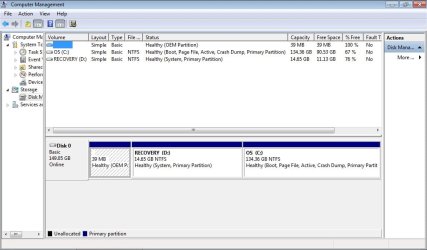
Post screenshot of disk management in win7. Only then we know exact partition layout.

Paralyzed... hmmm don't know what to say
 

My Computer My Computer

Computer type
Laptop
Computer Manufacturer/Model Number
ACER ASPIRE 5742G
OS
Microsoft Windows 7 Home Premium 64-bits 7601 Multiprocessor Free Service Pack 1
CPU
Intel(R) Core(TM) i3 CPU M 370 @ 2.40GHz
Motherboard
Acer Aspire 5742G
Memory
4,00 GB
Graphics Card(s)
ATI Mobility Radeon HD 5400 Series
Sound Card
(1) AMD High Definition Audio Device (2) Realtek High Defi
Screen Resolution
1366 x 768 x 32 bits (4294967296 colors) @ 60 Hz
Hard Drives
WDC WD5000BEVT-22ZAT0
care to explain what you mean by disk management?
 

My Computer My Computer

Computer type
PC/Desktop
Computer Manufacturer/Model Number
Custom
OS
Win7Ux64
By the way, I appreciate everyone's help in this matter. I think i'll become an active and (as far as i can) helpful member when i get back home :D
 

My Computer My Computer

Computer type
PC/Desktop
Computer Manufacturer/Model Number
Custom
OS
Win7Ux64

My Computer My Computer

Computer type
Laptop
Computer Manufacturer/Model Number
ACER ASPIRE 5742G
OS
Microsoft Windows 7 Home Premium 64-bits 7601 Multiprocessor Free Service Pack 1
CPU
Intel(R) Core(TM) i3 CPU M 370 @ 2.40GHz
Motherboard
Acer Aspire 5742G
Memory
4,00 GB
Graphics Card(s)
ATI Mobility Radeon HD 5400 Series
Sound Card
(1) AMD High Definition Audio Device (2) Realtek High Defi
Screen Resolution
1366 x 768 x 32 bits (4294967296 colors) @ 60 Hz
Hard Drives
WDC WD5000BEVT-22ZAT0
Here it is. :)
 

Attachments

  • diskman.jpg
    diskman.jpg
    58.9 KB · Views: 5

My Computer My Computer

Computer type
PC/Desktop
Computer Manufacturer/Model Number
Custom
OS
Win7Ux64
Thanx for disk managment screenshot. Bootmanager and bootmenu are in RECOVERY partition (it's marked system).
You only have 1 physical harddisk. Still "BOOTMGR IS MISSING" when booting?
How exactly did you boot to win7??
 

My Computer My Computer

Computer type
Laptop
Computer Manufacturer/Model Number
ACER ASPIRE 5742G
OS
Microsoft Windows 7 Home Premium 64-bits 7601 Multiprocessor Free Service Pack 1
CPU
Intel(R) Core(TM) i3 CPU M 370 @ 2.40GHz
Motherboard
Acer Aspire 5742G
Memory
4,00 GB
Graphics Card(s)
ATI Mobility Radeon HD 5400 Series
Sound Card
(1) AMD High Definition Audio Device (2) Realtek High Defi
Screen Resolution
1366 x 768 x 32 bits (4294967296 colors) @ 60 Hz
Hard Drives
WDC WD5000BEVT-22ZAT0
I've been refreshing the page and never noticed there was a 2nd page, lol.

I had a USB with pmagic that i used. i went to extra boot features, loaded GRUB2, scanned for OS, and selected the one for windows, for some reason 2 appear on display. i select the 2nd one. As i was following all the bootsect and bootrec steps, i forgot to remove the USB and what happened was that it put a file called BCD in the USB. if i load the pc off the USB, it loads perfectly. That's how i got it on.
 

My Computer My Computer

Computer type
PC/Desktop
Computer Manufacturer/Model Number
Custom
OS
Win7Ux64

My Computer My Computer

Computer type
Laptop
Computer Manufacturer/Model Number
ACER ASPIRE 5742G
OS
Microsoft Windows 7 Home Premium 64-bits 7601 Multiprocessor Free Service Pack 1
CPU
Intel(R) Core(TM) i3 CPU M 370 @ 2.40GHz
Motherboard
Acer Aspire 5742G
Memory
4,00 GB
Graphics Card(s)
ATI Mobility Radeon HD 5400 Series
Sound Card
(1) AMD High Definition Audio Device (2) Realtek High Defi
Screen Resolution
1366 x 768 x 32 bits (4294967296 colors) @ 60 Hz
Hard Drives
WDC WD5000BEVT-22ZAT0
MERCI KAKTUSSOFT!

it is on D.

After changing the active partition, it boots without the USB. Almost as good as new. it just has a blinking underline on the top left for a split second and does take a tiny bit longer to load. but it works. Is it completely fixed now or are there a few more steps to take?
 

My Computer My Computer

Computer type
PC/Desktop
Computer Manufacturer/Model Number
Custom
OS
Win7Ux64
MERCI KAKTUSSOFT!

it is on D.

After changing the active partition, it boots without the USB. Almost as good as new. it just has a blinking underline on the top left for a split second and does take a tiny bit longer to load. but it works. Is it completely fixed now or are there a few more steps to take?
Only problem was: C was active partition! It said "missing bootmgr" all the time. Boot sequence is as follows (sort of):

  1. Find harddisk
  2. load sector 0 of harddisk, the bootcode (MBR)
  3. bootcode searches for active partition and loads its bootsector and runs that code. (sector 0 of partition)
  4. In that code is an instruction to run file bootmgr.
  5. bootmgr loads file \boot\bcd the boot menu.
"bootmgr missing" means it fails in step 4!! Indeed C was ACTIVE and doesn't have bootmgr

boot using an usb stick with special bootcode works different of course. Most likely it scans all partitions for known files like bootmgr, grub and so on and jumps to it. Most likely bootrec and bootsect commands modified the usb stick.

I don't know who did make C ACTIVE (that's why partition RECOVERY became INACTIVE. Only 1 ACTIVE partition is allowed for each physical disk). Linux didn't touch RECOVERY and WIN7 partition (why should it). I think all is fine now
 
Last edited:

My Computer My Computer

Computer type
Laptop
Computer Manufacturer/Model Number
ACER ASPIRE 5742G
OS
Microsoft Windows 7 Home Premium 64-bits 7601 Multiprocessor Free Service Pack 1
CPU
Intel(R) Core(TM) i3 CPU M 370 @ 2.40GHz
Motherboard
Acer Aspire 5742G
Memory
4,00 GB
Graphics Card(s)
ATI Mobility Radeon HD 5400 Series
Sound Card
(1) AMD High Definition Audio Device (2) Realtek High Defi
Screen Resolution
1366 x 768 x 32 bits (4294967296 colors) @ 60 Hz
Hard Drives
WDC WD5000BEVT-22ZAT0
Thank you very much. Thanks to everyone else as well. Does anyone have any advise as to where i can learn more on repairing OS and software issues like this? Or just learn more in general? Super hard to locate study material for A+ so i'm stuck.
 

My Computer My Computer

Computer type
PC/Desktop
Computer Manufacturer/Model Number
Custom
OS
Win7Ux64
Actually, one small issue has come up that i just noticed. Now, when i open up "My computer", it shows a 2nd drive called D. the Recovery one. This was never up before i installed linux. i know it's the recovery one and would like for it to remain invisible except for when i have to reformat. any ideas?
 

My Computer My Computer

Computer type
PC/Desktop
Computer Manufacturer/Model Number
Custom
OS
Win7Ux64
Actually, one small issue has come up that i just noticed. Now, when i open up "My computer", it shows a 2nd drive called D. the Recovery one. This was never up before i installed linux. i know it's the recovery one and would like for it to remain invisible except for when i have to reformat. any ideas?
disk managment. Right click on the RECOVERY partition. Drive letter->remove
Is that what you mean?
 

My Computer My Computer

Computer type
Laptop
Computer Manufacturer/Model Number
ACER ASPIRE 5742G
OS
Microsoft Windows 7 Home Premium 64-bits 7601 Multiprocessor Free Service Pack 1
CPU
Intel(R) Core(TM) i3 CPU M 370 @ 2.40GHz
Motherboard
Acer Aspire 5742G
Memory
4,00 GB
Graphics Card(s)
ATI Mobility Radeon HD 5400 Series
Sound Card
(1) AMD High Definition Audio Device (2) Realtek High Defi
Screen Resolution
1366 x 768 x 32 bits (4294967296 colors) @ 60 Hz
Hard Drives
WDC WD5000BEVT-22ZAT0
Thanks! that worked. any chance you have any tips as to where i can go or what i can do to learn more about things like this? :D
 

My Computer My Computer

Computer type
PC/Desktop
Computer Manufacturer/Model Number
Custom
OS
Win7Ux64
Thank you very much. Thanks to everyone else as well. Does anyone have any advise as to where i can learn more on repairing OS and software issues like this? Or just learn more in general? Super hard to locate study material for A+ so i'm stuck.
http://www.sevenforums.com/tutorials/219533-troubleshooting-windows-7-failure-boot.html
And may other tutorials on sevenforums

Booting - Wikipedia, the free encyclopedia
Master boot record - Wikipedia, the free encyclopedia
Volume boot record - Wikipedia, the free encyclopedia

What special things you want to learn? Google is your friend!
 

My Computer My Computer

Computer type
Laptop
Computer Manufacturer/Model Number
ACER ASPIRE 5742G
OS
Microsoft Windows 7 Home Premium 64-bits 7601 Multiprocessor Free Service Pack 1
CPU
Intel(R) Core(TM) i3 CPU M 370 @ 2.40GHz
Motherboard
Acer Aspire 5742G
Memory
4,00 GB
Graphics Card(s)
ATI Mobility Radeon HD 5400 Series
Sound Card
(1) AMD High Definition Audio Device (2) Realtek High Defi
Screen Resolution
1366 x 768 x 32 bits (4294967296 colors) @ 60 Hz
Hard Drives
WDC WD5000BEVT-22ZAT0
Back
Top