Solved bootmgr problem, system working with win7 DVD

My Computer My Computer

Computer Manufacturer/Model Number
Home built
OS
windows7 64bit home premium
CPU
Intel 2core 6600 2,40Ghz
Motherboard
HP Compaq G G61 notebook
Memory
4 GB
Graphics Card(s)
Nividea Geforce GTX 460
Sound Card
Realtek high defenition
Monitor(s) Displays
1- Samsung 27"
Hard Drives
2 HDs
C: & D: drives on same HD as partitons
E: drive.
Case
Grey box?
Cooling
Fans?
Keyboard
microsoft 5121
Mouse
microsoft comfout digital 3000
Internet Speed
10000 / 1000
Your specs are confusing. It says your Computer is home built, but then the mobo says it's a Compaq laptop.

If you have a laptop you can disable the HD in BIOS setup, or move the data off and wipe D now since it's probably interfering anyway and the only way to know for sure is to wipe it. Then you can leave it installed. Diskpart Clean Command

And, yes, you need to have the Win7 HD set as the first HD to boot in BIOS setup. Check that now, or unplug or disable D to be sure.

no this aint a laptop. Its a desk PC.
Ill try to wipe the data off the D.
 

My Computer My Computer

Computer Manufacturer/Model Number
Home built
OS
windows7 64bit home premium
CPU
Intel 2core 6600 2,40Ghz
Motherboard
HP Compaq G G61 notebook
Memory
4 GB
Graphics Card(s)
Nividea Geforce GTX 460
Sound Card
Realtek high defenition
Monitor(s) Displays
1- Samsung 27"
Hard Drives
2 HDs
C: & D: drives on same HD as partitons
E: drive.
Case
Grey box?
Cooling
Fans?
Keyboard
microsoft 5121
Mouse
microsoft comfout digital 3000
Internet Speed
10000 / 1000
I'm taking a guess here that the second HD was installed after WinXP was installed. If that was true then

Disk 0 would have had C & D
Disk 1 would have been E

Then you installed Win7 and Win7 assigned drive letters to the Primary Partitions first
Disk 0 primary partition = C
Disk 1 primary partition = D

Then drive letters got assigned to the logical drives
Disk 0 extended partition, logical drive = E

Hope that clears it up a little.
 

My Computer My Computer

Computer Manufacturer/Model Number
Self built
OS
Windows 7 Ultimate x64
CPU
Intel Pentium Dual Core E5200 2.5GHz (3.77GHz OC)
Motherboard
Asus P5Q-E
Memory
Corsair 4GB DDR2 (4x1GB CM2X1024-6400C4)
Graphics Card(s)
Palit GeForce GTS 250 (1024MB)
Sound Card
On Board (ADI AD2000B 8ch HD)
Monitor(s) Displays
Samsung 32in LCD TV
Screen Resolution
1360x768
Hard Drives
2 x 1TB Samsung 103SJ (Raid0)
2 x External 500GB Samsung 502IJ (NexStar 3 HD Enclosures)
PSU
550W Antec Neo HE 550
Case
Antec P180
Cooling
Xigmatex Red Scorpion CPU Cooler. 3x120mm Fans
Keyboard
Logitech MX5000 Laser (Combo)
Mouse
Logitech MX5000 Laser (Combo)
Internet Speed
ADSL2+ (avg 10 Mbps Down, 0.80 Mbps up)
Other Info
Gigabyte GN-WP01GS 54g Wireless Lan Card
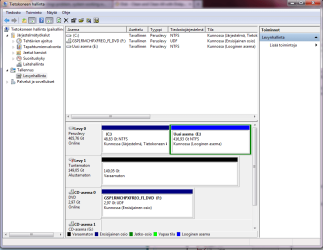
ok cleaned D drive.
 

Attachments

  • done.png
    done.png
    33.7 KB · Views: 7

My Computer My Computer

Computer Manufacturer/Model Number
Home built
OS
windows7 64bit home premium
CPU
Intel 2core 6600 2,40Ghz
Motherboard
HP Compaq G G61 notebook
Memory
4 GB
Graphics Card(s)
Nividea Geforce GTX 460
Sound Card
Realtek high defenition
Monitor(s) Displays
1- Samsung 27"
Hard Drives
2 HDs
C: & D: drives on same HD as partitons
E: drive.
Case
Grey box?
Cooling
Fans?
Keyboard
microsoft 5121
Mouse
microsoft comfout digital 3000
Internet Speed
10000 / 1000
I'm taking a guess here that the second HD was installed after WinXP was installed. If that was true then

Disk 0 would have had C & D
Disk 1 would have been E

Then you installed Win7 and Win7 assigned drive letters to the Primary Partitions first
Disk 0 primary partition = C
Disk 1 primary partition = D

Then drive letters got assigned to the logical drives
Disk 0 extended partition, logical drive = E

Hope that clears it up a little.

thanks, thats how it went yes.
 

My Computer My Computer

Computer Manufacturer/Model Number
Home built
OS
windows7 64bit home premium
CPU
Intel 2core 6600 2,40Ghz
Motherboard
HP Compaq G G61 notebook
Memory
4 GB
Graphics Card(s)
Nividea Geforce GTX 460
Sound Card
Realtek high defenition
Monitor(s) Displays
1- Samsung 27"
Hard Drives
2 HDs
C: & D: drives on same HD as partitons
E: drive.
Case
Grey box?
Cooling
Fans?
Keyboard
microsoft 5121
Mouse
microsoft comfout digital 3000
Internet Speed
10000 / 1000
Maximize the Disk Mgmt screenshot so we can see all of the listings.

Did you run Startup Repair three separate times with reboots while only C was marked Active. Yes or No?

Was there ever an OS on Disk1 which is showing as D in Disk mgmt now?

yes, i run startup repair 3 times, only got it done once though, having some lockup problems.

No, ive never hade a Operating System???? OS on disc 1, it has always been just a backup HD with folders and files only.
 

My Computer My Computer

Computer Manufacturer/Model Number
Home built
OS
windows7 64bit home premium
CPU
Intel 2core 6600 2,40Ghz
Motherboard
HP Compaq G G61 notebook
Memory
4 GB
Graphics Card(s)
Nividea Geforce GTX 460
Sound Card
Realtek high defenition
Monitor(s) Displays
1- Samsung 27"
Hard Drives
2 HDs
C: & D: drives on same HD as partitons
E: drive.
Case
Grey box?
Cooling
Fans?
Keyboard
microsoft 5121
Mouse
microsoft comfout digital 3000
Internet Speed
10000 / 1000
Then run the three separate Startup Repairs with reboots in between to see if it corrects.

If there is no boot code on Disk1 you can leave it plugged in, although it would be best to disable it in BIOS so it can't interfere.
 
well, its working now. cleaning the D drive up and doing the 3 startups repairs have finaly cured it.

Thanks guys, much apreachiated. special thanks to Greg, keep on surfin m8.
 

My Computer My Computer

Computer Manufacturer/Model Number
Home built
OS
windows7 64bit home premium
CPU
Intel 2core 6600 2,40Ghz
Motherboard
HP Compaq G G61 notebook
Memory
4 GB
Graphics Card(s)
Nividea Geforce GTX 460
Sound Card
Realtek high defenition
Monitor(s) Displays
1- Samsung 27"
Hard Drives
2 HDs
C: & D: drives on same HD as partitons
E: drive.
Case
Grey box?
Cooling
Fans?
Keyboard
microsoft 5121
Mouse
microsoft comfout digital 3000
Internet Speed
10000 / 1000
Glad it's solved. Good work Greg.
 

My Computer My Computer

Computer Manufacturer/Model Number
Self built
OS
Windows 7 Ultimate x64
CPU
Intel Pentium Dual Core E5200 2.5GHz (3.77GHz OC)
Motherboard
Asus P5Q-E
Memory
Corsair 4GB DDR2 (4x1GB CM2X1024-6400C4)
Graphics Card(s)
Palit GeForce GTS 250 (1024MB)
Sound Card
On Board (ADI AD2000B 8ch HD)
Monitor(s) Displays
Samsung 32in LCD TV
Screen Resolution
1360x768
Hard Drives
2 x 1TB Samsung 103SJ (Raid0)
2 x External 500GB Samsung 502IJ (NexStar 3 HD Enclosures)
PSU
550W Antec Neo HE 550
Case
Antec P180
Cooling
Xigmatex Red Scorpion CPU Cooler. 3x120mm Fans
Keyboard
Logitech MX5000 Laser (Combo)
Mouse
Logitech MX5000 Laser (Combo)
Internet Speed
ADSL2+ (avg 10 Mbps Down, 0.80 Mbps up)
Other Info
Gigabyte GN-WP01GS 54g Wireless Lan Card
Glad the problem has been solved. What did solve the problem? Three startup repairs, or cleaning up second harddisk (nothing was on it, only system volume folder and recycle bin)
 

My Computer My Computer

Computer type
Laptop
Computer Manufacturer/Model Number
ACER ASPIRE 5742G
OS
Microsoft Windows 7 Home Premium 64-bits 7601 Multiprocessor Free Service Pack 1
CPU
Intel(R) Core(TM) i3 CPU M 370 @ 2.40GHz
Motherboard
Acer Aspire 5742G
Memory
4,00 GB
Graphics Card(s)
ATI Mobility Radeon HD 5400 Series
Sound Card
(1) AMD High Definition Audio Device (2) Realtek High Defi
Screen Resolution
1366 x 768 x 32 bits (4294967296 colors) @ 60 Hz
Hard Drives
WDC WD5000BEVT-22ZAT0
Possibly both, or it could have been marking the partition Active if that had not yet been done before Repairs x3.

You need three Startup Repairs to repair or rewrite the System boot files to the partition which MUST be marked Active.

And it's best to unplug other HD's since old boot code can sometimes conflict, so wiping the HD may have cleared the boot sector, too. Bootsecting can remain even with a deleted or formatted HD.
 
Possibly both, or it could have been marking the partition Active if that had not yet been done before Repairs x3.

You need three Startup Repairs to repair or rewrite the System boot files to the partition which MUST be marked Active.

And it's best to unplug other HD's since old boot code can sometimes conflict, so wiping the HD may have cleared the boot sector, too. Bootsecting can remain even with a deleted or formatted HD.
C partition was active all the time. MBR and boot sector were rebuild. System could start using dvd..... very strange!

Other disk doesn't have on active partitition.... still don't understand what went wrong.

Sometimes computer problems are a great mistery
 

My Computer My Computer

Computer type
Laptop
Computer Manufacturer/Model Number
ACER ASPIRE 5742G
OS
Microsoft Windows 7 Home Premium 64-bits 7601 Multiprocessor Free Service Pack 1
CPU
Intel(R) Core(TM) i3 CPU M 370 @ 2.40GHz
Motherboard
Acer Aspire 5742G
Memory
4,00 GB
Graphics Card(s)
ATI Mobility Radeon HD 5400 Series
Sound Card
(1) AMD High Definition Audio Device (2) Realtek High Defi
Screen Resolution
1366 x 768 x 32 bits (4294967296 colors) @ 60 Hz
Hard Drives
WDC WD5000BEVT-22ZAT0
If you know for sure OP ran three complete Startup Repairs with reboots (often not completed) while C was marked Active, then it was possibly interference from the other HD which can retain the /nt60 bootsecting even if it's formatted and deleted, but not if it's Wiped with Clean command. This is why the unplug, which he satisfied by wiping.

We have some cases where the SysReserved partition is also corrupt so that the Active flag needs to be shifted to the Win7 partition itself to run the Repairs, if first it won't start trying Repairs on SysReserved.

You get a feel for these after so many thousand (Today is my third Anniversary here). One thing we've learned since beta is that automated Startup Repair covers more bases than just the bootrec commands which it also automates. However in rare cases bootrec/bootsect commands need running manually if all else fails. Troubleshooting Windows 7 Failure to Boot - Windows 7 Forums

Edit: What a perfect circle! I see our original teacher here SIW2 is in the thread so maybe he'll elaborate on all of this.
 
Last edited:
If you know for sure OP ran three complete Startup Repairs with reboots (often not completed) while C was marked Active, then it was possibly interference from the other HD which can retain the /nt60 bootsecting even if it's formatted and deleted, but not if it's Wiped with Clean command. This is why the unplug, which he satisfied by wiping.

We have some cases where the SysReserved partition is also corrupt so that the Active flag needs to be shifted to the Win7 partition itself to run the Repairs, if first it won't start trying Repairs on SysReserved.

You get a feel for these after so many thousand (Today is my third Anniversary here). One thing we've learned since beta is that automated Startup Repair covers more bases than just the bootrec commands which it also automates. However in rare cases bootrec/bootsect commands need running manually if all else fails. Troubleshooting Windows 7 Failure to Boot - Windows 7 Forums

Edit: What a perfect circle! I see our original teacher here SIW2 is in the thread so maybe he'll elaborate on all of this.
Thanx for all the clear explanation. He didn't perform startup repair 3 times I think. But the first startup repair said everything was OK and system was booting fine with DVD inserted. Even bootsector and MBR were raplaced using bootsect.

So I think the second disk is actually the first drive that BIOS tries to boot from(?) Second drive was almost sure the problem. But still I don't understand why it says "missing bootmgr" as this message comes from partition bootsector (not MBR). That partition wasn't active at all!! It looks like MBR thinks it's active

Should replacing second disk MBR and bootsector fix the problem you think? We'll never know

Now I have learned something... never trust my own logic. To be sure it boots from right disk... unplug all other disks.
 

My Computer My Computer

Computer type
Laptop
Computer Manufacturer/Model Number
ACER ASPIRE 5742G
OS
Microsoft Windows 7 Home Premium 64-bits 7601 Multiprocessor Free Service Pack 1
CPU
Intel(R) Core(TM) i3 CPU M 370 @ 2.40GHz
Motherboard
Acer Aspire 5742G
Memory
4,00 GB
Graphics Card(s)
ATI Mobility Radeon HD 5400 Series
Sound Card
(1) AMD High Definition Audio Device (2) Realtek High Defi
Screen Resolution
1366 x 768 x 32 bits (4294967296 colors) @ 60 Hz
Hard Drives
WDC WD5000BEVT-22ZAT0
Back
Top