
Hi chaps.
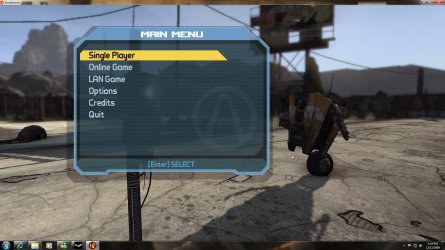
Was playing Borderland today on my Win 7 rig and i accidently pressed something to cause the game to into window'd mode.
ive closed the program, reset the comp and even alt+tab in and out and its still window'd.
Im lost on what to do as i was went from XP to 7 and i have to relearn alot of new features.
Heres a picture of what i mean.
thanks in advance
Worked it out, thanks anyway people.
I didnt realise alt+ctrl+enter toggles between window'ed and full screen.
Was playing Borderland today on my Win 7 rig and i accidently pressed something to cause the game to into window'd mode.
ive closed the program, reset the comp and even alt+tab in and out and its still window'd.
Im lost on what to do as i was went from XP to 7 and i have to relearn alot of new features.
Heres a picture of what i mean.
thanks in advance
Worked it out, thanks anyway people.
I didnt realise alt+ctrl+enter toggles between window'ed and full screen.
Attachments
Last edited:
My Computer
- OS
- Windows 7 Ultimate Beta
- CPU
- I7 920
- Motherboard
- EX58-UD4P
- Memory
- 6 gig
- Graphics Card(s)
- GTX275


