
Solved Both of my drives showing as system drives

prizna

New member
Member
Local time
5:59 PM
Messages
51
I have a custom build desktop with 2 internal drives a 'Samsung SSD 840 Pro' and a 'Seagate Barracuda ST32000641AS'

I decided to format my PC using the Windows 7 boot disk, but noticed when choosing what drive to install my OS to, both of my drives types are labeled as System Drives, I decided to go ahead anyway and install my OS to my SSD, but after completing installation, Disk Management shows both of my drives as Active drives. I have searched a bit online and it seems that only my C drive should be an Active drive, does this have anything to do with both of my drives being read as System Drives at the start of installation. What would be the reason for both of my drives being Active? I have no problems with reformatting if needed.
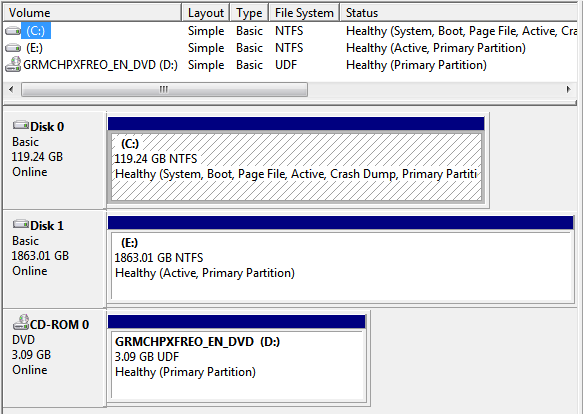
1vZjJol.png


thanks,
 

My Computer My Computer

At a glance

Windows 7 Home Premium 64bitIntel(R) Core(TM) i7-2600 CPU @ 3.40GHz8.00gbNVIDIA GeForce GTX 770
Computer type
PC/Desktop
Computer Manufacturer/Model Number
Custom Build
OS
Windows 7 Home Premium 64bit
CPU
Intel(R) Core(TM) i7-2600 CPU @ 3.40GHz
Motherboard
Gigabyte Technology Co., Ltd. Z68A-D3H-B3
Memory
8.00gb
Graphics Card(s)
NVIDIA GeForce GTX 770
Sound Card
NVIDIA High Definition Audio
Monitor(s) Displays
BenQ E2420HD
Screen Resolution
1920x1080
Hard Drives
Samsung SSD 840 PRO Seri
ST32000641AS
Seagate Expansion Desk USB Device
Antivirus
Kaspersky Internet Security 2013
Browser
Google Chrome

My Computer My Computer

At a glance

Win7 Ultimate X64Intel i5 3570K8GB DDR3 1600Onboard
Computer type
PC/Desktop
Computer Manufacturer/Model Number
Pauly Special
OS
Win7 Ultimate X64
CPU
Intel i5 3570K
Motherboard
Gigabyte Z77X-DS3H
Memory
8GB DDR3 1600
Graphics Card(s)
Onboard
Sound Card
Onboard
Screen Resolution
1280x1024
Hard Drives
Samsung 840 Evo SSD (OS)
1TB Spinner (Data)
PSU
800W Arctic
Case
Cooler Master
Cooling
3x120mm Fans
Keyboard
MS Wireless
Mouse
MS Wireless
Internet Speed
20M
Thanks for the reply, I will give it a try and then report back. But is there any reason that both my drives would be labeled as System Drives during installation and why they would both become active in the first place?

thanks,
 

My Computer My Computer

At a glance

Windows 7 Home Premium 64bitIntel(R) Core(TM) i7-2600 CPU @ 3.40GHz8.00gbNVIDIA GeForce GTX 770
Computer type
PC/Desktop
Computer Manufacturer/Model Number
Custom Build
OS
Windows 7 Home Premium 64bit
CPU
Intel(R) Core(TM) i7-2600 CPU @ 3.40GHz
Motherboard
Gigabyte Technology Co., Ltd. Z68A-D3H-B3
Memory
8.00gb
Graphics Card(s)
NVIDIA GeForce GTX 770
Sound Card
NVIDIA High Definition Audio
Monitor(s) Displays
BenQ E2420HD
Screen Resolution
1920x1080
Hard Drives
Samsung SSD 840 PRO Seri
ST32000641AS
Seagate Expansion Desk USB Device
Antivirus
Kaspersky Internet Security 2013
Browser
Google Chrome
The most common reason is that the drive once contained an operating system. People think they can just format the drive and be done with it. But that Active flag is set at a more basic level than formatting. You need to either wipe the drive clean, or manually switch off the Active flag as Pauly gave instructions for.
 

My Computer My Computer

At a glance

Windows 7 64 Bit Home Premium SP1i7-3820GSkill F3-14900CL9Q - 16GBEVGA GeForce GTX660 - Driver 352.86
Computer type
PC/Desktop
Computer Manufacturer/Model Number
Home Built - Jan 2013
OS
Windows 7 64 Bit Home Premium SP1
CPU
i7-3820
Motherboard
Asus P9X79-PRO - Bios 4608
Memory
GSkill F3-14900CL9Q - 16GB
Graphics Card(s)
EVGA GeForce GTX660 - Driver 352.86
Sound Card
On board Realtek ALC898
Monitor(s) Displays
Acer S271HL
Screen Resolution
1920 x 1080
Hard Drives
#1- Samsung 840 Pro Series
#2- Western Digital WD1002FAEX Sata3 Black
#3- Western Digital WD1002FAEX Sata3 Black
PSU
Corsair CMPSU-850TX-V2 - 850 watt (by Seasonic)
Case
Corsair Obsidian 550D
Cooling
Standard 3 120mm case fans, Cooler Master Hyper 212 EVO
Keyboard
MS KC-0405
Mouse
Intellimouse 5-button
Internet Speed
56 Mbits/Sec (on a good day)
Antivirus
Avast & Malwarebytes
Browser
Firefox
Other Info
Asus DVD - DRW-24B1ST 24X
So having the OS on my secondary drive (the Seagate) in the past would also make it seen as a System Drive at the start of installation? (not Disk Management) I only ask because I previously had trouble where after installing the OS on my SSD, my secondary drive was seen as the System Drive in Disk Management and my SSD wan't, after a bit of troubleshooting I found that my secondary drive was in socket 00 while my SSD was in socket 01, switching these fixed the problem and now makes my SSD seen as the System Drive in Disk Management but has led me to both my drives being seen as System Drives at the start of installation. (not Disk Management)
 

My Computer My Computer

At a glance

Windows 7 Home Premium 64bitIntel(R) Core(TM) i7-2600 CPU @ 3.40GHz8.00gbNVIDIA GeForce GTX 770
Computer type
PC/Desktop
Computer Manufacturer/Model Number
Custom Build
OS
Windows 7 Home Premium 64bit
CPU
Intel(R) Core(TM) i7-2600 CPU @ 3.40GHz
Motherboard
Gigabyte Technology Co., Ltd. Z68A-D3H-B3
Memory
8.00gb
Graphics Card(s)
NVIDIA GeForce GTX 770
Sound Card
NVIDIA High Definition Audio
Monitor(s) Displays
BenQ E2420HD
Screen Resolution
1920x1080
Hard Drives
Samsung SSD 840 PRO Seri
ST32000641AS
Seagate Expansion Desk USB Device
Antivirus
Kaspersky Internet Security 2013
Browser
Google Chrome
That is why we have a rule: when installing an operating system, disconnect all other drives except the one you are installing the OS on.

Yes, any ACTIVE partition is seen by BIOS as a system drive, and it will try to start up from there. If the first ACTIVE partition does not have an OS to start up then the system will just freeze there.
 

My Computer My Computer

At a glance

Windows 7 64 Bit Home Premium SP1i7-3820GSkill F3-14900CL9Q - 16GBEVGA GeForce GTX660 - Driver 352.86
Computer type
PC/Desktop
Computer Manufacturer/Model Number
Home Built - Jan 2013
OS
Windows 7 64 Bit Home Premium SP1
CPU
i7-3820
Motherboard
Asus P9X79-PRO - Bios 4608
Memory
GSkill F3-14900CL9Q - 16GB
Graphics Card(s)
EVGA GeForce GTX660 - Driver 352.86
Sound Card
On board Realtek ALC898
Monitor(s) Displays
Acer S271HL
Screen Resolution
1920 x 1080
Hard Drives
#1- Samsung 840 Pro Series
#2- Western Digital WD1002FAEX Sata3 Black
#3- Western Digital WD1002FAEX Sata3 Black
PSU
Corsair CMPSU-850TX-V2 - 850 watt (by Seasonic)
Case
Corsair Obsidian 550D
Cooling
Standard 3 120mm case fans, Cooler Master Hyper 212 EVO
Keyboard
MS KC-0405
Mouse
Intellimouse 5-button
Internet Speed
56 Mbits/Sec (on a good day)
Antivirus
Avast & Malwarebytes
Browser
Firefox
Other Info
Asus DVD - DRW-24B1ST 24X
So having the OS on my secondary drive (the Seagate) in the past would also make it seen as a System Drive at the start of installation? (not Disk Management) I only ask because I previously had trouble where after installing the OS on my SSD, my secondary drive was seen as the System Drive in Disk Management and my SSD wan't, after a bit of troubleshooting I found that my secondary drive was in socket 00 while my SSD was in socket 01, switching these fixed the problem and now makes my SSD seen as the System Drive in Disk Management but has led me to both my drives being seen as System Drives at the start of installation. (not Disk Management)
The installer always grabs the disk with the lowest port number and installs the bootmgr there (which makes it 'active'). If that happens to you, it is possible to copy the bootmgr to C:\ without reinstalling.

http://www.sevenforums.com/tutorials/209885-bootmgr-move-c-easybcd.html
 

My Computer My Computer

At a glance

Vista, Windows7, Mint Mate, Zorin, Windows 8from 1.6GHz Duo to i7
Computer Manufacturer/Model Number
HP, Dell, Gateway, Toshiba - 4 laptops and 2 desktops
OS
Vista, Windows7, Mint Mate, Zorin, Windows 8
CPU
from 1.6GHz Duo to i7
Monitor(s) Displays
2x HP w2207
Hard Drives
5x HDD, 7x SSD, 12x Externals
Keyboard
with trackball - no mices
Mouse
Trackball mice
Internet Speed
DSL 6000
Before I swapped my SSD from socket 01 to 00 I did actually try disconnecting my Seagate (at the time was in socket 00) while installing the OS on my SSD, this did make my SSD the system, active drive at the time, I then shut down and reconnected my seagate but after restarting my SSD was no longer the system, active drive and my seagate was now the system, active drive. This is no longer a problem after swapping my SSD to socket 00, but is there any reason that the system, active drive would swap after that reboot and reconnect of the Seagate?
 

My Computer My Computer

At a glance

Windows 7 Home Premium 64bitIntel(R) Core(TM) i7-2600 CPU @ 3.40GHz8.00gbNVIDIA GeForce GTX 770
Computer type
PC/Desktop
Computer Manufacturer/Model Number
Custom Build
OS
Windows 7 Home Premium 64bit
CPU
Intel(R) Core(TM) i7-2600 CPU @ 3.40GHz
Motherboard
Gigabyte Technology Co., Ltd. Z68A-D3H-B3
Memory
8.00gb
Graphics Card(s)
NVIDIA GeForce GTX 770
Sound Card
NVIDIA High Definition Audio
Monitor(s) Displays
BenQ E2420HD
Screen Resolution
1920x1080
Hard Drives
Samsung SSD 840 PRO Seri
ST32000641AS
Seagate Expansion Desk USB Device
Antivirus
Kaspersky Internet Security 2013
Browser
Google Chrome
Yes, as WHS (and I) have stated: the system tries the first Active drive it finds.
 

My Computer My Computer

At a glance

Windows 7 64 Bit Home Premium SP1i7-3820GSkill F3-14900CL9Q - 16GBEVGA GeForce GTX660 - Driver 352.86
Computer type
PC/Desktop
Computer Manufacturer/Model Number
Home Built - Jan 2013
OS
Windows 7 64 Bit Home Premium SP1
CPU
i7-3820
Motherboard
Asus P9X79-PRO - Bios 4608
Memory
GSkill F3-14900CL9Q - 16GB
Graphics Card(s)
EVGA GeForce GTX660 - Driver 352.86
Sound Card
On board Realtek ALC898
Monitor(s) Displays
Acer S271HL
Screen Resolution
1920 x 1080
Hard Drives
#1- Samsung 840 Pro Series
#2- Western Digital WD1002FAEX Sata3 Black
#3- Western Digital WD1002FAEX Sata3 Black
PSU
Corsair CMPSU-850TX-V2 - 850 watt (by Seasonic)
Case
Corsair Obsidian 550D
Cooling
Standard 3 120mm case fans, Cooler Master Hyper 212 EVO
Keyboard
MS KC-0405
Mouse
Intellimouse 5-button
Internet Speed
56 Mbits/Sec (on a good day)
Antivirus
Avast & Malwarebytes
Browser
Firefox
Other Info
Asus DVD - DRW-24B1ST 24X
Thanks for all the help guys, I followed the steps to mark my drive as inactive and now my C drive is the only active drive. I just have one more question to clarify something that occurred during some of my testing. Does it make sense that when my SSD was connected to socked 01 (not 00) of my motherboard, that during windows setup when I choose what drive I want my OS on, the SSD type was labeled as primary and not system even though I have had the OS installed on that SSD in the past?
 

My Computer My Computer

At a glance

Windows 7 Home Premium 64bitIntel(R) Core(TM) i7-2600 CPU @ 3.40GHz8.00gbNVIDIA GeForce GTX 770
Computer type
PC/Desktop
Computer Manufacturer/Model Number
Custom Build
OS
Windows 7 Home Premium 64bit
CPU
Intel(R) Core(TM) i7-2600 CPU @ 3.40GHz
Motherboard
Gigabyte Technology Co., Ltd. Z68A-D3H-B3
Memory
8.00gb
Graphics Card(s)
NVIDIA GeForce GTX 770
Sound Card
NVIDIA High Definition Audio
Monitor(s) Displays
BenQ E2420HD
Screen Resolution
1920x1080
Hard Drives
Samsung SSD 840 PRO Seri
ST32000641AS
Seagate Expansion Desk USB Device
Antivirus
Kaspersky Internet Security 2013
Browser
Google Chrome
No, I really can't explain what you saw without seeing it myself.

IF the SSD was the only drive connected to the motherboard at the time then it should not matter at all which port it was plugged into. In that case it makes no sense (to me).

IF the spinning HDD, still active, was also attached at the time you saw this then that was the reason.
 

My Computer My Computer

At a glance

Windows 7 64 Bit Home Premium SP1i7-3820GSkill F3-14900CL9Q - 16GBEVGA GeForce GTX660 - Driver 352.86
Computer type
PC/Desktop
Computer Manufacturer/Model Number
Home Built - Jan 2013
OS
Windows 7 64 Bit Home Premium SP1
CPU
i7-3820
Motherboard
Asus P9X79-PRO - Bios 4608
Memory
GSkill F3-14900CL9Q - 16GB
Graphics Card(s)
EVGA GeForce GTX660 - Driver 352.86
Sound Card
On board Realtek ALC898
Monitor(s) Displays
Acer S271HL
Screen Resolution
1920 x 1080
Hard Drives
#1- Samsung 840 Pro Series
#2- Western Digital WD1002FAEX Sata3 Black
#3- Western Digital WD1002FAEX Sata3 Black
PSU
Corsair CMPSU-850TX-V2 - 850 watt (by Seasonic)
Case
Corsair Obsidian 550D
Cooling
Standard 3 120mm case fans, Cooler Master Hyper 212 EVO
Keyboard
MS KC-0405
Mouse
Intellimouse 5-button
Internet Speed
56 Mbits/Sec (on a good day)
Antivirus
Avast & Malwarebytes
Browser
Firefox
Other Info
Asus DVD - DRW-24B1ST 24X
Old install probably had boot sector on the spinner and OS on the SSD
 

My Computer My Computer

At a glance

Win7 Ultimate X64Intel i5 3570K8GB DDR3 1600Onboard
Computer type
PC/Desktop
Computer Manufacturer/Model Number
Pauly Special
OS
Win7 Ultimate X64
CPU
Intel i5 3570K
Motherboard
Gigabyte Z77X-DS3H
Memory
8GB DDR3 1600
Graphics Card(s)
Onboard
Sound Card
Onboard
Screen Resolution
1280x1024
Hard Drives
Samsung 840 Evo SSD (OS)
1TB Spinner (Data)
PSU
800W Arctic
Case
Cooler Master
Cooling
3x120mm Fans
Keyboard
MS Wireless
Mouse
MS Wireless
Internet Speed
20M
Thanks again guys, everything is working as it should now, so I have marked the thread as solved.
 

My Computer My Computer

At a glance

Windows 7 Home Premium 64bitIntel(R) Core(TM) i7-2600 CPU @ 3.40GHz8.00gbNVIDIA GeForce GTX 770
Computer type
PC/Desktop
Computer Manufacturer/Model Number
Custom Build
OS
Windows 7 Home Premium 64bit
CPU
Intel(R) Core(TM) i7-2600 CPU @ 3.40GHz
Motherboard
Gigabyte Technology Co., Ltd. Z68A-D3H-B3
Memory
8.00gb
Graphics Card(s)
NVIDIA GeForce GTX 770
Sound Card
NVIDIA High Definition Audio
Monitor(s) Displays
BenQ E2420HD
Screen Resolution
1920x1080
Hard Drives
Samsung SSD 840 PRO Seri
ST32000641AS
Seagate Expansion Desk USB Device
Antivirus
Kaspersky Internet Security 2013
Browser
Google Chrome
Back
Top