
I have a custom build desktop with 2 internal drives a 'Samsung SSD 840 Pro' and a 'Seagate Barracuda ST32000641AS'
I decided to format my PC using the Windows 7 boot disk, but noticed when choosing what drive to install my OS to, both of my drives types are labeled as System Drives, I decided to go ahead anyway and install my OS to my SSD, but after completing installation, Disk Management shows both of my drives as Active drives. I have searched a bit online and it seems that only my C drive should be an Active drive, does this have anything to do with both of my drives being read as System Drives at the start of installation. What would be the reason for both of my drives being Active? I have no problems with reformatting if needed.
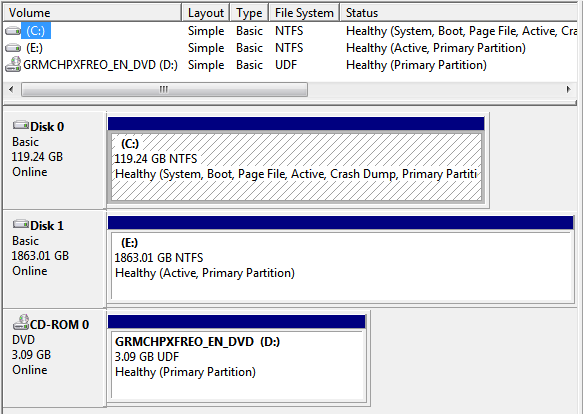
thanks,
I decided to format my PC using the Windows 7 boot disk, but noticed when choosing what drive to install my OS to, both of my drives types are labeled as System Drives, I decided to go ahead anyway and install my OS to my SSD, but after completing installation, Disk Management shows both of my drives as Active drives. I have searched a bit online and it seems that only my C drive should be an Active drive, does this have anything to do with both of my drives being read as System Drives at the start of installation. What would be the reason for both of my drives being Active? I have no problems with reformatting if needed.
thanks,
My Computer
At a glance
Windows 7 Home Premium 64bitIntel(R) Core(TM) i7-2600 CPU @ 3.40GHz8.00gbNVIDIA GeForce GTX 770
- Computer type
- PC/Desktop
- Computer Manufacturer/Model Number
- Custom Build
- OS
- Windows 7 Home Premium 64bit
- CPU
- Intel(R) Core(TM) i7-2600 CPU @ 3.40GHz
- Motherboard
- Gigabyte Technology Co., Ltd. Z68A-D3H-B3
- Memory
- 8.00gb
- Graphics Card(s)
- NVIDIA GeForce GTX 770
- Sound Card
- NVIDIA High Definition Audio
- Monitor(s) Displays
- BenQ E2420HD
- Screen Resolution
- 1920x1080
- Hard Drives
- Samsung SSD 840 PRO Seri
ST32000641AS
Seagate Expansion Desk USB Device
- Antivirus
- Kaspersky Internet Security 2013
- Browser
- Google Chrome


