Both sfc/startup repair cannot fix corruption - credui.dll

Matrix828

New member
Local time
7:51 AM
Messages
14
For a while now I have been unable to open WhoCrashed (first noticed after a BSOD) due to "credui.dll" being missing. Reinstalling did not fix this problem.
Now this problem has 'spread' to chrome, removing my ability to use it, for the same reason (but thanks to an "old_chrome.exe" found in the chrome installation folder I can internet again)
I have attempted a sfc /scannow (sfcdetails.txt attached), which found corrupted files (a lot of them by a quick look) but was unable to repair.
I grabbed an installation disc (w/ SP1) and tried to run startup repair, but it could even find my windows installation :confused:.
Attempting to run sfc with the offline parameters off the installation disc just says that it is unable to start.
Startup repair goes through very quickly and only says it fixed an invalid system partition?

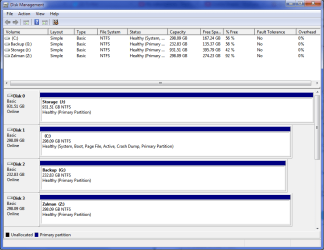
Attached is also a picture of my disk management window - no system reserved in my C:\ drive? Is this normal? :confused:

I'd really rather not do a repair/clean install of windows so this is last on the list of things to do.

I've also done a lot of googling to find solutions but to no avail.
 

Attachments

  • disk management.png
    disk management.png
    25.5 KB · Views: 2
  • sfcdetails.txt
    sfcdetails.txt
    214.5 KB · Views: 7
Last edited:

My Computer My Computer

Computer type
PC/Desktop
Computer Manufacturer/Model Number
Custom
OS
Windows 7 Ultimate x64
CPU
Intel i7-3570k @ 4.0GHz
Motherboard
MSI Z77A-G45 Gaming
Memory
2x4GB Corsair Vengeance Pro
Graphics Card(s)
MSI GTX 650 Ti BOOST
Hard Drives
120GB Corsair Force SSD - OS
1TB WD Green - Storage
Antivirus
Microsoft Security Essentials
Browser
Chrome
c:\windows\system32\credui.dll is a hardlink to a file in C:\Windows\WinSxS.

C:\Windows\System32>fsutil hardlink list "C:\Windows\System32\credui.dll"
\Windows\WinSxS\amd64_microsoft-windows-credui_31bf3856ad364e35_6.2.9200.16384_n
one_3400f42618b1a9ff\credui.dll
\Windows\System32\credui.dll

Try replacing the file in the WinSxS folder.
 

My Computer My Computer

Computer type
PC/Desktop
Computer Manufacturer/Model Number
Lenovo IdeaCenter 450
OS
Windows 10 Pro X64
CPU
Intel Quad Core i7-4770 @ 3.4Ghz
Memory
16.0GB PC3-12800 DDR3 SDRAM 1600 MHz
Graphics Card(s)
Intel Integrated HD Graphics
Sound Card
Realtek HD Audio
Monitor(s) Displays
HP 22" LCD
Screen Resolution
1680 x 1050
Hard Drives
250GB Samsung EVO SATA-3 SSD
2TB Seagate ST2000DM001 SATA-2
1.5TB Seagate ST3150041AS SATA
Keyboard
Dell USB
Mouse
Lenovo USB
Internet Speed
Cable via Road Runner 3MB Upload, 30MB Download
Antivirus
Windows Defender, MBAM Pro, MBAE
Browser
Seamonkey
Other Info
UEFI/GPT
PLDS DVD-RW DH16AERSH
Having no system reserved is due to installing to a pre-formatted drive, no problem at all, it's included in C:\.

Look like you have a lot of corrupt files, I'll ask some one who can help you fix it, assuming you try nothing on your own. You have done something to corrupt them.
Hang tight.
 

My Computer My Computer

Computer type
PC/Desktop
Computer Manufacturer/Model Number
Home Built Desktop By DataTech
OS
Windows 7 Ultimate X64 SP1
CPU
Intel i5-2550K, Differing ~4.4-4.8GHz No built in GPU
Motherboard
ASUS P8Z68-V PRO/GEN3
Memory
16GB G.Skill Sniper 1866MHz @ 2133MHz 2x8GB
Graphics Card(s)
ASUS GTX650TIB-DC2OC-2GD5, (650TI Boost)
Sound Card
Onboard Realtek 5-1
Monitor(s) Displays
Samsung P2570HD
Screen Resolution
1920x1080
Hard Drives
Samsung 840 Pro 256GB SSD for OS, 500GB Seagate Constellation (Enterprise drive) for Data
PSU
Corsair HX650W
Case
Inwin Dragon Rider
Cooling
Hyper 212 EVO w/two Noctua fans, push-pull, @1300 RPM
Keyboard
E-Z Eyes, bright yellow keys with large characters
Mouse
steelseries SENSEI Laser Pro Gaming
Internet Speed
48-51Mbs Mbs down, 11 Mbs up Xfinity Cable
Antivirus
Norton Internet Security 2013
Browser
IE 10, Opera, Pale Moon if needed
Other Info
4 case fans, LG BluRay-RE, ASUS DVD-RW, Mr. Fusion power supply, 1.21 gigawatts.
Here's the list of file errors - I'll post a fix protocol for them later, when I get time.
Code:
2014-03-03 21:00:37, Info                  CSI    00000393 [SR] Repairing 22 (0x0000000000000016) components
2014-03-03 21:00:37, Info                  CSI    00000394 [SR] Beginning Verify and Repair transaction
2014-03-03 21:00:37, Info                  CSI    00000395 [SR] Cannot repair member file [l:32{16}]"batmeter.dll.mui" of Microsoft-Windows-batmeter.Resources, Version = 6.1.7600.16385, pA = PROCESSOR_ARCHITECTURE_AMD64 (9), Culture = [l:10{5}]"en-US", VersionScope = 1 nonSxS, PublicKeyToken = {l:8 b:31bf3856ad364e35}, Type neutral, TypeName neutral, PublicKey neutral in the store, file is missing
2014-03-03 21:00:37, Info                  CSI    00000396 [SR] Cannot repair member file [l:24{12}]"Faultrep.dll" of Microsoft-Windows-ErrorReportingFaults, Version = 6.1.7601.17514, pA = PROCESSOR_ARCHITECTURE_AMD64 (9), Culture neutral, VersionScope = 1 nonSxS, PublicKeyToken = {l:8 b:31bf3856ad364e35}, Type neutral, TypeName neutral, PublicKey neutral in the store, file is missing
2014-03-03 21:00:37, Info                  CSI    00000397 [SR] Cannot repair member file [l:12{6}]"fc.exe" of Microsoft-Windows-FileSystemCompareUtilities, Version = 6.1.7600.16385, pA = PROCESSOR_ARCHITECTURE_AMD64 (9), Culture neutral, VersionScope = 1 nonSxS, PublicKeyToken = {l:8 b:31bf3856ad364e35}, Type neutral, TypeName neutral, PublicKey neutral in the store, file is missing
2014-03-03 21:00:37, Info                  CSI    00000398 [SR] Cannot repair member file [l:28{14}]"fdBthProxy.dll" of Microsoft-Windows-FDBTH, Version = 6.1.7600.16385, pA = PROCESSOR_ARCHITECTURE_AMD64 (9), Culture neutral, VersionScope = 1 nonSxS, PublicKeyToken = {l:8 b:31bf3856ad364e35}, Type neutral, TypeName neutral, PublicKey neutral in the store, file is missing
2014-03-03 21:00:37, Info                  CSI    00000399 [SR] Cannot repair member file [l:18{9}]"fdBth.dll" of Microsoft-Windows-FDBTH, Version = 6.1.7600.16385, pA = PROCESSOR_ARCHITECTURE_AMD64 (9), Culture neutral, VersionScope = 1 nonSxS, PublicKeyToken = {l:8 b:31bf3856ad364e35}, Type neutral, TypeName neutral, PublicKey neutral in the store, file is missing
2014-03-03 21:00:37, Info                  CSI    0000039a [SR] Cannot repair member file [l:26{13}]"MsiCofire.dll" of Microsoft-Windows-Msi-CorruptedFileRepair, Version = 6.1.7600.16385, pA = PROCESSOR_ARCHITECTURE_AMD64 (9), Culture neutral, VersionScope = 1 nonSxS, PublicKeyToken = {l:8 b:31bf3856ad364e35}, Type neutral, TypeName neutral, PublicKey neutral in the store, file is missing
2014-03-03 21:00:37, Info                  CSI    0000039b [SR] Cannot repair member file [l:46{23}]"AuxiliaryDisplayCpl.dll" of Microsoft-Windows-MobilePC-AuxiliaryDisplay-CPL, Version = 6.1.7601.17514, pA = PROCESSOR_ARCHITECTURE_AMD64 (9), Culture neutral, VersionScope = 1 nonSxS, PublicKeyToken = {l:8 b:31bf3856ad364e35}, Type neutral, TypeName neutral, PublicKey neutral in the store, file is missing
2014-03-03 21:00:37, Info                  CSI    0000039c [SR] Cannot repair member file [l:50{25}]"MediaCenter-ppdlic.xrm-ms" of Microsoft-Windows-MediaCenter-Licensing, Version = 6.1.7600.16385, pA = PROCESSOR_ARCHITECTURE_AMD64 (9), Culture neutral, VersionScope = 1 nonSxS, PublicKeyToken = {l:8 b:31bf3856ad364e35}, Type neutral, TypeName neutral, PublicKey neutral in the store, file is missing
2014-03-03 21:00:37, Info                  CSI    0000039d [SR] Cannot repair member file [l:56{28}]"AuxiliaryDisplayServices.dll" of Microsoft-Windows-MobilePC-AuxiliaryDisplay-SystemDataProviders, Version = 6.1.7601.17514, pA = PROCESSOR_ARCHITECTURE_AMD64 (9), Culture neutral, VersionScope = 1 nonSxS, PublicKeyToken = {l:8 b:31bf3856ad364e35}, Type neutral, TypeName neutral, PublicKey neutral in the store, file is missing
2014-03-03 21:00:37, Info                  CSI    0000039e [SR] Cannot repair member file [l:56{28}]"Windows Battery Critical.wav" of Microsoft-Windows-Shell-Sounds, Version = 6.1.7600.16385, pA = PROCESSOR_ARCHITECTURE_AMD64 (9), Culture neutral, VersionScope = 1 nonSxS, PublicKeyToken = {l:8 b:31bf3856ad364e35}, Type neutral, TypeName neutral, PublicKey neutral in the store, file is missing
2014-03-03 21:00:37, Info                  CSI    0000039f [SR] Cannot repair member file [l:46{23}]"Windows Battery Low.wav" of Microsoft-Windows-Shell-Sounds, Version = 6.1.7600.16385, pA = PROCESSOR_ARCHITECTURE_AMD64 (9), Culture neutral, VersionScope = 1 nonSxS, PublicKeyToken = {l:8 b:31bf3856ad364e35}, Type neutral, TypeName neutral, PublicKey neutral in the store, file is missing
2014-03-03 21:00:37, Info                  CSI    000003a0 [SR] Cannot repair member file [l:38{19}]"Windows Balloon.wav" of Microsoft-Windows-Shell-Sounds, Version = 6.1.7600.16385, pA = PROCESSOR_ARCHITECTURE_AMD64 (9), Culture neutral, VersionScope = 1 nonSxS, PublicKeyToken = {l:8 b:31bf3856ad364e35}, Type neutral, TypeName neutral, PublicKey neutral in the store, file is missing
2014-03-03 21:00:37, Info                  CSI    000003a1 [SR] Cannot repair member file [l:50{25}]"Windows Critical Stop.wav" of Microsoft-Windows-Shell-Sounds, Version = 6.1.7600.16385, pA = PROCESSOR_ARCHITECTURE_AMD64 (9), Culture neutral, VersionScope = 1 nonSxS, PublicKeyToken = {l:8 b:31bf3856ad364e35}, Type neutral, TypeName neutral, PublicKey neutral in the store, file is missing
2014-03-03 21:00:37, Info                  CSI    000003a2 [SR] Cannot repair member file [l:30{15}]"basecsp.dll.mui" of Microsoft-Windows-SmartCardKsp.Resources, Version = 6.1.7600.16385, pA = PROCESSOR_ARCHITECTURE_AMD64 (9), Culture = [l:10{5}]"en-US", VersionScope = 1 nonSxS, PublicKeyToken = {l:8 b:31bf3856ad364e35}, Type neutral, TypeName neutral, PublicKey neutral in the store, file is missing
2014-03-03 21:00:37, Info                  CSI    000003a3 [SR] Cannot repair member file [l:24{12}]"batt.dll.mui" of Microsoft.Windows.Hardware.Devices.ClassInstaller.BATTERY-DriverClass.Resources, Version = 6.1.7600.16385, pA = PROCESSOR_ARCHITECTURE_AMD64 (9), Culture = [l:10{5}]"en-US", VersionScope = 1 nonSxS, PublicKeyToken = {l:8 b:31bf3856ad364e35}, Type neutral, TypeName neutral, PublicKey neutral in the store, file is missing
2014-03-03 21:00:37, Info                  CSI    000003a4 [SR] Cannot repair member file [l:24{12}]"MpClient.dll" of Security-Malware-Windows-Defender, Version = 6.1.7601.18170, pA = PROCESSOR_ARCHITECTURE_AMD64 (9), Culture neutral, VersionScope = 1 nonSxS, PublicKeyToken = {l:8 b:31bf3856ad364e35}, Type neutral, TypeName neutral, PublicKey neutral in the store, file is missing
2014-03-03 21:00:37, Info                  CSI    000003a5 [SR] Cannot repair member file [l:18{9}]"MpSvc.dll" of Security-Malware-Windows-Defender, Version = 6.1.7601.18170, pA = PROCESSOR_ARCHITECTURE_AMD64 (9), Culture neutral, VersionScope = 1 nonSxS, PublicKeyToken = {l:8 b:31bf3856ad364e35}, Type neutral, TypeName neutral, PublicKey neutral in the store, file is missing
2014-03-03 21:00:37, Info                  CSI    000003a6 [SR] Cannot repair member file [l:20{10}]"perfos.dll" of Microsoft-Windows-PerformanceBaseCounters, Version = 6.1.7600.16385, pA = PROCESSOR_ARCHITECTURE_IA32_ON_WIN64 (10), Culture neutral, VersionScope = 1 nonSxS, PublicKeyToken = {l:8 b:31bf3856ad364e35}, Type neutral, TypeName neutral, PublicKey neutral in the store, file is missing
2014-03-03 21:00:37, Info                  CSI    000003a7 [SR] Cannot repair member file [l:22{11}]"perfnet.dll" of Microsoft-Windows-PerformanceBaseCounters, Version = 6.1.7600.16385, pA = PROCESSOR_ARCHITECTURE_IA32_ON_WIN64 (10), Culture neutral, VersionScope = 1 nonSxS, PublicKeyToken = {l:8 b:31bf3856ad364e35}, Type neutral, TypeName neutral, PublicKey neutral in the store, file is missing
2014-03-03 21:00:37, Info                  CSI    000003a8 [SR] Cannot repair member file [l:24{12}]"perfproc.dll" of Microsoft-Windows-PerformanceBaseCounters, Version = 6.1.7600.16385, pA = PROCESSOR_ARCHITECTURE_IA32_ON_WIN64 (10), Culture neutral, VersionScope = 1 nonSxS, PublicKeyToken = {l:8 b:31bf3856ad364e35}, Type neutral, TypeName neutral, PublicKey neutral in the store, file is missing
2014-03-03 21:00:37, Info                  CSI    000003a9 [SR] Cannot repair member file [l:22{11}]"credwiz.exe" of Microsoft-Windows-Credwiz, Version = 6.1.7600.16385, pA = PROCESSOR_ARCHITECTURE_INTEL (0), Culture neutral, VersionScope = 1 nonSxS, PublicKeyToken = {l:8 b:31bf3856ad364e35}, Type neutral, TypeName neutral, PublicKey neutral in the store, file is missing
2014-03-03 21:00:37, Info                  CSI    000003aa [SR] Cannot repair member file [l:20{10}]"credui.dll" of Microsoft-Windows-CredUI, Version = 6.1.7601.17514, pA = PROCESSOR_ARCHITECTURE_INTEL (0), Culture neutral, VersionScope = 1 nonSxS, PublicKeyToken = {l:8 b:31bf3856ad364e35}, Type neutral, TypeName neutral, PublicKey neutral in the store, file is missing
2014-03-03 21:00:37, Info                  CSI    000003ab [SR] Cannot repair member file [l:56{28}]"RunLegacyCPLElevated.exe.mui" of Microsoft-Windows-RunLegacyCPLElevated.Resources, Version = 6.1.7600.16385, pA = PROCESSOR_ARCHITECTURE_INTEL (0), Culture = [l:10{5}]"en-US", VersionScope = 1 nonSxS, PublicKeyToken = {l:8 b:31bf3856ad364e35}, Type neutral, TypeName neutral, PublicKey neutral in the store, file is missing
2014-03-03 21:00:37, Info                  CSI    000003ac [SR] Cannot repair member file [l:26{13}]"runas.exe.mui" of Microsoft-Windows-RunAs.Resources, Version = 6.1.7600.16385, pA = PROCESSOR_ARCHITECTURE_INTEL (0), Culture = [l:10{5}]"en-US", VersionScope = 1 nonSxS, PublicKeyToken = {l:8 b:31bf3856ad364e35}, Type neutral, TypeName neutral, PublicKey neutral in the store, file is missing
2014-03-03 21:00:37, Info                  CSI    000003ad [SR] Cannot repair member file [l:32{16}]"rundll32.exe.mui" of Microsoft-Windows-rundll32.Resources, Version = 6.1.7600.16385, pA = PROCESSOR_ARCHITECTURE_INTEL (0), Culture = [l:10{5}]"en-US", VersionScope = 1 nonSxS, PublicKeyToken = {l:8 b:31bf3856ad364e35}, Type neutral, TypeName neutral, PublicKey neutral in the store, file is missing
2014-03-03 21:00:37, Info                  CSI    000003ae [SR] Cannot repair member file [l:30{15}]"runonce.exe.mui" of Microsoft-Windows-runonce.Resources, Version = 6.1.7600.16385, pA = PROCESSOR_ARCHITECTURE_INTEL (0), Culture = [l:10{5}]"en-US", VersionScope = 1 nonSxS, PublicKeyToken = {l:8 b:31bf3856ad364e35}, Type neutral, TypeName neutral, PublicKey neutral in the store, file is missing
2014-03-03 21:00:37, Info                  CSI    000003af [SR] Cannot repair member file [l:22{11}]"credssp.dll" of Microsoft-Windows-Security-CredSSP, Version = 6.1.7601.17514, pA = PROCESSOR_ARCHITECTURE_INTEL (0), Culture neutral, VersionScope = 1 nonSxS, PublicKeyToken = {l:8 b:31bf3856ad364e35}, Type neutral, TypeName neutral, PublicKey neutral in the store, file is missing
2014-03-03 21:00:37, Info                  CSI    000003b0 [SR] Cannot verify component files for Microsoft.VC80.MFCLOC, Version = 8.0.50727.4027, pA = PROCESSOR_ARCHITECTURE_INTEL (0), Culture neutral, VersionScope neutral, PublicKeyToken = {l:8 b:1fc8b3b9a1e18e3b}, Type = [l:10{5}]"win32", TypeName neutral, PublicKey neutral, manifest is damaged (FALSE)

2014-03-03 21:00:37, Info                  CSI    000003b1 [SR] Cannot verify component files for Microsoft.VC80.MFC, Version = 8.0.50727.4027, pA = PROCESSOR_ARCHITECTURE_INTEL (0), Culture neutral, VersionScope neutral, PublicKeyToken = {l:8 b:1fc8b3b9a1e18e3b}, Type = [l:10{5}]"win32", TypeName neutral, PublicKey neutral, manifest is damaged (FALSE)
 

My Computer My Computer

Computer type
Laptop
Computer Manufacturer/Model Number
Asus K52F or Lenovo B51-80
OS
Win 7 x64 Home Premium (and x86 VirtualBox VM)/Win10
CPU
i3 370M/i7 6500U
Motherboard
Asus/Lenovo
Memory
8GB - finally :)/8GB
Graphics Card(s)
it's an i3, dude!/dual Intel&nVidia
Sound Card
onboard
Monitor(s) Displays
15.6" built-in
Screen Resolution
1366x768/1920x1080
Hard Drives
750GB Seagate internal
Sundry external drives attached to other computers on the local network
1TB SSD on the Lenovo
PSU
n/a
Internet Speed
as much as I can get - usually on a dongle/phone, so <1MB/s
Antivirus
MSE/Defender
Browser
IE11/12/Edge/Chrome/FF(if I must)
I've uploaded a file - ztkaa.zip - to my OneDrive at Noel's OneDrive
Please download and save it.

Right-click on the saved file and select Extract all...
Change the target to C:\ and click on Extract
Close all windows (it would be a good idea to print these instructions!)

Now reboot to the Repair Environment - as soon as the machine restarts, start tapping F8 - this should bring up the Advanced Boot Menu, at the top of which should be the option 'Repair my Computer'
Pick that
You'll have to log in with your username and password.

Pick the option to use a Command Prompt
At the prompt type
DIR C:\ztkaa
hit the enter key - if you get a 'Not Found' error try
DIR D:\ztkaa
or
DIR E:\ztkaa


The drive letter in use when you find the folder will need to be substituted (for<drive>) into the following command...


XCOPY <drive>:\ztkaa <drive>:\windows\winsxs /y /i /s /v /h


(e.g. XCOPY P:\wfire P:\windows\winsxs /y /i /s /v /h )


run the command (it should take almost no time) and when the prompt returns, type
EXIT
and hit the Enter key to exit Command Prompt - reboot to Normal Mode Windows.

Now run SFC /SCANNOW in an Elevated Command Prompt
then reboot and upload the new CBS.log file to your reply
 

My Computer My Computer

Computer type
Laptop
Computer Manufacturer/Model Number
Asus K52F or Lenovo B51-80
OS
Win 7 x64 Home Premium (and x86 VirtualBox VM)/Win10
CPU
i3 370M/i7 6500U
Motherboard
Asus/Lenovo
Memory
8GB - finally :)/8GB
Graphics Card(s)
it's an i3, dude!/dual Intel&nVidia
Sound Card
onboard
Monitor(s) Displays
15.6" built-in
Screen Resolution
1366x768/1920x1080
Hard Drives
750GB Seagate internal
Sundry external drives attached to other computers on the local network
1TB SSD on the Lenovo
PSU
n/a
Internet Speed
as much as I can get - usually on a dongle/phone, so <1MB/s
Antivirus
MSE/Defender
Browser
IE11/12/Edge/Chrome/FF(if I must)
I apologise for the lateness of this reply, seven forums wouldn't let me upload attachments.

Instead, I have copied everything inside the new sfcdetails.txt into a pastebin here.
 

My Computer My Computer

Computer type
PC/Desktop
Computer Manufacturer/Model Number
Custom
OS
Windows 7 Ultimate x64
CPU
Intel i7-3570k @ 4.0GHz
Motherboard
MSI Z77A-G45 Gaming
Memory
2x4GB Corsair Vengeance Pro
Graphics Card(s)
MSI GTX 650 Ti BOOST
Hard Drives
120GB Corsair Force SSD - OS
1TB WD Green - Storage
Antivirus
Microsoft Security Essentials
Browser
Chrome
Odd - a number of the files were fixed, but some weren't.

Code:
2014-03-06 21:56:04, Info                  CSI    0000035c [SR] Repairing 22 (0x0000000000000016) components
2014-03-06 21:56:04, Info                  CSI    0000035d [SR] Beginning Verify and Repair transaction
2014-03-06 21:56:04, Info                  CSI    0000035e [SR] Cannot repair member file [l:56{28}]"Windows Battery Critical.wav" of Microsoft-Windows-Shell-Sounds, Version = 6.1.7600.16385, pA = PROCESSOR_ARCHITECTURE_AMD64 (9), Culture neutral, VersionScope = 1 nonSxS, PublicKeyToken = {l:8 b:31bf3856ad364e35}, Type neutral, TypeName neutral, PublicKey neutral in the store, file is missing
2014-03-06 21:56:04, Info                  CSI    0000035f [SR] Cannot repair member file [l:46{23}]"Windows Battery Low.wav" of Microsoft-Windows-Shell-Sounds, Version = 6.1.7600.16385, pA = PROCESSOR_ARCHITECTURE_AMD64 (9), Culture neutral, VersionScope = 1 nonSxS, PublicKeyToken = {l:8 b:31bf3856ad364e35}, Type neutral, TypeName neutral, PublicKey neutral in the store, file is missing
2014-03-06 21:56:04, Info                  CSI    00000360 [SR] Cannot repair member file [l:38{19}]"Windows Balloon.wav" of Microsoft-Windows-Shell-Sounds, Version = 6.1.7600.16385, pA = PROCESSOR_ARCHITECTURE_AMD64 (9), Culture neutral, VersionScope = 1 nonSxS, PublicKeyToken = {l:8 b:31bf3856ad364e35}, Type neutral, TypeName neutral, PublicKey neutral in the store, file is missing
2014-03-06 21:56:04, Info                  CSI    00000361 [SR] Cannot repair member file [l:50{25}]"Windows Critical Stop.wav" of Microsoft-Windows-Shell-Sounds, Version = 6.1.7600.16385, pA = PROCESSOR_ARCHITECTURE_AMD64 (9), Culture neutral, VersionScope = 1 nonSxS, PublicKeyToken = {l:8 b:31bf3856ad364e35}, Type neutral, TypeName neutral, PublicKey neutral in the store, file is missing
2014-03-06 21:56:05, Info                  CSI    00000362 [SR] Cannot repair member file [l:20{10}]"perfos.dll" of Microsoft-Windows-PerformanceBaseCounters, Version = 6.1.7600.16385, pA = PROCESSOR_ARCHITECTURE_IA32_ON_WIN64 (10), Culture neutral, VersionScope = 1 nonSxS, PublicKeyToken = {l:8 b:31bf3856ad364e35}, Type neutral, TypeName neutral, PublicKey neutral in the store, file is missing
2014-03-06 21:56:05, Info                  CSI    00000363 [SR] Cannot repair member file [l:22{11}]"perfnet.dll" of Microsoft-Windows-PerformanceBaseCounters, Version = 6.1.7600.16385, pA = PROCESSOR_ARCHITECTURE_IA32_ON_WIN64 (10), Culture neutral, VersionScope = 1 nonSxS, PublicKeyToken = {l:8 b:31bf3856ad364e35}, Type neutral, TypeName neutral, PublicKey neutral in the store, file is missing
2014-03-06 21:56:05, Info                  CSI    00000364 [SR] Cannot repair member file [l:24{12}]"perfproc.dll" of Microsoft-Windows-PerformanceBaseCounters, Version = 6.1.7600.16385, pA = PROCESSOR_ARCHITECTURE_IA32_ON_WIN64 (10), Culture neutral, VersionScope = 1 nonSxS, PublicKeyToken = {l:8 b:31bf3856ad364e35}, Type neutral, TypeName neutral, PublicKey neutral in the store, file is missing
2014-03-06 21:56:05, Info                  CSI    00000365 [SR] Cannot repair member file [l:20{10}]"credui.dll" of Microsoft-Windows-CredUI, Version = 6.1.7601.17514, pA = PROCESSOR_ARCHITECTURE_INTEL (0), Culture neutral, VersionScope = 1 nonSxS, PublicKeyToken = {l:8 b:31bf3856ad364e35}, Type neutral, TypeName neutral, PublicKey neutral in the store, file is missing
2014-03-06 21:56:05, Info                  CSI    00000366 [SR] Cannot repair member file [l:56{28}]"RunLegacyCPLElevated.exe.mui" of Microsoft-Windows-RunLegacyCPLElevated.Resources, Version = 6.1.7600.16385, pA = PROCESSOR_ARCHITECTURE_INTEL (0), Culture = [l:10{5}]"en-US", VersionScope = 1 nonSxS, PublicKeyToken = {l:8 b:31bf3856ad364e35}, Type neutral, TypeName neutral, PublicKey neutral in the store, file is missing
2014-03-06 21:56:05, Info                  CSI    00000367 [SR] Cannot verify component files for Microsoft.VC80.MFCLOC, Version = 8.0.50727.4027, pA = PROCESSOR_ARCHITECTURE_INTEL (0), Culture neutral, VersionScope neutral, PublicKeyToken = {l:8 b:1fc8b3b9a1e18e3b}, Type = [l:10{5}]"win32", TypeName neutral, PublicKey neutral, manifest is damaged (FALSE)
2014-03-06 21:56:05, Info                  CSI    00000368 [SR] Cannot verify component files for Microsoft.VC80.MFC, Version = 8.0.50727.4027, pA = PROCESSOR_ARCHITECTURE_INTEL (0), Culture neutral, VersionScope neutral, PublicKeyToken = {l:8 b:1fc8b3b9a1e18e3b}, Type = [l:10{5}]"win32", TypeName neutral, PublicKey neutral, manifest is damaged (FALSE)


Please download and save the CheckSUR tool from http://support.microsoft.com/kb/947821
(you'll need to look in the details for Windows 7, downloading from the Microsoft Download Center)

Run it - The tool can take anywhere from 5 mins to a couple of hours to run (or 'Install') depending on how much it has to do, and may exit silently - it may appear to freeze for most of that time, but be patient.
The result is logged in the C:\Windows\Logs\CBS\CheckSUR.log file - and an archive …\checksur.persist.log file

Then zip the CheckSUR.log and upload it to your reply.
 

My Computer My Computer

Computer type
Laptop
Computer Manufacturer/Model Number
Asus K52F or Lenovo B51-80
OS
Win 7 x64 Home Premium (and x86 VirtualBox VM)/Win10
CPU
i3 370M/i7 6500U
Motherboard
Asus/Lenovo
Memory
8GB - finally :)/8GB
Graphics Card(s)
it's an i3, dude!/dual Intel&nVidia
Sound Card
onboard
Monitor(s) Displays
15.6" built-in
Screen Resolution
1366x768/1920x1080
Hard Drives
750GB Seagate internal
Sundry external drives attached to other computers on the local network
1TB SSD on the Lenovo
PSU
n/a
Internet Speed
as much as I can get - usually on a dongle/phone, so <1MB/s
Antivirus
MSE/Defender
Browser
IE11/12/Edge/Chrome/FF(if I must)
I believe I have already used that tool before, attached are both the requested files.

Thank you for your help.
 

Attachments

My Computer My Computer

Computer type
PC/Desktop
Computer Manufacturer/Model Number
Custom
OS
Windows 7 Ultimate x64
CPU
Intel i7-3570k @ 4.0GHz
Motherboard
MSI Z77A-G45 Gaming
Memory
2x4GB Corsair Vengeance Pro
Graphics Card(s)
MSI GTX 650 Ti BOOST
Hard Drives
120GB Corsair Force SSD - OS
1TB WD Green - Storage
Antivirus
Microsoft Security Essentials
Browser
Chrome
Code:
Checking Component Store
(f) CSI Payload File Missing 0x00000000 msi.dll amd64_microsoft-windows-installer-engine_31bf3856ad364e35_6.1.7601.17514_none_61a0839aca244942 
(f) CSI Payload File Missing 0x00000000 perfos.dll wow64_microsoft-windows-p..ormancebasecounters_31bf3856ad364e35_6.1.7600.16385_none_97bcd9bcab2b9b3a 
(f) CSI Payload File Missing 0x00000000 perfnet.dll wow64_microsoft-windows-p..ormancebasecounters_31bf3856ad364e35_6.1.7600.16385_none_97bcd9bcab2b9b3a 
(f) CSI Payload File Missing 0x00000000 perfproc.dll wow64_microsoft-windows-p..ormancebasecounters_31bf3856ad364e35_6.1.7600.16385_none_97bcd9bcab2b9b3a 
(f) CSI Payload File Missing 0x00000000 Windows Battery Critical.wav amd64_microsoft-windows-shell-sounds_31bf3856ad364e35_6.1.7600.16385_none_73076dd9cf3a9dce 
(f) CSI Payload File Missing 0x00000000 Windows Battery Low.wav amd64_microsoft-windows-shell-sounds_31bf3856ad364e35_6.1.7600.16385_none_73076dd9cf3a9dce 
(f) CSI Payload File Missing 0x00000000 Windows Balloon.wav amd64_microsoft-windows-shell-sounds_31bf3856ad364e35_6.1.7600.16385_none_73076dd9cf3a9dce 
(f) CSI Payload File Missing 0x00000000 Windows Critical Stop.wav amd64_microsoft-windows-shell-sounds_31bf3856ad364e35_6.1.7600.16385_none_73076dd9cf3a9dce 
(f) CSI Payload File Missing 0x00000000 credui.dll x86_microsoft-windows-credui_31bf3856ad364e35_6.1.7601.17514_none_dd3eb6aced2f8d13 
(f) CSI Payload File Missing 0x00000000 drvmain.sdb wow64_microsoft-windows-a..ence-mitigations-c5_31bf3856ad364e35_6.1.7601.17974_none_746011233d79b9a7 
(f) CSI Manifest Missing 0x00000002 x86_microsoft.vc80.mfc_1fc8b3b9a1e18e3b_8.0.50727.4027_none_cbeeb6564710a1d1.manifest x86_microsoft.vc80.mfc_1fc8b3b9a1e18e3b_8.0.50727.4027_none_cbeeb6564710a1d1 
(f) CSI Payload File Missing 0x00000000 RunLegacyCPLElevated.exe.mui x86_microsoft-windows-r..lelevated.resources_31bf3856ad364e35_6.1.7600.16385_en-us_ce201b940a7d6ea5 
(f) CSI Manifest Missing 0x00000002 x86_microsoft.vc80.mfcloc_1fc8b3b9a1e18e3b_8.0.50727.4027_none_03c6f934205fcb15.manifest x86_microsoft.vc80.mfcloc_1fc8b3b9a1e18e3b_8.0.50727.4027_none_03c6f934205fcb15 
(f) CSI Payload File Missing 0x00000000 setup16.exe wow64_microsoft-windows-wow64_31bf3856ad364e35_6.1.7601.22209_none_d139c7943b60a596 
(f) CSI Payload File Missing 0x00000000 vbscript.dll wow64_microsoft-windows-scripting-vbscript_31bf3856ad364e35_9.4.8112.16483_none_c70e0cef351a6243 
(f) CSI Payload File Missing 0x00000000 api-ms-win-core-string-l1-1-0.dll x86_microsoft-windows-minkernelapinamespace_31bf3856ad364e35_6.1.7601.22209_none_0d52a9aaf32333d8 
(f) CSI Payload File Missing 0x00000000 url.dll x86_microsoft-windows-ie-winsockautodialstub_31bf3856ad364e35_9.4.8112.20557_none_0919a2c791413dac 
(f) CSI Payload File Missing 0x00000000 mshtmler.dll amd64_microsoft-windows-ie-htmleditingsupport_31bf3856ad364e35_8.0.7600.16385_none_6a1cbf5f4ad99b65 
(f) CSI Payload File Missing 0x00000000 api-ms-win-core-file-l1-1-0.dll amd64_microsoft-windows-minkernelapinamespace_31bf3856ad364e35_6.1.7601.22209_none_6971452eab80a50e 
(f) CSI Payload File Missing 0x00000000 api-ms-win-core-string-l1-1-0.dll amd64_microsoft-windows-minkernelapinamespace_31bf3856ad364e35_6.1.7601.22209_none_6971452eab80a50e 
(f) CSI Payload File Missing 0x00000000 MpClient.dll amd64_security-malware-windows-defender_31bf3856ad364e35_6.1.7601.22341_none_b648c5e888076cca 
(f) CSI Payload File Missing 0x00000000 MpSvc.dll amd64_security-malware-windows-defender_31bf3856ad364e35_6.1.7601.22341_none_b648c5e888076cca 
(f) CSI Payload File Missing 0x00000000 mshtmled.dll amd64_microsoft-windows-ie-htmlediting_31bf3856ad364e35_8.0.7601.17514_none_c109360dd10647b2 
(f) CSI Payload File Missing 0x00000000 VGX.dll x86_microsoft-windows-ie-vgx_31bf3856ad364e35_9.4.8112.20593_none_05f6a2141c55df06 
(f) CSI Payload File Missing 0x00000000 mqcertui.dll amd64_microsoft-windows-msmq-admin_31bf3856ad364e35_6.1.7601.17514_none_1574070d540beef7 
(f) CSI Payload File Missing 0x00000000 tzres.dll.mui x86_microsoft-windows-i..timezones.resources_31bf3856ad364e35_6.1.7601.21855_en-us_85dc1d26f945c1de

It's going to take me a while to source the files - and it needs to be done in two hits anyhow.

I'll post the manifest files in a few minutes.
 

My Computer My Computer

Computer type
Laptop
Computer Manufacturer/Model Number
Asus K52F or Lenovo B51-80
OS
Win 7 x64 Home Premium (and x86 VirtualBox VM)/Win10
CPU
i3 370M/i7 6500U
Motherboard
Asus/Lenovo
Memory
8GB - finally :)/8GB
Graphics Card(s)
it's an i3, dude!/dual Intel&nVidia
Sound Card
onboard
Monitor(s) Displays
15.6" built-in
Screen Resolution
1366x768/1920x1080
Hard Drives
750GB Seagate internal
Sundry external drives attached to other computers on the local network
1TB SSD on the Lenovo
PSU
n/a
Internet Speed
as much as I can get - usually on a dongle/phone, so <1MB/s
Antivirus
MSE/Defender
Browser
IE11/12/Edge/Chrome/FF(if I must)
...this may take longer. I though I had the proper manifests for the VC++ 2005 install to hand - but it seems I have everything except these.
Back tomorrow, with luck!
 

My Computer My Computer

Computer type
Laptop
Computer Manufacturer/Model Number
Asus K52F or Lenovo B51-80
OS
Win 7 x64 Home Premium (and x86 VirtualBox VM)/Win10
CPU
i3 370M/i7 6500U
Motherboard
Asus/Lenovo
Memory
8GB - finally :)/8GB
Graphics Card(s)
it's an i3, dude!/dual Intel&nVidia
Sound Card
onboard
Monitor(s) Displays
15.6" built-in
Screen Resolution
1366x768/1920x1080
Hard Drives
750GB Seagate internal
Sundry external drives attached to other computers on the local network
1TB SSD on the Lenovo
PSU
n/a
Internet Speed
as much as I can get - usually on a dongle/phone, so <1MB/s
Antivirus
MSE/Defender
Browser
IE11/12/Edge/Chrome/FF(if I must)
Here's everything but the VC++ 2005 files....


I've uploaded a file - 828aa.zip - to my OneDrive at Noel's OneDrive
Please download and save it.

Right-click on the saved file and select Extract all...
Change the target to C:\ and click on Extract
Close all windows (it would be a good idea to print these instructions!)

Now reboot to the Repair Environment - as soon as the machine restarts, start tapping F8 - this should bring up the Advanced Boot Menu, at the top of which should be the option 'Repair my Computer'
Pick that
You'll have to log in with your username and password.

Pick the option to use a Command Prompt
At the prompt type
DIR C:\828aa
hit the enter key - if you get a 'Not Found' error try
DIR D:\828aa
or
DIR E:\828aa


The drive letter in use when you find the folder will need to be substituted (for<drive>) into the following command...


XCOPY <drive>:\828aa <drive>:\windows\winsxs /y /i /s /v /h


(e.g. XCOPY P:\wfire P:\windows\winsxs /y /i /s /v /h )


run the command (it should take almost no time) and when the prompt returns, type
EXIT
and hit the Enter key to exit Command Prompt - reboot to Normal Mode Windows.

Now run SFC /SCANNOW in an Elevated Command Prompt
then reboot and upload the new CBS.log file to your reply
 

My Computer My Computer

Computer type
Laptop
Computer Manufacturer/Model Number
Asus K52F or Lenovo B51-80
OS
Win 7 x64 Home Premium (and x86 VirtualBox VM)/Win10
CPU
i3 370M/i7 6500U
Motherboard
Asus/Lenovo
Memory
8GB - finally :)/8GB
Graphics Card(s)
it's an i3, dude!/dual Intel&nVidia
Sound Card
onboard
Monitor(s) Displays
15.6" built-in
Screen Resolution
1366x768/1920x1080
Hard Drives
750GB Seagate internal
Sundry external drives attached to other computers on the local network
1TB SSD on the Lenovo
PSU
n/a
Internet Speed
as much as I can get - usually on a dongle/phone, so <1MB/s
Antivirus
MSE/Defender
Browser
IE11/12/Edge/Chrome/FF(if I must)
I have done as you have said; logs attached.
 

Attachments

My Computer My Computer

Computer type
PC/Desktop
Computer Manufacturer/Model Number
Custom
OS
Windows 7 Ultimate x64
CPU
Intel i7-3570k @ 4.0GHz
Motherboard
MSI Z77A-G45 Gaming
Memory
2x4GB Corsair Vengeance Pro
Graphics Card(s)
MSI GTX 650 Ti BOOST
Hard Drives
120GB Corsair Force SSD - OS
1TB WD Green - Storage
Antivirus
Microsoft Security Essentials
Browser
Chrome
I seem to have missed one file - apart from the manifests we know about.
I'll deal with that one tomorrow...
Code:
2014-03-10 00:10:44, Info                  CSI    00000331 [SR] Repairing 6 components
2014-03-10 00:10:44, Info                  CSI    00000332 [SR] Beginning Verify and Repair transaction
2014-03-10 00:10:44, Info                  CSI    00000333 [SR] Cannot repair member file [l:50{25}]"Windows Critical Stop.wav" of Microsoft-Windows-Shell-Sounds, Version = 6.1.7600.16385, pA = PROCESSOR_ARCHITECTURE_AMD64 (9), Culture neutral, VersionScope = 1 nonSxS, PublicKeyToken = {l:8 b:31bf3856ad364e35}, Type neutral, TypeName neutral, PublicKey neutral in the store, file is missing
2014-03-10 00:10:44, Info                  CSI    00000334 [SR] Cannot verify component files for Microsoft.VC80.MFCLOC, Version = 8.0.50727.4027, pA = PROCESSOR_ARCHITECTURE_INTEL (0), Culture neutral, VersionScope neutral, PublicKeyToken = {l:8 b:1fc8b3b9a1e18e3b}, Type = [l:10{5}]"win32", TypeName neutral, PublicKey neutral, manifest is damaged (FALSE)
2014-03-10 00:10:44, Info                  CSI    00000335 [SR] Cannot verify component files for Microsoft.VC80.MFC, Version = 8.0.50727.4027, pA = PROCESSOR_ARCHITECTURE_INTEL (0), Culture neutral, VersionScope neutral, PublicKeyToken = {l:8 b:1fc8b3b9a1e18e3b}, Type = [l:10{5}]"win32", TypeName neutral, PublicKey neutral, manifest is damaged (FALSE)
 

My Computer My Computer

Computer type
Laptop
Computer Manufacturer/Model Number
Asus K52F or Lenovo B51-80
OS
Win 7 x64 Home Premium (and x86 VirtualBox VM)/Win10
CPU
i3 370M/i7 6500U
Motherboard
Asus/Lenovo
Memory
8GB - finally :)/8GB
Graphics Card(s)
it's an i3, dude!/dual Intel&nVidia
Sound Card
onboard
Monitor(s) Displays
15.6" built-in
Screen Resolution
1366x768/1920x1080
Hard Drives
750GB Seagate internal
Sundry external drives attached to other computers on the local network
1TB SSD on the Lenovo
PSU
n/a
Internet Speed
as much as I can get - usually on a dongle/phone, so <1MB/s
Antivirus
MSE/Defender
Browser
IE11/12/Edge/Chrome/FF(if I must)
Still hunting for the VC files :(

Lets get the final one of the others sorted...


I've uploaded a file - 828ab.zip - to my OneDrive at Noel's OneDrive
Please download and save it.

Right-click on the saved file and select Extract all...
Change the target to C:\ and click on Extract
Close all windows (it would be a good idea to print these instructions!)

Now reboot to the Repair Environment - as soon as the machine restarts, start tapping F8 - this should bring up the Advanced Boot Menu, at the top of which should be the option 'Repair my Computer'
Pick that
You'll have to log in with your username and password.

Pick the option to use a Command Prompt
At the prompt type
DIR C:\828ab
hit the enter key - if you get a 'Not Found' error try
DIR D:\828ab
or
DIR E:\828ab


The drive letter in use when you find the folder will need to be substituted (for<drive>) into the following command...


XCOPY <drive>:\828ab <drive>:\windows\winsxs /y /i /s /v /h


(e.g. XCOPY P:\wfire P:\windows\winsxs /y /i /s /v /h )


run the command (it should take almost no time) and when the prompt returns, type
EXIT
and hit the Enter key to exit Command Prompt - reboot to Normal Mode Windows.

Now run SFC /SCANNOW in an Elevated Command Prompt
then reboot and upload the new CBS.log file to your reply
 

My Computer My Computer

Computer type
Laptop
Computer Manufacturer/Model Number
Asus K52F or Lenovo B51-80
OS
Win 7 x64 Home Premium (and x86 VirtualBox VM)/Win10
CPU
i3 370M/i7 6500U
Motherboard
Asus/Lenovo
Memory
8GB - finally :)/8GB
Graphics Card(s)
it's an i3, dude!/dual Intel&nVidia
Sound Card
onboard
Monitor(s) Displays
15.6" built-in
Screen Resolution
1366x768/1920x1080
Hard Drives
750GB Seagate internal
Sundry external drives attached to other computers on the local network
1TB SSD on the Lenovo
PSU
n/a
Internet Speed
as much as I can get - usually on a dongle/phone, so <1MB/s
Antivirus
MSE/Defender
Browser
IE11/12/Edge/Chrome/FF(if I must)
Since my last post (and reboot) I finally have access to chrome without using "old_chrome.exe", and whocrashed opens without error! You people here are brilliant, thank you so much for the help!!

I have attached the new sfcdetails.txt, lets hope there aren't many more files to replace now.

I am also getting a new error - "wermgr.exe Application Error" - I have googled it and people said to either disable the Windows Error Reporting service or just delete the file from system32. Should I attempt to pull a working one from an installation disc and replace it?

A thousand thanks to you, Noel :)
 

Attachments

My Computer My Computer

Computer type
PC/Desktop
Computer Manufacturer/Model Number
Custom
OS
Windows 7 Ultimate x64
CPU
Intel i7-3570k @ 4.0GHz
Motherboard
MSI Z77A-G45 Gaming
Memory
2x4GB Corsair Vengeance Pro
Graphics Card(s)
MSI GTX 650 Ti BOOST
Hard Drives
120GB Corsair Force SSD - OS
1TB WD Green - Storage
Antivirus
Microsoft Security Essentials
Browser
Chrome
Just the two VC++ files to deal with now - I have a team hunting for them :)

We've got the source update - but it's a case of knowing the proper procedures for extraction and renaming - which I don't. If I have to, I'll create a new machine to install the update into and then pull the files from that (but that's going to mean about 5 hours work!)

Back when I've found the files....

Here's the summary output from your last scan..
Code:
2014-03-10 17:25:11, Info                  CSI    00000326 [SR] Repairing 3 components
2014-03-10 17:25:11, Info                  CSI    00000327 [SR] Beginning Verify and Repair transaction
2014-03-10 17:25:11, Info                  CSI    00000328 [SR] Cannot verify component files for Microsoft.VC80.MFCLOC, Version = 8.0.50727.4027, pA = PROCESSOR_ARCHITECTURE_INTEL (0), Culture neutral, VersionScope neutral, PublicKeyToken = {l:8 b:1fc8b3b9a1e18e3b}, Type = [l:10{5}]"win32", TypeName neutral, PublicKey neutral, manifest is damaged (FALSE)
2014-03-10 17:25:11, Info                  CSI    00000329 [SR] Cannot verify component files for Microsoft.VC80.MFC, Version = 8.0.50727.4027, pA = PROCESSOR_ARCHITECTURE_INTEL (0), Culture neutral, VersionScope neutral, PublicKeyToken = {l:8 b:1fc8b3b9a1e18e3b}, Type = [l:10{5}]"win32", TypeName neutral, PublicKey neutral, manifest is damaged (FALSE)
2014-03-10 17:25:11, Info                  CSI    0000032a [SR] Repairing corrupted file [ml:520{260},l:40{20}]"\??\C:\Windows\Media"\[l:50{25}]"Windows Critical Stop.wav" from store
2014-03-10 17:25:11, Info                  CSI    0000032c [SR] Repair complete
 

My Computer My Computer

Computer type
Laptop
Computer Manufacturer/Model Number
Asus K52F or Lenovo B51-80
OS
Win 7 x64 Home Premium (and x86 VirtualBox VM)/Win10
CPU
i3 370M/i7 6500U
Motherboard
Asus/Lenovo
Memory
8GB - finally :)/8GB
Graphics Card(s)
it's an i3, dude!/dual Intel&nVidia
Sound Card
onboard
Monitor(s) Displays
15.6" built-in
Screen Resolution
1366x768/1920x1080
Hard Drives
750GB Seagate internal
Sundry external drives attached to other computers on the local network
1TB SSD on the Lenovo
PSU
n/a
Internet Speed
as much as I can get - usually on a dongle/phone, so <1MB/s
Antivirus
MSE/Defender
Browser
IE11/12/Edge/Chrome/FF(if I must)
With luck this will work :)


I've uploaded a file - 828ac.zip - to my OneDrive at Noel's OneDrive
Please download and save it.
Right-click on the downloaded file, and select Extract all…
Extract to the default location - which will create a new folder 828ac in the same place.
Open this folder - there should be one folder inside it (Manifests,)

Copy the content of the manifests folder (.manifest files) into this folder:

C:\Windows\Temp\CheckSur\Winsxs\Manifests

Now run the CheckSUR tool again (it may take a while)

Post the new CheckSUR.log file, and the CheckSUR.persist.log file.
 

My Computer My Computer

Computer type
Laptop
Computer Manufacturer/Model Number
Asus K52F or Lenovo B51-80
OS
Win 7 x64 Home Premium (and x86 VirtualBox VM)/Win10
CPU
i3 370M/i7 6500U
Motherboard
Asus/Lenovo
Memory
8GB - finally :)/8GB
Graphics Card(s)
it's an i3, dude!/dual Intel&nVidia
Sound Card
onboard
Monitor(s) Displays
15.6" built-in
Screen Resolution
1366x768/1920x1080
Hard Drives
750GB Seagate internal
Sundry external drives attached to other computers on the local network
1TB SSD on the Lenovo
PSU
n/a
Internet Speed
as much as I can get - usually on a dongle/phone, so <1MB/s
Antivirus
MSE/Defender
Browser
IE11/12/Edge/Chrome/FF(if I must)
Here you go, Noel.
 

Attachments

My Computer My Computer

Computer type
PC/Desktop
Computer Manufacturer/Model Number
Custom
OS
Windows 7 Ultimate x64
CPU
Intel i7-3570k @ 4.0GHz
Motherboard
MSI Z77A-G45 Gaming
Memory
2x4GB Corsair Vengeance Pro
Graphics Card(s)
MSI GTX 650 Ti BOOST
Hard Drives
120GB Corsair Force SSD - OS
1TB WD Green - Storage
Antivirus
Microsoft Security Essentials
Browser
Chrome
OUCH!
looks like I may have goofed with those two files :(

They seem either to be wrong, or to have highlighted other problems...

Here's the edited highlights of the CheckSUR log

Code:
Checking Component Store
(f) CSI Manifest Missing 0x00000002 x86_microsoft.vc80.mfc_1fc8b3b9a1e18e3b_8.0.50727.4027_none_cbeeb6564710a1d1.manifest x86_microsoft.vc80.mfc_1fc8b3b9a1e18e3b_8.0.50727.4027_none_cbeeb6564710a1d1 
(w) CSI Located Replacement: Invalid (S256H) 0x00000000 Temp\CheckSUR\winsxs\Manifests\x86_microsoft.vc80.mfc_1fc8b3b9a1e18e3b_8.0.50727.4027_none_cbeeb6564710a1d1.manifest x86_microsoft.vc80.mfc_1fc8b3b9a1e18e3b_8.0.50727.4027_none_cbeeb6564710a1d1 
(f) CSI Manifest Missing 0x00000002 x86_microsoft.vc80.mfcloc_1fc8b3b9a1e18e3b_8.0.50727.4027_none_03c6f934205fcb15.manifest x86_microsoft.vc80.mfcloc_1fc8b3b9a1e18e3b_8.0.50727.4027_none_03c6f934205fcb15 
(w) CSI Located Replacement: Invalid (S256H) 0x00000000 Temp\CheckSUR\winsxs\Manifests\x86_microsoft.vc80.mfcloc_1fc8b3b9a1e18e3b_8.0.50727.4027_none_03c6f934205fcb15.manifest x86_microsoft.vc80.mfcloc_1fc8b3b9a1e18e3b_8.0.50727.4027_none_03c6f934205fcb15 
(f) CSI Payload File Missing 0x00000000 mshtmler.dll amd64_microsoft-windows-ie-htmleditingsupport_31bf3856ad364e35_8.0.7600.16385_none_6a1cbf5f4ad99b65 
(f) CSI Payload File Missing 0x00000000 VGX.dll x86_microsoft-windows-ie-vgx_31bf3856ad364e35_9.4.8112.20593_none_05f6a2141c55df06 
 
Unavailable repair files:
 winsxs\manifests\x86_microsoft.vc80.mfc_1fc8b3b9a1e18e3b_8.0.50727.4027_none_cbeeb6564710a1d1.manifest
 winsxs\manifests\x86_microsoft.vc80.mfcloc_1fc8b3b9a1e18e3b_8.0.50727.4027_none_03c6f934205fcb15.manifest

This means that either I got the files wrong, or you have other problems as well.
In view of the difficulties with VC files in general, I think that the problem lies with me.

I'll have to review and come back to you.
 

My Computer My Computer

Computer type
Laptop
Computer Manufacturer/Model Number
Asus K52F or Lenovo B51-80
OS
Win 7 x64 Home Premium (and x86 VirtualBox VM)/Win10
CPU
i3 370M/i7 6500U
Motherboard
Asus/Lenovo
Memory
8GB - finally :)/8GB
Graphics Card(s)
it's an i3, dude!/dual Intel&nVidia
Sound Card
onboard
Monitor(s) Displays
15.6" built-in
Screen Resolution
1366x768/1920x1080
Hard Drives
750GB Seagate internal
Sundry external drives attached to other computers on the local network
1TB SSD on the Lenovo
PSU
n/a
Internet Speed
as much as I can get - usually on a dongle/phone, so <1MB/s
Antivirus
MSE/Defender
Browser
IE11/12/Edge/Chrome/FF(if I must)
I *think* I may have the source of the problem - an excess line-feed!

I'll upload new copies of the files in a few minutes
 

My Computer My Computer

Computer type
Laptop
Computer Manufacturer/Model Number
Asus K52F or Lenovo B51-80
OS
Win 7 x64 Home Premium (and x86 VirtualBox VM)/Win10
CPU
i3 370M/i7 6500U
Motherboard
Asus/Lenovo
Memory
8GB - finally :)/8GB
Graphics Card(s)
it's an i3, dude!/dual Intel&nVidia
Sound Card
onboard
Monitor(s) Displays
15.6" built-in
Screen Resolution
1366x768/1920x1080
Hard Drives
750GB Seagate internal
Sundry external drives attached to other computers on the local network
1TB SSD on the Lenovo
PSU
n/a
Internet Speed
as much as I can get - usually on a dongle/phone, so <1MB/s
Antivirus
MSE/Defender
Browser
IE11/12/Edge/Chrome/FF(if I must)
Back
Top