Brand new hexacore CPU

Vain

New member
Local time
5:11 PM
Messages
23
The problem is that, while Device Manager acknowledges six cores, MSConfig and Task Manager only displays three cores. I can choose to boot with 1-3 cores, and I can monitor the activity on 1-3 cores.

I've fiddled around in BIOS to no avail, but maybe someone out there has had a problem similiar to this?

It's an AMD Phenom II X6 1090T 3.2GhZ
 

My Computer My Computer

OS
Windows 7 Ultimate 64-bit
Hi Vain, what is the mobo brand and model?
 

My Computer My Computer

Computer Manufacturer/Model Number
WALLONN7 / LIN BLACK SERIES II
OS
Windows 7 Ultimate x64 SP1
CPU
AMD PHENOM II X6 1090T 3.2GHz
Motherboard
GIGABYTE GA-890FXA-UD7
Memory
8GB G.SKILL RIPJAWS - F3-10666CL7D
Graphics Card(s)
SAPPHIRE ATI RADEON HD 5870 VAPOR X OC
Sound Card
REALTEK DOLBY HOME THEATER
Monitor(s) Displays
LED LG W2486L
Screen Resolution
1080p
Hard Drives
SEAGATE 1TB -ST31000528AS - AHCI MODE - AS SATA
PSU
ZALMAN ZM1000-HP 1000W
Case
THERMALTAKE XASER VI VG4000SWA
Cooling
140MM x3 / 120MM x1 AIR COOLING - THERMALTAKE
Keyboard
MICROSOFT DIGITAL MEDIA KEYBOARD 3000 - USB
Mouse
MICROSOFT BASIC OPTICAL MOUSE 2.0 - USB
Internet Speed
600KBPS
Other Info
MICROSOFT XBOX 360 CONTROLLER
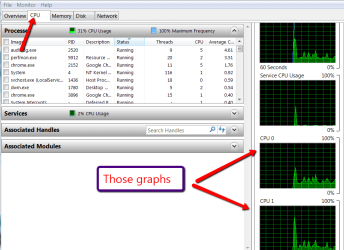
How many cores do you see in Resource Monitor > CPU tab - The graphs on the right side.
 

Attachments

  • 2011-04-29_1944.png
    2011-04-29_1944.png
    29.8 KB · Views: 17

My Computer My Computer

Computer Manufacturer/Model Number
HP, Dell, Gateway, Toshiba - 4 laptops and 2 desktops
OS
Vista, Windows7, Mint Mate, Zorin, Windows 8
CPU
from 1.6GHz Duo to i7
Monitor(s) Displays
2x HP w2207
Hard Drives
5x HDD, 7x SSD, 12x Externals
Keyboard
with trackball - no mices
Mouse
Trackball mice
Internet Speed
DSL 6000
It's an Asus M4A89TD PRO/USB3,

As for the graphs, I see CPU0, CPU1 and CPU2. I've searched a few other forums, and one person had a problem with his computer only detecting five of the six. I've tried turning AMD Turbo Core Technology both on and off in BIOS with no succes, could it be that the motherboard does not compute with six cores, even though it states that it is hexacore ready?

EDIT: The guy that had it only detecting five cores uses the same motherboard as I, so it's probably not the motherboard's fault.
 

My Computer My Computer

OS
Windows 7 Ultimate 64-bit
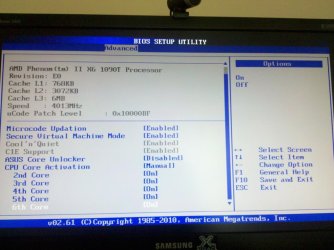
My brother has that chip and when we first booted up it showed only 5 cores, and in the BIOS there was a place to turn on and off each core.
 

My Computer My Computer

Computer Manufacturer/Model Number
HAL-9000
OS
Windows 7 Ultimate 64bit
CPU
Intel i7 3770K
Motherboard
Asus Sabertooth Z77
Memory
16GB DDR3 1333 Corsair XMS3
Graphics Card(s)
XFX HD6950 2GB EyeFinity
Sound Card
Logitech G35 & Sennheiser PC135 & VIA HD
Monitor(s) Displays
23" HP 2310e, 23" Samsung B2230, 21.5" Viewsonic
Screen Resolution
5760x1080
Hard Drives
16TB of Storage
128GB & 256GB Crucial M4 SSD's, 2X 1TB WD Black, 3x 2TB WD, 3x 2TB Samsung F4, 1.5TB Seagate, WD 500GB,
PSU
Antec True Power New 650watt
Case
Cooler Master HAF-932
Cooling
Corsair H60 Hydro Cooler, 3x 230mm Fans, 2x120mm Fan
Keyboard
Logitech G15 and G13
Mouse
Logitech G700 Gaming Mouse
Internet Speed
50/10 Mbit
Other Info
Speakers : Alesis M1 Active Mk2 Studio Monitors , APC RS 1200 UPS, HP 4500DN Color Laser, HP P1006 mono Laser, Kodak 8500 Dye-Sub, Epson 1280 inkjet, Epson Worforce 610 MFC
It's an Asus M4A89TD PRO/USB3,

As for the graphs, I see CPU0, CPU1 and CPU2. I've searched a few other forums, and one person had a problem with his computer only detecting five of the six. I've tried turning AMD Turbo Core Technology both on and off in BIOS with no succes, could it be that the motherboard does not compute with six cores, even though it states that it is hexacore ready?

EDIT: The guy that had it only detecting five cores uses the same motherboard as I, so it's probably not the motherboard's fault.

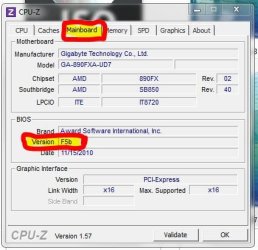
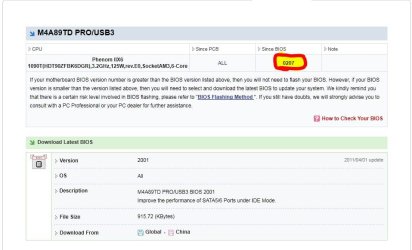
I asked about the brand and model of your motherboard to see if it would be necessary to update the Bios. You know which version of yours? If you're not, you can use CPU-Z - download the zip file - , as shown below. As regards the minimum version of BIOS that you need, the number is 0207, as shown in another figure.
 

Attachments

  • 1.JPG
    1.JPG
    37.7 KB · Views: 3
  • 2.JPG
    2.JPG
    63.8 KB · Views: 5

My Computer My Computer

Computer Manufacturer/Model Number
WALLONN7 / LIN BLACK SERIES II
OS
Windows 7 Ultimate x64 SP1
CPU
AMD PHENOM II X6 1090T 3.2GHz
Motherboard
GIGABYTE GA-890FXA-UD7
Memory
8GB G.SKILL RIPJAWS - F3-10666CL7D
Graphics Card(s)
SAPPHIRE ATI RADEON HD 5870 VAPOR X OC
Sound Card
REALTEK DOLBY HOME THEATER
Monitor(s) Displays
LED LG W2486L
Screen Resolution
1080p
Hard Drives
SEAGATE 1TB -ST31000528AS - AHCI MODE - AS SATA
PSU
ZALMAN ZM1000-HP 1000W
Case
THERMALTAKE XASER VI VG4000SWA
Cooling
140MM x3 / 120MM x1 AIR COOLING - THERMALTAKE
Keyboard
MICROSOFT DIGITAL MEDIA KEYBOARD 3000 - USB
Mouse
MICROSOFT BASIC OPTICAL MOUSE 2.0 - USB
Internet Speed
600KBPS
Other Info
MICROSOFT XBOX 360 CONTROLLER
Version 0207 is the initial BIOS that the motherboard is released with. I tried updating the BIOS anyway, but it can still only monitor three cores.
 

My Computer My Computer

OS
Windows 7 Ultimate 64-bit
Sadly I haven't found anything in BIOS to turn any cores on or off, and I'm pretty sure I've checked everything in there by now.

Which tab was it exactly that you and your brother found it?
 

My Computer My Computer

OS
Windows 7 Ultimate 64-bit
Oh, I totally forgot about this thread when I was over there yesterday. We were actually in the BIOS too, just to change HDD boot settings, though.
I am going to Busch Gardens Theme Park in an hour and will be there all day so if I am not worn out when I get home tonight, I'll swing by his place and look and take a picture of the settings.
 

My Computer My Computer

Computer Manufacturer/Model Number
HAL-9000
OS
Windows 7 Ultimate 64bit
CPU
Intel i7 3770K
Motherboard
Asus Sabertooth Z77
Memory
16GB DDR3 1333 Corsair XMS3
Graphics Card(s)
XFX HD6950 2GB EyeFinity
Sound Card
Logitech G35 & Sennheiser PC135 & VIA HD
Monitor(s) Displays
23" HP 2310e, 23" Samsung B2230, 21.5" Viewsonic
Screen Resolution
5760x1080
Hard Drives
16TB of Storage
128GB & 256GB Crucial M4 SSD's, 2X 1TB WD Black, 3x 2TB WD, 3x 2TB Samsung F4, 1.5TB Seagate, WD 500GB,
PSU
Antec True Power New 650watt
Case
Cooler Master HAF-932
Cooling
Corsair H60 Hydro Cooler, 3x 230mm Fans, 2x120mm Fan
Keyboard
Logitech G15 and G13
Mouse
Logitech G700 Gaming Mouse
Internet Speed
50/10 Mbit
Other Info
Speakers : Alesis M1 Active Mk2 Studio Monitors , APC RS 1200 UPS, HP 4500DN Color Laser, HP P1006 mono Laser, Kodak 8500 Dye-Sub, Epson 1280 inkjet, Epson Worforce 610 MFC
Ah ****ing ace, thanks!

So dedicated helpers on this forum, it's lovely.
 

My Computer My Computer

OS
Windows 7 Ultimate 64-bit
here is the screen on his BIOS, I am also worn out and sore, must have walked 10 miles in that park.
 

Attachments

  • imagejpeg_2.jpg
    imagejpeg_2.jpg
    110.8 KB · Views: 14

My Computer My Computer

Computer Manufacturer/Model Number
HAL-9000
OS
Windows 7 Ultimate 64bit
CPU
Intel i7 3770K
Motherboard
Asus Sabertooth Z77
Memory
16GB DDR3 1333 Corsair XMS3
Graphics Card(s)
XFX HD6950 2GB EyeFinity
Sound Card
Logitech G35 & Sennheiser PC135 & VIA HD
Monitor(s) Displays
23" HP 2310e, 23" Samsung B2230, 21.5" Viewsonic
Screen Resolution
5760x1080
Hard Drives
16TB of Storage
128GB & 256GB Crucial M4 SSD's, 2X 1TB WD Black, 3x 2TB WD, 3x 2TB Samsung F4, 1.5TB Seagate, WD 500GB,
PSU
Antec True Power New 650watt
Case
Cooler Master HAF-932
Cooling
Corsair H60 Hydro Cooler, 3x 230mm Fans, 2x120mm Fan
Keyboard
Logitech G15 and G13
Mouse
Logitech G700 Gaming Mouse
Internet Speed
50/10 Mbit
Other Info
Speakers : Alesis M1 Active Mk2 Studio Monitors , APC RS 1200 UPS, HP 4500DN Color Laser, HP P1006 mono Laser, Kodak 8500 Dye-Sub, Epson 1280 inkjet, Epson Worforce 610 MFC
Hm, I've checked that already. /sadface
 

My Computer My Computer

OS
Windows 7 Ultimate 64-bit
Back
Top