Solved Broken pictures, videos, and downloads

Jinxy24

New member
Local time
2:57 PM
Messages
9
Hello all, I just installed a new modem in my house. Since doing so, my laptop has started acting up. Pictures will load for all of a quarter of a second and then turn into the broken picture icon. Video players like promptfile, putlocker, etc won't appear on screen let alone load the actual videos. I tried downloading firefox to see if it was just chrome acting up, but whether it be on chrome or internet explorer, I get an error message saying that the download failed due to internet connectivity problems. Sometimes the webpage won't even load. I can still use the internet, it's still fast, but nothing shows up. I tried playing minecraft and rise of mythos, but I keep getting server connection problems that kick me out. I've deleted all my cookies and internet caches, I ran AVG and had no flags, I called mediacom and they said it was my laptop, and I've turned everything on and off again. My desktop isn't having any of these problems whatsoever. Before changing modems my laptop worked just fine. I went on my phone and used wifi to view pictures and such as well. Any help would be much appreciated. Thank you for your time.

Edit: I've been spending time on damnlol.com, but since I started having this problem, the pictures there keep breaking. I refresh the page, go to the previous picture and then back to the original, and it still breaks every time. It seems, however, when I look at the picture on my desktop and then look at it on my laptop, it will load. I also use tumblr, but practically all of the pictures there are broken and there is no fixing them from what I've tried. When I go on other major websites, everything breaks and gets out of place. Refreshing it doesn't help.
 
Last edited:

My Computer My Computer

At a glance

Windows 7 Home Premium 64bit8 Gigabytes
Computer type
Laptop
Computer Manufacturer/Model Number
Dell Inspiron 5720
OS
Windows 7 Home Premium 64bit
Memory
8 Gigabytes
Hard Drives
1 Terabyte
Antivirus
AVG
Browser
Crhome
I went on my phone and used wifi to view pictures and such as well.

Does this mean phone was alright or experienced problems? Will start listing some suggestions once you let us know.
 

My Computer My Computer

At a glance

Windows 7 Ultimate x64 SP1AMD Phenom 2 1090T2x8GB Kingston HyperX Fury Black 1600Mhz Unga...MSI GTX 970 Gaming 4G
Computer type
PC/Desktop
Computer Manufacturer/Model Number
Custom Build
OS
Windows 7 Ultimate x64 SP1
CPU
AMD Phenom 2 1090T
Motherboard
Gigabyte GA-890FXA-UD5
Memory
2x8GB Kingston HyperX Fury Black 1600Mhz Unganged
Graphics Card(s)
MSI GTX 970 Gaming 4G
Sound Card
Realtek On-Board HD 7.1 Audio / Logitech G35
Monitor(s) Displays
3xAcer GD245HQ
Screen Resolution
1920x1080
Hard Drives
Samsung 850 Pro 512GB SSD - OS /
WD Caviar Black SATA 3 - 1 TBx2 - Dynamic RAID 0 /
WD Caviar Green SATA 2 - 640GBx2 - Dynamic RAID 0 /
WD Caviar Green SATA 2 - 640GB - Internal Backup /
Seagate Barracude SATA 3 - 3TB - External Backup/ Sync
PSU
HighPower 1000W
Case
Cooler Master HAF 932
Cooling
Noctua NH-D14
Keyboard
Logitech G19
Mouse
Logitech G500
Internet Speed
100/4 Mbit Cable (100GB quota)
Antivirus
ZoneAlarm Extreme Security / MBAM Pro / MBAE Free / SAS Free
Browser
IE 11 - Firefox - Chrome
Other Info
Logitech F710/ G27/ G940/ Z5500 // TrackIR 5 // Nvidia 3D Surround Vision
I went on my phone and there was no issue. The pictures loaded normally.
 

My Computer My Computer

At a glance

Windows 7 Home Premium 64bit8 Gigabytes
Computer type
Laptop
Computer Manufacturer/Model Number
Dell Inspiron 5720
OS
Windows 7 Home Premium 64bit
Memory
8 Gigabytes
Hard Drives
1 Terabyte
Antivirus
AVG
Browser
Crhome
Ok, try in order (move to other only if previous fails):
Please create a manual System Restore point before beginning: http://www.sevenforums.com/tutorials/700-system-restore.html

- Change DNS server to OpenDNS or GoogleDNS (restart PC just in case - http://www.sevenforums.com/tutorials/15037-dns-addressing-how-change-windows-7-a.html

- Run in cmd (restart once finished):
Code:
netsh winsock reset

- Download and run as admin - Download Complete Internet Repair - MajorGeeks
--Select options:
---Reset Internet Protocol
---Repair Winsock
---Renew Internet Connections
---Flush DNS Resolver Cache
---Reset Windows Firewall Configuration
 

My Computer My Computer

At a glance

Windows 7 Ultimate x64 SP1AMD Phenom 2 1090T2x8GB Kingston HyperX Fury Black 1600Mhz Unga...MSI GTX 970 Gaming 4G
Computer type
PC/Desktop
Computer Manufacturer/Model Number
Custom Build
OS
Windows 7 Ultimate x64 SP1
CPU
AMD Phenom 2 1090T
Motherboard
Gigabyte GA-890FXA-UD5
Memory
2x8GB Kingston HyperX Fury Black 1600Mhz Unganged
Graphics Card(s)
MSI GTX 970 Gaming 4G
Sound Card
Realtek On-Board HD 7.1 Audio / Logitech G35
Monitor(s) Displays
3xAcer GD245HQ
Screen Resolution
1920x1080
Hard Drives
Samsung 850 Pro 512GB SSD - OS /
WD Caviar Black SATA 3 - 1 TBx2 - Dynamic RAID 0 /
WD Caviar Green SATA 2 - 640GBx2 - Dynamic RAID 0 /
WD Caviar Green SATA 2 - 640GB - Internal Backup /
Seagate Barracude SATA 3 - 3TB - External Backup/ Sync
PSU
HighPower 1000W
Case
Cooler Master HAF 932
Cooling
Noctua NH-D14
Keyboard
Logitech G19
Mouse
Logitech G500
Internet Speed
100/4 Mbit Cable (100GB quota)
Antivirus
ZoneAlarm Extreme Security / MBAM Pro / MBAE Free / SAS Free
Browser
IE 11 - Firefox - Chrome
Other Info
Logitech F710/ G27/ G940/ Z5500 // TrackIR 5 // Nvidia 3D Surround Vision
Okay, so I tried all three options in order. There are no changes, the pictures still don't load. I then tried to do a system restore. I reset my computer to the day before I installed the modem, but it still didn't fix anything. I don't know how this could be a problem with my computer now.
 

My Computer My Computer

At a glance

Windows 7 Home Premium 64bit8 Gigabytes
Computer type
Laptop
Computer Manufacturer/Model Number
Dell Inspiron 5720
OS
Windows 7 Home Premium 64bit
Memory
8 Gigabytes
Hard Drives
1 Terabyte
Antivirus
AVG
Browser
Crhome
One more thing to try on your PC. Download Win7 MAC Address Changer v2.0 and note the current MAC address, then click randomize.

And try re-plugging the cable on both ends. Try different ports on the router as well.

This is for diagnostic reasons: go to ZenMate page with chrome and install it. There will be a shield icon, make sure you turn it on and see if pages load ok.
 

My Computer My Computer

At a glance

Windows 7 Ultimate x64 SP1AMD Phenom 2 1090T2x8GB Kingston HyperX Fury Black 1600Mhz Unga...MSI GTX 970 Gaming 4G
Computer type
PC/Desktop
Computer Manufacturer/Model Number
Custom Build
OS
Windows 7 Ultimate x64 SP1
CPU
AMD Phenom 2 1090T
Motherboard
Gigabyte GA-890FXA-UD5
Memory
2x8GB Kingston HyperX Fury Black 1600Mhz Unganged
Graphics Card(s)
MSI GTX 970 Gaming 4G
Sound Card
Realtek On-Board HD 7.1 Audio / Logitech G35
Monitor(s) Displays
3xAcer GD245HQ
Screen Resolution
1920x1080
Hard Drives
Samsung 850 Pro 512GB SSD - OS /
WD Caviar Black SATA 3 - 1 TBx2 - Dynamic RAID 0 /
WD Caviar Green SATA 2 - 640GBx2 - Dynamic RAID 0 /
WD Caviar Green SATA 2 - 640GB - Internal Backup /
Seagate Barracude SATA 3 - 3TB - External Backup/ Sync
PSU
HighPower 1000W
Case
Cooler Master HAF 932
Cooling
Noctua NH-D14
Keyboard
Logitech G19
Mouse
Logitech G500
Internet Speed
100/4 Mbit Cable (100GB quota)
Antivirus
ZoneAlarm Extreme Security / MBAM Pro / MBAE Free / SAS Free
Browser
IE 11 - Firefox - Chrome
Other Info
Logitech F710/ G27/ G940/ Z5500 // TrackIR 5 // Nvidia 3D Surround Vision
So I downloaded ZenMate and it immediately fixed everything. I can download, see pictures, and load videos. Thank you so much! Is it permanently fixed now?
 

My Computer My Computer

At a glance

Windows 7 Home Premium 64bit8 Gigabytes
Computer type
Laptop
Computer Manufacturer/Model Number
Dell Inspiron 5720
OS
Windows 7 Home Premium 64bit
Memory
8 Gigabytes
Hard Drives
1 Terabyte
Antivirus
AVG
Browser
Crhome
So adding the ZenMate extension did fix the downloading problem, the broken pictures, and the video players, but it didn't fix the games. Rise of Mythos keeps disconnecting from the server. Minecraft will connect to the server for a second and then it kicks me out because it lost connection.
 

My Computer My Computer

At a glance

Windows 7 Home Premium 64bit8 Gigabytes
Computer type
Laptop
Computer Manufacturer/Model Number
Dell Inspiron 5720
OS
Windows 7 Home Premium 64bit
Memory
8 Gigabytes
Hard Drives
1 Terabyte
Antivirus
AVG
Browser
Crhome
...when I look at the picture on my desktop and then look at it on my laptop, it will load...
How odd. Take the laptop to another network (e.g. Starbucks, McDonald's...) and test.


Some systems ignore the changes made by tools like this.

You should ask the OP to...
...take note of the original MAC address via ipconfig/all
...change the MAC via the tool
...disable the network adapter that was changed
...enable the network adapter that was disabled
...check the MAC address via ipconfig/all

If there is no MAC address change, then you cannot use this as a troubleshooting step.
 

My Computer My Computer

At a glance

W7 Pro SP1 64biti78GBIntel HD Graphics
Computer type
Laptop
Computer Manufacturer/Model Number
Employer provided Dell Latitude
OS
W7 Pro SP1 64bit
CPU
i7
Memory
8GB
Graphics Card(s)
Intel HD Graphics
Hard Drives
crappy SSD
Antivirus
Employer mandated Symantec Endpoint Protection
Browser
Pale Moon 64bit, IE11 64bit & Chrome 64bit
You should ask the OP to...
...take note of the original MAC address via ipconfig/all
...change the MAC via the tool
...disable the network adapter that was changed
...enable the network adapter that was disabled
...check the MAC address via ipconfig/all

If there is no MAC address change, then you cannot use this as a troubleshooting step.

I'm sorry, I don't understand what you mean by that... I'm not very tech savvy. Could you explain those steps any better?

Thanks for your help you two! I greatly appreciate it.
 

My Computer My Computer

At a glance

Windows 7 Home Premium 64bit8 Gigabytes
Computer type
Laptop
Computer Manufacturer/Model Number
Dell Inspiron 5720
OS
Windows 7 Home Premium 64bit
Memory
8 Gigabytes
Hard Drives
1 Terabyte
Antivirus
AVG
Browser
Crhome
Sorry that I was not clear. Those notes were for GokAy.

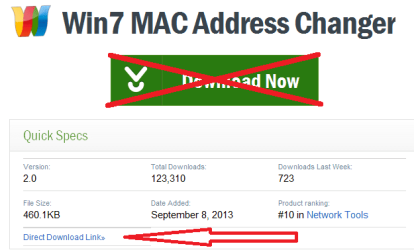
In post #6, GokAy suggested that you download that MAC address changing tool. Please wait for GokAy to confirm that you should get that tool. If that is still desired, you should probably use CNET's direct download link.

MAC.png

If GokAy still wants you to change your MAC address, then GokAy can provide more details to that brief list of steps that I posted.
 

My Computer My Computer

At a glance

W7 Pro SP1 64biti78GBIntel HD Graphics
Computer type
Laptop
Computer Manufacturer/Model Number
Employer provided Dell Latitude
OS
W7 Pro SP1 64bit
CPU
i7
Memory
8GB
Graphics Card(s)
Intel HD Graphics
Hard Drives
crappy SSD
Antivirus
Employer mandated Symantec Endpoint Protection
Browser
Pale Moon 64bit, IE11 64bit & Chrome 64bit
So after a bit more messing around on tumblr, I realized that not all of the pictures are loading. A lot more load, only one out of every ten or so fail instead of all of them. So I guess the problem isn't completely fixed... I'm sorry this is such a hassle.
 

My Computer My Computer

At a glance

Windows 7 Home Premium 64bit8 Gigabytes
Computer type
Laptop
Computer Manufacturer/Model Number
Dell Inspiron 5720
OS
Windows 7 Home Premium 64bit
Memory
8 Gigabytes
Hard Drives
1 Terabyte
Antivirus
AVG
Browser
Crhome
I am not home to assist better at the moment. But regarding ZenMate, I suggested it as a diagnostic step, if possible we should find the underlying cause and fix that, instead of relying on a 3rd party VPN solution. There is a use for it for sure but not in your case.

@UsernameIssues: I will try to compose a better MAC address changing steps. The program homepage does host the file by the way (right below Cnet link), no need to even go to Cnet.
 

My Computer My Computer

At a glance

Windows 7 Ultimate x64 SP1AMD Phenom 2 1090T2x8GB Kingston HyperX Fury Black 1600Mhz Unga...MSI GTX 970 Gaming 4G
Computer type
PC/Desktop
Computer Manufacturer/Model Number
Custom Build
OS
Windows 7 Ultimate x64 SP1
CPU
AMD Phenom 2 1090T
Motherboard
Gigabyte GA-890FXA-UD5
Memory
2x8GB Kingston HyperX Fury Black 1600Mhz Unganged
Graphics Card(s)
MSI GTX 970 Gaming 4G
Sound Card
Realtek On-Board HD 7.1 Audio / Logitech G35
Monitor(s) Displays
3xAcer GD245HQ
Screen Resolution
1920x1080
Hard Drives
Samsung 850 Pro 512GB SSD - OS /
WD Caviar Black SATA 3 - 1 TBx2 - Dynamic RAID 0 /
WD Caviar Green SATA 2 - 640GBx2 - Dynamic RAID 0 /
WD Caviar Green SATA 2 - 640GB - Internal Backup /
Seagate Barracude SATA 3 - 3TB - External Backup/ Sync
PSU
HighPower 1000W
Case
Cooler Master HAF 932
Cooling
Noctua NH-D14
Keyboard
Logitech G19
Mouse
Logitech G500
Internet Speed
100/4 Mbit Cable (100GB quota)
Antivirus
ZoneAlarm Extreme Security / MBAM Pro / MBAE Free / SAS Free
Browser
IE 11 - Firefox - Chrome
Other Info
Logitech F710/ G27/ G940/ Z5500 // TrackIR 5 // Nvidia 3D Surround Vision
I used the program homepage link before posting and I got a 404 page :-(

I tested again today and the file downloaded from there :-)

It must have been a temporary thing.
 

My Computer My Computer

At a glance

W7 Pro SP1 64biti78GBIntel HD Graphics
Computer type
Laptop
Computer Manufacturer/Model Number
Employer provided Dell Latitude
OS
W7 Pro SP1 64bit
CPU
i7
Memory
8GB
Graphics Card(s)
Intel HD Graphics
Hard Drives
crappy SSD
Antivirus
Employer mandated Symantec Endpoint Protection
Browser
Pale Moon 64bit, IE11 64bit & Chrome 64bit
Okay, so I realized something. I used my phone as a mobile hotspot to connect to the internet and everything works just fine. I was able to log into minecraft and everything loaded, movies and pictures work just fine, there are absolutely no problems. So it must be a hardware issue with the router or modem. I think I'm going to unplug everything and try to set it up again. If it doesn't work, I'm calling mediacom again to see what they have to say. Thank you for all of your help!
 

My Computer My Computer

At a glance

Windows 7 Home Premium 64bit8 Gigabytes
Computer type
Laptop
Computer Manufacturer/Model Number
Dell Inspiron 5720
OS
Windows 7 Home Premium 64bit
Memory
8 Gigabytes
Hard Drives
1 Terabyte
Antivirus
AVG
Browser
Crhome
Hmm ok, then best is to factory reset the modem/router. Check the manual how to perform it.
 

My Computer My Computer

At a glance

Windows 7 Ultimate x64 SP1AMD Phenom 2 1090T2x8GB Kingston HyperX Fury Black 1600Mhz Unga...MSI GTX 970 Gaming 4G
Computer type
PC/Desktop
Computer Manufacturer/Model Number
Custom Build
OS
Windows 7 Ultimate x64 SP1
CPU
AMD Phenom 2 1090T
Motherboard
Gigabyte GA-890FXA-UD5
Memory
2x8GB Kingston HyperX Fury Black 1600Mhz Unganged
Graphics Card(s)
MSI GTX 970 Gaming 4G
Sound Card
Realtek On-Board HD 7.1 Audio / Logitech G35
Monitor(s) Displays
3xAcer GD245HQ
Screen Resolution
1920x1080
Hard Drives
Samsung 850 Pro 512GB SSD - OS /
WD Caviar Black SATA 3 - 1 TBx2 - Dynamic RAID 0 /
WD Caviar Green SATA 2 - 640GBx2 - Dynamic RAID 0 /
WD Caviar Green SATA 2 - 640GB - Internal Backup /
Seagate Barracude SATA 3 - 3TB - External Backup/ Sync
PSU
HighPower 1000W
Case
Cooler Master HAF 932
Cooling
Noctua NH-D14
Keyboard
Logitech G19
Mouse
Logitech G500
Internet Speed
100/4 Mbit Cable (100GB quota)
Antivirus
ZoneAlarm Extreme Security / MBAM Pro / MBAE Free / SAS Free
Browser
IE 11 - Firefox - Chrome
Other Info
Logitech F710/ G27/ G940/ Z5500 // TrackIR 5 // Nvidia 3D Surround Vision
Okay, reseting the modem and router fixed everything. My computer is working just fine. I don't know why restarting them when this problem first started didn't work, but whatever. Thank you for all your help. Sorry for being such a pain.
 

My Computer My Computer

At a glance

Windows 7 Home Premium 64bit8 Gigabytes
Computer type
Laptop
Computer Manufacturer/Model Number
Dell Inspiron 5720
OS
Windows 7 Home Premium 64bit
Memory
8 Gigabytes
Hard Drives
1 Terabyte
Antivirus
AVG
Browser
Crhome
:thumbsup:
 

My Computer My Computer

At a glance

Windows 7 Ultimate x64 SP1AMD Phenom 2 1090T2x8GB Kingston HyperX Fury Black 1600Mhz Unga...MSI GTX 970 Gaming 4G
Computer type
PC/Desktop
Computer Manufacturer/Model Number
Custom Build
OS
Windows 7 Ultimate x64 SP1
CPU
AMD Phenom 2 1090T
Motherboard
Gigabyte GA-890FXA-UD5
Memory
2x8GB Kingston HyperX Fury Black 1600Mhz Unganged
Graphics Card(s)
MSI GTX 970 Gaming 4G
Sound Card
Realtek On-Board HD 7.1 Audio / Logitech G35
Monitor(s) Displays
3xAcer GD245HQ
Screen Resolution
1920x1080
Hard Drives
Samsung 850 Pro 512GB SSD - OS /
WD Caviar Black SATA 3 - 1 TBx2 - Dynamic RAID 0 /
WD Caviar Green SATA 2 - 640GBx2 - Dynamic RAID 0 /
WD Caviar Green SATA 2 - 640GB - Internal Backup /
Seagate Barracude SATA 3 - 3TB - External Backup/ Sync
PSU
HighPower 1000W
Case
Cooler Master HAF 932
Cooling
Noctua NH-D14
Keyboard
Logitech G19
Mouse
Logitech G500
Internet Speed
100/4 Mbit Cable (100GB quota)
Antivirus
ZoneAlarm Extreme Security / MBAM Pro / MBAE Free / SAS Free
Browser
IE 11 - Firefox - Chrome
Other Info
Logitech F710/ G27/ G940/ Z5500 // TrackIR 5 // Nvidia 3D Surround Vision
Back
Top