BSOD after Windows Logo

jkility

New member
Local time
1:01 PM
Messages
1
Hi

I bought a new PC case and have fitted everything from the old case to the new case (No new hardware, just a straight swap). All plugged in and wired up etc but seem to be having a problem booting to my SSD.

Boot up PC and BIOS recognizes the SSD. Then it tries to boot into Windows and comes up with an error screen saying Windows Failed to Boot, would you like to do a startup repair, I say yes and let it do its thing, it restarts and tries to boot into Windows, gets as far as the logo screen and then BSOD with the following error:

"A problem has been detected and windows has been shut down to prevent damage to your computer.
If this is the first time you've seen this stop error screen, restart your computer. if this screen appears again follow these steps:

Check for viruses on your computer. Remove any newly installed hard drives or hard drive controllers. Check your had drive to make sure it is properly configured and terminated. Run CHKDSK /F to check for hard drive corruption, and then restart your computer

*** STOP: 0X0000007B (0XFFFFF880009A9928, 0XFFFFFFFFC0000034, 0X0000000000000000, 0X0000000000000000)"

Ran Seatools long and short tests and they both passed.
Booted into windows on another harddrive and ran Error Checking Check Disk and select both "Automatically fix file system errors and Scan for and attempt recovery of bad sectors, came up with errors and fixed them and still coming up with BSOD

I've got 2 other hard dries (1 bootable) and have managed to boot into windows with it and it works perfectly. I've got Hirens Boot CD and have attempted at running Check Disk but the F drive (SSD) is read protected and so is unable to. Not really sure where to go from here really.

Got a ASUS M5A99X EVO Motherboard if that makes a difference?
 
Last edited:

My Computer

Computer type
PC/Desktop
OS
windows 7 ultimate x64
Hello and welcome jkility have you tried chkdsk in safe mode?
I f not try this and use the net access to run some scans for malware and look at what is in that drive.

BOOTABLEUBUNTU

Makea bootable Ubuntu disk http://www.ubuntu.com/download

Setthe BIOS to boot from the optical when the machine boots it will show you ascreen with TRY or INSTALL > select TRY. You can of course remove the hard drive and any otherdrives when doing this as if the optical alone is the only drive left in themachine then the BIOS will only find it to boot from.

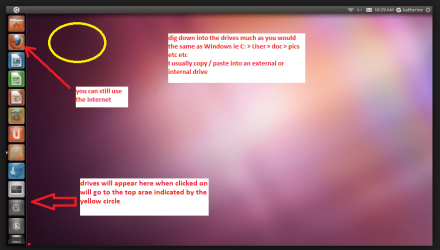
Whenit is finished - it takes very little time you will get a screen like in thepic .

Openthe drive you want > User and dig down until you get to the data / settingsyou may be able to copy / paste the material you want to an external source orother installed drive doing this.

Iam not sure if it will but I have recovered tons of data etc using this methodboth on "dead" or just plain drives that you cannot get data fromusing Windows.
 

Attachments

  • UBUTUX.PNG
    UBUTUX.PNG
    128.9 KB · Views: 0

My Computer

Computer type
PC/Desktop
Computer Manufacturer/Model Number
Own build (new) Desk1 / Asus ROG Win 7 / Desk2 1st build
OS
Desk1 7 Home Prem / Desk2 10 Pro / Main lap Asus ROG 10 Pro 2 laptop Toshiba 7 Pro Asus P2520 7 & 10
CPU
Desk1 i5 3750K / Laptop i7 GTX 860M / Desk2 i5 2500
Motherboard
Desk1 Asus P877-V / Desk2 Gigabyte H67 UD3H / Laptop ?
Memory
Desk1 8GB (1866) / Desk2 16GB (1333) / Laptop 8Gb DDR3
Graphics Card(s)
Desk 1& 2NVidia GTX 650 & Laptops on board Intel
Sound Card
Desk 1 & 2 -XONAR DG Realtek High Def audio Laptop
Monitor(s) Displays
Desk 1 Benq HD 2450 / Desk2 Philips 24" / Laptop 17.5"
Screen Resolution
1920x1080 D1 & D2 & Laptop 1
Hard Drives
Desk1 Samsung 120GB 830 SSD
Asus ROG 256GB 850 Pro SSD
Desk2 Samsung 840 256 SSD
Toshiba 120GB EVO
PSU
Desk 1 Corsair HX 1050/ Laptop ? / Desk 2 Corsair HX 650
Case
Desk 1 Cooler HAF XM ? Toshiba laptop / Desk2 Coolermaster
Cooling
Fans on all Desk1 -2 Desk2 - all Coolermasters 5 Laptop ?
Keyboard
Desk 1 MS Sidewinder X6 Desk 2 MS Sidewinder X 4
Mouse
Desk 1&2 - Gigabyte MS 900 gamer - laptop - Logitec wireless
Internet Speed
ADSL2+
Other Info
One other Desktop (tester) and spare Toshba laptop both with SSD's
Running Kaspersky 2016 ISS on all machines config'd identically
Logitec audio stereo systems on each machine (x3)
Canon MG5250MFC
Router/modem TP-Link running WPA2SK
I'm not familiar with Ubuntu so see if ICit2lol's method works. Putting in my 2 cents below.


Booted into windows on another harddrive and ran Error Checking Check Disk and select both "Automatically fix file system errors and Scan for and attempt recovery of bad sectors, came up with errors and fixed them and still coming up with BSOD

That particular hard drive, back up your info and throw it away. Once errors comes up, more will come in the future. No sense keeping it.

About the SSD, if you have a SATA-USB adapter, plug it in another computer and then run Windows Checkdisk choosing the option "scan for attempted recovery of bad sectors". If you come up with errors, do as what i stated above. If no errors, run Seatools on the SSD again doing long and short generic.

If no problems, then nothing is wrong with the SSD itself. You said you used another hard drive and you booted just fine which means nothing else is wrong hardware-wise. More than likely, your boot records got corrupted or an updated driver is causing the problem and you have to rollback the driver.

I would backup that SSD, format the drive and do a clean install of windows and see what happens.

Have you tried booting the SSD on safe mode?

About the motherboard, check this microsoft support link. It may help since it deals with your stop error code: Advanced troubleshooting for "Stop error code 0x0000007B (INACCESSIBLE_BOOT_DEVICE)" errors in Windows XP
 

My Computer

Computer type
Laptop
Computer Manufacturer/Model Number
Toshiba Satellite A500
OS
Windows 7 Home Premium 32 Bit
CPU
Intel Core 2 Duo P7450
Motherboard
Insyde H20 Version 1.8
Memory
8GB
Graphics Card(s)
NVIDIA GeForce GT 230M
Hard Drives
Toshiba MK2555GSX 500GB
Antivirus
Avast Antivirus Free
Browser
Google Chrome & Mozilla Firefox
Try going into bios and check your sata controller and make sure it is set to what it was before the swap. It should be in AHCI with an SSD, but if you didn't set it that way, try IDE. If that doesn't work, set bios to optimized defaults.
 

My Computers

System One System Two

  • Computer type
    PC/Desktop
    Computer Manufacturer/Model Number
    ALWAYS UNDER CONSTRUCTION
    OS
    Windows 11 Pro
    CPU
    Ryzen 9 5900X
    Motherboard
    Asus X570 Crosshair Viii Hero
    Memory
    32GB G Skill DDR4-3600
    Graphics Card(s)
    EVGA RTX 3080 FTW 3 Ultra
    Sound Card
    On Board/Sennheiser PC37X Headset
    Monitor(s) Displays
    3 X Asus 27"
    Screen Resolution
    2560x1440
    Hard Drives
    2 X 1 TB NVME drives
    PSU
    EVGA 850
    Case
    Phanteks Eclipse P400A
    Cooling
    EVGA 280 AIO
    Keyboard
    Logitech G510s/ Logitech G13
    Mouse
    Logitech G502
    Internet Speed
    24/1
    Antivirus
    ESET/MBAM Pro/SAS Pro
    Browser
    Chrome/ Firefox/ Edge
  • Computer type
    Laptop
    System Manufacturer/Model Number
    Dell 16 Plus
    OS
    Windows 11 Pro
    CPU
    Intel Ultra 9 288V
    Memory
    32 GB LPDDR5X 8533
    Monitor(s) Displays
    16" Mini-LED HDR600 Touch 90 Hz
    Screen Resolution
    2560X1600
    Hard Drives
    1 TB NVME
Back
Top