
BSOD Analysis - Getting Started

Jonathan_King

New member
Guru
SF Team
Local time
5:45 PM
Messages
13,322
Location
Rednecksville
So, you're interested in learning to solve BSODs? A satisfying goal, and there's good job security as there's an endless supply of threads.

To be a good BSOD analyst, you don't need deep technical knowledge of how Windows works (though it doesn't hurt!). You do need a good "technician's knowledge" of computers, as there's so much more to it than "what driver was blamed?". As often as not, hardware is the cause, and you should be proficient in that regard. Instructing OPs how to swap out RAM, change memory voltages, and spot PSU problems is SO much easier when you are familiar with the processes already.

Good surface knowledge of Windows is essential. What if that driver won't install right? What if Windows won't boot right? What if you suspect malware is the cause...do you know how to spot other signs of it? What if the OP wants to do a repair install but his DVD is giving him an error message? You could just farm stuff out, but it's better if you're capable of handling it all yourself.

Perhaps even more important is a desire to get to the bottom of the case, no matter what it is. Good BSOD analysts don't feel the need to stick to the "rules" of the game. They exercise complete liberty to post whatever they want in the thread, no matter how unorthodox it might be. Feel like turning the OP into a guinea pig? Go for it! Try new things, learn what doesn't work, and remember what did work for next time. And when you see a thread someone else has solved, spend the 30 seconds and find out what symptoms the the OP was having, and what the solution was.


Ready to proceed?

Start by installing Windbg from the Windows SDK: http://msdn.microsoft.com/en-us/windows/hardware/hh852360

Once installed, associate .dmp files with Windbg by entering the following in a command prompt:
Code:
"C:\Program Files (x86)\Windows Kits\8.0\Debuggers\x64\windbg.exe" -IA
If Windbg is installed in a different location, change the command accordingly. Just a heads-up, the -IA part is case sensitive. Confused the heck out of me when I first tried it, as most commands are not case sensitive.

When done, open a copy of Windbg, go to File > Symbol file path, and copy/paste:
Code:
SRV*c:\symbols*http://msdl.microsoft.com/download/symbols
You can replace C:\symbols with any other path you'd like the symbol cache to be stored on. If you have a low-capacity SSD, be warned the folder can grow to a couple GBs.

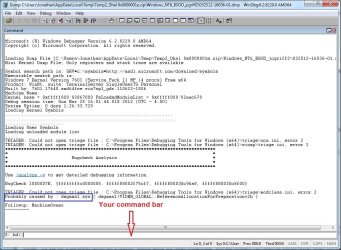
After that, you can just double-click on the dmps and it will open. If a driver or program is the cause of the BSODs, it will usually show up in the Probably Caused By line.
Code:
Probably caused by: e1c62x64.sys
You can look up the drivers it blames here: Driver Reference Table

A couple other tips:

If a Windows/system driver is blamed, it's not the real problem. Use your powers of reasoning: if tcpip.sys is blamed, perhaps the network adapter drivers are at fault?

You can use Driver Verifier to try to get 3rd-party drivers blamed: http://www.sevenforums.com/tutorials/101379-driver-verifier-enable-disable.html

If Verifier_Enabled dumps continue to point to system drivers, hardware is most likely the cause. The most common cause is RAM, though CPU, motherboard, PSU, video card, hard drive, and sometimes some funky ones (monitor, USB devices) can also cause problems. I wrote up some tutorials to diagnostics we use often:

http://www.sevenforums.com/tutorials/105647-ram-test-memtest86.html

http://www.sevenforums.com/tutorials/100352-hardware-stress-test-prime95.html

To get a list of the running drivers on the system at the time of the crash, run from Windbg:
Code:
lmntsm
Spend some time looking up those drivers on the Driver Reference Table until you can quickly glance down the list and pick out the 3rd-party ones. The Windows drivers are rarely of any consequence, but you should still know what they do. One word of warning, however: don't fall into the same pitfall all too many people do, and that is putting too much emphasis on the date of the driver. Is it true that older drivers can have compatibility problems, and should be updated, but few things that I see BSOD analysts doing irritate me more than lists of drivers to update. If a 3rd-party driver is the cause, 95% of the time it will be blamed directly.

I'd be a fool not to at least mention the !analyze -v command. Try running that on a dump, see what kind of information it reveals. PROCESS_NAME shows which process was running at the time of the crash; usually not enough to make any conclusions, but when taken from many dumps from the same system, may reveal some circumstantial evidence. FAILURE_BUCKET_ID and BUCKET ID can sometimes reveal culprit drivers that are not blamed in the Probably Caused By line.

And one last command I rarely see any other BSOD analysts on the volunteer forums using: the !sysinfo commands. !sysinfo machineid shows information about the motherboard and OEM. !sysinfo smbios reveals a wealth of information about the motherboard configuration. Want to know what size DIMMs are installed in which slots, and what speed they're running at? Give it a whirl! Or run the generic !sysinfo command for a list of supported arguments and try them out.


Get to know what information you have access to. Once you do, you will no longer be content to simply use the dumps. I resigned from a Moderator position and left another forum once, among other reasons, but a major part was they didn't see the point in asking for the other info, and weren't on board with my attempts to get some instructions stickied.


That's the basic idea of what we do. As you go along, you'll have dozens (if not more!) of questions. Feel free to post questions in this thread, or you can PM me and I'll help you along.

Good luck!
 

Attachments
  • Capture.JPG
    Capture.JPG
    258.1 KB · Views: 307
Last edited:

My Computer

Computer Manufacturer/Model Number
Custom
OS
Windows 7 Professional x64
CPU
Intel i7 2600K OC'd @ 4620 MHz
Motherboard
Asus P8Z68-V Pro
Memory
16GB GSkill Sniper 2133 Mhz (4x4GB)
Graphics Card(s)
EVGA GeForce GTX 480 SuperClocked+
Sound Card
Realtek High Definition Audio
Monitor(s) Displays
2x Acer S273HLbmii 27"
Screen Resolution
2 x 1920x1080
Hard Drives
64GB Crucial M4 SSD

Storage: Hitachi 1TB 5400RPM, Samsung 1.5TB 5400RPM
PSU
Corsair HW Series 750w (modular)
Case
Cooler Master HAF 932 Advanced Blue Edition
Cooling
CM Hyper 212+ CPU cooler, 3x 230mm + 1x 140mm case fans
Keyboard
Logitech MK320 (wireless)
Mouse
Logitech MK320 (wireless)
Internet Speed
30 Mb/s : 2 Mb/s
Excellent post Jon, could be a tutorial with a couple more pictures ;)

Well done.
 

My Computer

Computer type
PC/Desktop
Computer Manufacturer/Model Number
76~2.0
OS
Windows 7 Ult x64 - SP1/ Windows 8 Pro x64
CPU
Intel Core i5-3570K 4.6GHz
Motherboard
Gigabyte GA-Z77X UD3H, f18
Memory
8GB (2X4GB) DDR3 1600 Corsair Vengeance CL8 1.5v
Graphics Card(s)
Sapphire HD 7770 Vapor-X OC 1GB DDR5
Sound Card
Onboard VIA VT2021
Monitor(s) Displays
22" LCD Dell
Screen Resolution
1680x1050
Hard Drives
Samsung 840Pro 128GB SSD,
Seagate Barracuda 500GB SATA2 7200rpm 32MB cache, Seagate Barracuda 1TB SATA2 7200rpm 32MB cache,
PSU
Corsair HX650W
Case
Cooler Master Storm Scout
Cooling
Corsair H80 2x12cm Noctua NF P12 , 2x14cm case fans
Keyboard
Logitech Wave
Mouse
CM Sentinel
Internet Speed
Dismal
Antivirus
Avast
Browser
Opera Next
Other Info
Haswell laptop: HP Envy 17t-j, i7-4700MQ, GeForce 740M 2GB DDR3, 17.3" Full HD 1920x1080, 16GB RAM, Samsung 840 Pro 128GB, 1TB Hitachi 7200 HDD,
Desktop: eSATA ports,
External eSATA Seagate 500GB SATA2 7200rpm,
External WD USB 500GB
I am lost! The above link for sdk goes to Windows 8 beta stuff. Nowhere can I see anything like windbg. Am a newbie to Win7, having just begun to use it after frustration with old PC and XP. Can you make it a bit clearer please? I am having frequent BSOD messages and have managed to get the jcgriff2 extract so far.
 

My Computer

OS
windows 7 home premium 64
CPU
Intel core i5 2500 4x3.3GHz LGA 1155 6MB cache
Motherboard
Gigabyte GA-Z68X-UD3H-B3
Memory
2 Kingston 4GB 1333MHz DDR3 NON ECC
Graphics Card(s)
none
Sound Card
none
Monitor(s) Displays
LG Flatron W2252TQ
Hard Drives
"C" OCZ VERTEX 3 120GB SATA III 2.5"
WD 1TB SATA III 3.5"64MB Caviar Green Intellipower
PSU
Coolermaster 500W
Case
Coolermaster Elite 431P
Cooling
-
Hi Bob,

I've updated the link; is there anything else you'd like clarified? I have posted in your thread, btw.
 

My Computer

Computer Manufacturer/Model Number
Custom
OS
Windows 7 Professional x64
CPU
Intel i7 2600K OC'd @ 4620 MHz
Motherboard
Asus P8Z68-V Pro
Memory
16GB GSkill Sniper 2133 Mhz (4x4GB)
Graphics Card(s)
EVGA GeForce GTX 480 SuperClocked+
Sound Card
Realtek High Definition Audio
Monitor(s) Displays
2x Acer S273HLbmii 27"
Screen Resolution
2 x 1920x1080
Hard Drives
64GB Crucial M4 SSD

Storage: Hitachi 1TB 5400RPM, Samsung 1.5TB 5400RPM
PSU
Corsair HW Series 750w (modular)
Case
Cooler Master HAF 932 Advanced Blue Edition
Cooling
CM Hyper 212+ CPU cooler, 3x 230mm + 1x 140mm case fans
Keyboard
Logitech MK320 (wireless)
Mouse
Logitech MK320 (wireless)
Internet Speed
30 Mb/s : 2 Mb/s
I am lost! The above link for sdk goes to Windows 8 beta stuff. Nowhere can I see anything like windbg. Am a newbie to Win7, having just begun to use it after frustration with old PC and XP. Can you make it a bit clearer please? I am having frequent BSOD messages and have managed to get the jcgriff2 extract so far.

You can install the Windows 8 SDK/WDK regardless of which Windows OS you are using. The Debugging Tools for Windows will work on Windows Vista and 7 (even XP too I think). It is just preferred because it uses the newest version of the Debugging Tools (Windbg), whereas installing the Win7 SDK/WDK will result in installing an older Windbg.
 

My Computer

OS
Windows 7 64-bit
Had some trouble installing the Debugger on Win8 RP.
Finally got it working.
 

My Computer

Computer type
PC/Desktop
Computer Manufacturer/Model Number
76~2.0
OS
Windows 7 Ult x64 - SP1/ Windows 8 Pro x64
CPU
Intel Core i5-3570K 4.6GHz
Motherboard
Gigabyte GA-Z77X UD3H, f18
Memory
8GB (2X4GB) DDR3 1600 Corsair Vengeance CL8 1.5v
Graphics Card(s)
Sapphire HD 7770 Vapor-X OC 1GB DDR5
Sound Card
Onboard VIA VT2021
Monitor(s) Displays
22" LCD Dell
Screen Resolution
1680x1050
Hard Drives
Samsung 840Pro 128GB SSD,
Seagate Barracuda 500GB SATA2 7200rpm 32MB cache, Seagate Barracuda 1TB SATA2 7200rpm 32MB cache,
PSU
Corsair HX650W
Case
Cooler Master Storm Scout
Cooling
Corsair H80 2x12cm Noctua NF P12 , 2x14cm case fans
Keyboard
Logitech Wave
Mouse
CM Sentinel
Internet Speed
Dismal
Antivirus
Avast
Browser
Opera Next
Other Info
Haswell laptop: HP Envy 17t-j, i7-4700MQ, GeForce 740M 2GB DDR3, 17.3" Full HD 1920x1080, 16GB RAM, Samsung 840 Pro 128GB, 1TB Hitachi 7200 HDD,
Desktop: eSATA ports,
External eSATA Seagate 500GB SATA2 7200rpm,
External WD USB 500GB
Hey Jonathan that was an interesting read I am really impressed - I just wish I had more of a knowledge re Windows surface stuff as I only compute and fix for a pastime / hobby pending my imminent retirement.

John
 

My Computer

Computer type
PC/Desktop
Computer Manufacturer/Model Number
Own build (new) Desk1 / Asus ROG Win 7 / Desk2 1st build
OS
Desk1 7 Home Prem / Desk2 10 Pro / Main lap Asus ROG 10 Pro 2 laptop Toshiba 7 Pro Asus P2520 7 & 10
CPU
Desk1 i5 3750K / Laptop i7 GTX 860M / Desk2 i5 2500
Motherboard
Desk1 Asus P877-V / Desk2 Gigabyte H67 UD3H / Laptop ?
Memory
Desk1 8GB (1866) / Desk2 16GB (1333) / Laptop 8Gb DDR3
Graphics Card(s)
Desk 1& 2NVidia GTX 650 & Laptops on board Intel
Sound Card
Desk 1 & 2 -XONAR DG Realtek High Def audio Laptop
Monitor(s) Displays
Desk 1 Benq HD 2450 / Desk2 Philips 24" / Laptop 17.5"
Screen Resolution
1920x1080 D1 & D2 & Laptop 1
Hard Drives
Desk1 Samsung 120GB 830 SSD
Asus ROG 256GB 850 Pro SSD
Desk2 Samsung 840 256 SSD
Toshiba 120GB EVO
PSU
Desk 1 Corsair HX 1050/ Laptop ? / Desk 2 Corsair HX 650
Case
Desk 1 Cooler HAF XM ? Toshiba laptop / Desk2 Coolermaster
Cooling
Fans on all Desk1 -2 Desk2 - all Coolermasters 5 Laptop ?
Keyboard
Desk 1 MS Sidewinder X6 Desk 2 MS Sidewinder X 4
Mouse
Desk 1&2 - Gigabyte MS 900 gamer - laptop - Logitec wireless
Internet Speed
ADSL2+
Other Info
One other Desktop (tester) and spare Toshba laptop both with SSD's
Running Kaspersky 2016 ISS on all machines config'd identically
Logitec audio stereo systems on each machine (x3)
Canon MG5250MFC
Router/modem TP-Link running WPA2SK
I'm confused. Which one of these file packages do I get?
 

My Computer

Computer type
PC/Desktop
Computer Manufacturer/Model Number
Custom
OS
Microsoft Windows 7 Home Premium 64-bit Service Pack 1
CPU
AMD A10-6800K APU with Radeon(tm)™ HD Graphics 4100
Motherboard
ASRock FM2A85X Extreme4-M
Memory
(2) G.Skill F3-12800CL10-8GBXL
Graphics Card(s)
ASUS R7 250 Series (0x6610)
Sound Card
Realtek High Definition Audio
Monitor(s) Displays
Acer X213H LCD monitor, 21"
Screen Resolution
1920 x 1080 x 32 bits @ 60 Hz
Hard Drives
WD Black, 1.0TB, WDC WD1002FAEX-00Z3A0
PSU
Rosewill Quark-650
Case
Raidmax Comet SECC Steel ATX Mid Tower Computer Case
Cooling
1 x 80mm + 2 x 120mm + Stock cooler
Mouse
Gear Head Wireless Optical 5-button mouse
Internet Speed
FTTx 6000 / 1000
Antivirus
Avast! Free Antivirus 2015.10.0.2208
Browser
Google Chrome Version 40.0.2214.115
Other Info
*AMD Dual-Graphics
*Uses OpenDNS
*Uses Folding@Home
*HP 16x Super-Multi DVD Writer
*Superspeed 74-in-1 Card Reader
*Maximum overclock has not been determined.
I'm confused. Which one of these file packages do I get?

Chose the Windows SDK.


Also, I am trying to learn BSODs, and made my first attempt of reading one and made a post. I am hoping someone will correct me and tell me what i assumed wrong or read wrong.
 

My Computer

Computer type
PC/Desktop
Computer Manufacturer/Model Number
Custom
OS
Windows 8.1 Pro x64
CPU
Intel Core i5-4570 CPU @ 3.20GHz
Motherboard
Gigabyte Z87-D3HP-CF
Memory
8GB DDR3-1596 - Dual Channel
Graphics Card(s)
NVIDIA GeForce GTX 750 Ti SC
Sound Card
Onboard
Monitor(s) Displays
Samsung
Screen Resolution
1920x1080
Hard Drives
SSD - 120GB
Second - 1TB
Antivirus
MSE
Browser
Chrome
Honor, what is the post you're referring too? Thanks.
 

My Computer

OS
Windows 7 64-bit

My Computer

Computer type
PC/Desktop
Computer Manufacturer/Model Number
Custom
OS
Windows 8.1 Pro x64
CPU
Intel Core i5-4570 CPU @ 3.20GHz
Motherboard
Gigabyte Z87-D3HP-CF
Memory
8GB DDR3-1596 - Dual Channel
Graphics Card(s)
NVIDIA GeForce GTX 750 Ti SC
Sound Card
Onboard
Monitor(s) Displays
Samsung
Screen Resolution
1920x1080
Hard Drives
SSD - 120GB
Second - 1TB
Antivirus
MSE
Browser
Chrome
That's all I can do here. I've been trying to figure out this guy's crashing laptop, especially the hideous bit where it says "KERNEL_MODE_INPAGE_ERROR". That's as far as I'm gonna go.
(The second argument in the crash string says: 0xC0000185.)
 

My Computer

Computer type
PC/Desktop
Computer Manufacturer/Model Number
Custom
OS
Microsoft Windows 7 Home Premium 64-bit Service Pack 1
CPU
AMD A10-6800K APU with Radeon(tm)™ HD Graphics 4100
Motherboard
ASRock FM2A85X Extreme4-M
Memory
(2) G.Skill F3-12800CL10-8GBXL
Graphics Card(s)
ASUS R7 250 Series (0x6610)
Sound Card
Realtek High Definition Audio
Monitor(s) Displays
Acer X213H LCD monitor, 21"
Screen Resolution
1920 x 1080 x 32 bits @ 60 Hz
Hard Drives
WD Black, 1.0TB, WDC WD1002FAEX-00Z3A0
PSU
Rosewill Quark-650
Case
Raidmax Comet SECC Steel ATX Mid Tower Computer Case
Cooling
1 x 80mm + 2 x 120mm + Stock cooler
Mouse
Gear Head Wireless Optical 5-button mouse
Internet Speed
FTTx 6000 / 1000
Antivirus
Avast! Free Antivirus 2015.10.0.2208
Browser
Google Chrome Version 40.0.2214.115
Other Info
*AMD Dual-Graphics
*Uses OpenDNS
*Uses Folding@Home
*HP 16x Super-Multi DVD Writer
*Superspeed 74-in-1 Card Reader
*Maximum overclock has not been determined.
Once installed, associate .dmp files with Windbg by entering the following in a command prompt:
Code:
"C:\Program Files (x86)\Debugging Tools for Windows (x64)\Debuggers\x64\windbg.exe" -IA
If Windbg is installed in a different location, change the command accordingly.
Running Windows 8 Release Preview, the path and command is
Code:
"C:\Program Files (x86)\Windows Kits\8.0\Debuggers\x64\windbg.exe" -IA

Kari
 

My Computer

Computer type
Laptop
Computer Manufacturer/Model Number
HP ENVY 17-1150eg
OS
Windows 10 Pro x64 EN-GB
CPU
1.6 GHz Intel Core i7-720QM Processor
Memory
6 GB
Graphics Card(s)
ATI Mobility Radeon HD 5850 Graphics
Sound Card
Beats sound system with integrated subwoofer
Monitor(s) Displays
17" laptop display, 22" LED and 32" Full HD TV through HDMI
Screen Resolution
1600*900 (1), 1920*1080 (2&3)
Hard Drives
Internal: 2 x 500 GB SATA Hard Disk Drive 7200 rpm
External: 2TB for backups, 3TB USB3 network drive for media
Cooling
As Envy runs a bit warm, I have it on a Cooler Master pad
Keyboard
Logitech diNovo Media Desktop Laser (bluetooth)
Mouse
Logitech Performance Mouse MX
Internet Speed
50/10 Mbps VDSL
Antivirus
Windows Defender 4.3.9431.0
Browser
Maxthon 3.5.2., IE11
From what Kari mentioned, this applies to the Windows 8 Release Preview WDK/SDK, not the OS itself. Even if you installed this newest kit on Windows 7 or older, this directory will also be used unless you specified otherwise in the installation.

I personally find it very strange that it also installed the x64 stuff in the x86 install redirect. It definitely had me searching for a while at first to discover it.
 

My Computer

OS
Windows 7 64-bit
That's all I can do here. I've been trying to figure out this guy's crashing laptop, especially the hideous bit where it says "KERNEL_MODE_INPAGE_ERROR". That's as far as I'm gonna go.
(The second argument in the crash string says: 0xC0000185.)

Use !error in Windbg with that NTSTATUS error that was listed in the second argument to get a definition of what it meant. Whenever you see "C" followed by a bunch of zeroes and a small number, you can often consider it an NTSTATUS error code, which you can run through !error to get an explanation for it:

Code:
0: kd> !error C0000185
Error code: (NTSTATUS) 0xc0000185 (3221225861) - The I/O device reported an I/O error.

In this case, it's pretty esoteric. Your next step is to figure out what the I/O error was that got generated during the I/O (IRP). I think !analyze -v sometimes displays this error in its output, but not exactly sure.

In the thread you linked too, I'm not seeing a recent crashdump the OP provided that mentions that bugcheck. What crashdump are you referring too?
 

My Computer

OS
Windows 7 64-bit
From what Kari mentioned, this applies to the Windows 8 Release Preview WDK/SDK, not the OS itself. Even if you installed this newest kit on Windows 7 or older, this directory will also be used unless you specified otherwise in the installation.

I personally find it very strange that it also installed the x64 stuff in the x86 install redirect. It definitely had me searching for a while at first to discover it.

Also had the same.

Though all I did was copy the files out of the x64 folder, and put them in the root of the debugger folder I made on C and went from there.
 

My Computer

Computer type
PC/Desktop
Computer Manufacturer/Model Number
Custom Built
OS
Windows 8.1 Pro x64
CPU
Intel Core i7 4790k
Motherboard
MSI Z97S Krait Edition
Memory
8GB Corsair Dominator 1600MHz
Graphics Card(s)
MSI TwinFrozr GeForce GTX770
Sound Card
ASUS Xonar DX/XD 7.1
Monitor(s) Displays
Dell 24" S2409W + Dell 20" E207WFP
Screen Resolution
1920x1080 + 1680x1050
Hard Drives
1x 120GB OCZ Agility 3, 1x 750GB Western Digital Caviar Black, 1x 1TB Western Digital Caviar Blue
PSU
Corsair HX850 modular
Case
Fractal Design Define R4
Cooling
Corsair H60 w/ twin Corsair SP120 fans
Keyboard
Logitech G510S Keyboard
Mouse
Logitech G500S Laser Mouse
Internet Speed
40Mbps
Antivirus
Microsoft Security Essentials
Browser
Google Chrome
Other Info
LG Blu-Ray player
That should work. Windbg is a pretty portable item, as the most I can recall it'll ever look for are environment vars for symbols and whatnot. You may however lose certain preferences and workspace settings if you start moving it around, as I believe that's retained in the registry.
 

My Computer

OS
Windows 7 64-bit
Willing to learn, however WinDBG just gives me this what ever I do even the symbol file path is set according to Jonathan's instructions:

Code:
Microsoft (R) Windows Debugger Version 6.2.8400.0 AMD64
Copyright (c) Microsoft Corporation. All rights reserved.


Loading Dump File [D:\Users\Kari\Desktop\dumps\Seven Forums\080312-33009-01.dmp]
Mini Kernel Dump File: Only registers and stack trace are available

Symbol search path is: *** Invalid ***
****************************************************************************
* Symbol loading may be unreliable without a symbol search path.           *
* Use .symfix to have the debugger choose a symbol path.                   *
* After setting your symbol path, use .reload to refresh symbol locations. *
****************************************************************************
Executable search path is: 
*********************************************************************
* Symbols can not be loaded because symbol path is not initialized. *
*                                                                   *
* The Symbol Path can be set by:                                    *
*   using the _NT_SYMBOL_PATH environment variable.                 *
*   using the -y <symbol_path> argument when starting the debugger. *
*   using .sympath and .sympath+                                    *
*********************************************************************
Unable to load image \SystemRoot\system32\ntoskrnl.exe, Win32 error 0n2
*** WARNING: Unable to verify timestamp for ntoskrnl.exe
*** ERROR: Module load completed but symbols could not be loaded for ntoskrnl.exe
Windows 7 Kernel Version 7601 (Service Pack 1) MP (4 procs) Free x64
Product: LanManNt, suite: Enterprise TerminalServer SingleUserTS
Built by: 7601.17835.amd64fre.win7sp1_gdr.120503-2030
Machine Name:
Kernel base = 0xfffff800`01e1b000 PsLoadedModuleList = 0xfffff800`0205f670
Debug session time: Fri Aug  3 17:27:35.241 2012 (UTC + 2:00)
System Uptime: 1 days 18:17:24.224
*********************************************************************
* Symbols can not be loaded because symbol path is not initialized. *
*                                                                   *
* The Symbol Path can be set by:                                    *
*   using the _NT_SYMBOL_PATH environment variable.                 *
*   using the -y <symbol_path> argument when starting the debugger. *
*   using .sympath and .sympath+                                    *
*********************************************************************
Unable to load image \SystemRoot\system32\ntoskrnl.exe, Win32 error 0n2
*** WARNING: Unable to verify timestamp for ntoskrnl.exe
*** ERROR: Module load completed but symbols could not be loaded for ntoskrnl.exe
Loading Kernel Symbols
...............................................................
................................................................
.................................
Loading User Symbols
Loading unloaded module list
....................
*******************************************************************************
*                                                                             *
*                        Bugcheck Analysis                                    *
*                                                                             *
*******************************************************************************

Use !analyze -v to get detailed debugging information.

BugCheck F4, {3, fffffa800f6962f0, fffffa800f6965d0, fffff80002199510}

***** Kernel symbols are WRONG. Please fix symbols to do analysis.

----- ETW minidump data unavailable-----
unable to get nt!KiCurrentEtwBufferOffset
unable to get nt!KiCurrentEtwBufferBase
*************************************************************************
***                                                                   ***
***                                                                   ***
***    Either you specified an unqualified symbol, or your debugger   ***
***    doesn't have full symbol information.  Unqualified symbol      ***
***    resolution is turned off by default. Please either specify a   ***
***    fully qualified symbol module!symbolname, or enable resolution ***
***    of unqualified symbols by typing ".symopt- 100". Note that   ***
***    enabling unqualified symbol resolution with network symbol     ***
***    server shares in the symbol path may cause the debugger to     ***
***    appear to hang for long periods of time when an incorrect      ***
***    symbol name is typed or the network symbol server is down.     ***
***                                                                   ***
***    For some commands to work properly, your symbol path           ***
***    must point to .pdb files that have full type information.      ***
***                                                                   ***
***    Certain .pdb files (such as the public OS symbols) do not      ***
***    contain the required information.  Contact the group that      ***
***    provided you with these symbols if you need this command to    ***
***    work.                                                          ***
***                                                                   ***
***    Type referenced: nt!_KPRCB                                     ***
***                                                                   ***
*************************************************************************
*************************************************************************
***                                                                   ***
***                                                                   ***
***    Either you specified an unqualified symbol, or your debugger   ***
***    doesn't have full symbol information.  Unqualified symbol      ***
***    resolution is turned off by default. Please either specify a   ***
***    fully qualified symbol module!symbolname, or enable resolution ***
***    of unqualified symbols by typing ".symopt- 100". Note that   ***
***    enabling unqualified symbol resolution with network symbol     ***
***    server shares in the symbol path may cause the debugger to     ***
***    appear to hang for long periods of time when an incorrect      ***
***    symbol name is typed or the network symbol server is down.     ***
***                                                                   ***
***    For some commands to work properly, your symbol path           ***
***    must point to .pdb files that have full type information.      ***
***                                                                   ***
***    Certain .pdb files (such as the public OS symbols) do not      ***
***    contain the required information.  Contact the group that      ***
***    provided you with these symbols if you need this command to    ***
***    work.                                                          ***
***                                                                   ***
***    Type referenced: nt!KPRCB                                      ***
***                                                                   ***
*************************************************************************
*************************************************************************
***                                                                   ***
***                                                                   ***
***    Either you specified an unqualified symbol, or your debugger   ***
***    doesn't have full symbol information.  Unqualified symbol      ***
***    resolution is turned off by default. Please either specify a   ***
***    fully qualified symbol module!symbolname, or enable resolution ***
***    of unqualified symbols by typing ".symopt- 100". Note that   ***
***    enabling unqualified symbol resolution with network symbol     ***
***    server shares in the symbol path may cause the debugger to     ***
***    appear to hang for long periods of time when an incorrect      ***
***    symbol name is typed or the network symbol server is down.     ***
***                                                                   ***
***    For some commands to work properly, your symbol path           ***
***    must point to .pdb files that have full type information.      ***
***                                                                   ***
***    Certain .pdb files (such as the public OS symbols) do not      ***
***    contain the required information.  Contact the group that      ***
***    provided you with these symbols if you need this command to    ***
***    work.                                                          ***
***                                                                   ***
***    Type referenced: nt!_KPRCB                                     ***
***                                                                   ***
*************************************************************************
*************************************************************************
***                                                                   ***
***                                                                   ***
***    Either you specified an unqualified symbol, or your debugger   ***
***    doesn't have full symbol information.  Unqualified symbol      ***
***    resolution is turned off by default. Please either specify a   ***
***    fully qualified symbol module!symbolname, or enable resolution ***
***    of unqualified symbols by typing ".symopt- 100". Note that   ***
***    enabling unqualified symbol resolution with network symbol     ***
***    server shares in the symbol path may cause the debugger to     ***
***    appear to hang for long periods of time when an incorrect      ***
***    symbol name is typed or the network symbol server is down.     ***
***                                                                   ***
***    For some commands to work properly, your symbol path           ***
***    must point to .pdb files that have full type information.      ***
***                                                                   ***
***    Certain .pdb files (such as the public OS symbols) do not      ***
***    contain the required information.  Contact the group that      ***
***    provided you with these symbols if you need this command to    ***
***    work.                                                          ***
***                                                                   ***
***    Type referenced: nt!KPRCB                                      ***
***                                                                   ***
*************************************************************************
*************************************************************************
***                                                                   ***
***                                                                   ***
***    Either you specified an unqualified symbol, or your debugger   ***
***    doesn't have full symbol information.  Unqualified symbol      ***
***    resolution is turned off by default. Please either specify a   ***
***    fully qualified symbol module!symbolname, or enable resolution ***
***    of unqualified symbols by typing ".symopt- 100". Note that   ***
***    enabling unqualified symbol resolution with network symbol     ***
***    server shares in the symbol path may cause the debugger to     ***
***    appear to hang for long periods of time when an incorrect      ***
***    symbol name is typed or the network symbol server is down.     ***
***                                                                   ***
***    For some commands to work properly, your symbol path           ***
***    must point to .pdb files that have full type information.      ***
***                                                                   ***
***    Certain .pdb files (such as the public OS symbols) do not      ***
***    contain the required information.  Contact the group that      ***
***    provided you with these symbols if you need this command to    ***
***    work.                                                          ***
***                                                                   ***
***    Type referenced: nt!_KPRCB                                     ***
***                                                                   ***
*************************************************************************
*************************************************************************
***                                                                   ***
***                                                                   ***
***    Either you specified an unqualified symbol, or your debugger   ***
***    doesn't have full symbol information.  Unqualified symbol      ***
***    resolution is turned off by default. Please either specify a   ***
***    fully qualified symbol module!symbolname, or enable resolution ***
***    of unqualified symbols by typing ".symopt- 100". Note that   ***
***    enabling unqualified symbol resolution with network symbol     ***
***    server shares in the symbol path may cause the debugger to     ***
***    appear to hang for long periods of time when an incorrect      ***
***    symbol name is typed or the network symbol server is down.     ***
***                                                                   ***
***    For some commands to work properly, your symbol path           ***
***    must point to .pdb files that have full type information.      ***
***                                                                   ***
***    Certain .pdb files (such as the public OS symbols) do not      ***
***    contain the required information.  Contact the group that      ***
***    provided you with these symbols if you need this command to    ***
***    work.                                                          ***
***                                                                   ***
***    Type referenced: nt!_KPRCB                                     ***
***                                                                   ***
*************************************************************************
*************************************************************************
***                                                                   ***
***                                                                   ***
***    Either you specified an unqualified symbol, or your debugger   ***
***    doesn't have full symbol information.  Unqualified symbol      ***
***    resolution is turned off by default. Please either specify a   ***
***    fully qualified symbol module!symbolname, or enable resolution ***
***    of unqualified symbols by typing ".symopt- 100". Note that   ***
***    enabling unqualified symbol resolution with network symbol     ***
***    server shares in the symbol path may cause the debugger to     ***
***    appear to hang for long periods of time when an incorrect      ***
***    symbol name is typed or the network symbol server is down.     ***
***                                                                   ***
***    For some commands to work properly, your symbol path           ***
***    must point to .pdb files that have full type information.      ***
***                                                                   ***
***    Certain .pdb files (such as the public OS symbols) do not      ***
***    contain the required information.  Contact the group that      ***
***    provided you with these symbols if you need this command to    ***
***    work.                                                          ***
***                                                                   ***
***    Type referenced: nt!_KPRCB                                     ***
***                                                                   ***
*************************************************************************
*************************************************************************
***                                                                   ***
***                                                                   ***
***    Either you specified an unqualified symbol, or your debugger   ***
***    doesn't have full symbol information.  Unqualified symbol      ***
***    resolution is turned off by default. Please either specify a   ***
***    fully qualified symbol module!symbolname, or enable resolution ***
***    of unqualified symbols by typing ".symopt- 100". Note that   ***
***    enabling unqualified symbol resolution with network symbol     ***
***    server shares in the symbol path may cause the debugger to     ***
***    appear to hang for long periods of time when an incorrect      ***
***    symbol name is typed or the network symbol server is down.     ***
***                                                                   ***
***    For some commands to work properly, your symbol path           ***
***    must point to .pdb files that have full type information.      ***
***                                                                   ***
***    Certain .pdb files (such as the public OS symbols) do not      ***
***    contain the required information.  Contact the group that      ***
***    provided you with these symbols if you need this command to    ***
***    work.                                                          ***
***                                                                   ***
***    Type referenced: nt!_KPRCB                                     ***
***                                                                   ***
*************************************************************************
Probably caused by : wininit.exe

Followup: MachineOwner
---------

Symbol search path is: *** Invalid ***. What am I doing wrong? Notice I am running Windows 8 RP.
 

My Computer

Computer type
Laptop
Computer Manufacturer/Model Number
HP ENVY 17-1150eg
OS
Windows 10 Pro x64 EN-GB
CPU
1.6 GHz Intel Core i7-720QM Processor
Memory
6 GB
Graphics Card(s)
ATI Mobility Radeon HD 5850 Graphics
Sound Card
Beats sound system with integrated subwoofer
Monitor(s) Displays
17" laptop display, 22" LED and 32" Full HD TV through HDMI
Screen Resolution
1600*900 (1), 1920*1080 (2&3)
Hard Drives
Internal: 2 x 500 GB SATA Hard Disk Drive 7200 rpm
External: 2TB for backups, 3TB USB3 network drive for media
Cooling
As Envy runs a bit warm, I have it on a Cooler Master pad
Keyboard
Logitech diNovo Media Desktop Laser (bluetooth)
Mouse
Logitech Performance Mouse MX
Internet Speed
50/10 Mbps VDSL
Antivirus
Windows Defender 4.3.9431.0
Browser
Maxthon 3.5.2., IE11
Looks like no symbol path is set. Open a blank copy of Windbg, press Crtl-S, paste the symbol path, then exit Windbg, selecting "Yes" when asked to save workspace info.

EDIT: actually it looks like there may be a typo in your path. Repeat the process (as I described above) and make sure there are no leading spaces, etc.
 

My Computer

Computer Manufacturer/Model Number
Custom
OS
Windows 7 Professional x64
CPU
Intel i7 2600K OC'd @ 4620 MHz
Motherboard
Asus P8Z68-V Pro
Memory
16GB GSkill Sniper 2133 Mhz (4x4GB)
Graphics Card(s)
EVGA GeForce GTX 480 SuperClocked+
Sound Card
Realtek High Definition Audio
Monitor(s) Displays
2x Acer S273HLbmii 27"
Screen Resolution
2 x 1920x1080
Hard Drives
64GB Crucial M4 SSD

Storage: Hitachi 1TB 5400RPM, Samsung 1.5TB 5400RPM
PSU
Corsair HW Series 750w (modular)
Case
Cooler Master HAF 932 Advanced Blue Edition
Cooling
CM Hyper 212+ CPU cooler, 3x 230mm + 1x 140mm case fans
Keyboard
Logitech MK320 (wireless)
Mouse
Logitech MK320 (wireless)
Internet Speed
30 Mb/s : 2 Mb/s
The symbol path will most likely be blank in Windbg unless something is open with it (dump file, open process, etc.). If you just open Windbg by itself it won't show up anything.
 

My Computer

OS
Windows 7 64-bit
Back
Top