BSOD apon shutdown, Wont power off.

Mcgluke

Banned
Local time
4:29 PM
Messages
27
Hey Y'all

Long time no visit i'm sorry but the reason for my post is due to my Laptop not shutting down correctly, Stuck on last screen of shut down then BSOD's.

Not too sure if i have all the info you need here, I'll give it a shot ok.

Many thanks in advance for taking the time to read and hopefully help.

- System

- Provider


[ Name] Microsoft-Windows-Kernel-Power


[ Guid] {331C3B3A-2005-44C2-AC5E-77220C37D6B4}


EventID 41


Version 2


Level 1


Task 63


Opcode 0


Keywords 0x8000000000000002

- TimeCreated


[ SystemTime] 2013-10-05T16:17:04.410812100Z


EventRecordID 243287


Correlation

- Execution


[ ProcessID] 4


[ ThreadID] 8


Channel System


Computer Luke

- Security


[ UserID] S-1-5-18

- EventData

BugcheckCode 159

BugcheckParameter1 0x4

BugcheckParameter2 0x258

BugcheckParameter3 0xfffffa80042e5040

BugcheckParameter4 0xfffff80000b9c3d0

SleepInProgress false

PowerButtonTimestamp 0

Cheers
 

My Computer

Computer type
Laptop
Computer Manufacturer/Model Number
Asus ZenBook UX21E
OS
Kali Linux, Custom OS's
CPU
i7
Hard Drives
SSD
Antivirus
Australia
Code:
[FONT=Lucida Console]Built by: 7601.18229.amd64fre.win7sp1_gdr.130801-1533 
Debug session time: Sat Oct  5 18:19:35.470 2013 (UTC + 6:00) 
System Uptime: 0 days 1:16:56.890 
BugCheck 1000009F, {4, 258, fffffa80042e5040, fffff80000b9c3d0} 
*** WARNING: Unable to verify timestamp for btwampfl.sys 
*** ERROR: Module load completed but symbols could not be loaded for btwampfl.sys 
Probably caused by : btwampfl.sys ( btwampfl+bcc2 ) 
BUGCHECK_STR:  0x9F 
PROCESS_NAME:  System 
¨¨¨¨¨¨¨¨¨¨¨¨¨¨¨¨¨¨¨¨¨¨¨¨¨¨¨¨¨¨¨¨¨¨¨¨¨¨¨¨¨¨¨¨¨¨¨¨¨¨¨¨¨¨¨¨¨¨¨¨¨¨¨¨¨¨¨¨¨¨¨¨¨¨¨¨¨`` [/FONT]
Reduce the start-up items, Antivirus software is basically whats required.
------------------------
Code:
dtsoftbus01.sys             Thu Jun 20 13:22:51 2013 (51C2ADCB)
Daemon Tools (also Alcohol % software) are known to cause BSOD's on some Win7 systems (mostly due to the sptd.sys driver, although we have seen dtsoftbus01.sys blamed on several occasions). Please uninstall Daemon Tools.
As an alternative:
Follow this-
Get rid of intel rapid storage.
Code:
iaStor.sys                  Fri May 20 22:52:24 2011 (4DD69C48)
  1. Right click on "my computer" icon and click "manage" on the context menu.
  2. It will open the "computer management" window.
  3. Select "Device Manager" in the left pane, It will list all the existing devices up.
  4. Expand "Disc Drives" by clicking on the triangle in front of it.
  5. Select one item under it, right click, uninstall.
  6. Continue the process for all items under "Disc Drives"
  7. Now restart the computer. At restart, windows will auto configure the appropriate system driver, msahci.sys.
Update these drivers:
nusb3hub.sys Fri Jun 10 14:00:35 2011 (4DF1CF23)
NEC Electronics USB 3.0 Host Controller Driver (previous BSOD issues with 2010 and earlier versions)
Driver Reference Table - nusb3hub.sys

nusb3xhc.sys Fri Jun 10 14:00:38 2011 (4DF1CF26)
NEC Electronics USB 3.0 Host Controller Driver (previous BSOD issues with 2010 and earlier versions)
Driver Reference Table - nusb3xhc.sys
------------------------
Run the System File Checker that scans the of all protected Windows 7 system files and replaces incorrect corrupted, changed/modified, or damaged versions with the correct versions if possible:
  • Click on the :orb:
  • Type CMD on Search
  • Left click and Run as Administrator
  • Type SFC /scannow - read here
Run Disk Check on your Hard Drive for file system errors and bad sectors on it - read here
------------------------
Make scans with these tools -
------------------------
Upload a screenshot using:
Test your Hard Drive(s) by running:
------------------------
Test and Diagnose RAM Issues with Memtest86+:

   Tip

  • :info: Pay close attention to Part 3 of the tutorial "If you have errors"
  • :tip: Test the RAM with Memtest86+ for at least 7-10 passes. It may take up to 22 passes to find problems. Make sure to run it once after the system has been on for a few hours and is warm, and then also run it again when the system has been off for a few hours and is cold.
 

My Computer

Computer type
PC/Desktop
Computer Manufacturer/Model Number
Self assembled
OS
Windows 10 Home 64Bit
CPU
Intel Core i5 10400 @ 2.90GHz
Motherboard
Intel Corporation DG41WV (PROCESSOR)
Memory
8.00GB Single-Channel Unknown @ 1329MHz (16-20-20-38)
Sound Card
Realtek High Definition Audio
Monitor(s) Displays
DELL E170S
Screen Resolution
1280x1024 pixels
Hard Drives
931GB TOSHIBA DT01ACA100 (SATA)
238GB TEAM TM8PS7256G (SATA SSD)
Case
Nothing Fancy
Cooling
Fans
Keyboard
A4 Tech Co LTD
Mouse
A4 Tech Co Ltd/Logitech
Internet Speed
25 Mbps
Koolkat77,

Now running clean start up, No DTools and have updated NEC USB 3.0. No Rapid storage, Have run SFC a few times with 100% pass each time.

TDSSKiller comes up clean as does Eset.. Unsure of what screenshot you requested (hoping the one i ULED) I prefer HD Tune which shows another parameter. I am aware of these warning and have been monitoring them for the last 6 months without change.

I ran Memtest for 14 passes about 2 months ago thinking RAM may be the cause but no it passes 100% too.

BSODS are random, I highly doubt its a virus/malware. What other steps can i take?

Thank you for the help!
 

My Computer

Computer type
Laptop
Computer Manufacturer/Model Number
Asus ZenBook UX21E
OS
Kali Linux, Custom OS's
CPU
i7
Hard Drives
SSD
Antivirus
Australia
Follow the quotes below:
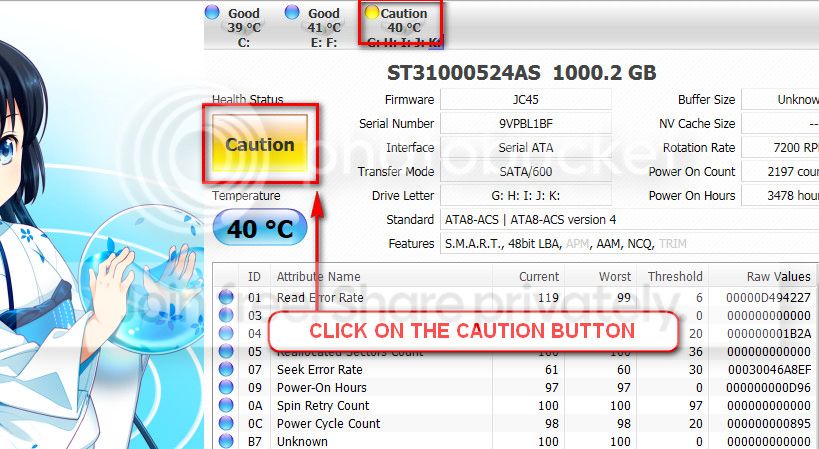
the caution indication can be converted to good using crystaldiscinfo. Click on the caution button, you will get another window ....
1_zps1eeadfca.jpg


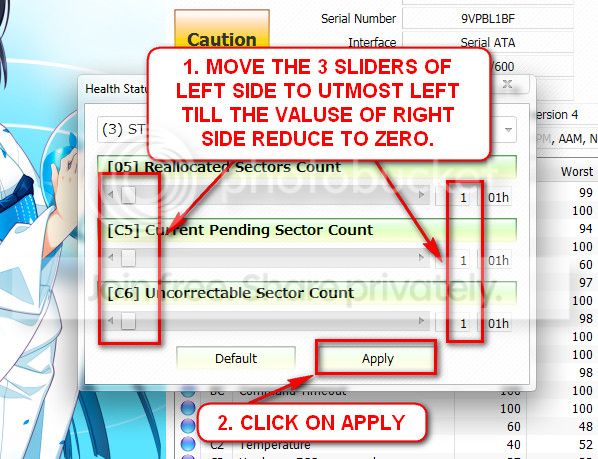
in the resulting window, there are three sliders in the left. Drag them to the ultimate left, and notice the values at the right side are converting to zeros.
2_zps50ae6eec.jpg


now click the apply button, and notice that the caution is gone.
seatool for dos: seatools | seagate download

  • burn it in a blank cd. Boot from the cd, click on "accept", wait for it to finish detecting the drives, then in the upper left corner select "basic tests", then select "long test" and let it run.
 

My Computer

Computer type
PC/Desktop
Computer Manufacturer/Model Number
Self assembled
OS
Windows 10 Home 64Bit
CPU
Intel Core i5 10400 @ 2.90GHz
Motherboard
Intel Corporation DG41WV (PROCESSOR)
Memory
8.00GB Single-Channel Unknown @ 1329MHz (16-20-20-38)
Sound Card
Realtek High Definition Audio
Monitor(s) Displays
DELL E170S
Screen Resolution
1280x1024 pixels
Hard Drives
931GB TOSHIBA DT01ACA100 (SATA)
238GB TEAM TM8PS7256G (SATA SSD)
Case
Nothing Fancy
Cooling
Fans
Keyboard
A4 Tech Co LTD
Mouse
A4 Tech Co Ltd/Logitech
Internet Speed
25 Mbps
Sweet, back to "good" health. When i boot Seatools it states there are no drives/devices found nor any controllers??
 

My Computer

Computer type
Laptop
Computer Manufacturer/Model Number
Asus ZenBook UX21E
OS
Kali Linux, Custom OS's
CPU
i7
Hard Drives
SSD
Antivirus
Australia
Set the storage controller to IDE mode and then run seatools.
When the test is over, he need to set the AHCI mode back otherwise windows will not boot.
 

My Computer

Computer type
PC/Desktop
Computer Manufacturer/Model Number
Self assembled
OS
Windows 10 Home 64Bit
CPU
Intel Core i5 10400 @ 2.90GHz
Motherboard
Intel Corporation DG41WV (PROCESSOR)
Memory
8.00GB Single-Channel Unknown @ 1329MHz (16-20-20-38)
Sound Card
Realtek High Definition Audio
Monitor(s) Displays
DELL E170S
Screen Resolution
1280x1024 pixels
Hard Drives
931GB TOSHIBA DT01ACA100 (SATA)
238GB TEAM TM8PS7256G (SATA SSD)
Case
Nothing Fancy
Cooling
Fans
Keyboard
A4 Tech Co LTD
Mouse
A4 Tech Co Ltd/Logitech
Internet Speed
25 Mbps
Back
Top