
Hey guys. So this PC of mine is one that I built on my own back in 2013, and it's never had a BSOD until today. What happened was I turned my PC on this morning to check an email, and then I put it into Sleep Mode so I could go out. I turned my monitor off instantly so I don't know if the BSOD happened right away or while I was gone, but when I came back my computer wouldn't wake up when I clicked my mouse button. I hit the power button and that turned it on, and I was asked on boot if I wanted to start in Safe Mode or start normally. I started normally, and when I got to my desktop I was shown the following error message:
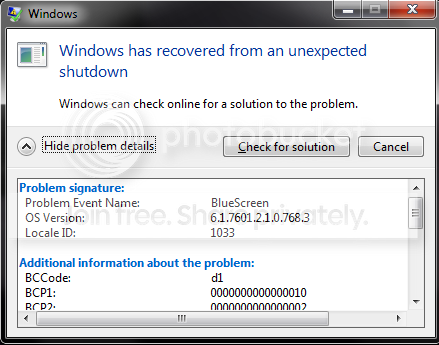

I'm not very good at deciphering Blue Screens, so any help I can get would be very much appreciated. Here's the log zip file thing (if I've done it correctly) and some additional info:
RAM: 8.00 GB
OS: Windows 7 Home Premium 64 bit
Video Card: NVIDIA GeForce GTX 770
Processor: Intel Core i5-3570K
The inside of my PC hasn't been cleaned in a while and is quite dusty.


I'm not very good at deciphering Blue Screens, so any help I can get would be very much appreciated. Here's the log zip file thing (if I've done it correctly) and some additional info:
RAM: 8.00 GB
OS: Windows 7 Home Premium 64 bit
Video Card: NVIDIA GeForce GTX 770
Processor: Intel Core i5-3570K
The inside of my PC hasn't been cleaned in a while and is quite dusty.
Last edited:
My Computer
- Computer Manufacturer/Model Number
- HP-Pavilion a6130n
- OS
- Windows 7 Home Premium 32bit
- CPU
- AMD Athlon 64 X2 Duel Core Processor 5000+, 2600Mhz
- Memory
- 3.00 GB
- Graphics Card(s)
- NVIDIA GeForce 8800 GTS 512
- Sound Card
- HTO CLARO
- Screen Resolution
- 1680 x 1050 x 59 hertz

