BSOD Clock interrupt not received on a secondary processor ...

It's made by a company called Renesas, I'm on my mobile so I can't check what programs you have installed via msinfo32.
 

My Computer My Computer

Computer type
PC/Desktop
Ive attached the furmark test? Not sure what to do with it now?
 

My Computer My Computer

Computer type
PC/Desktop
Computer Manufacturer/Model Number
Dell XPS L701X
OS
Windows 7 64 bit Home Premiu
CPU
intel core processor i7 CPU Q740 @ 1.73 GHz
Motherboard
Intel PCH HM57
Memory
4.00GB
Graphics Card(s)
NVIDIA GeForce GT 445M
Sound Card
Realtek High Definition Audio
Monitor(s) Displays
Generic PnP Monitor
Screen Resolution
1600x900
Hard Drives
WDC WD5000BEKT-75KA9T0
Keyboard
Standard PS/2 keyboard
Mouse
Synaptics PS/2 Port Touchpad
Antivirus
Norton 360
Browser
google
Proceed with driver removal, everything seems to be fine except that the GPU is bit hot, I suppose it could be overlooked stated that it is a laptop.

Does it ever normally get that hot?
 

My Computer My Computer

Computer type
PC/Desktop
Ive done all the instructions as you have shown except Norton 360, as I have only just renewed my subscription and I didnt want to be without an antivirus. Is there another one you can advise that does the same as 360 but thats not as argumentative with the system?
Ive not had any BSOD as yet today, but I have had several freezes in the last day, which I have to power off manually and re-start.

Thanks again for your help. It has been really appreciated . A couple of the drivers have message coming up in the 'flag status' but I will have a look and see if anything important
 

My Computer My Computer

Computer type
PC/Desktop
Computer Manufacturer/Model Number
Dell XPS L701X
OS
Windows 7 64 bit Home Premiu
CPU
intel core processor i7 CPU Q740 @ 1.73 GHz
Motherboard
Intel PCH HM57
Memory
4.00GB
Graphics Card(s)
NVIDIA GeForce GT 445M
Sound Card
Realtek High Definition Audio
Monitor(s) Displays
Generic PnP Monitor
Screen Resolution
1600x900
Hard Drives
WDC WD5000BEKT-75KA9T0
Keyboard
Standard PS/2 keyboard
Mouse
Synaptics PS/2 Port Touchpad
Antivirus
Norton 360
Browser
google
Yes, we recommend MSE and Malwarebytes as they cause no issues.

If you are getting freezes then I suggest enabling Driver Verifier.

Enable driver verifier but only enable the options: Standard settings and IRP logging step 3.
Don't enable Force Pending I/O Requests

Enable Driver Verifier to monitor the drivers.
Driver Verifier -Enable and Disable
Run Driver Verifier for 24 hours or the occurrence of the next crash, whichever is earlier.

   Information

We use Driver Verifier as it puts a stress on the drivers, and so it makes the unstable drivers crash. This should flag the driver responsible in the dump file.
It

Driver Verifier will make the system laggy, this is normal so don't worry.

Before enabling DV, make sure that you have earlier System restore points made in your computer.

If there are no points, make a System Restore Point Manually


Post back the results.
 

My Computer My Computer

Computer type
PC/Desktop
I ran the driver verifier for 24 hrs without any BSOD. The system was laggy as the instructions said it would be. So I uninstalled driver verifier this morning and have been working on my laptop since. and hey presto 17.00 I had a BSOD. I was searching the internet at the time and not sure if this is relevant. Ive looked for the memory dump to upload to one drive, but there isn't one showing ?
 

My Computer My Computer

Computer type
PC/Desktop
Computer Manufacturer/Model Number
Dell XPS L701X
OS
Windows 7 64 bit Home Premiu
CPU
intel core processor i7 CPU Q740 @ 1.73 GHz
Motherboard
Intel PCH HM57
Memory
4.00GB
Graphics Card(s)
NVIDIA GeForce GT 445M
Sound Card
Realtek High Definition Audio
Monitor(s) Displays
Generic PnP Monitor
Screen Resolution
1600x900
Hard Drives
WDC WD5000BEKT-75KA9T0
Keyboard
Standard PS/2 keyboard
Mouse
Synaptics PS/2 Port Touchpad
Antivirus
Norton 360
Browser
google
I suggest running these hardware tests.

Stress test your CPU with Prime95

I recommend running Prime95 for around 2 hours

   Warning

As with most stress tests your component's temperature will rapidly increase.
It is advised that you download a temperature monitoring program like HWmonitor
Keep an eye on your temperatures and stop the tests if it starts to overheat


Stress test your graphics card with Furmark

I recommend running it for around 30 minutes

   Warning

Furmark will increase the temperature of your GPU rapidly so keep and eye on your temperatures


Memtest86 will test your RAM

   Information

Run Memtest86 for at least 8 passes so we get enough information to confirm that your RAM isn't failing


Run a Disk Check to scan for errors

   Note

Afterwards go into an Elevated Command Prompt (Run as administrator) and type in sfc /scannow
If it finds errors reboot and run the scan two more times


Run SeaTools to see if your HDD or SSD is failing

Post back the results.
 

My Computer My Computer

Computer type
PC/Desktop
The CPU test temperature got up to 95 and then the computer turned off, so I didn't try re-running becasue of the temperature.
All the others ran ok, without any problems or error messages. the sfc /scannow came up with a few errors unable to fix. I did a print screen which Ive attached
 

My Computer My Computer

Computer type
PC/Desktop
Computer Manufacturer/Model Number
Dell XPS L701X
OS
Windows 7 64 bit Home Premiu
CPU
intel core processor i7 CPU Q740 @ 1.73 GHz
Motherboard
Intel PCH HM57
Memory
4.00GB
Graphics Card(s)
NVIDIA GeForce GT 445M
Sound Card
Realtek High Definition Audio
Monitor(s) Displays
Generic PnP Monitor
Screen Resolution
1600x900
Hard Drives
WDC WD5000BEKT-75KA9T0
Keyboard
Standard PS/2 keyboard
Mouse
Synaptics PS/2 Port Touchpad
Antivirus
Norton 360
Browser
google
That's bad, very bad...

A CPU should never get that hot, no wonder you computer turned off.
You should check to see if there is enough airflow, is your case big enough?
Remove dust by using a can of compressed air.

Reapply thermal paste which should reduce the temperature.

Are you overclocking?
If so stop.
 

My Computer My Computer

Computer type
PC/Desktop
Hi doc
I thought so. There seems to be enough airflow? The vents are underneath the 'laptop' (desktop replacement). The fan was making a loud noise on Monday and I rang dell. They have an engineer coming today to change the heat sink and fan (at a cost!), but they also said this wouldn't cause the BSOD . The stop code is a processor error code? The guy did a remote access and updated the bios and something else, but within an hour it had blue screened again.

Whats overclocking? I'm not doing it deliberately, but how would I know if I was doing it?
 

My Computer My Computer

Computer type
PC/Desktop
Computer Manufacturer/Model Number
Dell XPS L701X
OS
Windows 7 64 bit Home Premiu
CPU
intel core processor i7 CPU Q740 @ 1.73 GHz
Motherboard
Intel PCH HM57
Memory
4.00GB
Graphics Card(s)
NVIDIA GeForce GT 445M
Sound Card
Realtek High Definition Audio
Monitor(s) Displays
Generic PnP Monitor
Screen Resolution
1600x900
Hard Drives
WDC WD5000BEKT-75KA9T0
Keyboard
Standard PS/2 keyboard
Mouse
Synaptics PS/2 Port Touchpad
Antivirus
Norton 360
Browser
google
I have the same code here, except the last code in the data quad is 0x4.

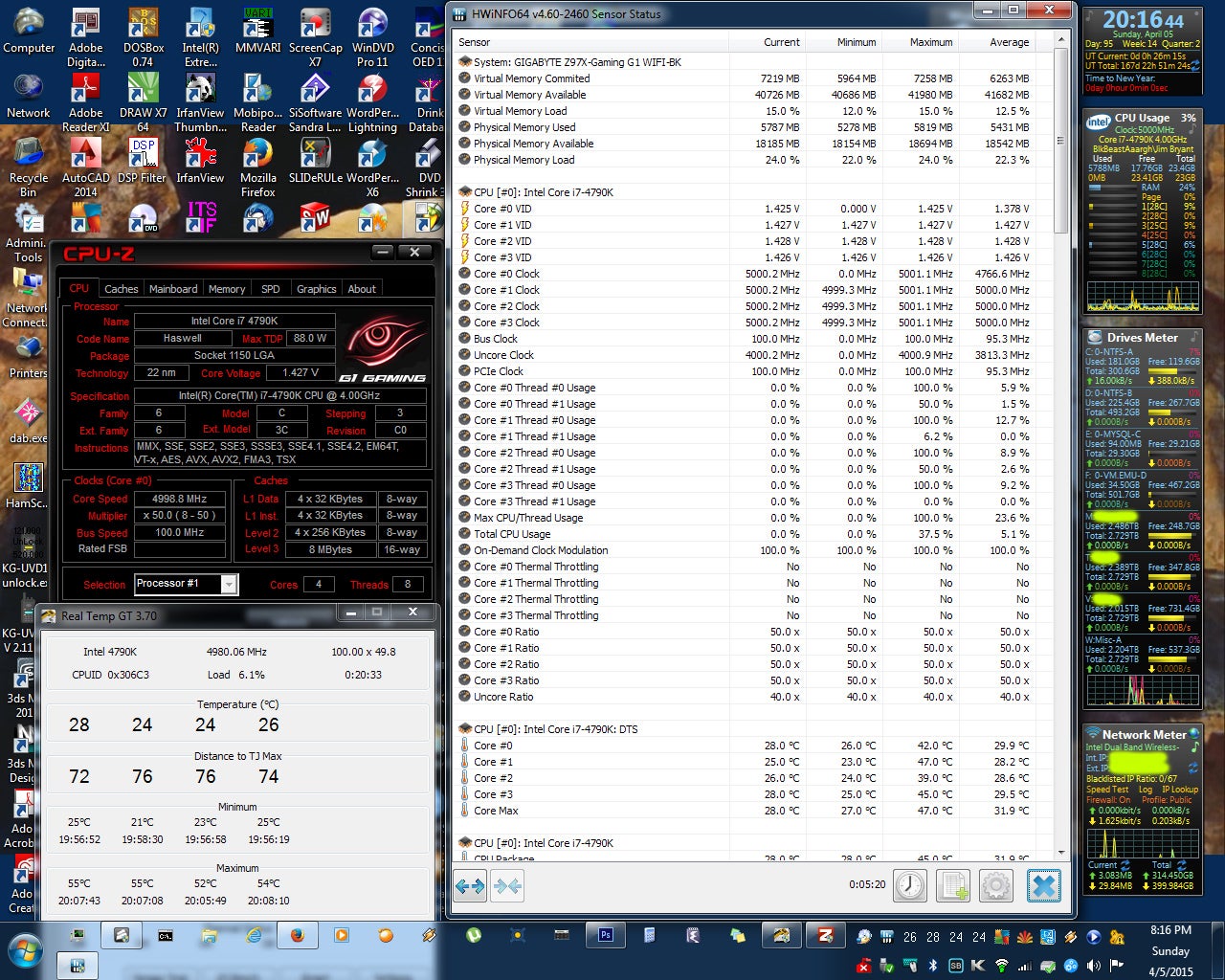
I just got this right after starting SETI@home (KWSN Lunatics AVX optimized client). This is after successful boot into Winblowz, CorsairLink (100% on fans, and Performance Mode on the pump), HWiNFO-64, CPU-Z, and RealTemp running, screenshot taken, CPU-Z validation via IE, Photoshop started, prtscrn grab pasted, personal data obscured, saved as jpeg, firefox started, several posts, firefox exited, BOINC/SETI started, then after a couple of seconds, (I don't think this is a thermal, as max temp showing at time of freeze was 70C), then I get the bluescreen.

This also happens at 4.9 GHz @1.39 Vcore. This happened this time at 5 GHz @1.425 Vcore.

a7fdb5cd_5.GHz1.425Vcore.jpeg
 

My Computer My Computer

Computer type
PC/Desktop
Computer Manufacturer/Model Number
Gigabyte
OS
Windows 7 Ultimate x64
CPU
i7-4790K
Motherboard
GA-Z97X-Gaming G1 WIFI-BK
Memory
G.SKILL and Team Vulcan DDR3-2400, 24GB total
Sound Card
Onboard Soundblaster Core3D
PSU
Corsair HX650
Case
Corsair Obsidian 750D
Cooling
Corsair H100i GTX
Back
Top