BSOD coming up randomly.

FragzZ

New member
Local time
3:32 PM
Messages
15
BSOD WIN32K.sys.

So lately i'm getting these BSOD's. I tested my CPU, RAM and GPU. (Prime95, pass 7 memtest and furmark).
No BSODs from that. I opened the .dmp file and this is the outcome:

Code:
*******************************************************************************
*                                                                             *
*                        Bugcheck Analysis                                    *
*                                                                             *
*******************************************************************************

SYSTEM_SERVICE_EXCEPTION (3b)
An exception happened while executing a system service routine.
Arguments:
Arg1: 00000000c0000005, Exception code that caused the bugcheck
Arg2: fffff96000104283, Address of the exception record for the exception that caused the bugcheck
Arg3: fffff88007063020, Address of the context record for the exception that caused the bugcheck
Arg4: 0000000000000000, zero.

Debugging Details:
------------------


EXCEPTION_CODE: (NTSTATUS) 0xc0000005 - The instruction at 0x%08lx referenced memory at 0x%08lx. The memory could not be %s.

FAULTING_IP: 
win32k!HmgLockEx+a3
fffff960`00104283 0fb7430c        movzx   eax,word ptr [rbx+0Ch]

CONTEXT:  fffff88007063020 -- (.cxr 0xfffff88007063020)
rax=fffff900c0200000 rbx=0000000000000000 rcx=fffffa8009633060
rdx=fffff900c0200000 rsi=0000000000000000 rdi=fffff900c0200000
rip=fffff96000104283 rsp=fffff88007063a00 rbp=0000000000000000
 r8=0000000000000001  r9=0000000000000000 r10=0000000000000000
r11=fffff88007063a68 r12=0000000004905700 r13=0000000000000000
r14=0000000000000001 r15=0000000000000000
iopl=0         nv up ei pl zr na po nc
cs=0010  ss=0018  ds=002b  es=002b  fs=0053  gs=002b             efl=00010246
win32k!HmgLockEx+0xa3:
fffff960`00104283 0fb7430c        movzx   eax,word ptr [rbx+0Ch] ds:002b:00000000`0000000c=????
Resetting default scope

CUSTOMER_CRASH_COUNT:  1

DEFAULT_BUCKET_ID:  VISTA_DRIVER_FAULT

BUGCHECK_STR:  0x3B

PROCESS_NAME:  dwm.exe

CURRENT_IRQL:  0

LAST_CONTROL_TRANSFER:  from fffff960002bc6b0 to fffff96000104283

STACK_TEXT:  
fffff880`07063a00 fffff960`002bc6b0 : fffff900`c3052350 00000000`00000001 00000000`321216ba fffff900`c3184cd0 : win32k!HmgLockEx+0xa3
fffff880`07063a70 fffff960`002bbbae : fffff900`c3052350 00000000`00000000 000016ba`00000000 00000000`00000000 : win32k!SFMLOGICALSURFACE::OwnsSurfaceCleanup+0x40
fffff880`07063aa0 fffff960`002bcab3 : 00000000`00000000 00000000`321216ba fffff900`c3052350 00000000`04905750 : win32k!SFMLOGICALSURFACE::DeInitialize+0x4e
fffff880`07063ae0 fffff960`002195ff : 00000000`00000000 fffff900`c010c010 fffff900`c3052350 00000000`00000020 : win32k!bhLSurfDestroyLogicalSurfaceObject+0x4b
fffff880`07063b20 fffff960`0023a908 : 00000800`00000001 00000000`00000001 fffff880`07063c60 00000000`00000000 : win32k!GreSfmCloseCompositorRef+0x10f
fffff880`07063b60 fffff800`030d8153 : fffffa80`09633060 00000000`0396fac0 000007fe`f8ead610 00000000`00000000 : win32k!NtGdiHLSurfSetInformation+0x1a8
fffff880`07063be0 000007fe`fe434efa : 00000000`00000000 00000000`00000000 00000000`00000000 00000000`00000000 : nt!KiSystemServiceCopyEnd+0x13
00000000`0396f518 00000000`00000000 : 00000000`00000000 00000000`00000000 00000000`00000000 00000000`00000000 : 0x7fe`fe434efa


FOLLOWUP_IP: 
win32k!HmgLockEx+a3
fffff960`00104283 0fb7430c        movzx   eax,word ptr [rbx+0Ch]

SYMBOL_STACK_INDEX:  0

SYMBOL_NAME:  win32k!HmgLockEx+a3

FOLLOWUP_NAME:  MachineOwner

MODULE_NAME: win32k

IMAGE_NAME:  win32k.sys

DEBUG_FLR_IMAGE_TIMESTAMP:  4a5bc5e0

STACK_COMMAND:  .cxr 0xfffff88007063020 ; kb

FAILURE_BUCKET_ID:  X64_0x3B_win32k!HmgLockEx+a3

BUCKET_ID:  X64_0x3B_win32k!HmgLockEx+a3

Followup: MachineOwner
---------

Thanks in advance,

FragzZ

Ingame: (battlefield 4): http://prntscr.com/2ll4an

System specs:
CPU: Intel core I5 3570k 3,4GHZ
GPU: MSI GTX 760
MOBO: MSI Z77A-G43
PSU: Corsair TX 650 Watt
RAM: 8 GB 1600mhz ripjawx
SSD: Adata 120GB
HDD: Seagate 1tb
 
Last edited:

My Computer

Computer type
PC/Desktop
OS
Windows 7 Ultimate x64
Hi FragzZ.

Install Service pack 1 and all other windows updates. Otherwise the system will remain vulnerable to threats.
Code:
[COLOR=Red]Windows 7 Kernel Version 7600 MP [/COLOR](4 procs) Free x64
Product: WinNt, suite: TerminalServer SingleUserTS
Built by: 7600.16385.amd64fre.win7_rtm.090713-1255
Learn how to install Windows 7 Service Pack 1 (SP1)
Service Pack and Update Center - Microsoft Windows

A stop 0x3B is often caused by a display driver (though it has some other reasons too); and it seems to be the same in your case.
Code:
fffff880`07062148  fffff880`10170c2fUnable to load image \SystemRoot\system32\DRIVERS\nvlddmkm.sys, Win32 error 0n2
*** WARNING: Unable to verify timestamp for nvlddmkm.sys
[COLOR=Red]*** ERROR: Module load completed but symbols could not be loaded for nvlddmkm.sys[/COLOR]
 nvlddmkm+0x36fc2f
Code:
fffff880`0fe01000 fffff880`10a4a000   nvlddmkm T (no symbols)           
    Loaded symbol image file: nvlddmkm.sys
    Image path: \SystemRoot\system32\DRIVERS\nvlddmkm.sys
[COLOR=Red]    Image name: nvlddmkm.sys
    Timestamp:        Thu Dec 19 22:32:52 2013[/COLOR] (52B326BC)
    CheckSum:         00C19112
    ImageSize:        00C49000
    Translations:     0000.04b0 0000.04e4 0409.04b0 0409.04e4
You have the latest version of the display driver installed. And unfortunately I dont know any driver version that works good with GTX 760. You may try the drivers on a trial and error basis:

  • 320.49 WHQL
  • 327.23 WHQL
  • 331.58 WHWL
  • 331.65 WHQL
  • 331.82 WHQL
Get them from Drivers - Download NVIDIA Drivers

Do a clean install on all of them. Uninstall the previously installed driver first.
Uninstall All nvidia items in Control Panel > Programs and features
    • 3D Vision Control Driver
    • 3D Vision Driver
    • Graphics Driver
    • HD Audio Driver
    • PhysX
    • nvidia Update
    (Are you using nvidia chipset drivers? If so, dont uninstall anything other than those are listed).
  • Now follow Drivers - Clean Left over Files after Uninstalling
  • Download the target WHQL. While installing, Select Custom (Advanced) install. In the next page, follow this settings:

Lengthy process, but the only stable version of nvidia is 314.22 lately, which does not support 700 series GPU.
 

My Computer

Computer type
PC/Desktop
Computer Manufacturer/Model Number
Self Assembled
OS
Microsoft Windows 10 Pro Insider Preview 64-bit
CPU
Intel(R) Core(TM) i3-4130 CPU @ 3.40GHz
Motherboard
Gigabyte Technology Co., Ltd. B85M-D3H
Memory
Corsair Vengence 4GB x2 (8.00GB Dual-Channel DDR3 @ 798MHz)
Graphics Card(s)
2047MB GeForce GTS 450 (ZOTAC International)
Sound Card
Onboard (Realtek High Definition Audio)
Monitor(s) Displays
LG Flatron E2040T
Screen Resolution
1600x900
Hard Drives
Western Digital 1 TB
Seagate 500 GB
PSU
Corsair VS550
Case
Cooler Master K380
Cooling
Cooler Master Seidon 120V Plus
Keyboard
Logitech MK260r
Mouse
Logitech MK260r
Internet Speed
PMPL Broadband
Antivirus
Windows Defender + MBAM
Browser
Firefox
Other Info
Dell Studio 15" Laptop
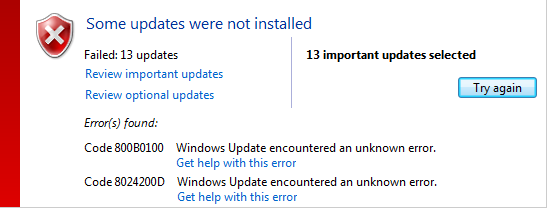
Now I got problems with updating windows...

l4LgHdZ.png


(The update includes SP1)
 

My Computer

Computer type
PC/Desktop
OS
Windows 7 Ultimate x64

My Computer

Computer type
PC/Desktop
Computer Manufacturer/Model Number
Self Assembled
OS
Microsoft Windows 10 Pro Insider Preview 64-bit
CPU
Intel(R) Core(TM) i3-4130 CPU @ 3.40GHz
Motherboard
Gigabyte Technology Co., Ltd. B85M-D3H
Memory
Corsair Vengence 4GB x2 (8.00GB Dual-Channel DDR3 @ 798MHz)
Graphics Card(s)
2047MB GeForce GTS 450 (ZOTAC International)
Sound Card
Onboard (Realtek High Definition Audio)
Monitor(s) Displays
LG Flatron E2040T
Screen Resolution
1600x900
Hard Drives
Western Digital 1 TB
Seagate 500 GB
PSU
Corsair VS550
Case
Cooler Master K380
Cooling
Cooler Master Seidon 120V Plus
Keyboard
Logitech MK260r
Mouse
Logitech MK260r
Internet Speed
PMPL Broadband
Antivirus
Windows Defender + MBAM
Browser
Firefox
Other Info
Dell Studio 15" Laptop
Didn't work, I made a new topic in there, I installed a previous driver update were I never had problems with, I will mark this topic resolved when I don't have any BSODS.

UPDATE: I still got BSOD.
 
Last edited:

My Computer

Computer type
PC/Desktop
OS
Windows 7 Ultimate x64
Still nvidia display driver.
Code:
fffff880`07eea1e8  fffff880`100a1fdcUnable to load image \SystemRoot\system32\DRIVERS\nvlddmkm.sys, Win32 error 0n2
*** WARNING: Unable to verify timestamp for nvlddmkm.sys
[COLOR=Red]*** ERROR: Module load completed but symbols could not be loaded for nvlddmkm.sys[/COLOR]
 nvlddmkm+0x1cafdc
With another version.
Code:
fffff880`0fed7000 fffff880`10b18000   nvlddmkm T (no symbols)           
    Loaded symbol image file: nvlddmkm.sys
    Image path: \SystemRoot\system32\DRIVERS\nvlddmkm.sys
[COLOR=Red]    Image name: nvlddmkm.sys
    Timestamp:        Mon Nov 11 18:54:05 2013 [/COLOR](5280DA75)
    CheckSum:         00C10283
    ImageSize:        00C41000
    Translations:     0000.04b0 0000.04e4 0409.04b0 0409.04e4
 

My Computer

Computer type
PC/Desktop
Computer Manufacturer/Model Number
Self Assembled
OS
Microsoft Windows 10 Pro Insider Preview 64-bit
CPU
Intel(R) Core(TM) i3-4130 CPU @ 3.40GHz
Motherboard
Gigabyte Technology Co., Ltd. B85M-D3H
Memory
Corsair Vengence 4GB x2 (8.00GB Dual-Channel DDR3 @ 798MHz)
Graphics Card(s)
2047MB GeForce GTS 450 (ZOTAC International)
Sound Card
Onboard (Realtek High Definition Audio)
Monitor(s) Displays
LG Flatron E2040T
Screen Resolution
1600x900
Hard Drives
Western Digital 1 TB
Seagate 500 GB
PSU
Corsair VS550
Case
Cooler Master K380
Cooling
Cooler Master Seidon 120V Plus
Keyboard
Logitech MK260r
Mouse
Logitech MK260r
Internet Speed
PMPL Broadband
Antivirus
Windows Defender + MBAM
Browser
Firefox
Other Info
Dell Studio 15" Laptop
I installed an older version of nvidia..

331.82 WHQL
 

My Computer

Computer type
PC/Desktop
OS
Windows 7 Ultimate x64
Back
Top