Solved BSOD for 3 months BCCode: 7f

alisan

New member
Local time
5:23 AM
Messages
9
hello guys ! \
i am new here , but i have always read threads trying to slove my problem
this time , i decided to post a thread myself
i have been having bsod for 3 months now
i have tried everything checked my ram , replaced my PSU , installed winows 8 then 8.1 then 7 32 bit
then again windows 7 X64

here's every thing i could find :

BCCode: 7f
BCP1: 0000000000000008
BCP2: 0000000080050033
BCP3: 00000000000406F8
BCP4: FFFFF800030E0EF6
OS Version: 6_1_7601
Service Pack: 1_0
Product: 256_1

files that helps :

C:\Windows\Minidump\030115-18314-01.dmp
C:\Users\Admin\AppData\Local\Temp\WER-45770-0.sysdata.xml

and this is the zip file :
View attachment 351169

please help :"(
 

My Computer

Computer type
PC/Desktop
OS
widows 7 x64
CPU
pentuim g850
Motherboard
p8h61 asus
Memory
4gb dd3 1333
Graphics Card(s)
gt 630 4gb
Hard Drives
1tb wester digital
Antivirus
non
Browser
google chrom
Code:
UNEXPECTED_KERNEL_MODE_TRAP (7f)
This means a trap occurred in kernel mode, and it's a trap of a kind
that the kernel isn't allowed to have/catch (bound trap) or that
is always instant death (double fault).  The first number in the
bugcheck params is the number of the trap (8 = double fault, etc)
Consult an Intel x86 family manual to learn more about what these
traps are. Here is a *portion* of those codes:
If kv shows a taskGate
        use .tss on the part before the colon, then kv.
Else if kv shows a trapframe
        use .trap on that value
Else
        .trap on the appropriate frame will show where the trap was taken
        (on x86, this will be the ebp that goes with the procedure KiTrap)
Endif
kb will then show the corrected stack.
Arguments:
[COLOR=Red]Arg1: 0000000000000008, EXCEPTION_DOUBLE_FAULT[/COLOR]
Arg2: 0000000080050033
Arg3: 00000000000406f8
Arg4: fffff800030e0ef6
There are two common cause of a double fault.
A driver causing stack overflow; and
A hardware issue.
First let us check for the drivers. enable Driver Verifier to monitor the drivers.Run Driver Verifier for 24 hours or the occurrence of the next crash, whichever is earlier.

   Information
Why Driver Verifier:
It puts a stress on the drivers, ans so it makes the unstable drivers crash. Hopefully the driver that crashes is recorded in the memory dump.

How Can we know that DV is enabled:
It will make the system bit of slow, laggy.

   Warning
Before enabling DV, make it sure that you have earlier System restore points made in your computer. You can check it easily by using CCleaner looking at Tools > System Restore.

If there is no points, make a System Restore Point manually before enabling DV.

   Tip


Let us know the results, with the subsequent crash dumps, if any.

Also, from another crash dump ....
Code:
BugCheck 1000007E, {ffffffffc0000005, fffff80003088770, fffff880034f44c8, fffff880034f3d20}

Probably caused by : msrpc.sys ( msrpc!LRPC_CASSOCIATION::OpenSecurityContextWorker+b9 )

Followup: MachineOwner
---------
Remote control programs also can cause this BSOD. So if you have any such program installed, Uninstall it.

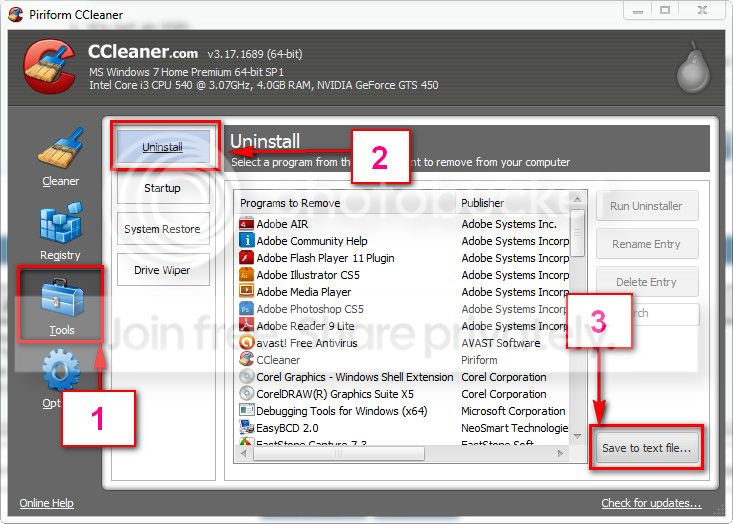
Better download and install CCleaner. Then run it.
Go to "Tools" .... by default it will open the "uninstall" tab.
Click on save as text file. Save it on your desktop.
Upload the text file for us.
2012-11-02_224417.jpg
 

My Computer

Computer type
PC/Desktop
Computer Manufacturer/Model Number
Self Assembled
OS
Microsoft Windows 10 Pro Insider Preview 64-bit
CPU
Intel(R) Core(TM) i3-4130 CPU @ 3.40GHz
Motherboard
Gigabyte Technology Co., Ltd. B85M-D3H
Memory
Corsair Vengence 4GB x2 (8.00GB Dual-Channel DDR3 @ 798MHz)
Graphics Card(s)
2047MB GeForce GTS 450 (ZOTAC International)
Sound Card
Onboard (Realtek High Definition Audio)
Monitor(s) Displays
LG Flatron E2040T
Screen Resolution
1600x900
Hard Drives
Western Digital 1 TB
Seagate 500 GB
PSU
Corsair VS550
Case
Cooler Master K380
Cooling
Cooler Master Seidon 120V Plus
Keyboard
Logitech MK260r
Mouse
Logitech MK260r
Internet Speed
PMPL Broadband
Antivirus
Windows Defender + MBAM
Browser
Firefox
Other Info
Dell Studio 15" Laptop
thanks for replay
about stress on the drivers,
i took it to pc shop to repair my pc and he already done that
because he told me that he tries his best to stress the pc and drivers so he could see the problem but the problem did not show
i took it to another shop , same thing stressing it , and nothing happen , they both said that they did not see any problem or bsod
which is very weird
i also have a new hard from western digital its empty , i still get the problem
any suggestion ?
 

My Computer

Computer type
PC/Desktop
OS
widows 7 x64
CPU
pentuim g850
Motherboard
p8h61 asus
Memory
4gb dd3 1333
Graphics Card(s)
gt 630 4gb
Hard Drives
1tb wester digital
Antivirus
non
Browser
google chrom

My Computer

Computer type
PC/Desktop
OS
widows 7 x64
CPU
pentuim g850
Motherboard
p8h61 asus
Memory
4gb dd3 1333
Graphics Card(s)
gt 630 4gb
Hard Drives
1tb wester digital
Antivirus
non
Browser
google chrom
Enable Driver Verifier yourself, following the instructions carefully. Let us see how it responds?

Not seeing any remote control program, apparently. If anything I missed (I am not aware of all the installed programs, but most of them are games. :) ) Driver Verifier will catch it.
 

My Computer

Computer type
PC/Desktop
Computer Manufacturer/Model Number
Self Assembled
OS
Microsoft Windows 10 Pro Insider Preview 64-bit
CPU
Intel(R) Core(TM) i3-4130 CPU @ 3.40GHz
Motherboard
Gigabyte Technology Co., Ltd. B85M-D3H
Memory
Corsair Vengence 4GB x2 (8.00GB Dual-Channel DDR3 @ 798MHz)
Graphics Card(s)
2047MB GeForce GTS 450 (ZOTAC International)
Sound Card
Onboard (Realtek High Definition Audio)
Monitor(s) Displays
LG Flatron E2040T
Screen Resolution
1600x900
Hard Drives
Western Digital 1 TB
Seagate 500 GB
PSU
Corsair VS550
Case
Cooler Master K380
Cooling
Cooler Master Seidon 120V Plus
Keyboard
Logitech MK260r
Mouse
Logitech MK260r
Internet Speed
PMPL Broadband
Antivirus
Windows Defender + MBAM
Browser
Firefox
Other Info
Dell Studio 15" Laptop
okay sure, i'll do it right away , but i have one problem , which is i can't keep it my pc for 24 hours , i could only 6 to 7 hours daily
the reason ? well i live in syria we have no electricity only 6 to 7 hours , if that's okay
and i wanted to cancel the program , is it safe to do so ?
i mean i might have to cancel , would that be a problem ?
yeah i only play games on pc :D nothing else at all
 

My Computer

Computer type
PC/Desktop
OS
widows 7 x64
CPU
pentuim g850
Motherboard
p8h61 asus
Memory
4gb dd3 1333
Graphics Card(s)
gt 630 4gb
Hard Drives
1tb wester digital
Antivirus
non
Browser
google chrom
also i am enabling Driver Verifier
step 5 says select all drivers not provided by Microsoft Corporation.
so if i had vclone.sys elaborate bytes ag
do i mark it too ?
or just dump-atapi.sys <unknown>
hope i get a quick answer , so i could go on
also thanks alot for your interest in helping me
 

My Computer

Computer type
PC/Desktop
OS
widows 7 x64
CPU
pentuim g850
Motherboard
p8h61 asus
Memory
4gb dd3 1333
Graphics Card(s)
gt 630 4gb
Hard Drives
1tb wester digital
Antivirus
non
Browser
google chrom
So you are a dedicated gamer? Nice! :)

Add one more thing .... as you are planning to shut the computer down in between a verifier session. Free up the startup. Windows does not need any other program to auto start with it, but the auto start programs often conflicts and causes various problems including BSODs.

  1. Click on the Start button
  2. Type “msconfig (without quotes), click the resulting link. It will open the System Configuration window.
  3. Select the “Startup” tab.
  4. Deselect all items other than the antivirus.
  5. Apply > OK
  6. Accept then restart.
Otherwise the computer may give a trouble at the reboot.

If anything is there to be caught by the verifier, it will not take 24 hours. This is just a maximum time set in order to be sure.

Enable it. If it causes BSOD, then disable it and supply the crash dump.
 

My Computer

Computer type
PC/Desktop
Computer Manufacturer/Model Number
Self Assembled
OS
Microsoft Windows 10 Pro Insider Preview 64-bit
CPU
Intel(R) Core(TM) i3-4130 CPU @ 3.40GHz
Motherboard
Gigabyte Technology Co., Ltd. B85M-D3H
Memory
Corsair Vengence 4GB x2 (8.00GB Dual-Channel DDR3 @ 798MHz)
Graphics Card(s)
2047MB GeForce GTS 450 (ZOTAC International)
Sound Card
Onboard (Realtek High Definition Audio)
Monitor(s) Displays
LG Flatron E2040T
Screen Resolution
1600x900
Hard Drives
Western Digital 1 TB
Seagate 500 GB
PSU
Corsair VS550
Case
Cooler Master K380
Cooling
Cooler Master Seidon 120V Plus
Keyboard
Logitech MK260r
Mouse
Logitech MK260r
Internet Speed
PMPL Broadband
Antivirus
Windows Defender + MBAM
Browser
Firefox
Other Info
Dell Studio 15" Laptop
okay i'll do what you just said
but first i have to tell you what happen
after i finish step 7 , which says i have to restart my pc
i went to start button , wanted to click on restart but couldn't because i had BSOD
it was fast could not read anything but something like wink32
also it gave me this after logging in :


BCCode: 3b
BCP1: 00000000C0000005
BCP2: FFFFF9600027701C
BCP3: FFFFF880095BBC90
BCP4: 0000000000000000
OS Version: 6_1_7601
Service Pack: 1_0
Product: 256_1

files that help :
C:\Windows\Minidump\030115-16286-01.dmp
C:\Users\Admin\AppData\Local\Temp\WER-40934-0.sysdata.xml
 

My Computer

Computer type
PC/Desktop
OS
widows 7 x64
CPU
pentuim g850
Motherboard
p8h61 asus
Memory
4gb dd3 1333
Graphics Card(s)
gt 630 4gb
Hard Drives
1tb wester digital
Antivirus
non
Browser
google chrom

My Computer

Computer type
PC/Desktop
Computer Manufacturer/Model Number
Self Assembled
OS
Microsoft Windows 10 Pro Insider Preview 64-bit
CPU
Intel(R) Core(TM) i3-4130 CPU @ 3.40GHz
Motherboard
Gigabyte Technology Co., Ltd. B85M-D3H
Memory
Corsair Vengence 4GB x2 (8.00GB Dual-Channel DDR3 @ 798MHz)
Graphics Card(s)
2047MB GeForce GTS 450 (ZOTAC International)
Sound Card
Onboard (Realtek High Definition Audio)
Monitor(s) Displays
LG Flatron E2040T
Screen Resolution
1600x900
Hard Drives
Western Digital 1 TB
Seagate 500 GB
PSU
Corsair VS550
Case
Cooler Master K380
Cooling
Cooler Master Seidon 120V Plus
Keyboard
Logitech MK260r
Mouse
Logitech MK260r
Internet Speed
PMPL Broadband
Antivirus
Windows Defender + MBAM
Browser
Firefox
Other Info
Dell Studio 15" Laptop
okay mate , here it is :

View attachment 351187

do i disable driver verifier or wait ?

though i will chose to wait until you say so boss :D
am excited might find some answers , hope so
 

My Computer

Computer type
PC/Desktop
OS
widows 7 x64
CPU
pentuim g850
Motherboard
p8h61 asus
Memory
4gb dd3 1333
Graphics Card(s)
gt 630 4gb
Hard Drives
1tb wester digital
Antivirus
non
Browser
google chrom
Disable Verifier. :( It is not a driver caused stack overflow, apparently.

So we have to check the root of the issue in the hardware. Let us start with some conventional hardware tests.

Test your RAM modules for possible errors. Run memtest86+ for at least 8 consecutive passes.

If it start showing errors/red lines, stop testing. A single error is enough to determine that something is going bad there.

Stress test the Graphics Card using Furmark. Take a screenshot of the furmark window before closing it. Upload the screenshot for us.

Stress test the CPU. It saves the result as a .txt file in the prime95's folder. Upload the file for us.

Check if the Power Supply Unit (PSU) supplying adequate power to the computer or not.
Also let us know the wattage of the PSU.

Is the computer hot? Report us the heat of the computer after a couple of hours of your normal usage. Upload a screenshot of the summery tab of Speccy. Alternatively, you can publish a Speccy snapshot too: http://www.sevenforums.com/tutorials/311593-speccy-publish-snapshot-your-system-specs.html .

Take time with the tests. Let us know the results.
 

My Computer

Computer type
PC/Desktop
Computer Manufacturer/Model Number
Self Assembled
OS
Microsoft Windows 10 Pro Insider Preview 64-bit
CPU
Intel(R) Core(TM) i3-4130 CPU @ 3.40GHz
Motherboard
Gigabyte Technology Co., Ltd. B85M-D3H
Memory
Corsair Vengence 4GB x2 (8.00GB Dual-Channel DDR3 @ 798MHz)
Graphics Card(s)
2047MB GeForce GTS 450 (ZOTAC International)
Sound Card
Onboard (Realtek High Definition Audio)
Monitor(s) Displays
LG Flatron E2040T
Screen Resolution
1600x900
Hard Drives
Western Digital 1 TB
Seagate 500 GB
PSU
Corsair VS550
Case
Cooler Master K380
Cooling
Cooler Master Seidon 120V Plus
Keyboard
Logitech MK260r
Mouse
Logitech MK260r
Internet Speed
PMPL Broadband
Antivirus
Windows Defender + MBAM
Browser
Firefox
Other Info
Dell Studio 15" Laptop
hello again mate !
i am back with results
so i did test my ram ( 1 stick of 4gb ram no brand )
could not pass test 3 , it took 2 hours !
then i lost elecetricty du to the situation in syria but thankfuly i am using ups , so i turn it off with no issue
so i decided to grap a 1 stick of 2gb ddr3 1333 ( my mobo use 1333, 1066 non ecc )
tried em for 2 days , today is the third days
guss what ?
no bsod at all
and my pc used to collapse on me , driver used to have marks on em when i turn it on , even sound driver got broken before , but widows sloved it

anyway after replacing my ram , non of this problem happen at all
today is the third day . what do you suggest boss ?
did the problem got solved

also since my ram brook down , and i live syria
i am at limited choices for ram brands
i found two good brands : Memory Search | Kingston
and one called zipline , it has a gold colour
i know this is not a thread to ask about it , but you seems to have very knowledge about pc
i mean you helped me to figure the cause of bsod , thank you for that !
 
Last edited:

My Computer

Computer type
PC/Desktop
OS
widows 7 x64
CPU
pentuim g850
Motherboard
p8h61 asus
Memory
4gb dd3 1333
Graphics Card(s)
gt 630 4gb
Hard Drives
1tb wester digital
Antivirus
non
Browser
google chrom
hello again mate !
i am back with results
so i did test my ram ( 1 stick of 4gb ram no brand )
could not pass test 3 , it took 2 hours !
then i lost elecetricty du to the situation in syria but thankfuly i am using ups , so i turn it off with no issue
so i decided to grap a 1 stick of 2gb ddr3 1333 ( my mobo use 1333, 1066 non ecc )
tried em for 2 days , today is the third days
guss what ?
no bsod at all
and my pc used to collapse on me , driver used to have marks on em when i turn it on , even sound driver got broken before , but widows sloved it

anyway after replacing my ram , non of this problem happen at all
today is the third day . what do you suggest boss ?
did the problem got solved
Good job mate, it seems that you have solved your issue. :) Very well done! :thumbsup:

also since my ram brook down , and i live in hellholl called syria ( where everyone kill everyone )
i am at limited choices for ram brands
i found two good brands : Memory Search | Kingston
and one called zipline , it has a gold colour
i know this is not a thread to ask about it , but you seems to have very knowledge about pc
i mean you helped me to figure the cause of bsod , thank you for that !
Please mate, dont say any negative of your place? Syria has a very rich history and many a things to be proud of.

I used Kingston at a time, they are good enough. But I never used zipline, so cannot say about it with certainty. What I would say to you in addition that dont use a mix of RAM, use RAM of same Brand and FSB.

Also, we can consider this issue as solved, IMHO. :) If issues bounces back, we will troubleshoot it again. :)
 

My Computer

Computer type
PC/Desktop
Computer Manufacturer/Model Number
Self Assembled
OS
Microsoft Windows 10 Pro Insider Preview 64-bit
CPU
Intel(R) Core(TM) i3-4130 CPU @ 3.40GHz
Motherboard
Gigabyte Technology Co., Ltd. B85M-D3H
Memory
Corsair Vengence 4GB x2 (8.00GB Dual-Channel DDR3 @ 798MHz)
Graphics Card(s)
2047MB GeForce GTS 450 (ZOTAC International)
Sound Card
Onboard (Realtek High Definition Audio)
Monitor(s) Displays
LG Flatron E2040T
Screen Resolution
1600x900
Hard Drives
Western Digital 1 TB
Seagate 500 GB
PSU
Corsair VS550
Case
Cooler Master K380
Cooling
Cooler Master Seidon 120V Plus
Keyboard
Logitech MK260r
Mouse
Logitech MK260r
Internet Speed
PMPL Broadband
Antivirus
Windows Defender + MBAM
Browser
Firefox
Other Info
Dell Studio 15" Laptop
okay mate , sure thing :D
yeah it is a great place , hope it get back to what it used to be , peaceful place ,not a war zone .
thanks in advance then i am going to pick up Kingston
is there any way to test the stick after buying it ? just to make sure i am good to go
 

My Computer

Computer type
PC/Desktop
OS
widows 7 x64
CPU
pentuim g850
Motherboard
p8h61 asus
Memory
4gb dd3 1333
Graphics Card(s)
gt 630 4gb
Hard Drives
1tb wester digital
Antivirus
non
Browser
google chrom

My Computer

Computer type
PC/Desktop
Computer Manufacturer/Model Number
Self Assembled
OS
Microsoft Windows 10 Pro Insider Preview 64-bit
CPU
Intel(R) Core(TM) i3-4130 CPU @ 3.40GHz
Motherboard
Gigabyte Technology Co., Ltd. B85M-D3H
Memory
Corsair Vengence 4GB x2 (8.00GB Dual-Channel DDR3 @ 798MHz)
Graphics Card(s)
2047MB GeForce GTS 450 (ZOTAC International)
Sound Card
Onboard (Realtek High Definition Audio)
Monitor(s) Displays
LG Flatron E2040T
Screen Resolution
1600x900
Hard Drives
Western Digital 1 TB
Seagate 500 GB
PSU
Corsair VS550
Case
Cooler Master K380
Cooling
Cooler Master Seidon 120V Plus
Keyboard
Logitech MK260r
Mouse
Logitech MK260r
Internet Speed
PMPL Broadband
Antivirus
Windows Defender + MBAM
Browser
Firefox
Other Info
Dell Studio 15" Laptop
Back
Top