
You are using an out of date browser. It may not display this or other websites correctly.
You should upgrade or use an alternative browser.
You should upgrade or use an alternative browser.
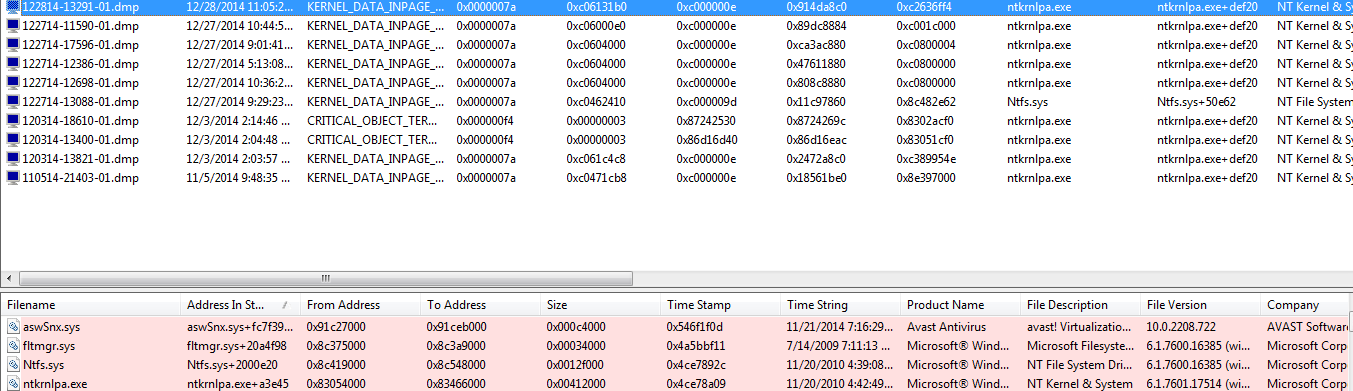
BSOD from unknown reasons, bug check 0x0000007a
- Thread starter GJayCee
- Start date

Additional information is required.
1. Download the DM Log Collector application to your desktop by clicking the link below
DM Log Collector.exe
2. Run it by double-clicking the icon on your desktop, and follow the prompts.
3. Locate the .ZIP file that is created on your desktop, and upload it here in your next reply.

1. Download the DM Log Collector application to your desktop by clicking the link below
DM Log Collector.exe
2. Run it by double-clicking the icon on your desktop, and follow the prompts.
3. Locate the .ZIP file that is created on your desktop, and upload it here in your next reply.
My Computer
- Computer type
- PC/Desktop
- Computer Manufacturer/Model Number
- Golden Mk. I.4
- OS
- Windows 10 Pro x64 ; Xubuntu x64
- CPU
- Intel i7 860 @ 2.80 GHz O/C'ed to 4.0GHz
- Motherboard
- Gigabyte P55A-UD3R Rev.1. Award BIOS F13
- Memory
- 16GB Corsair Vengance DDR3 @ 661 MHz Dual Channel (9-9-9-24)
- Graphics Card(s)
- EVGA NVidia GTX 560 1024MB
- Sound Card
- Realtek Integrated
- Monitor(s) Displays
- Dual Samsung SyncMaster 2494HS
- Screen Resolution
- 1920*1080 and 1920*1080
- Hard Drives
- 1*Samsung 840 EVO 120GB SSD;
1*OCZ Vertex 2 60GB SSD;
2*Samsung F3 SpinPoint 1TB in RAID0;
1*Samsung F1 SpinPoint 1TB;
2*Western Digital 1TB External USB 3.0
1*Western Digital 500GB External USB 3.0
1*Seagate 500GB External USB 2.0
- PSU
- Thermaltake ToughPower QFan 750W
- Case
- Thermaltake Element S VK60001W2Z
- Cooling
- Corsair H60 Water Cooling, 2*230mm and 2*80mm case fans
- Keyboard
- Logitech G110
- Mouse
- Logitech MX518
Code:
*******************************************************************************
*                                                                             *
*                        Bugcheck Analysis                                    *
*                                                                             *
*******************************************************************************

Use !analyze -v to get detailed debugging information.

BugCheck 7A, {c06131b0, c000000e, 914da8c0, c2636ff4}

*** WARNING: Unable to verify timestamp for aswSnx.sys
*** ERROR: Module load completed but symbols could not be loaded for aswSnx.sys
Probably caused by : [B][COLOR="Red"]aswSnx.sys[/COLOR][/B] ( aswSnx+19ea0 )

Followup: MachineOwner
---------My Computer
- Computer type
- PC/Desktop
- Computer Manufacturer/Model Number
- Golden Mk. I.4
- OS
- Windows 10 Pro x64 ; Xubuntu x64
- CPU
- Intel i7 860 @ 2.80 GHz O/C'ed to 4.0GHz
- Motherboard
- Gigabyte P55A-UD3R Rev.1. Award BIOS F13
- Memory
- 16GB Corsair Vengance DDR3 @ 661 MHz Dual Channel (9-9-9-24)
- Graphics Card(s)
- EVGA NVidia GTX 560 1024MB
- Sound Card
- Realtek Integrated
- Monitor(s) Displays
- Dual Samsung SyncMaster 2494HS
- Screen Resolution
- 1920*1080 and 1920*1080
- Hard Drives
- 1*Samsung 840 EVO 120GB SSD;
1*OCZ Vertex 2 60GB SSD;
2*Samsung F3 SpinPoint 1TB in RAID0;
1*Samsung F1 SpinPoint 1TB;
2*Western Digital 1TB External USB 3.0
1*Western Digital 500GB External USB 3.0
1*Seagate 500GB External USB 2.0
- PSU
- Thermaltake ToughPower QFan 750W
- Case
- Thermaltake Element S VK60001W2Z
- Cooling
- Corsair H60 Water Cooling, 2*230mm and 2*80mm case fans
- Keyboard
- Logitech G110
- Mouse
- Logitech MX518
Driver Reference Table - aswSnx.SYSAre you sure this is all Avasts' fault?
Kaspersky is far more resource hungry than MSE, but its your choice.I'll stick to Kaspersky since MSE eats up my memory.
My Computer
- Computer type
- PC/Desktop
- Computer Manufacturer/Model Number
- Golden Mk. I.4
- OS
- Windows 10 Pro x64 ; Xubuntu x64
- CPU
- Intel i7 860 @ 2.80 GHz O/C'ed to 4.0GHz
- Motherboard
- Gigabyte P55A-UD3R Rev.1. Award BIOS F13
- Memory
- 16GB Corsair Vengance DDR3 @ 661 MHz Dual Channel (9-9-9-24)
- Graphics Card(s)
- EVGA NVidia GTX 560 1024MB
- Sound Card
- Realtek Integrated
- Monitor(s) Displays
- Dual Samsung SyncMaster 2494HS
- Screen Resolution
- 1920*1080 and 1920*1080
- Hard Drives
- 1*Samsung 840 EVO 120GB SSD;
1*OCZ Vertex 2 60GB SSD;
2*Samsung F3 SpinPoint 1TB in RAID0;
1*Samsung F1 SpinPoint 1TB;
2*Western Digital 1TB External USB 3.0
1*Western Digital 500GB External USB 3.0
1*Seagate 500GB External USB 2.0
- PSU
- Thermaltake ToughPower QFan 750W
- Case
- Thermaltake Element S VK60001W2Z
- Cooling
- Corsair H60 Water Cooling, 2*230mm and 2*80mm case fans
- Keyboard
- Logitech G110
- Mouse
- Logitech MX518
Code:
*******************************************************************************
*                                                                             *
*                        Bugcheck Analysis                                    *
*                                                                             *
*******************************************************************************

Use !analyze -v to get detailed debugging information.

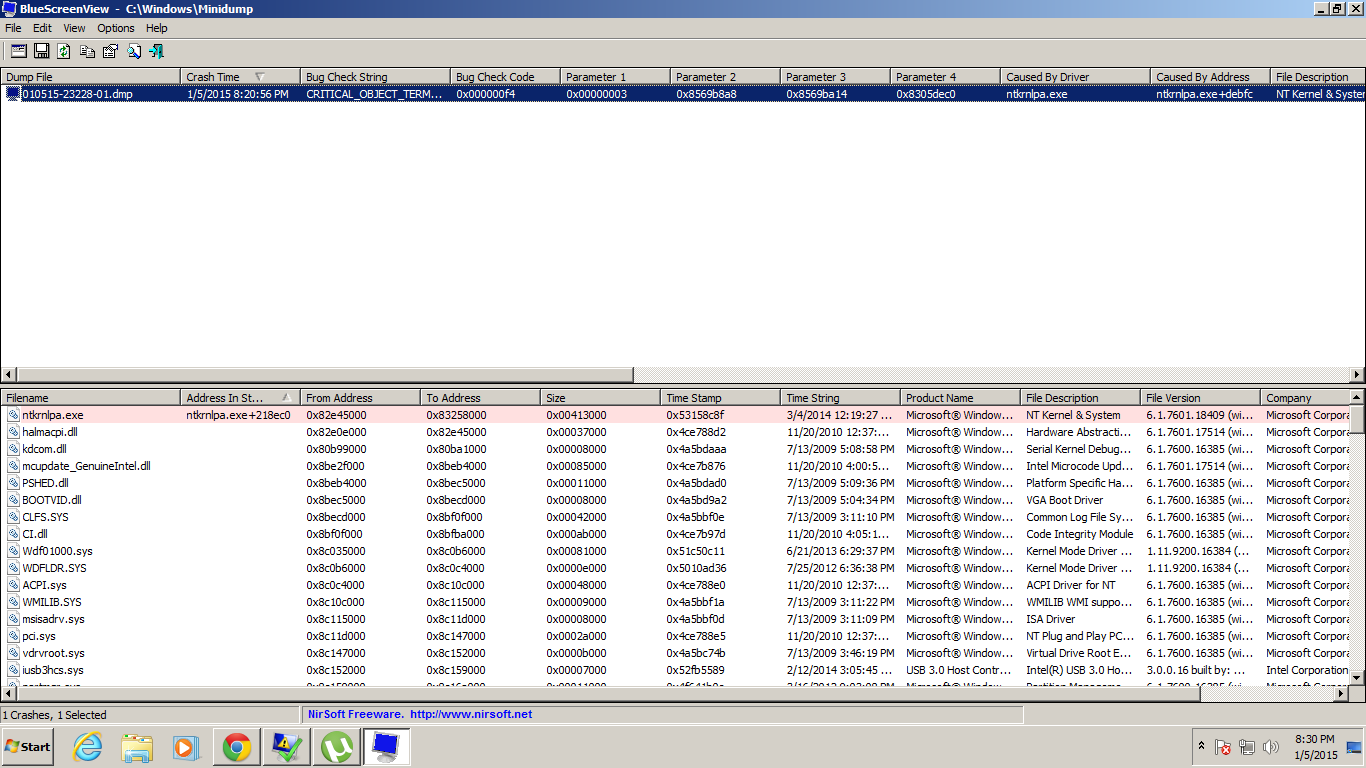
BugCheck F4, {3, 8569b8a8, 8569ba14, 8305dec0}

----- ETW minidump data unavailable-----
Probably caused by : [B][COLOR="Red"]hardware_disk[/COLOR][/B]

Followup: MachineOwner
---------http://www.sevenforums.com/tutorials/313457-seatools-dos-windows-how-use.html
My Computer
- Computer type
- PC/Desktop
- Computer Manufacturer/Model Number
- Golden Mk. I.4
- OS
- Windows 10 Pro x64 ; Xubuntu x64
- CPU
- Intel i7 860 @ 2.80 GHz O/C'ed to 4.0GHz
- Motherboard
- Gigabyte P55A-UD3R Rev.1. Award BIOS F13
- Memory
- 16GB Corsair Vengance DDR3 @ 661 MHz Dual Channel (9-9-9-24)
- Graphics Card(s)
- EVGA NVidia GTX 560 1024MB
- Sound Card
- Realtek Integrated
- Monitor(s) Displays
- Dual Samsung SyncMaster 2494HS
- Screen Resolution
- 1920*1080 and 1920*1080
- Hard Drives
- 1*Samsung 840 EVO 120GB SSD;
1*OCZ Vertex 2 60GB SSD;
2*Samsung F3 SpinPoint 1TB in RAID0;
1*Samsung F1 SpinPoint 1TB;
2*Western Digital 1TB External USB 3.0
1*Western Digital 500GB External USB 3.0
1*Seagate 500GB External USB 2.0
- PSU
- Thermaltake ToughPower QFan 750W
- Case
- Thermaltake Element S VK60001W2Z
- Cooling
- Corsair H60 Water Cooling, 2*230mm and 2*80mm case fans
- Keyboard
- Logitech G110
- Mouse
- Logitech MX518
Run the SHORT test of the DOS version of SeaTools:Code:******************************************************************************* * * * Bugcheck Analysis * * * ******************************************************************************* Use !analyze -v to get detailed debugging information. BugCheck F4, {3, 8569b8a8, 8569ba14, 8305dec0} ----- ETW minidump data unavailable----- Probably caused by : [B][COLOR="Red"]hardware_disk[/COLOR][/B] Followup: MachineOwner ---------
http://www.sevenforums.com/tutorials/313457-seatools-dos-windows-how-use.html
I did a Short test and it was good.
Can the RAM be a culrpit in the BSOD? Because I still have another issue with my Onboard Graphics Card which is in another thread. Care to check it out? Could it be that these two seperate issue can be caused by the RAM?
http://www.sevenforums.com/graphic-...-4600-distorted-pixels-constant-crashing.html
My Computer
- Computer type
- PC/Desktop
- OS
- Windows 7 Ultimate x86
Its really bad practice to be tackling different BSOD'S in different threads...really bad.
Suggest you try solve one first before tackling the other.
Suggest you try solve one first before tackling the other.
My Computer
- Computer type
- PC/Desktop
- Computer Manufacturer/Model Number
- Golden Mk. I.4
- OS
- Windows 10 Pro x64 ; Xubuntu x64
- CPU
- Intel i7 860 @ 2.80 GHz O/C'ed to 4.0GHz
- Motherboard
- Gigabyte P55A-UD3R Rev.1. Award BIOS F13
- Memory
- 16GB Corsair Vengance DDR3 @ 661 MHz Dual Channel (9-9-9-24)
- Graphics Card(s)
- EVGA NVidia GTX 560 1024MB
- Sound Card
- Realtek Integrated
- Monitor(s) Displays
- Dual Samsung SyncMaster 2494HS
- Screen Resolution
- 1920*1080 and 1920*1080
- Hard Drives
- 1*Samsung 840 EVO 120GB SSD;
1*OCZ Vertex 2 60GB SSD;
2*Samsung F3 SpinPoint 1TB in RAID0;
1*Samsung F1 SpinPoint 1TB;
2*Western Digital 1TB External USB 3.0
1*Western Digital 500GB External USB 3.0
1*Seagate 500GB External USB 2.0
- PSU
- Thermaltake ToughPower QFan 750W
- Case
- Thermaltake Element S VK60001W2Z
- Cooling
- Corsair H60 Water Cooling, 2*230mm and 2*80mm case fans
- Keyboard
- Logitech G110
- Mouse
- Logitech MX518
Similar threads
- Replies
- 9
- Views
- 5K

- Replies
- 3
- Views
- 10K


- Replies
- 10
- Views
- 4K

