BSOD irql not less or equal

speedlever

New member
Member
VIP
Local time
1:56 PM
Messages
128
Windows7x64 FR (replaced Vista/x64)
6 GB Ram
80 GB Intel X25M SSD
320 GB Samsung internal SATA
2 TB Samsung internal SATA
1.5 TB WD external SATA
Corsair HX520 PSU
Asus P5B-E running Intel E6600, 7600GT, Antec Solo case with dual HD cooling fans up front.

System built 4.5 years ago.
Win7 re-installed 12/2010 on the SSD after my 2nd HD failure in one year.. both on WD740ADFD Raptors. The first Raptor HD failed in 01/2010 at which point I put in a warranty replacement Raptor and switched from Vista/64 to Win7/64. The Intel SSD replaced the Raptor HD for my OS drive at the time of the 12/2010 Raptor failure.

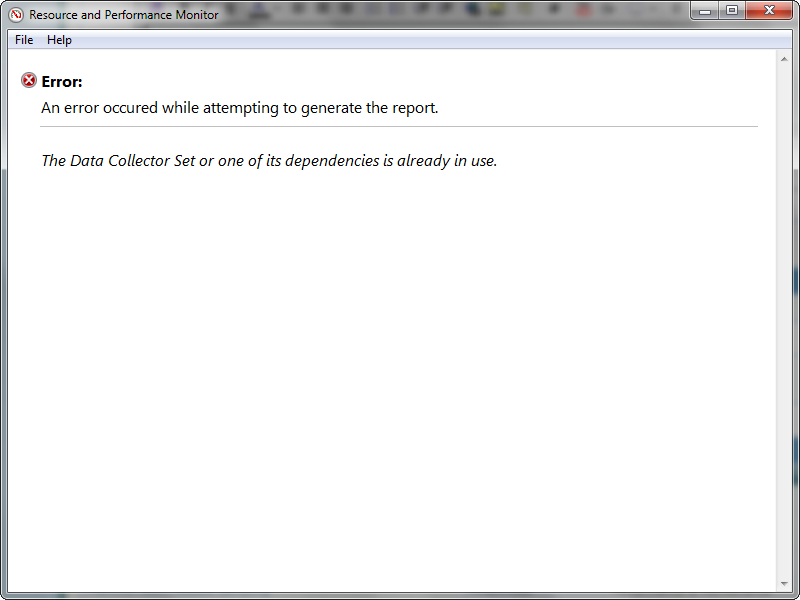
See attached bsod file. Unable to run the perfmon /report as it returns the following when I run it:
b9PNL.png
 

My Computer

OS
Windows 7 x64 home premium
CPU
Intel core i5-2500k
Motherboard
Asus P8Z68-V Pro
Memory
2x4GB G.Skill DDR3-1333, 2x2GB AData DDR3-1333
Graphics Card(s)
HD3000 graphics
Sound Card
on board
Monitor(s) Displays
Samsung 19" syncmaster
Screen Resolution
1280x1024
Hard Drives
Intel 80 GB X25-M SSD
Samsung HD321KJ 320 GB SATA
Samsung HD204UI 2.0 TB SATA
WD 1.5 TB Green eSATA in an external NexStar enclosure
PSU
Corsair HX520W
Case
Antec Solo
Cooling
CoolerMaster Hyper 212+ with dual fans
Keyboard
MS Natural Ergonomic 4000
Mouse
Logitech
Internet Speed
RoadRunner
ASACPI.sys the 2005 version is a huge cause of BSODs

Please visit this link: ASUSTeK Computer Inc. -Support- Drivers and Download P7P55D LE
Scroll down to the Utilities category, then scroll down to the "
ATK0110 driver for WindowsXP/Vista/Windows 7 32&64-bit" (it's about the 12th item down).
Download and install it.
Go to C:\Windows\System32\drivers to check and make sure that the ASACPI.sys file is date stamped from 2009 or 2010 (NOT 2005)


BSOD seems to have been caused by TightVCN TightVNC: VNC-Compatible Free Remote Control / Remote Desktop Software
Reinstall this software or remove it
Code:
ASACPI.sys        fffff880`03c55000    fffff880`03c5d000    0x00008000    0x42476c4c    28/03/2005 06:30:36
Code:
*******************************************************************************
*                                                                             *
*                        Bugcheck Analysis                                    *
*                                                                             *
*******************************************************************************

DRIVER_IRQL_NOT_LESS_OR_EQUAL (d1)
An attempt was made to access a pageable (or completely invalid) address at an
interrupt request level (IRQL) that is too high.  This is usually
caused by drivers using improper addresses.
If kernel debugger is available get stack backtrace.
Arguments:
Arg1: 00000000c0000008, memory referenced
Arg2: 0000000000000002, IRQL
Arg3: 0000000000000000, value 0 = read operation, 1 = write operation
Arg4: fffffa8008566b30, address which referenced memory

Debugging Details:
------------------


READ_ADDRESS: GetPointerFromAddress: unable to read from fffff80002cba100
 00000000c0000008 

CURRENT_IRQL:  2

FAULTING_IP: 
+0
fffffa80`08566b30 0300            add     eax,dword ptr [rax]

CUSTOMER_CRASH_COUNT:  1

DEFAULT_BUCKET_ID:  VISTA_DRIVER_FAULT

BUGCHECK_STR:  0xD1

PROCESS_NAME:  tvnserver.exe

TRAP_FRAME:  fffff880060a97b0 -- (.trap 0xfffff880060a97b0)
NOTE: The trap frame does not contain all registers.
Some register values may be zeroed or incorrect.
rax=00000000c0000008 rbx=0000000000000000 rcx=00000000c0000101
rdx=fffff880060a9c01 rsi=0000000000000000 rdi=0000000000000000
rip=fffffa8008566b30 rsp=fffff880060a9948 rbp=fffffa8008586b60
 r8=fffffa8006101f30  r9=ffffffff40000100 r10=fffff80002d24a14
r11=fffffa8008585060 r12=0000000000000000 r13=0000000000000000
r14=0000000000000000 r15=0000000000000000
iopl=0         nv up ei pl zr na po nc
fffffa80`08566b30 0300            add     eax,dword ptr [rax] ds:9c20:00000000`c0000008=????????
Resetting default scope

LAST_CONTROL_TRANSFER:  from fffff80002a871e9 to fffff80002a87c40

STACK_TEXT:  
fffff880`060a9668 fffff800`02a871e9 : 00000000`0000000a 00000000`c0000008 00000000`00000002 00000000`00000000 : nt!KeBugCheckEx
fffff880`060a9670 fffff800`02a85e60 : fffffa80`08585060 fffffa80`09c5db60 00000000`00000000 fffff880`009e8180 : nt!KiBugCheckDispatch+0x69
fffff880`060a97b0 fffffa80`08566b30 : fffff800`02ad385c 00000000`00000000 fffffa80`09c5db60 00000000`00000000 : nt!KiPageFault+0x260
fffff880`060a9948 fffff800`02ad385c : 00000000`00000000 fffffa80`09c5db60 00000000`00000000 00000000`00000000 : 0xfffffa80`08566b30
fffff880`060a9950 00000000`00000000 : 00000000`00000000 00000000`00000000 00000000`00000000 00000000`00000000 : nt!KiDpcInterrupt+0xcc


STACK_COMMAND:  kb

FOLLOWUP_IP: 
nt!KiPageFault+260
fffff800`02a85e60 440f20c0        mov     rax,cr8

SYMBOL_STACK_INDEX:  2

SYMBOL_NAME:  nt!KiPageFault+260

FOLLOWUP_NAME:  MachineOwner

MODULE_NAME: nt

IMAGE_NAME:  ntkrnlmp.exe

DEBUG_FLR_IMAGE_TIMESTAMP:  4e02aaa3

FAILURE_BUCKET_ID:  X64_0xD1_nt!KiPageFault+260

BUCKET_ID:  X64_0xD1_nt!KiPageFault+260

Followup: MachineOwner
---------
 

My Computer

Computer type
PC/Desktop
Computer Manufacturer/Model Number
Custom Build
OS
Windows 10 Pro x64, Arch Linux
CPU
Intel Core 2 Quad Q8200 OC'd 3.08GHz
Motherboard
Asus Rampage formula LGA775
Memory
8GB DDR2 900Mhz
Graphics Card(s)
MSI GT730 2GB GDDR5 (Kepler)
Sound Card
Supreme FX2
Monitor(s) Displays
Samsung LS22F350 LED
Screen Resolution
1080P
Hard Drives
Kingston SSDNow UV400 120GB, 500GB Hitachi, 2TB Samsung, 500GB Seagate FreeAgent, 640GB Samsung, 160GB Toshiba (Arch)
PSU
AeroCool 500W Bronze
Cooling
Cooler Master V6 + 3X fans
Keyboard
Prolink keyboard
Mouse
Logitech M705
Internet Speed
1MiB/s
Browser
Chrome Beta
Wow! That is fast service!

So two possible issues:
1) outdated asacpi.sys file
-- sure enough, mine is dated 2005:
2CJRo.png


2) TightVNC. I'll uninstall that as I'm not really using it. It was installed because I put PocketCloud on my iPad but never really use it for RDP purposes.. I use logmein instead.

Thanks. I'll repost here if any followup needed.
 

My Computer

OS
Windows 7 x64 home premium
CPU
Intel core i5-2500k
Motherboard
Asus P8Z68-V Pro
Memory
2x4GB G.Skill DDR3-1333, 2x2GB AData DDR3-1333
Graphics Card(s)
HD3000 graphics
Sound Card
on board
Monitor(s) Displays
Samsung 19" syncmaster
Screen Resolution
1280x1024
Hard Drives
Intel 80 GB X25-M SSD
Samsung HD321KJ 320 GB SATA
Samsung HD204UI 2.0 TB SATA
WD 1.5 TB Green eSATA in an external NexStar enclosure
PSU
Corsair HX520W
Case
Antec Solo
Cooling
CoolerMaster Hyper 212+ with dual fans
Keyboard
MS Natural Ergonomic 4000
Mouse
Logitech
Internet Speed
RoadRunner
I d/l the new atk0110 file:
ALuCL.png


Installed it as admin, at which point the system self-rebooted. Unexpected!

But when I looked again, it still shows as the 2005 file:
G1spZ.png


How do I get the 2009 file to install?

Edit: nevermind. I thought I could depend on my everything search to give me the info. But that first file will not open up in everything search. When I navigated to the file via Windows Explorer, I saw that the 2009 file had indeed been installed.

iBQsz.png
 
Last edited:

My Computer

OS
Windows 7 x64 home premium
CPU
Intel core i5-2500k
Motherboard
Asus P8Z68-V Pro
Memory
2x4GB G.Skill DDR3-1333, 2x2GB AData DDR3-1333
Graphics Card(s)
HD3000 graphics
Sound Card
on board
Monitor(s) Displays
Samsung 19" syncmaster
Screen Resolution
1280x1024
Hard Drives
Intel 80 GB X25-M SSD
Samsung HD321KJ 320 GB SATA
Samsung HD204UI 2.0 TB SATA
WD 1.5 TB Green eSATA in an external NexStar enclosure
PSU
Corsair HX520W
Case
Antec Solo
Cooling
CoolerMaster Hyper 212+ with dual fans
Keyboard
MS Natural Ergonomic 4000
Mouse
Logitech
Internet Speed
RoadRunner
Unexpected shutdown (apparent BSOD)

Second day in a row. Came home this evening to find that the computer had rebooted after experiencing an unexpected shutdown sometime mid-afternoon.

Unable to run the perfmon /report as before.

Here's the zip file:
 
Last edited:

My Computer

OS
Windows 7 x64 home premium
CPU
Intel core i5-2500k
Motherboard
Asus P8Z68-V Pro
Memory
2x4GB G.Skill DDR3-1333, 2x2GB AData DDR3-1333
Graphics Card(s)
HD3000 graphics
Sound Card
on board
Monitor(s) Displays
Samsung 19" syncmaster
Screen Resolution
1280x1024
Hard Drives
Intel 80 GB X25-M SSD
Samsung HD321KJ 320 GB SATA
Samsung HD204UI 2.0 TB SATA
WD 1.5 TB Green eSATA in an external NexStar enclosure
PSU
Corsair HX520W
Case
Antec Solo
Cooling
CoolerMaster Hyper 212+ with dual fans
Keyboard
MS Natural Ergonomic 4000
Mouse
Logitech
Internet Speed
RoadRunner
Enable driver verifier and see if it catches anything
http://www.sevenforums.com/tutorials/101379-driver-verifier-enable-disable.html

BSOD BUGCHECK SUMMARY
Code:
[font=lucida console]
Built by: 7601.17640.amd64fre.win7sp1_gdr.110622-1506
Debug session time: Sat Aug 20 15:34:43.002 2011 (UTC - 4:00)
System Uptime: 0 days 20:56:09.718
Probably caused by : win32k.sys ( win32k!SetWakeBit+f8 )
BUGCHECK_STR:  0xA
PROCESS_NAME:  csrss.exe
FAILURE_BUCKET_ID:  X64_0xA_win32k!SetWakeBit+f8
BiosReleaseDate = 04/15/2009
SystemManufacturer = System manufacturer
SystemProductName = System Product Name
CPUID:        "Intel(R) Core(TM)2 CPU          6600  @ 2.40GHz"
MaxSpeed:     2400
CurrentSpeed: 2401
¨¨¨¨¨¨¨¨¨¨¨¨¨¨¨¨¨¨¨¨¨¨¨¨¨¨¨¨¨¨¨¨¨¨¨¨¨¨¨¨¨¨¨¨¨¨¨¨¨¨¨¨¨¨¨¨¨¨¨¨¨¨¨¨¨¨¨¨¨¨¨¨¨¨¨¨¨¨¨¨¨¨¨¨¨¨``
  
[/font]
 

My Computer

Computer Manufacturer/Model Number
Self Built
OS
Windows 7 Home Premium 64bit
CPU
Intel Core i5-2500 @ 3.8GHz
Motherboard
MSI P67A-GD65
Memory
G.SKILL Ripjaws Series 8GB (2 x 4GB) DDR3 1600
Graphics Card(s)
NVIDIA GTX 550Ti
Sound Card
On Board
Monitor(s) Displays
ASUS 23"
Hard Drives
OCZ Vertex 3 VTX3-25SAT3-60G
Keyboard
Wireless
Mouse
Wireless
Will do. Off to reboot after running through the verifier setup.

Apologies for the new thread. I mis-remembered the posting instructions.
 

My Computer

OS
Windows 7 x64 home premium
CPU
Intel core i5-2500k
Motherboard
Asus P8Z68-V Pro
Memory
2x4GB G.Skill DDR3-1333, 2x2GB AData DDR3-1333
Graphics Card(s)
HD3000 graphics
Sound Card
on board
Monitor(s) Displays
Samsung 19" syncmaster
Screen Resolution
1280x1024
Hard Drives
Intel 80 GB X25-M SSD
Samsung HD321KJ 320 GB SATA
Samsung HD204UI 2.0 TB SATA
WD 1.5 TB Green eSATA in an external NexStar enclosure
PSU
Corsair HX520W
Case
Antec Solo
Cooling
CoolerMaster Hyper 212+ with dual fans
Keyboard
MS Natural Ergonomic 4000
Mouse
Logitech
Internet Speed
RoadRunner
OK. It didn't take long to get a BSOD after enabling verifier.exe. As soon as I rebooted and loaded all the automatic startup stuff, I manually started Process Explorer and then started SpeedFan 4.4 at which point I got an immediate BSOD.

After the PC rebooted, I started verifier.exe, disabled it and restarted again, then ran the BSODD&SFC app, zipped it and here we are.
 

My Computer

OS
Windows 7 x64 home premium
CPU
Intel core i5-2500k
Motherboard
Asus P8Z68-V Pro
Memory
2x4GB G.Skill DDR3-1333, 2x2GB AData DDR3-1333
Graphics Card(s)
HD3000 graphics
Sound Card
on board
Monitor(s) Displays
Samsung 19" syncmaster
Screen Resolution
1280x1024
Hard Drives
Intel 80 GB X25-M SSD
Samsung HD321KJ 320 GB SATA
Samsung HD204UI 2.0 TB SATA
WD 1.5 TB Green eSATA in an external NexStar enclosure
PSU
Corsair HX520W
Case
Antec Solo
Cooling
CoolerMaster Hyper 212+ with dual fans
Keyboard
MS Natural Ergonomic 4000
Mouse
Logitech
Internet Speed
RoadRunner
Crash was caused by process explorer. I would uninstall the program or if there is a newer version you can try installing that.

BSOD BUGCHECK SUMMARY
Code:
[font=lucida console]
Built by: 7601.17640.amd64fre.win7sp1_gdr.110622-1506
Debug session time: Sat Aug 20 21:19:24.046 2011 (UTC - 4:00)
System Uptime: 0 days 0:03:10.810
*** WARNING: Unable to verify timestamp for PROCEXP141.SYS
*** ERROR: Module load completed but symbols could not be loaded for PROCEXP141.SYS
Probably caused by : PROCEXP141.SYS ( PROCEXP141+1bb7 )
DRIVER_VERIFIER_DETECTED_VIOLATION (c4)
BUGCHECK_STR:  0xc4_f6
DEFAULT_BUCKET_ID:  VERIFIER_ENABLED_VISTA_MINIDUMP
PROCESS_NAME:  procexp64.exe
FAILURE_BUCKET_ID:  X64_0xc4_f6_VRF_PROCEXP141+1bb7
BiosReleaseDate = 04/15/2009
SystemManufacturer = System manufacturer
SystemProductName = System Product Name
CPUID:        "Intel(R) Core(TM)2 CPU          6600  @ 2.40GHz"
MaxSpeed:     2400
CurrentSpeed: 2401
¨¨¨¨¨¨¨¨¨¨¨¨¨¨¨¨¨¨¨¨¨¨¨¨¨¨¨¨¨¨¨¨¨¨¨¨¨¨¨¨¨¨¨¨¨¨¨¨¨¨¨¨¨¨¨¨¨¨¨¨¨¨¨¨¨¨¨¨¨¨¨¨¨¨¨¨¨¨¨¨¨¨¨¨¨¨``
  
[/font]
 

My Computer

Computer Manufacturer/Model Number
Self Built
OS
Windows 7 Home Premium 64bit
CPU
Intel Core i5-2500 @ 3.8GHz
Motherboard
MSI P67A-GD65
Memory
G.SKILL Ripjaws Series 8GB (2 x 4GB) DDR3 1600
Graphics Card(s)
NVIDIA GTX 550Ti
Sound Card
On Board
Monitor(s) Displays
ASUS 23"
Hard Drives
OCZ Vertex 3 VTX3-25SAT3-60G
Keyboard
Wireless
Mouse
Wireless
Wow. I did not expect PE to be a problem. OK, I just updated from 14.01 to 15.03 and will re-enable verifier and see what happens.

Thanks.

Edit: I've been running a couple of hours or so with verifier running. No issues or problems thus far. I'll keep it running overnight and if nothing else by morning, I'll assume updating PE fixed the problem. Very interesting!
 
Last edited:

My Computer

OS
Windows 7 x64 home premium
CPU
Intel core i5-2500k
Motherboard
Asus P8Z68-V Pro
Memory
2x4GB G.Skill DDR3-1333, 2x2GB AData DDR3-1333
Graphics Card(s)
HD3000 graphics
Sound Card
on board
Monitor(s) Displays
Samsung 19" syncmaster
Screen Resolution
1280x1024
Hard Drives
Intel 80 GB X25-M SSD
Samsung HD321KJ 320 GB SATA
Samsung HD204UI 2.0 TB SATA
WD 1.5 TB Green eSATA in an external NexStar enclosure
PSU
Corsair HX520W
Case
Antec Solo
Cooling
CoolerMaster Hyper 212+ with dual fans
Keyboard
MS Natural Ergonomic 4000
Mouse
Logitech
Internet Speed
RoadRunner
Rats. Ran for 6+ hours and then kablooie. BSOD.. the IRQL not less or equal type. Thank goodness for the session recovery in FireFox6. ;)
 

My Computer

OS
Windows 7 x64 home premium
CPU
Intel core i5-2500k
Motherboard
Asus P8Z68-V Pro
Memory
2x4GB G.Skill DDR3-1333, 2x2GB AData DDR3-1333
Graphics Card(s)
HD3000 graphics
Sound Card
on board
Monitor(s) Displays
Samsung 19" syncmaster
Screen Resolution
1280x1024
Hard Drives
Intel 80 GB X25-M SSD
Samsung HD321KJ 320 GB SATA
Samsung HD204UI 2.0 TB SATA
WD 1.5 TB Green eSATA in an external NexStar enclosure
PSU
Corsair HX520W
Case
Antec Solo
Cooling
CoolerMaster Hyper 212+ with dual fans
Keyboard
MS Natural Ergonomic 4000
Mouse
Logitech
Internet Speed
RoadRunner

My Computer

Computer type
PC/Desktop
Computer Manufacturer/Model Number
Custom Build
OS
Windows 10 Pro x64, Arch Linux
CPU
Intel Core 2 Quad Q8200 OC'd 3.08GHz
Motherboard
Asus Rampage formula LGA775
Memory
8GB DDR2 900Mhz
Graphics Card(s)
MSI GT730 2GB GDDR5 (Kepler)
Sound Card
Supreme FX2
Monitor(s) Displays
Samsung LS22F350 LED
Screen Resolution
1080P
Hard Drives
Kingston SSDNow UV400 120GB, 500GB Hitachi, 2TB Samsung, 500GB Seagate FreeAgent, 640GB Samsung, 160GB Toshiba (Arch)
PSU
AeroCool 500W Bronze
Cooling
Cooler Master V6 + 3X fans
Keyboard
Prolink keyboard
Mouse
Logitech M705
Internet Speed
1MiB/s
Browser
Chrome Beta
You have a silicon labs usb express driver that is not compatible with win 7. I can point you to the right site but it might take a little doing to find the right one.
Technical Support - Mixed-Signal ICs

Are you using any kind of Garmin GPS?

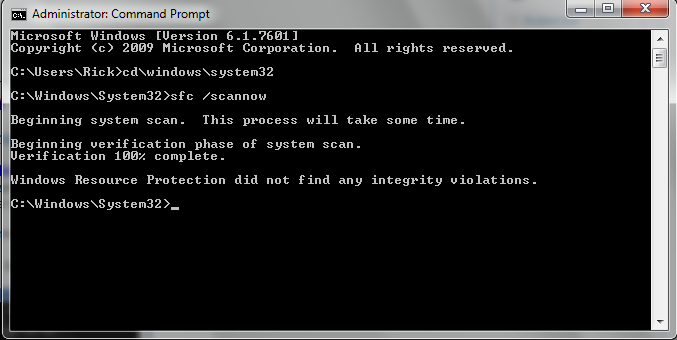
Run SFC /SCANNOW Command - System File Checker

Yes. I have a Nuvi 1690, a Garmin Forerunner 405 (which uses Garmin ANT agent and USB stick), and a Garmin Edge 305.

Are you tying the silicon labs usb driver to Garmin or are they not related?

Lemme see what the sfc/scannow command produces.

No further BSOD's in the last 11 hours. Yet.

Edit: here are the results:

ea4LS.png
 
Last edited:

My Computer

OS
Windows 7 x64 home premium
CPU
Intel core i5-2500k
Motherboard
Asus P8Z68-V Pro
Memory
2x4GB G.Skill DDR3-1333, 2x2GB AData DDR3-1333
Graphics Card(s)
HD3000 graphics
Sound Card
on board
Monitor(s) Displays
Samsung 19" syncmaster
Screen Resolution
1280x1024
Hard Drives
Intel 80 GB X25-M SSD
Samsung HD321KJ 320 GB SATA
Samsung HD204UI 2.0 TB SATA
WD 1.5 TB Green eSATA in an external NexStar enclosure
PSU
Corsair HX520W
Case
Antec Solo
Cooling
CoolerMaster Hyper 212+ with dual fans
Keyboard
MS Natural Ergonomic 4000
Mouse
Logitech
Internet Speed
RoadRunner
Are you tying the silicon labs usb driver to Garmin or are they not related?
They are not related but the garmin software isn't Windows 7 compatible and is known to cause issues
 

My Computer

Computer type
PC/Desktop
Computer Manufacturer/Model Number
Custom Build
OS
Windows 10 Pro x64, Arch Linux
CPU
Intel Core 2 Quad Q8200 OC'd 3.08GHz
Motherboard
Asus Rampage formula LGA775
Memory
8GB DDR2 900Mhz
Graphics Card(s)
MSI GT730 2GB GDDR5 (Kepler)
Sound Card
Supreme FX2
Monitor(s) Displays
Samsung LS22F350 LED
Screen Resolution
1080P
Hard Drives
Kingston SSDNow UV400 120GB, 500GB Hitachi, 2TB Samsung, 500GB Seagate FreeAgent, 640GB Samsung, 160GB Toshiba (Arch)
PSU
AeroCool 500W Bronze
Cooling
Cooler Master V6 + 3X fans
Keyboard
Prolink keyboard
Mouse
Logitech M705
Internet Speed
1MiB/s
Browser
Chrome Beta
Shucks. The Garmin stuff is in (more or less) frequent use. I suppose I should be glad that it doesn't cause any more problems than I experience.

No more BSODs in the last 14 hours.

I have no idea what to do about that USB driver you mentioned. Have we done all we can do? Shall I terminate the verifier program?

Edit: is there any particular Garmin software at fault or are you speaking of all Garmin software in regards to Win7/64?
 

My Computer

OS
Windows 7 x64 home premium
CPU
Intel core i5-2500k
Motherboard
Asus P8Z68-V Pro
Memory
2x4GB G.Skill DDR3-1333, 2x2GB AData DDR3-1333
Graphics Card(s)
HD3000 graphics
Sound Card
on board
Monitor(s) Displays
Samsung 19" syncmaster
Screen Resolution
1280x1024
Hard Drives
Intel 80 GB X25-M SSD
Samsung HD321KJ 320 GB SATA
Samsung HD204UI 2.0 TB SATA
WD 1.5 TB Green eSATA in an external NexStar enclosure
PSU
Corsair HX520W
Case
Antec Solo
Cooling
CoolerMaster Hyper 212+ with dual fans
Keyboard
MS Natural Ergonomic 4000
Mouse
Logitech
Internet Speed
RoadRunner
Shucks. The Garmin stuff is in (more or less) frequent use. I suppose I should be glad that it doesn't cause any more problems than I experience.

No more BSODs in the last 14 hours.

I have no idea what to do about that USB driver you mentioned. Have we done all we can do? Shall I terminate the verifier program?

Edit: is there any particular Garmin software at fault or are you speaking of all Garmin software in regards to Win7/64?
Yes terminate the verifier
From what I've seen these Garmin software use old drivers, in fact the Garmin software are not old but the driver they use are obsolete. These were never Windows 7 Certified
 

My Computer

Computer type
PC/Desktop
Computer Manufacturer/Model Number
Custom Build
OS
Windows 10 Pro x64, Arch Linux
CPU
Intel Core 2 Quad Q8200 OC'd 3.08GHz
Motherboard
Asus Rampage formula LGA775
Memory
8GB DDR2 900Mhz
Graphics Card(s)
MSI GT730 2GB GDDR5 (Kepler)
Sound Card
Supreme FX2
Monitor(s) Displays
Samsung LS22F350 LED
Screen Resolution
1080P
Hard Drives
Kingston SSDNow UV400 120GB, 500GB Hitachi, 2TB Samsung, 500GB Seagate FreeAgent, 640GB Samsung, 160GB Toshiba (Arch)
PSU
AeroCool 500W Bronze
Cooling
Cooler Master V6 + 3X fans
Keyboard
Prolink keyboard
Mouse
Logitech M705
Internet Speed
1MiB/s
Browser
Chrome Beta
Thanks.

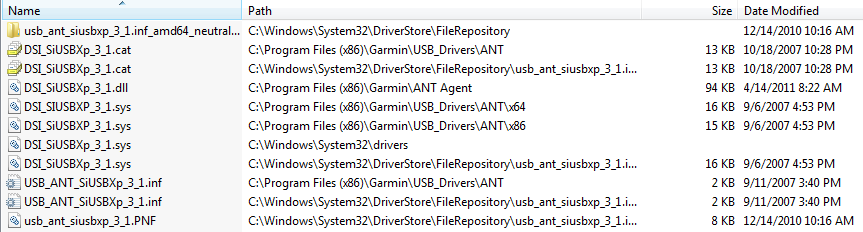
Can you give me the filespecs on the silicon labs usb express driver in question? I'm not sure what to even look for.

Edit: nevermind. This looks like it/them and mostly seem related to Garmin's ANT agent.

ZduWq.png
 

My Computer

OS
Windows 7 x64 home premium
CPU
Intel core i5-2500k
Motherboard
Asus P8Z68-V Pro
Memory
2x4GB G.Skill DDR3-1333, 2x2GB AData DDR3-1333
Graphics Card(s)
HD3000 graphics
Sound Card
on board
Monitor(s) Displays
Samsung 19" syncmaster
Screen Resolution
1280x1024
Hard Drives
Intel 80 GB X25-M SSD
Samsung HD321KJ 320 GB SATA
Samsung HD204UI 2.0 TB SATA
WD 1.5 TB Green eSATA in an external NexStar enclosure
PSU
Corsair HX520W
Case
Antec Solo
Cooling
CoolerMaster Hyper 212+ with dual fans
Keyboard
MS Natural Ergonomic 4000
Mouse
Logitech
Internet Speed
RoadRunner
Regarding the Silicon Labs usb driver mentioned above, has anyone here had any luck using something like DriverMax with Win7/64 to find and repair driver issues?

I discovered this over at Gizmo's freebie site.
 

My Computer

OS
Windows 7 x64 home premium
CPU
Intel core i5-2500k
Motherboard
Asus P8Z68-V Pro
Memory
2x4GB G.Skill DDR3-1333, 2x2GB AData DDR3-1333
Graphics Card(s)
HD3000 graphics
Sound Card
on board
Monitor(s) Displays
Samsung 19" syncmaster
Screen Resolution
1280x1024
Hard Drives
Intel 80 GB X25-M SSD
Samsung HD321KJ 320 GB SATA
Samsung HD204UI 2.0 TB SATA
WD 1.5 TB Green eSATA in an external NexStar enclosure
PSU
Corsair HX520W
Case
Antec Solo
Cooling
CoolerMaster Hyper 212+ with dual fans
Keyboard
MS Natural Ergonomic 4000
Mouse
Logitech
Internet Speed
RoadRunner
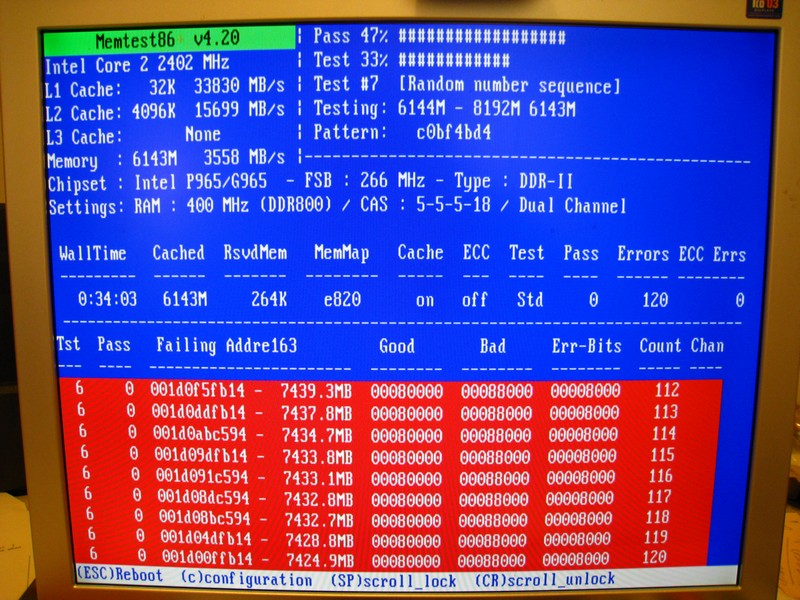
Thinking that some of my issues may be related, I thought I'd post the results of a memtest86 run I just ran. I haven't noticed any BSOD instances for a while now, but I am getting random hangs when running Firefox or Chrome and I see cpu activity around 50%. After 15-20 seconds, the system picks up and continues. But only that app that I'm running hangs. I can open up other apps.

I decided to run the Windows7 memory diagnostics test. It told me I have a hardware issue, but is not very specific. So I d/l a copy of memtest86 v 4.2 and burned it to a CD... ran the test for 30 minutes or so and it confirms I have a memory issue.

I have two sticks of 2GB ram and 2 sticks of 1GB ram for 6 GB (6144Mb) total. How do I interpret this pic to find the faulty memory module?

GQAwN.jpg
 

My Computer

OS
Windows 7 x64 home premium
CPU
Intel core i5-2500k
Motherboard
Asus P8Z68-V Pro
Memory
2x4GB G.Skill DDR3-1333, 2x2GB AData DDR3-1333
Graphics Card(s)
HD3000 graphics
Sound Card
on board
Monitor(s) Displays
Samsung 19" syncmaster
Screen Resolution
1280x1024
Hard Drives
Intel 80 GB X25-M SSD
Samsung HD321KJ 320 GB SATA
Samsung HD204UI 2.0 TB SATA
WD 1.5 TB Green eSATA in an external NexStar enclosure
PSU
Corsair HX520W
Case
Antec Solo
Cooling
CoolerMaster Hyper 212+ with dual fans
Keyboard
MS Natural Ergonomic 4000
Mouse
Logitech
Internet Speed
RoadRunner
Thinking that some of my issues may be related, I thought I'd post the results of a memtest86 run I just ran. I haven't noticed any BSOD instances for a while now, but I am getting random hangs when running Firefox or Chrome and I see cpu activity around 50%. After 15-20 seconds, the system picks up and continues. But only that app that I'm running hangs. I can open up other apps.

I decided to run the Windows7 memory diagnostics test. It told me I have a hardware issue, but is not very specific. So I d/l a copy of memtest86 v 4.2 and burned it to a CD... ran the test for 30 minutes or so and it confirms I have a memory issue.

I have two sticks of 2GB ram and 2 sticks of 1GB ram for 6 GB (6144Mb) total. How do I interpret this pic to find the faulty memory module?

GQAwN.jpg
Yes, this RAM is defective and should be replaced :)
 

My Computer

Computer type
PC/Desktop
Computer Manufacturer/Model Number
Custom Build
OS
Windows 10 Pro x64, Arch Linux
CPU
Intel Core 2 Quad Q8200 OC'd 3.08GHz
Motherboard
Asus Rampage formula LGA775
Memory
8GB DDR2 900Mhz
Graphics Card(s)
MSI GT730 2GB GDDR5 (Kepler)
Sound Card
Supreme FX2
Monitor(s) Displays
Samsung LS22F350 LED
Screen Resolution
1080P
Hard Drives
Kingston SSDNow UV400 120GB, 500GB Hitachi, 2TB Samsung, 500GB Seagate FreeAgent, 640GB Samsung, 160GB Toshiba (Arch)
PSU
AeroCool 500W Bronze
Cooling
Cooler Master V6 + 3X fans
Keyboard
Prolink keyboard
Mouse
Logitech M705
Internet Speed
1MiB/s
Browser
Chrome Beta
Back
Top