BSOD irql not less or equal

I appreciate the comment, but the question is how to find the bad stick out of the 4 sticks in my computer? I suppose I could start yanking pairs of ram out and trying to find which pair has a faulty chip. But then how to determine which of the two sticks has the faulty chip?
 

My Computer My Computer

OS
Windows 7 x64 home premium
CPU
Intel core i5-2500k
Motherboard
Asus P8Z68-V Pro
Memory
2x4GB G.Skill DDR3-1333, 2x2GB AData DDR3-1333
Graphics Card(s)
HD3000 graphics
Sound Card
on board
Monitor(s) Displays
Samsung 19" syncmaster
Screen Resolution
1280x1024
Hard Drives
Intel 80 GB X25-M SSD
Samsung HD321KJ 320 GB SATA
Samsung HD204UI 2.0 TB SATA
WD 1.5 TB Green eSATA in an external NexStar enclosure
PSU
Corsair HX520W
Case
Antec Solo
Cooling
CoolerMaster Hyper 212+ with dual fans
Keyboard
MS Natural Ergonomic 4000
Mouse
Logitech
Internet Speed
RoadRunner
I appreciate the comment, but the question is how to find the bad stick out of the 4 sticks in my computer? I suppose I could start yanking pairs of ram out and trying to find which pair has a faulty chip. But then how to determine which of the two sticks has the faulty chip?
Remove the 3 other RAMs sticks and test each stick at a time :)
 

My Computer My Computer

Computer type
PC/Desktop
Computer Manufacturer/Model Number
Custom Build
OS
Windows 10 Pro x64, Arch Linux
CPU
Intel Core 2 Quad Q8200 OC'd 3.08GHz
Motherboard
Asus Rampage formula LGA775
Memory
8GB DDR2 900Mhz
Graphics Card(s)
MSI GT730 2GB GDDR5 (Kepler)
Sound Card
Supreme FX2
Monitor(s) Displays
Samsung LS22F350 LED
Screen Resolution
1080P
Hard Drives
Kingston SSDNow UV400 120GB, 500GB Hitachi, 2TB Samsung, 500GB Seagate FreeAgent, 640GB Samsung, 160GB Toshiba (Arch)
PSU
AeroCool 500W Bronze
Cooling
Cooler Master V6 + 3X fans
Keyboard
Prolink keyboard
Mouse
Logitech M705
Internet Speed
1MiB/s
Browser
Chrome Beta
Which makes sense. I was thinking my two sticks of 1 Gb ram wouldn't run Win7 individually... but then again, they don't have to... it only has to run memtest86. Also, I was thinking I had to run memory in pairs. Apparently not.

Doh!
 

My Computer My Computer

OS
Windows 7 x64 home premium
CPU
Intel core i5-2500k
Motherboard
Asus P8Z68-V Pro
Memory
2x4GB G.Skill DDR3-1333, 2x2GB AData DDR3-1333
Graphics Card(s)
HD3000 graphics
Sound Card
on board
Monitor(s) Displays
Samsung 19" syncmaster
Screen Resolution
1280x1024
Hard Drives
Intel 80 GB X25-M SSD
Samsung HD321KJ 320 GB SATA
Samsung HD204UI 2.0 TB SATA
WD 1.5 TB Green eSATA in an external NexStar enclosure
PSU
Corsair HX520W
Case
Antec Solo
Cooling
CoolerMaster Hyper 212+ with dual fans
Keyboard
MS Natural Ergonomic 4000
Mouse
Logitech
Internet Speed
RoadRunner
As an update, this will really mess with your mind!

I ran memtest86 v4.20 and found that all 4 sticks of ram would individually fail in test 6 in any of the A dimms. I started testing in the B dimms and got a failure there too. WTH?

Sounds like a mobo to me since the odds of having all 4 sticks of ram go bad at one time have to be astronomical.

Being rather frustrated with the whole issue, I plugged all the ram back into the mobo and all seems to be running fine. Go figure.

But, just in case I need to buy an new mobo, ram, etc. I have all my data backed up. The scary part is all the custom tweaks I do to my programs... from custom storage options (vs default) to, well, you name it. I had two OS hd failures last year and recovering from them was no fun, even with my data being backed up.

Is there a nice and easy way to do a backup that will keep all my custom tweaks and program installs, etc. so that doing a system reset is not so painful?
 

My Computer My Computer

OS
Windows 7 x64 home premium
CPU
Intel core i5-2500k
Motherboard
Asus P8Z68-V Pro
Memory
2x4GB G.Skill DDR3-1333, 2x2GB AData DDR3-1333
Graphics Card(s)
HD3000 graphics
Sound Card
on board
Monitor(s) Displays
Samsung 19" syncmaster
Screen Resolution
1280x1024
Hard Drives
Intel 80 GB X25-M SSD
Samsung HD321KJ 320 GB SATA
Samsung HD204UI 2.0 TB SATA
WD 1.5 TB Green eSATA in an external NexStar enclosure
PSU
Corsair HX520W
Case
Antec Solo
Cooling
CoolerMaster Hyper 212+ with dual fans
Keyboard
MS Natural Ergonomic 4000
Mouse
Logitech
Internet Speed
RoadRunner
Argh. The plot sickens... er, I mean thickens. Just had another BSOD... first one in 17 days. This one was a system_service_exception.
 

My Computer My Computer

OS
Windows 7 x64 home premium
CPU
Intel core i5-2500k
Motherboard
Asus P8Z68-V Pro
Memory
2x4GB G.Skill DDR3-1333, 2x2GB AData DDR3-1333
Graphics Card(s)
HD3000 graphics
Sound Card
on board
Monitor(s) Displays
Samsung 19" syncmaster
Screen Resolution
1280x1024
Hard Drives
Intel 80 GB X25-M SSD
Samsung HD321KJ 320 GB SATA
Samsung HD204UI 2.0 TB SATA
WD 1.5 TB Green eSATA in an external NexStar enclosure
PSU
Corsair HX520W
Case
Antec Solo
Cooling
CoolerMaster Hyper 212+ with dual fans
Keyboard
MS Natural Ergonomic 4000
Mouse
Logitech
Internet Speed
RoadRunner
Argh. The plot sickens... er, I mean thickens. Just had another BSOD... first one in 17 days. This one was a system_service_exception.
Did you replace the RAM?
 

My Computer My Computer

Computer type
PC/Desktop
Computer Manufacturer/Model Number
Custom Build
OS
Windows 10 Pro x64, Arch Linux
CPU
Intel Core 2 Quad Q8200 OC'd 3.08GHz
Motherboard
Asus Rampage formula LGA775
Memory
8GB DDR2 900Mhz
Graphics Card(s)
MSI GT730 2GB GDDR5 (Kepler)
Sound Card
Supreme FX2
Monitor(s) Displays
Samsung LS22F350 LED
Screen Resolution
1080P
Hard Drives
Kingston SSDNow UV400 120GB, 500GB Hitachi, 2TB Samsung, 500GB Seagate FreeAgent, 640GB Samsung, 160GB Toshiba (Arch)
PSU
AeroCool 500W Bronze
Cooling
Cooler Master V6 + 3X fans
Keyboard
Prolink keyboard
Mouse
Logitech M705
Internet Speed
1MiB/s
Browser
Chrome Beta
No. I see no point in buying new ram. The remote possibility of all 4 sticks going bad at the same time lead me to believe I either have PSU or mobo issues. Now I'm not a great troubleshooter, but I just can't imagine how the ram can all go bad.

For $50, a local shop will diagnose the hardware for me. If I can't find a blown capacitor on the mobo or problems with the PSU, I may take it there and see what they can find. If all else fails, it may be time to start shopping for a new mobo, cpu, and ram. :\
 

My Computer My Computer

OS
Windows 7 x64 home premium
CPU
Intel core i5-2500k
Motherboard
Asus P8Z68-V Pro
Memory
2x4GB G.Skill DDR3-1333, 2x2GB AData DDR3-1333
Graphics Card(s)
HD3000 graphics
Sound Card
on board
Monitor(s) Displays
Samsung 19" syncmaster
Screen Resolution
1280x1024
Hard Drives
Intel 80 GB X25-M SSD
Samsung HD321KJ 320 GB SATA
Samsung HD204UI 2.0 TB SATA
WD 1.5 TB Green eSATA in an external NexStar enclosure
PSU
Corsair HX520W
Case
Antec Solo
Cooling
CoolerMaster Hyper 212+ with dual fans
Keyboard
MS Natural Ergonomic 4000
Mouse
Logitech
Internet Speed
RoadRunner
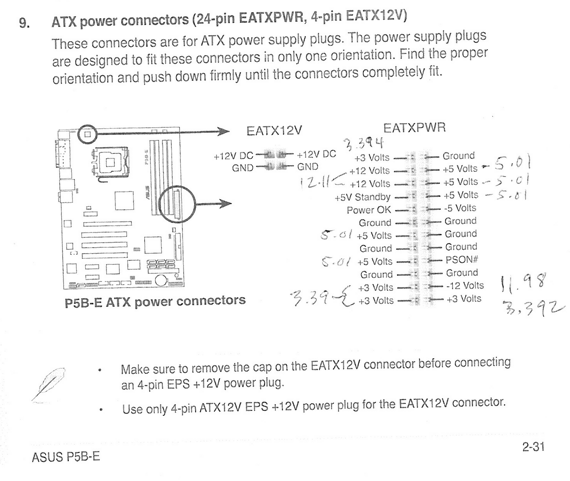
Update: here are the results of my PSU (Corsair HX520w) testing.

To test the PSU, I pulled the ram out and disconnected the power to the 3 HDs in the box. Had to listen to that infernal beeping error code during the time I had the system powered up for the test.

+12v lines measured 12.11v
-12v lines measured 11.98v
5v lines were all 5.01v
3.3 volt lines ranged between 3.390-3.394v
5poHq.png


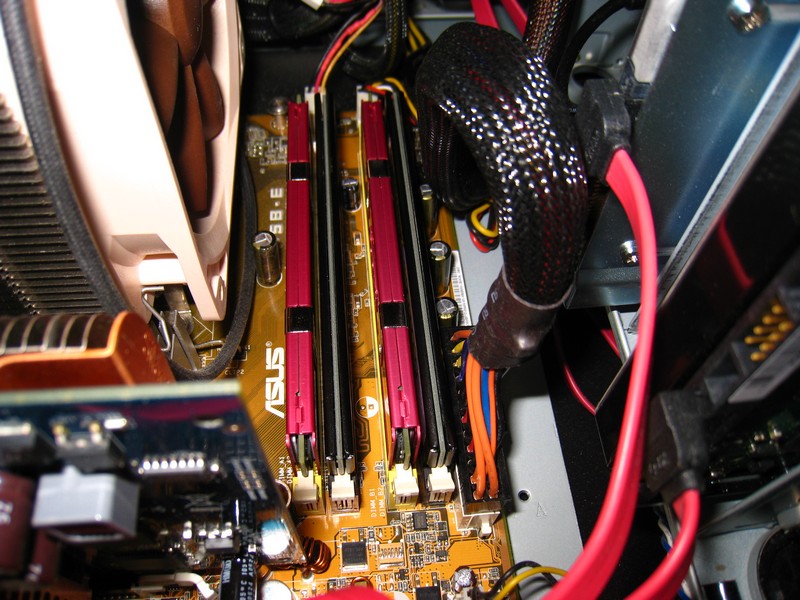
All the capacitors looked good.. no bulging tops or signs of damage.
s5NYi.jpg

ZAasI.jpg


And after I put everything back together, hooked up power and turned the system on, I got a msg saying the OC had failed. So I went into the BIOS and under AI tuning, set everything to default and saved it. I'll go back later and check the BIOS settings again. But I can't really tell any difference in system performance before or after.. just doing the 'net thing.

No smokin' gun found yet.
 

My Computer My Computer

OS
Windows 7 x64 home premium
CPU
Intel core i5-2500k
Motherboard
Asus P8Z68-V Pro
Memory
2x4GB G.Skill DDR3-1333, 2x2GB AData DDR3-1333
Graphics Card(s)
HD3000 graphics
Sound Card
on board
Monitor(s) Displays
Samsung 19" syncmaster
Screen Resolution
1280x1024
Hard Drives
Intel 80 GB X25-M SSD
Samsung HD321KJ 320 GB SATA
Samsung HD204UI 2.0 TB SATA
WD 1.5 TB Green eSATA in an external NexStar enclosure
PSU
Corsair HX520W
Case
Antec Solo
Cooling
CoolerMaster Hyper 212+ with dual fans
Keyboard
MS Natural Ergonomic 4000
Mouse
Logitech
Internet Speed
RoadRunner
It dawned on me that I have another DDR2 mobo in the house in a computer the kids use. It's an ASRock 4coredual-VSTA and only accepts 2x1Gb DDR2 ram sticks, so I can't test my 2x2GB Adata sticks (tried it and it won't boot.)

I yanked the Kingston value ram (DDR2-333, I think) and put it in my main PC... ran memtest86+ for something like 10 passes and got no errors. Even more confusing, I ran my Corsair 2x1GB twin2x sticks in the kids' PC and also got no errors after many passes.

Sheesh. None of this makes any sense.

I tried the Corsair ram in my main PC again, but reset the BIOS to run in default (best I can remember) settings and now the Corsair ram seems to run without error (at least after 5 passes.) But I can't get it to run at it's listed timings of 4-4-4-12 without error. I think the BIOS default is 5-5-5-18. FWIW, I'm still getting errors with the ADate 2x2Gb sticks, even with the BIOS at default settings.

I hate to spend money on more DDR2 ram. But if my mismatched ram is the problem, it may be my cheapest and fastest way to fix my system (which frankly, seems to be running fine as it... go figure.) It would sure save the OS and programs re-install and tweak process (lengthy.)
 

My Computer My Computer

OS
Windows 7 x64 home premium
CPU
Intel core i5-2500k
Motherboard
Asus P8Z68-V Pro
Memory
2x4GB G.Skill DDR3-1333, 2x2GB AData DDR3-1333
Graphics Card(s)
HD3000 graphics
Sound Card
on board
Monitor(s) Displays
Samsung 19" syncmaster
Screen Resolution
1280x1024
Hard Drives
Intel 80 GB X25-M SSD
Samsung HD321KJ 320 GB SATA
Samsung HD204UI 2.0 TB SATA
WD 1.5 TB Green eSATA in an external NexStar enclosure
PSU
Corsair HX520W
Case
Antec Solo
Cooling
CoolerMaster Hyper 212+ with dual fans
Keyboard
MS Natural Ergonomic 4000
Mouse
Logitech
Internet Speed
RoadRunner
It dawned on me that I have another DDR2 mobo in the house in a computer the kids use. It's an ASRock 4coredual-VSTA and only accepts 2x1Gb DDR2 ram sticks, so I can't test my 2x2GB Adata sticks (tried it and it won't boot.)

I yanked the Kingston value ram (DDR2-333, I think) and put it in my main PC... ran memtest86+ for something like 10 passes and got no errors. Even more confusing, I ran my Corsair 2x1GB twin2x sticks in the kids' PC and also got no errors after many passes.

Sheesh. None of this makes any sense.

I tried the Corsair ram in my main PC again, but reset the BIOS to run in default (best I can remember) settings and now the Corsair ram seems to run without error (at least after 5 passes.) But I can't get it to run at it's listed timings of 4-4-4-12 without error. I think the BIOS default is 5-5-5-18. FWIW, I'm still getting errors with the ADate 2x2Gb sticks, even with the BIOS at default settings.

I hate to spend money on more DDR2 ram. But if my mismatched ram is the problem, it may be my cheapest and fastest way to fix my system (which frankly, seems to be running fine as it... go figure.) It would sure save the OS and programs re-install and tweak process (lengthy.)
Try setting to the timings to 'Auto' or 'Default'
Incorrect timings may cause system instability in some cases
 

My Computer My Computer

Computer type
PC/Desktop
Computer Manufacturer/Model Number
Custom Build
OS
Windows 10 Pro x64, Arch Linux
CPU
Intel Core 2 Quad Q8200 OC'd 3.08GHz
Motherboard
Asus Rampage formula LGA775
Memory
8GB DDR2 900Mhz
Graphics Card(s)
MSI GT730 2GB GDDR5 (Kepler)
Sound Card
Supreme FX2
Monitor(s) Displays
Samsung LS22F350 LED
Screen Resolution
1080P
Hard Drives
Kingston SSDNow UV400 120GB, 500GB Hitachi, 2TB Samsung, 500GB Seagate FreeAgent, 640GB Samsung, 160GB Toshiba (Arch)
PSU
AeroCool 500W Bronze
Cooling
Cooler Master V6 + 3X fans
Keyboard
Prolink keyboard
Mouse
Logitech M705
Internet Speed
1MiB/s
Browser
Chrome Beta
When you guys use memtest86, do you set the mobo's BIOS to default settings first? I never considered what effect any custom settings I have could influence the outcome of the test.. 'til now.
 

My Computer My Computer

OS
Windows 7 x64 home premium
CPU
Intel core i5-2500k
Motherboard
Asus P8Z68-V Pro
Memory
2x4GB G.Skill DDR3-1333, 2x2GB AData DDR3-1333
Graphics Card(s)
HD3000 graphics
Sound Card
on board
Monitor(s) Displays
Samsung 19" syncmaster
Screen Resolution
1280x1024
Hard Drives
Intel 80 GB X25-M SSD
Samsung HD321KJ 320 GB SATA
Samsung HD204UI 2.0 TB SATA
WD 1.5 TB Green eSATA in an external NexStar enclosure
PSU
Corsair HX520W
Case
Antec Solo
Cooling
CoolerMaster Hyper 212+ with dual fans
Keyboard
MS Natural Ergonomic 4000
Mouse
Logitech
Internet Speed
RoadRunner
A new bsod today... Reference_by_pointer. Never seen that one before.
 

My Computer My Computer

OS
Windows 7 x64 home premium
CPU
Intel core i5-2500k
Motherboard
Asus P8Z68-V Pro
Memory
2x4GB G.Skill DDR3-1333, 2x2GB AData DDR3-1333
Graphics Card(s)
HD3000 graphics
Sound Card
on board
Monitor(s) Displays
Samsung 19" syncmaster
Screen Resolution
1280x1024
Hard Drives
Intel 80 GB X25-M SSD
Samsung HD321KJ 320 GB SATA
Samsung HD204UI 2.0 TB SATA
WD 1.5 TB Green eSATA in an external NexStar enclosure
PSU
Corsair HX520W
Case
Antec Solo
Cooling
CoolerMaster Hyper 212+ with dual fans
Keyboard
MS Natural Ergonomic 4000
Mouse
Logitech
Internet Speed
RoadRunner
STOP 0x00000018: REFERENCE_BY_POINTER

Usual causes: Device driver, kernel, hardware

Either system files are corrupt, old unstable device drivers or defective hardware are the possible causes

http://www.sevenforums.com/tutorials/1538-sfc-scannow-command-system-file-checker.html
http://www.sevenforums.com/tutorials/3413-repair-install.html

The only old drivers are:
Code:
SiLib.sys        fffff880`04cb2000    fffff880`04cc0000    0x0000e000    0x45c90bb2    07/02/2007 03:13:54                
DSI_SiUSBXp_3_1.sys        fffff880`04ca8000    fffff880`04cb2000    0x0000a000    0x45c90c16    07/02/2007 03:15:34           
lmimirr.sys        fffff880`0f053000    fffff880`0f05a000    0x00007000    0x461c108d    11/04/2007 02:32:45
Any software fro this vendor should be updated This is ANT, the Wireless Sensor Network Solution
Remove LogMeIn for diagnostic purposes
Code:
*******************************************************************************
*                                                                             *
*                        Bugcheck Analysis                                    *
*                                                                             *
*******************************************************************************

REFERENCE_BY_POINTER (18)
Arguments:
Arg1: 0000000000000000, Object type of the object whose reference count is being lowered
Arg2: fffffa8009d91060, Object whose reference count is being lowered
Arg3: 0000000000000002, Reserved
Arg4: ff00000000000002, Reserved
    The reference count of an object is illegal for the current state of the object.
    Each time a driver uses a pointer to an object the driver calls a kernel routine
    to increment the reference count of the object. When the driver is done with the
    pointer the driver calls another kernel routine to decrement the reference count.
    Drivers must match calls to the increment and decrement routines. This bugcheck
    can occur because an object's reference count goes to zero while there are still
    open handles to the object, in which case the fourth parameter indicates the number
    of opened handles. It may also occur when the object’s reference count drops below zero
    whether or not there are open handles to the object, and in that case the fourth parameter
    contains the actual value of the pointer references count.

Debugging Details:
------------------


CUSTOMER_CRASH_COUNT:  1

DEFAULT_BUCKET_ID:  VISTA_DRIVER_FAULT

BUGCHECK_STR:  0x18

PROCESS_NAME:  procexp64.exe

CURRENT_IRQL:  0

LAST_CONTROL_TRANSFER:  from fffff80002a68944 to fffff80002ac7c40

STACK_TEXT:  
fffff880`07964678 fffff800`02a68944 : 00000000`00000018 00000000`00000000 fffffa80`09d91060 00000000`00000002 : nt!KeBugCheckEx
fffff880`07964680 fffff800`02d83c9d : fffff880`07964ca0 fffffa80`0616ea10 fffffa80`0616ee30 00000000`0701b780 : nt! ?? ::FNODOBFM::`string'+0x49d71
fffff880`079646e0 fffff800`02dd19f6 : 00000000`07000080 00000000`000226c8 fffff880`07964870 00000000`00000000 : nt!ExpGetProcessInformation+0x4ef
fffff880`07964830 fffff800`02dd2449 : 00000000`07000080 fffff880`07964c30 00000000`00000000 00000000`00000001 : nt!ExpQuerySystemInformation+0xfb4
fffff880`07964be0 fffff800`02ac6ed3 : fffffa80`08701b60 fffff880`07964ca0 00000000`00000400 00000000`00000020 : nt!NtQuerySystemInformation+0x4d
fffff880`07964c20 00000000`7775167a : 00000000`00000000 00000000`00000000 00000000`00000000 00000000`00000000 : nt!KiSystemServiceCopyEnd+0x13
00000000`0557ddb8 00000000`00000000 : 00000000`00000000 00000000`00000000 00000000`00000000 00000000`00000000 : 0x7775167a


STACK_COMMAND:  kb

FOLLOWUP_IP: 
nt! ?? ::FNODOBFM::`string'+49d71
fffff800`02a68944 cc              int     3

SYMBOL_STACK_INDEX:  1

SYMBOL_NAME:  nt! ?? ::FNODOBFM::`string'+49d71

FOLLOWUP_NAME:  MachineOwner

MODULE_NAME: nt

IMAGE_NAME:  ntkrnlmp.exe

DEBUG_FLR_IMAGE_TIMESTAMP:  4e02aaa3

FAILURE_BUCKET_ID:  X64_0x18_nt!_??_::FNODOBFM::_string_+49d71

BUCKET_ID:  X64_0x18_nt!_??_::FNODOBFM::_string_+49d71

Followup: MachineOwner
---------
 

My Computer My Computer

Computer type
PC/Desktop
Computer Manufacturer/Model Number
Custom Build
OS
Windows 10 Pro x64, Arch Linux
CPU
Intel Core 2 Quad Q8200 OC'd 3.08GHz
Motherboard
Asus Rampage formula LGA775
Memory
8GB DDR2 900Mhz
Graphics Card(s)
MSI GT730 2GB GDDR5 (Kepler)
Sound Card
Supreme FX2
Monitor(s) Displays
Samsung LS22F350 LED
Screen Resolution
1080P
Hard Drives
Kingston SSDNow UV400 120GB, 500GB Hitachi, 2TB Samsung, 500GB Seagate FreeAgent, 640GB Samsung, 160GB Toshiba (Arch)
PSU
AeroCool 500W Bronze
Cooling
Cooler Master V6 + 3X fans
Keyboard
Prolink keyboard
Mouse
Logitech M705
Internet Speed
1MiB/s
Browser
Chrome Beta
Thanks for the info.

This system is driving me nuts. Nothing makes sense. memtest86 results are inconclusive. And yet the system just keeps running with just an occasional bsod or lockup. I'm starting to think it's time to replace the mobo, processor, and ram... reinstall win7/64 HP on the SSD and start all over... again.

Edit: I just learned that I may be able to replace the mobo, cpu, and ram without necessarily having to reinstall Win7/64HP. Now the OS re-install is no big deal, but reinstalling and tweaking all my program settings *is* a big deal. That makes this option more palatable, other than for the cost.
 
Last edited:

My Computer My Computer

OS
Windows 7 x64 home premium
CPU
Intel core i5-2500k
Motherboard
Asus P8Z68-V Pro
Memory
2x4GB G.Skill DDR3-1333, 2x2GB AData DDR3-1333
Graphics Card(s)
HD3000 graphics
Sound Card
on board
Monitor(s) Displays
Samsung 19" syncmaster
Screen Resolution
1280x1024
Hard Drives
Intel 80 GB X25-M SSD
Samsung HD321KJ 320 GB SATA
Samsung HD204UI 2.0 TB SATA
WD 1.5 TB Green eSATA in an external NexStar enclosure
PSU
Corsair HX520W
Case
Antec Solo
Cooling
CoolerMaster Hyper 212+ with dual fans
Keyboard
MS Natural Ergonomic 4000
Mouse
Logitech
Internet Speed
RoadRunner
I noticed that the computer had a couple of bsods in my absence today. I'll submit another report. Does this serve a purpose at this point? I'm thinking it's past time to dump this mobo, cpu, and ram and build a (basically) new system. Argh.
 

My Computer My Computer

OS
Windows 7 x64 home premium
CPU
Intel core i5-2500k
Motherboard
Asus P8Z68-V Pro
Memory
2x4GB G.Skill DDR3-1333, 2x2GB AData DDR3-1333
Graphics Card(s)
HD3000 graphics
Sound Card
on board
Monitor(s) Displays
Samsung 19" syncmaster
Screen Resolution
1280x1024
Hard Drives
Intel 80 GB X25-M SSD
Samsung HD321KJ 320 GB SATA
Samsung HD204UI 2.0 TB SATA
WD 1.5 TB Green eSATA in an external NexStar enclosure
PSU
Corsair HX520W
Case
Antec Solo
Cooling
CoolerMaster Hyper 212+ with dual fans
Keyboard
MS Natural Ergonomic 4000
Mouse
Logitech
Internet Speed
RoadRunner
I noticed that the computer had a couple of bsods in my absence today. I'll submit another report. Does this serve a purpose at this point? I'm thinking it's past time to dump this mobo, cpu, and ram and build a (basically) new system. Argh.
This was caused by nvlddmkm.sys, part of the Nvidia Driver
Either the driver is improperly installed or a combination of hardware defects might be causing the crash
I would suggest a reinstall of the Nvidia Driver
Code:
*******************************************************************************
*                                                                             *
*                        Bugcheck Analysis                                    *
*                                                                             *
*******************************************************************************

DRIVER_IRQL_NOT_LESS_OR_EQUAL (d1)
An attempt was made to access a pageable (or completely invalid) address at an
interrupt request level (IRQL) that is too high.  This is usually
caused by drivers using improper addresses.
If kernel debugger is available get stack backtrace.
Arguments:
Arg1: fffffa80667ccbb4, memory referenced
Arg2: 0000000000000002, IRQL
Arg3: 0000000000000001, value 0 = read operation, 1 = write operation
Arg4: fffff8800f49c8a6, address which referenced memory

Debugging Details:
------------------


WRITE_ADDRESS: GetPointerFromAddress: unable to read from fffff80002d0f100
 fffffa80667ccbb4 

CURRENT_IRQL:  2

FAULTING_IP: 
nvlddmkm+42f8a6
fffff880`0f49c8a6 4883c468        add     rsp,68h

CUSTOMER_CRASH_COUNT:  1

DEFAULT_BUCKET_ID:  VISTA_DRIVER_FAULT

BUGCHECK_STR:  0xD1

PROCESS_NAME:  System

TRAP_FRAME:  fffff80000b9c690 -- (.trap 0xfffff80000b9c690)
NOTE: The trap frame does not contain all registers.
Some register values may be zeroed or incorrect.
rax=0000000001000000 rbx=0000000000000000 rcx=0000000000000018
rdx=0000000000010000 rsi=0000000000000000 rdi=0000000000000000
rip=fffff8800f49c8a6 rsp=fffff80000b9c820 rbp=0000000000000000
 r8=0000000000000000  r9=0000000000000000 r10=fffffa800614c7b0
r11=fffff80000b9c720 r12=0000000000000000 r13=0000000000000000
r14=0000000000000000 r15=0000000000000000
iopl=0         nv up ei pl nz na po nc
nvlddmkm+0x42f8a6:
fffff880`0f49c8a6 4883c468        add     rsp,68h
Resetting default scope

LAST_CONTROL_TRANSFER:  from fffff80002adc1e9 to fffff80002adcc40

STACK_TEXT:  
fffff800`00b9c548 fffff800`02adc1e9 : 00000000`0000000a fffffa80`667ccbb4 00000000`00000002 00000000`00000001 : nt!KeBugCheckEx
fffff800`00b9c550 fffff800`02adae60 : fffffa80`060f9000 fffffa80`060f9000 00000000`00000000 fffffa80`073b62f0 : nt!KiBugCheckDispatch+0x69
fffff800`00b9c690 fffff880`0f49c8a6 : fffffa80`060f9000 00000000`00000000 00000000`00000001 fffffa80`073b6688 : nt!KiPageFault+0x260
fffff800`00b9c820 fffffa80`060f9000 : 00000000`00000000 00000000`00000001 fffffa80`073b6688 00000000`00000000 : nvlddmkm+0x42f8a6
fffff800`00b9c828 00000000`00000000 : 00000000`00000001 fffffa80`073b6688 00000000`00000000 fffff880`0f271820 : 0xfffffa80`060f9000


STACK_COMMAND:  kb

FOLLOWUP_IP: 
nvlddmkm+42f8a6
fffff880`0f49c8a6 4883c468        add     rsp,68h

SYMBOL_STACK_INDEX:  3

SYMBOL_NAME:  nvlddmkm+42f8a6

FOLLOWUP_NAME:  MachineOwner

MODULE_NAME: nvlddmkm

IMAGE_NAME:  nvlddmkm.sys

DEBUG_FLR_IMAGE_TIMESTAMP:  4e391010

FAILURE_BUCKET_ID:  X64_0xD1_nvlddmkm+42f8a6

BUCKET_ID:  X64_0xD1_nvlddmkm+42f8a6

Followup: MachineOwner
---------

 

My Computer My Computer

Computer type
PC/Desktop
Computer Manufacturer/Model Number
Custom Build
OS
Windows 10 Pro x64, Arch Linux
CPU
Intel Core 2 Quad Q8200 OC'd 3.08GHz
Motherboard
Asus Rampage formula LGA775
Memory
8GB DDR2 900Mhz
Graphics Card(s)
MSI GT730 2GB GDDR5 (Kepler)
Sound Card
Supreme FX2
Monitor(s) Displays
Samsung LS22F350 LED
Screen Resolution
1080P
Hard Drives
Kingston SSDNow UV400 120GB, 500GB Hitachi, 2TB Samsung, 500GB Seagate FreeAgent, 640GB Samsung, 160GB Toshiba (Arch)
PSU
AeroCool 500W Bronze
Cooling
Cooler Master V6 + 3X fans
Keyboard
Prolink keyboard
Mouse
Logitech M705
Internet Speed
1MiB/s
Browser
Chrome Beta
I'll uninstall and d/l a fresh copy of the Nvidia driver and install it.

The crashes are becoming more frequent. Do you think there's any point in me continuing to send in the bsod zip files for analysis?
 

My Computer My Computer

OS
Windows 7 x64 home premium
CPU
Intel core i5-2500k
Motherboard
Asus P8Z68-V Pro
Memory
2x4GB G.Skill DDR3-1333, 2x2GB AData DDR3-1333
Graphics Card(s)
HD3000 graphics
Sound Card
on board
Monitor(s) Displays
Samsung 19" syncmaster
Screen Resolution
1280x1024
Hard Drives
Intel 80 GB X25-M SSD
Samsung HD321KJ 320 GB SATA
Samsung HD204UI 2.0 TB SATA
WD 1.5 TB Green eSATA in an external NexStar enclosure
PSU
Corsair HX520W
Case
Antec Solo
Cooling
CoolerMaster Hyper 212+ with dual fans
Keyboard
MS Natural Ergonomic 4000
Mouse
Logitech
Internet Speed
RoadRunner
I'll uninstall and d/l a fresh copy of the Nvidia driver and install it.

The crashes are becoming more frequent. Do you think there's any point in me continuing to send in the bsod zip files for analysis?
All dumps seem to point to a GPU/RAM issue, it might also be failing hardware
 

My Computer My Computer

Computer type
PC/Desktop
Computer Manufacturer/Model Number
Custom Build
OS
Windows 10 Pro x64, Arch Linux
CPU
Intel Core 2 Quad Q8200 OC'd 3.08GHz
Motherboard
Asus Rampage formula LGA775
Memory
8GB DDR2 900Mhz
Graphics Card(s)
MSI GT730 2GB GDDR5 (Kepler)
Sound Card
Supreme FX2
Monitor(s) Displays
Samsung LS22F350 LED
Screen Resolution
1080P
Hard Drives
Kingston SSDNow UV400 120GB, 500GB Hitachi, 2TB Samsung, 500GB Seagate FreeAgent, 640GB Samsung, 160GB Toshiba (Arch)
PSU
AeroCool 500W Bronze
Cooling
Cooler Master V6 + 3X fans
Keyboard
Prolink keyboard
Mouse
Logitech M705
Internet Speed
1MiB/s
Browser
Chrome Beta
It may be worth yanking those 2x1GB ram sticks out of the stand-by computer and running 4x1GB ram for a while and see if I have any more issues with bsods. If I can run for a week or so without a bsod/lockup, it may be worth replacing all the DDR2 ram with a matched set of 4x2GB ram. Otherwise, it sounds like it will be time for a new mobo, cpu, and DDR3 ram.
 

My Computer My Computer

OS
Windows 7 x64 home premium
CPU
Intel core i5-2500k
Motherboard
Asus P8Z68-V Pro
Memory
2x4GB G.Skill DDR3-1333, 2x2GB AData DDR3-1333
Graphics Card(s)
HD3000 graphics
Sound Card
on board
Monitor(s) Displays
Samsung 19" syncmaster
Screen Resolution
1280x1024
Hard Drives
Intel 80 GB X25-M SSD
Samsung HD321KJ 320 GB SATA
Samsung HD204UI 2.0 TB SATA
WD 1.5 TB Green eSATA in an external NexStar enclosure
PSU
Corsair HX520W
Case
Antec Solo
Cooling
CoolerMaster Hyper 212+ with dual fans
Keyboard
MS Natural Ergonomic 4000
Mouse
Logitech
Internet Speed
RoadRunner
I have yet to replace the AData 2x2GB ram with the known good sticks of 2x1Gb ram from the standby computer.

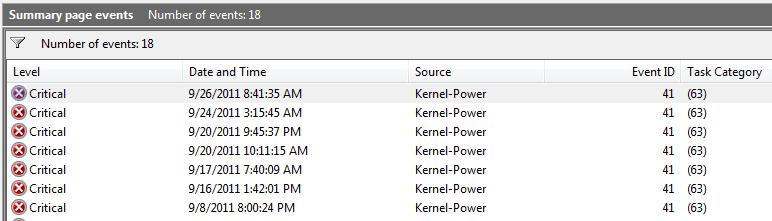
Another bsod today, while the computer was sitting unused.

Looking at event viewer, I can't really interpret anything from what I see. The critical events seem to parallel bsods... best I can tell.
gl5q3.png
 

My Computer My Computer

OS
Windows 7 x64 home premium
CPU
Intel core i5-2500k
Motherboard
Asus P8Z68-V Pro
Memory
2x4GB G.Skill DDR3-1333, 2x2GB AData DDR3-1333
Graphics Card(s)
HD3000 graphics
Sound Card
on board
Monitor(s) Displays
Samsung 19" syncmaster
Screen Resolution
1280x1024
Hard Drives
Intel 80 GB X25-M SSD
Samsung HD321KJ 320 GB SATA
Samsung HD204UI 2.0 TB SATA
WD 1.5 TB Green eSATA in an external NexStar enclosure
PSU
Corsair HX520W
Case
Antec Solo
Cooling
CoolerMaster Hyper 212+ with dual fans
Keyboard
MS Natural Ergonomic 4000
Mouse
Logitech
Internet Speed
RoadRunner
Back
Top