Bsod kernel_data_inpage_error

special jester

New member
Local time
4:49 PM
Messages
72
Hello All.

I could use some help. I've been having BSOD problems for a few months now. I went to stone computers (local computer store) and they did a reformat and a virus check with AVG and told me they fixed the issue. Of course they didn't and I am still having problems.

I tried upping the fan speed on my graphics card and that didn't work. I downloaded bluescreen view and did a scan and if you need I can upload any images you would need to help me out.

I think I uploaded what you guys need for BSOD posts. It should be in the attachments
 

My Computer

Computer type
PC/Desktop
Computer Manufacturer/Model Number
Custom Build
OS
Windows 7 64 bit
CPU
Intel I5
Motherboard
MSI Z86 Gaming
Memory
8192 MB RAM
Graphics Card(s)
AMD Radeon R9 200 series
Hard Drives
Local Disk 1 TB
Antivirus
AVG
Browser
Water Fox
Hello and welcome to the seven forum.

Hang on as a BSOD expert will look at your problem and then they will know how to help you...
 

My Computer

Computer type
PC/Desktop
Computer Manufacturer/Model Number
Lenovo
OS
Windows 7 Home Premium 64-Bit SP1
CPU
Intel Core i7 2600
Motherboard
Lenovo
Memory
8.00 GB Dual-Channel DDR3
Graphics Card(s)
1024MB GeForce GT 420
Sound Card
Intergrated Realtex ALC888S
Monitor(s) Displays
LG W40 series Widescreen
Screen Resolution
1920 by 1080 widescreen
Hard Drives
932GB Hitachi HDS TB
External drive 640 GB also
PSU
300W
Case
Tower
Cooling
yes came installed
Keyboard
Lenovo
Mouse
Laser wirless 5000
Antivirus
MBAM / Superantispyware pro paid for.
Browser
Google /
Other Info
PLDS DVD-RW DH16ABSH
Hello Jester, welcome to Sevenforums!

Sorry to hear about your problems with local shops, its all too common. Luckily now you have us.

Here is a summary of the BSOD's you're receiving
Code:
*******************************************************************************
*                                                                             *
*                        Bugcheck Analysis                                    *
*                                                                             *
*******************************************************************************

Use !analyze -v to get detailed debugging information.

[COLOR=Red]BugCheck 7A[/COLOR], {fffff6fc40027d40, ffffffff[COLOR=Red]c000000e[/COLOR], 13c82abe0, fffff88004fa8000}

Processing initial command '!analyze -v;r;kv;lmtn;lmtsmn;.bugcheck'
Probably caused by : ntkrnlmp.exe ( nt! ?? ::FNODOBFM::`string'+36c1a )

Followup: MachineOwner
---------

0: kd> !analyze -v;r;kv;lmtn;lmtsmn;.bugcheck
*******************************************************************************
*                                                                             *
*                        Bugcheck Analysis                                    *
*                                                                             *
*******************************************************************************

KERNEL_DATA_INPAGE_ERROR (7a)
The requested page of kernel data could not be read in.  Typically caused by
a bad block in the paging file or disk controller error. Also see
KERNEL_STACK_INPAGE_ERROR.
If the error status is 0xC000000E, 0xC000009C, 0xC000009D or 0xC0000185,
it means the disk subsystem has experienced a failure.
If the error status is 0xC000009A, then it means the request failed because
a filesystem failed to make forward progress.
Code:
*******************************************************************************
*                                                                             *
*                        Bugcheck Analysis                                    *
*                                                                             *
*******************************************************************************

Use !analyze -v to get detailed debugging information.

[COLOR=Red]BugCheck 7A[/COLOR], {fffff6fc40019878, ffffffff[COLOR=Red]c000009d[/COLOR], a367ebe0, fffff8800330f000}

Probably caused by : ntkrnlmp.exe ( nt! ?? ::FNODOBFM::`string'+36c1a )

Followup: MachineOwner
---------

Processing initial command '!analyze -v;r;kv;lmtn;lmtsmn;.bugcheck'
3: kd> !analyze -v;r;kv;lmtn;lmtsmn;.bugcheck
*******************************************************************************
*                                                                             *
*                        Bugcheck Analysis                                    *
*                                                                             *
*******************************************************************************

KERNEL_DATA_INPAGE_ERROR (7a)
The requested page of kernel data could not be read in.  Typically caused by
a bad block in the paging file or disk controller error. Also see
KERNEL_STACK_INPAGE_ERROR.
If the error status is 0xC000000E, 0xC000009C, 0xC000009D or 0xC0000185,
it means the disk subsystem has experienced a failure.
If the error status is 0xC000009A, then it means the request failed because
a filesystem failed to make forward progress.
Code:
Debugging Details:
------------------


[COLOR=Red]ERROR_CODE: (NTSTATUS) 0xc000000e - A device which does not exist was specified.[/COLOR]

DISK_HARDWARE_ERROR: There was error with disk hardware
[COLOR=Red]
BUGCHECK_STR:  0x7a_c000000e[/COLOR]

CUSTOMER_CRASH_COUNT:  1

DEFAULT_BUCKET_ID:  WIN7_DRIVER_FAULT

PROCESS_NAME:  System

CURRENT_IRQL:  0
All of your BSODs are pointing to some sort of problem with your hard drive or controller.

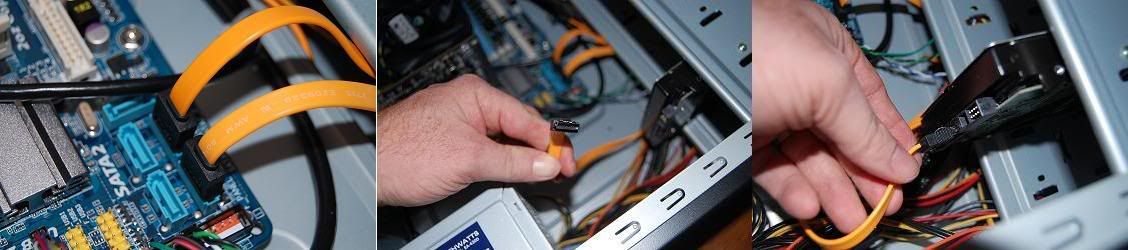
Make sure your cables are all secure. Switch to a different Sata connection and see if that helps.
SATACabletoHDD.jpg


If problems still persist (actually either way do this) run Hard drive tests
SeaTools for Windows | Seagate
 

My Computer

Computer type
PC/Desktop
Computer Manufacturer/Model Number
Custom
OS
Dual Boot: Windows 8.1 & Server 2012r2 VMs: Kali Linux, Backbox, Matriux, Windows 8.1
CPU
A10 7700 Kavari SteamRoller
Motherboard
ASUS A88XM-PLUS (FM2+ )
Memory
8GB DDR3 SDRAM PC3-8500
Graphics Card(s)
1024MB ATI AMD Radeon R7 Graphics
Sound Card
Realtek High Definition Audio
Monitor(s) Displays
Samsung
Hard Drives
SSD Crucial 120gb
WD VelociRaptor 1tb
PSU
Rosewill Gaming 650w
Case
Rosewill Galaxy 2
Internet Speed
55/12
Antivirus
Malwarebytes, MSE, SAS
Browser
FireFox, Chrome
Okay. I will give that a try. I'll let you know if it works.
 

My Computer

Computer type
PC/Desktop
Computer Manufacturer/Model Number
Custom Build
OS
Windows 7 64 bit
CPU
Intel I5
Motherboard
MSI Z86 Gaming
Memory
8192 MB RAM
Graphics Card(s)
AMD Radeon R9 200 series
Hard Drives
Local Disk 1 TB
Antivirus
AVG
Browser
Water Fox
Hi Gator, great post and thank you for helping special jester...
 

My Computer

Computer type
PC/Desktop
Computer Manufacturer/Model Number
Lenovo
OS
Windows 7 Home Premium 64-Bit SP1
CPU
Intel Core i7 2600
Motherboard
Lenovo
Memory
8.00 GB Dual-Channel DDR3
Graphics Card(s)
1024MB GeForce GT 420
Sound Card
Intergrated Realtex ALC888S
Monitor(s) Displays
LG W40 series Widescreen
Screen Resolution
1920 by 1080 widescreen
Hard Drives
932GB Hitachi HDS TB
External drive 640 GB also
PSU
300W
Case
Tower
Cooling
yes came installed
Keyboard
Lenovo
Mouse
Laser wirless 5000
Antivirus
MBAM / Superantispyware pro paid for.
Browser
Google /
Other Info
PLDS DVD-RW DH16ABSH
Still having BSOD

I tried replacing an ATA cable with a SATA cable and changed the port on the motherboard. I ran a seagate Long Generic test and the program said that my computer passed.

Still scratching my head on this one. Any ideas?
 

My Computer

Computer type
PC/Desktop
Computer Manufacturer/Model Number
Custom Build
OS
Windows 7 64 bit
CPU
Intel I5
Motherboard
MSI Z86 Gaming
Memory
8192 MB RAM
Graphics Card(s)
AMD Radeon R9 200 series
Hard Drives
Local Disk 1 TB
Antivirus
AVG
Browser
Water Fox
Did you receive a new BSOD?

If so, can you upload the new dump files?
 

My Computer

Computer type
PC/Desktop
Computer Manufacturer/Model Number
Custom
OS
Dual Boot: Windows 8.1 & Server 2012r2 VMs: Kali Linux, Backbox, Matriux, Windows 8.1
CPU
A10 7700 Kavari SteamRoller
Motherboard
ASUS A88XM-PLUS (FM2+ )
Memory
8GB DDR3 SDRAM PC3-8500
Graphics Card(s)
1024MB ATI AMD Radeon R7 Graphics
Sound Card
Realtek High Definition Audio
Monitor(s) Displays
Samsung
Hard Drives
SSD Crucial 120gb
WD VelociRaptor 1tb
PSU
Rosewill Gaming 650w
Case
Rosewill Galaxy 2
Internet Speed
55/12
Antivirus
Malwarebytes, MSE, SAS
Browser
FireFox, Chrome
Oh right. Here it is.
 

My Computer

Computer type
PC/Desktop
Computer Manufacturer/Model Number
Custom Build
OS
Windows 7 64 bit
CPU
Intel I5
Motherboard
MSI Z86 Gaming
Memory
8192 MB RAM
Graphics Card(s)
AMD Radeon R9 200 series
Hard Drives
Local Disk 1 TB
Antivirus
AVG
Browser
Water Fox
Hi Jester, you're still getting the same BSOD's

Code:
*******************************************************************************
*                                                                             *
*                        Bugcheck Analysis                                    *
*                                                                             *
*******************************************************************************

Use !analyze -v to get detailed debugging information.

[COLOR=Red]BugCheck 7A[/COLOR], {fffff6fc400098f8, ffffffff[COLOR=Red]c000000e[/COLOR], 1d84c0860, fffff8800131fdc4}

GetPointerFromAddress: unable to read from fffff8000330f278
*** WARNING: Unable to verify timestamp for win32k.sys
*** ERROR: Module load completed but symbols could not be loaded for win32k.sys
Processing initial command '!analyze -v;r;kv;lmtn;lmtsmn;.bugcheck'
Probably caused by : memory_corruption

Followup: memory_corruption
---------

0: kd> !analyze -v;r;kv;lmtn;lmtsmn;.bugcheck
*******************************************************************************
*                                                                             *
*                        Bugcheck Analysis                                    *
*                                                                             *
*******************************************************************************

[COLOR=Red]KERNEL_DATA_INPAGE_ERROR (7a)[/COLOR]
The requested page of kernel data could not be read in.  Typically caused by
a bad block in the paging file or disk controller error. Also see
KERNEL_STACK_INPAGE_ERROR.
If the error status is 0xC000000E, 0xC000009C, 0xC000009D or 0xC0000185,
it means the disk subsystem has experienced a failure.
If the error status is 0xC000009A, then it means the request failed because
a filesystem failed to make forward progress.
Arguments:
Arg1: fffff6fc400098f8, lock type that was held (value 1,2,3, or PTE address)
Arg2: ffffffffc000000e, error status (normally i/o status code)
Arg3: 00000001d84c0860, current process (virtual address for lock type 3, or PTE)
Arg4: fffff8800131fdc4, virtual address that could not be in-paged (or PTE contents if arg1 is a PTE address)

Debugging Details:
------------------


[COLOR=Red]ERROR_CODE: (NTSTATUS) 0xc000000e - A device which does not exist was specified.[/COLOR]

DISK_HARDWARE_ERROR: There was error with disk hardware

BUGCHECK_STR:  0x7a_c000000e

CUSTOMER_CRASH_COUNT:  1

DEFAULT_BUCKET_ID:  CODE_CORRUPTION

PROCESS_NAME:  System

CURRENT_IRQL:  0
This is looking more and more like a hardware issue. Either your Hard drive or the Disk controller itself

Try running chkdsk /f /r (See option two for command line)
http://www.sevenforums.com/tutorials/433-disk-check.html
 

My Computer

Computer type
PC/Desktop
Computer Manufacturer/Model Number
Custom
OS
Dual Boot: Windows 8.1 & Server 2012r2 VMs: Kali Linux, Backbox, Matriux, Windows 8.1
CPU
A10 7700 Kavari SteamRoller
Motherboard
ASUS A88XM-PLUS (FM2+ )
Memory
8GB DDR3 SDRAM PC3-8500
Graphics Card(s)
1024MB ATI AMD Radeon R7 Graphics
Sound Card
Realtek High Definition Audio
Monitor(s) Displays
Samsung
Hard Drives
SSD Crucial 120gb
WD VelociRaptor 1tb
PSU
Rosewill Gaming 650w
Case
Rosewill Galaxy 2
Internet Speed
55/12
Antivirus
Malwarebytes, MSE, SAS
Browser
FireFox, Chrome
I tried removing the serial ATA cable connecting the hard drive and disk drive to the motherboard. I replaced the one connecting the hard drive with a SATA cable and I couldn't find my other SATA cable so I just left the disk drive unhooked. I was trying to run the disk check that you asked me to but before I could spend more than one or two minutes on the computer all my icons would disappear on my desk top and be replaced with this.
 

My Computer

Computer type
PC/Desktop
Computer Manufacturer/Model Number
Custom Build
OS
Windows 7 64 bit
CPU
Intel I5
Motherboard
MSI Z86 Gaming
Memory
8192 MB RAM
Graphics Card(s)
AMD Radeon R9 200 series
Hard Drives
Local Disk 1 TB
Antivirus
AVG
Browser
Water Fox
Which program were you trying to run when receiving that error?
 

My Computer

Computer type
PC/Desktop
Computer Manufacturer/Model Number
Custom
OS
Dual Boot: Windows 8.1 & Server 2012r2 VMs: Kali Linux, Backbox, Matriux, Windows 8.1
CPU
A10 7700 Kavari SteamRoller
Motherboard
ASUS A88XM-PLUS (FM2+ )
Memory
8GB DDR3 SDRAM PC3-8500
Graphics Card(s)
1024MB ATI AMD Radeon R7 Graphics
Sound Card
Realtek High Definition Audio
Monitor(s) Displays
Samsung
Hard Drives
SSD Crucial 120gb
WD VelociRaptor 1tb
PSU
Rosewill Gaming 650w
Case
Rosewill Galaxy 2
Internet Speed
55/12
Antivirus
Malwarebytes, MSE, SAS
Browser
FireFox, Chrome
I was just running waterfox and trying to use the internet and also so my data check.

I just went out and bought a new sata cable for my disk drive to connect it to my mother board and now everything seems to be running alright but I will have to wait and see. I still have yet to do the data check.
 

My Computer

Computer type
PC/Desktop
Computer Manufacturer/Model Number
Custom Build
OS
Windows 7 64 bit
CPU
Intel I5
Motherboard
MSI Z86 Gaming
Memory
8192 MB RAM
Graphics Card(s)
AMD Radeon R9 200 series
Hard Drives
Local Disk 1 TB
Antivirus
AVG
Browser
Water Fox
I was actually trying to run the data check in the command prompt.
 

My Computer

Computer type
PC/Desktop
Computer Manufacturer/Model Number
Custom Build
OS
Windows 7 64 bit
CPU
Intel I5
Motherboard
MSI Z86 Gaming
Memory
8192 MB RAM
Graphics Card(s)
AMD Radeon R9 200 series
Hard Drives
Local Disk 1 TB
Antivirus
AVG
Browser
Water Fox
I was actually trying to run the data check in the command prompt.

Ok, after buying a new cord you haven't had a BSOD?

Have you gotten further than before (without BSOD)?
 

My Computer

Computer type
PC/Desktop
Computer Manufacturer/Model Number
Custom
OS
Dual Boot: Windows 8.1 & Server 2012r2 VMs: Kali Linux, Backbox, Matriux, Windows 8.1
CPU
A10 7700 Kavari SteamRoller
Motherboard
ASUS A88XM-PLUS (FM2+ )
Memory
8GB DDR3 SDRAM PC3-8500
Graphics Card(s)
1024MB ATI AMD Radeon R7 Graphics
Sound Card
Realtek High Definition Audio
Monitor(s) Displays
Samsung
Hard Drives
SSD Crucial 120gb
WD VelociRaptor 1tb
PSU
Rosewill Gaming 650w
Case
Rosewill Galaxy 2
Internet Speed
55/12
Antivirus
Malwarebytes, MSE, SAS
Browser
FireFox, Chrome
I haven't gotten one yet. I just had that one error again. The one with the picture that I sent. And it was after replacing the cords.
 

My Computer

Computer type
PC/Desktop
Computer Manufacturer/Model Number
Custom Build
OS
Windows 7 64 bit
CPU
Intel I5
Motherboard
MSI Z86 Gaming
Memory
8192 MB RAM
Graphics Card(s)
AMD Radeon R9 200 series
Hard Drives
Local Disk 1 TB
Antivirus
AVG
Browser
Water Fox
It seems the only way to get the computer back to normal is to restart it with a cold boot.
 

My Computer

Computer type
PC/Desktop
Computer Manufacturer/Model Number
Custom Build
OS
Windows 7 64 bit
CPU
Intel I5
Motherboard
MSI Z86 Gaming
Memory
8192 MB RAM
Graphics Card(s)
AMD Radeon R9 200 series
Hard Drives
Local Disk 1 TB
Antivirus
AVG
Browser
Water Fox
Here are some pictures of the most recent error.
 

My Computer

Computer type
PC/Desktop
Computer Manufacturer/Model Number
Custom Build
OS
Windows 7 64 bit
CPU
Intel I5
Motherboard
MSI Z86 Gaming
Memory
8192 MB RAM
Graphics Card(s)
AMD Radeon R9 200 series
Hard Drives
Local Disk 1 TB
Antivirus
AVG
Browser
Water Fox
Ok I still think this is going to go down to your Disk Controller but let me get another set of eyes here just to be sure.

However, it is encouraging that no BSODs have happened, its still a little concerning that you're getting that type of error.

Cannot find drive specified is not a great sign.
 

My Computer

Computer type
PC/Desktop
Computer Manufacturer/Model Number
Custom
OS
Dual Boot: Windows 8.1 & Server 2012r2 VMs: Kali Linux, Backbox, Matriux, Windows 8.1
CPU
A10 7700 Kavari SteamRoller
Motherboard
ASUS A88XM-PLUS (FM2+ )
Memory
8GB DDR3 SDRAM PC3-8500
Graphics Card(s)
1024MB ATI AMD Radeon R7 Graphics
Sound Card
Realtek High Definition Audio
Monitor(s) Displays
Samsung
Hard Drives
SSD Crucial 120gb
WD VelociRaptor 1tb
PSU
Rosewill Gaming 650w
Case
Rosewill Galaxy 2
Internet Speed
55/12
Antivirus
Malwarebytes, MSE, SAS
Browser
FireFox, Chrome
Not sure what happened but the error keeps happening and it's really weird. The computer is essentially unusable right now. I'm not sure why it's getting worse and I don't know what it could be.
 

My Computer

Computer type
PC/Desktop
Computer Manufacturer/Model Number
Custom Build
OS
Windows 7 64 bit
CPU
Intel I5
Motherboard
MSI Z86 Gaming
Memory
8192 MB RAM
Graphics Card(s)
AMD Radeon R9 200 series
Hard Drives
Local Disk 1 TB
Antivirus
AVG
Browser
Water Fox
If you can get onto the system, please try to see if you can follow this guide so we can eliminate some potential causes
http://www.sevenforums.com/tutorial...ation-conflicts-performing-clean-startup.html

Lets try to check the Disk with Seatools, start with Option 2
http://www.sevenforums.com/tutorials/313457-seatools-dos-windows-how-use.html#Part3

If you can't run chkdsk while you're in OS, try in a command prompt before booting up
http://www.sevenforums.com/tutorials/682-command-prompt-startup.html

Run this command:
chkdsk c: /f /r
 

My Computer

Computer type
PC/Desktop
Computer Manufacturer/Model Number
Custom
OS
Dual Boot: Windows 8.1 & Server 2012r2 VMs: Kali Linux, Backbox, Matriux, Windows 8.1
CPU
A10 7700 Kavari SteamRoller
Motherboard
ASUS A88XM-PLUS (FM2+ )
Memory
8GB DDR3 SDRAM PC3-8500
Graphics Card(s)
1024MB ATI AMD Radeon R7 Graphics
Sound Card
Realtek High Definition Audio
Monitor(s) Displays
Samsung
Hard Drives
SSD Crucial 120gb
WD VelociRaptor 1tb
PSU
Rosewill Gaming 650w
Case
Rosewill Galaxy 2
Internet Speed
55/12
Antivirus
Malwarebytes, MSE, SAS
Browser
FireFox, Chrome
Back
Top