BSOD ntoskrnl.exe Even after resetting to factory settings

Blurberry

New member
Local time
3:05 AM
Messages
3
SF Diagnostic File attached

I'm not a professional at using computers so I really need help with this.
I share this computer with my family, which also consists of some kids who play this game called League of Legends.
However, one day after I got on, the computer blue screened after a few minutes of surfing (around 20 minutes).

I tried System restore and Memory Diagnostic and it said I had something wrong with my hardware.

I was worried but because I had a back-up file, I went ahead and reformatted the computer, returning it to factory settings. However, after that the computer still had problems and I need help figuring out if it can be fixed without buying new hardware. Otherwise, I'll just buy a new computer.

I don't know if these will help but:
picture2nut.png

ImageShack® - Online Photo and Video Hosting
picture1nyo.png

ImageShack® - Online Photo and Video Hosting
 

My Computer My Computer

At a glance

Windows 7 Home Premium 64bitIntel (R) Pentium (R) CPU B960 @ 2.20GHz4.00GB (3.85 GB Usable)Intel (R) HD Graphics Family
Computer type
Laptop
Computer Manufacturer/Model Number
Acer
OS
Windows 7 Home Premium 64bit
CPU
Intel (R) Pentium (R) CPU B960 @ 2.20GHz
Motherboard
Acer Aspire 5749Z
Memory
4.00GB (3.85 GB Usable)
Graphics Card(s)
Intel (R) HD Graphics Family
Sound Card
Realtek High Definition Audio
Screen Resolution
1366 x 768 x 59 hertz
Antivirus
Avast
Browser
Google Chrome
The Bsod has been appearing even while no one is on the computer.
If you require extra info, the affected computer is a Acer Aspire with a Intel 8960 Processor.
It runs a Windows 7 Family Premium OS and is being affected by the error code 0x0000001A
 

My Computer My Computer

At a glance

Windows 7 Home Premium 64bitIntel (R) Pentium (R) CPU B960 @ 2.20GHz4.00GB (3.85 GB Usable)Intel (R) HD Graphics Family
Computer type
Laptop
Computer Manufacturer/Model Number
Acer
OS
Windows 7 Home Premium 64bit
CPU
Intel (R) Pentium (R) CPU B960 @ 2.20GHz
Motherboard
Acer Aspire 5749Z
Memory
4.00GB (3.85 GB Usable)
Graphics Card(s)
Intel (R) HD Graphics Family
Sound Card
Realtek High Definition Audio
Screen Resolution
1366 x 768 x 59 hertz
Antivirus
Avast
Browser
Google Chrome
Running Multiple antiviruses can cause things like BSOD's. Please uninstall Avast! and McAfee with their removal tools from the link below:
Uninstallers (removal tools) for common antivirus software - ESET Knowledgebase

Microsoft Security Essentials is recommended from a strict BSOD perspective.
Microsoft Security Essentials, Free antivirus for windows
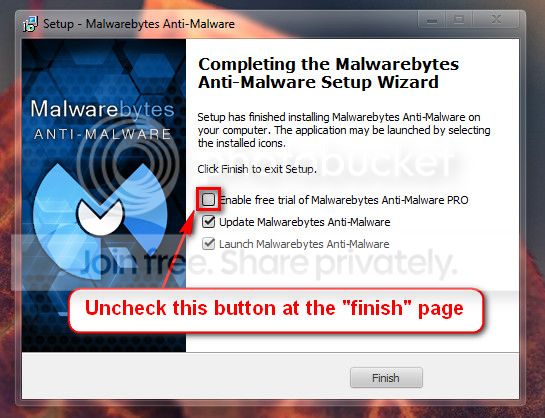
Malwarebytes Anti-Malware Free
Good and Free system security combination

   Warning
Do not start the free trial of Malware Bytes; remember to deselect that option when prompted.

2013-03-09_224312_zps62dc7c23.jpg


Run a full scan with both (separately) once downloaded, installed and updated.

Take memtest. Run for 8 passes and test each stick in a know good slot for an additional 6 passes.
http://www.sevenforums.com/tutorials/105647-ram-test-memtest86.html

   Note
Pay close attention to part 3 of the tutorial in order to rule out the faulty stick.

   Information
Errors are sometimes found after 8 passes. It can even take 20 passes for one error to show up.

   Tip
Do this test overnight, before going to bed.


Let us know the outcome.
 

My Computer My Computer

At a glance

Windows 10 Home 64BitIntel Core i5 10400 @ 2.90GHz8.00GB Single-Channel Unknown @ 1329MHz (16-2...
Computer type
PC/Desktop
Computer Manufacturer/Model Number
Self assembled
OS
Windows 10 Home 64Bit
CPU
Intel Core i5 10400 @ 2.90GHz
Motherboard
Intel Corporation DG41WV (PROCESSOR)
Memory
8.00GB Single-Channel Unknown @ 1329MHz (16-20-20-38)
Sound Card
Realtek High Definition Audio
Monitor(s) Displays
DELL E170S
Screen Resolution
1280x1024 pixels
Hard Drives
931GB TOSHIBA DT01ACA100 (SATA)
238GB TEAM TM8PS7256G (SATA SSD)
Case
Nothing Fancy
Cooling
Fans
Keyboard
A4 Tech Co LTD
Mouse
A4 Tech Co Ltd/Logitech
Internet Speed
25 Mbps
Sorry for the late update. I've tried all the recommendations and the problem seems to be with the ram. There were over 400 errors over the 9 passes.

I still have to run the selective ram tests to see which stick is faulty.

However, now the problem is just opening the laptop and finding where the ram is.

Edit: I've also attached an updated rar file of the SF Diagnostic file if it would help with any further problems.
 
Last edited:

My Computer My Computer

At a glance

Windows 7 Home Premium 64bitIntel (R) Pentium (R) CPU B960 @ 2.20GHz4.00GB (3.85 GB Usable)Intel (R) HD Graphics Family
Computer type
Laptop
Computer Manufacturer/Model Number
Acer
OS
Windows 7 Home Premium 64bit
CPU
Intel (R) Pentium (R) CPU B960 @ 2.20GHz
Motherboard
Acer Aspire 5749Z
Memory
4.00GB (3.85 GB Usable)
Graphics Card(s)
Intel (R) HD Graphics Family
Sound Card
Realtek High Definition Audio
Screen Resolution
1366 x 768 x 59 hertz
Antivirus
Avast
Browser
Google Chrome
Bad ram can cause all sorts of problem.

Replace the faulty stick and if you continue to have BSOD's after that we shall troubleshoot further.
 

My Computer My Computer

At a glance

Windows 10 Home 64BitIntel Core i5 10400 @ 2.90GHz8.00GB Single-Channel Unknown @ 1329MHz (16-2...
Computer type
PC/Desktop
Computer Manufacturer/Model Number
Self assembled
OS
Windows 10 Home 64Bit
CPU
Intel Core i5 10400 @ 2.90GHz
Motherboard
Intel Corporation DG41WV (PROCESSOR)
Memory
8.00GB Single-Channel Unknown @ 1329MHz (16-20-20-38)
Sound Card
Realtek High Definition Audio
Monitor(s) Displays
DELL E170S
Screen Resolution
1280x1024 pixels
Hard Drives
931GB TOSHIBA DT01ACA100 (SATA)
238GB TEAM TM8PS7256G (SATA SSD)
Case
Nothing Fancy
Cooling
Fans
Keyboard
A4 Tech Co LTD
Mouse
A4 Tech Co Ltd/Logitech
Internet Speed
25 Mbps
Have you replaced the bad RAM stick?
Any new BSOD's?
 

My Computer My Computer

At a glance

Windows 10 Home 64BitIntel Core i5 10400 @ 2.90GHz8.00GB Single-Channel Unknown @ 1329MHz (16-2...
Computer type
PC/Desktop
Computer Manufacturer/Model Number
Self assembled
OS
Windows 10 Home 64Bit
CPU
Intel Core i5 10400 @ 2.90GHz
Motherboard
Intel Corporation DG41WV (PROCESSOR)
Memory
8.00GB Single-Channel Unknown @ 1329MHz (16-20-20-38)
Sound Card
Realtek High Definition Audio
Monitor(s) Displays
DELL E170S
Screen Resolution
1280x1024 pixels
Hard Drives
931GB TOSHIBA DT01ACA100 (SATA)
238GB TEAM TM8PS7256G (SATA SSD)
Case
Nothing Fancy
Cooling
Fans
Keyboard
A4 Tech Co LTD
Mouse
A4 Tech Co Ltd/Logitech
Internet Speed
25 Mbps
Back
Top