BSOD while playing games or running windows assessment (graphics)

GrizzlyMatt

New member
Local time
8:23 AM
Messages
7
I've updated all of my drivers, my BIOS, updated windows completely. This is a new computer and I've been dealing with this for an entire week since I built it. I can't figure out how to fix it and I'm trying to avoid sinking more money into a system that already cost me a thousand up...

This is my windows has recovered from an unexpected error info. I have also attached my SF diagnostic folder.

Problem signature:
Problem Event Name: BlueScreen
OS Version: 6.1.7601.2.1.0.256.1
Locale ID: 1033

Additional information about the problem:
BCCode: 116
BCP1: FFFFFA800CC2F010
BCP2: FFFFF8800FC070DC
BCP3: FFFFFFFFC000009A
BCP4: 0000000000000004
OS Version: 6_1_7601
Service Pack: 1_0
Product: 256_1
 

My Computer My Computer

Computer type
PC/Desktop
Computer Manufacturer/Model Number
Custom Build
OS
Windows 7 Ultimate 64 bit
CPU
Intel i5 quad core 3.4ghz
Motherboard
Gigabyte lg1150 GA-H87M-D3H
Memory
8gb ram
Graphics Card(s)
Nvidia Gtx 760
Hard Drives
2 TB
Browser
Chrome
Hi GrizzlyMatt.

A stop 0x116 is a display/graphics related BSOD. And your GPU is GTX 760.
For a particular reason, we have to look after the display driver later, and check the hardware first.
Stress test the Graphics Card using Furmark.
Video Card - Stress Test with Furmark

Check if the Power Supply Unit (PSU) supplying adequate power to the computer or not.
eXtreme Power Supply Calculator
Also let us know the wattage of the PSU.

Is the computer hot? Report us the heat of the computer after a couple of hours of your normal usage. Upload a screenshot of the summery tab of Speccy. Alternatively, you can publish a Speccy snapshot too: http://www.sevenforums.com/tutorials/311593-speccy-publish-snapshot-your-system-specs.html .

Let us know the results. Will decide our further courses of action after seeing those.
_______________________________________________________________________________________
Code:
*******************************************************************************
*                                                                             *
*                        Bugcheck Analysis                                    *
*                                                                             *
*******************************************************************************

Use !analyze -v to get detailed debugging information.

BugCheck 116, {fffffa800cc2f010, fffff8800fc070dc, ffffffffc000009a, 4}

*** WARNING: Unable to verify timestamp for nvlddmkm.sys
*** ERROR: Module load completed but symbols could not be loaded for nvlddmkm.sys
Probably caused by : nvlddmkm.sys ( nvlddmkm+9a30dc )

Followup: MachineOwner
---------

3: kd> !analyze -v
*******************************************************************************
*                                                                             *
*                        Bugcheck Analysis                                    *
*                                                                             *
*******************************************************************************

VIDEO_TDR_FAILURE (116)
Attempt to reset the display driver and recover from timeout failed.
Arguments:
Arg1: fffffa800cc2f010, Optional pointer to internal TDR recovery context (TDR_RECOVERY_CONTEXT).
Arg2: fffff8800fc070dc, The pointer into responsible device driver module (e.g. owner tag).
Arg3: ffffffffc000009a, Optional error code (NTSTATUS) of the last failed operation.
Arg4: 0000000000000004, Optional internal context dependent data.

Debugging Details:
------------------


FAULTING_IP: 
nvlddmkm+9a30dc
fffff880`0fc070dc 803d66e9eeff00  cmp     byte ptr [nvlddmkm+0x891a49 (fffff880`0faf5a49)],0

DEFAULT_BUCKET_ID:  GRAPHICS_DRIVER_TDR_FAULT

CUSTOMER_CRASH_COUNT:  1

BUGCHECK_STR:  0x116

PROCESS_NAME:  System

CURRENT_IRQL:  0

ANALYSIS_VERSION: 6.3.9600.16384 (debuggers(dbg).130821-1623) amd64fre

STACK_TEXT:  
fffff880`023d3a48 fffff880`0ff0a140 : 00000000`00000116 fffffa80`0cc2f010 fffff880`0fc070dc ffffffff`c000009a : nt!KeBugCheckEx
fffff880`023d3a50 fffff880`0fedd867 : fffff880`0fc070dc fffffa80`0bee0000 00000000`00000000 ffffffff`c000009a : dxgkrnl!TdrBugcheckOnTimeout+0xec
fffff880`023d3a90 fffff880`0ff09f4f : fffffa80`ffffd84d ffffffff`fffe7960 fffffa80`0cc2f010 00000000`00000000 : dxgkrnl!DXGADAPTER::Reset+0x2a3
fffff880`023d3b40 fffff880`0ffd903d : fffffa80`0c58b160 00000000`00000080 00000000`00000000 fffffa80`0be30410 : dxgkrnl!TdrResetFromTimeout+0x23
fffff880`023d3bc0 fffff800`033702ea : 00000000`02cc57c8 fffffa80`0b9efb50 fffffa80`069b7840 fffffa80`0b9efb50 : dxgmms1!VidSchiWorkerThread+0x101
fffff880`023d3c00 fffff800`030c48e6 : fffff800`0324ee80 fffffa80`0b9efb50 fffff800`0325ccc0 00000000`00000000 : nt!PspSystemThreadStartup+0x5a
fffff880`023d3c40 00000000`00000000 : 00000000`00000000 00000000`00000000 00000000`00000000 00000000`00000000 : nt!KxStartSystemThread+0x16


STACK_COMMAND:  .bugcheck ; kb

FOLLOWUP_IP: 
nvlddmkm+9a30dc
fffff880`0fc070dc 803d66e9eeff00  cmp     byte ptr [nvlddmkm+0x891a49 (fffff880`0faf5a49)],0

SYMBOL_NAME:  nvlddmkm+9a30dc

FOLLOWUP_NAME:  MachineOwner

MODULE_NAME: nvlddmkm

IMAGE_NAME:  nvlddmkm.sys

DEBUG_FLR_IMAGE_TIMESTAMP:  52b326bc

FAILURE_BUCKET_ID:  X64_0x116_IMAGE_nvlddmkm.sys

BUCKET_ID:  X64_0x116_IMAGE_nvlddmkm.sys

ANALYSIS_SOURCE:  KM

FAILURE_ID_HASH_STRING:  km:x64_0x116_image_nvlddmkm.sys

FAILURE_ID_HASH:  {1f9e0448-3238-5868-3678-c8e526bb1edc}

Followup: MachineOwner
---------

3: kd> lmvm nvlddmkm
start             end                 module name
fffff880`0f264000 fffff880`0fead000   nvlddmkm T (no symbols)           
    Loaded symbol image file: nvlddmkm.sys
    Image path: \SystemRoot\system32\DRIVERS\nvlddmkm.sys
    Image name: nvlddmkm.sys
    Timestamp:        Thu Dec 19 22:32:52 2013 (52B326BC)
    CheckSum:         00C19112
    ImageSize:        00C49000
    Translations:     0000.04b0 0000.04e4 0409.04b0 0409.04e4

 

My Computer My Computer

Computer type
PC/Desktop
Computer Manufacturer/Model Number
Self Assembled
OS
Microsoft Windows 10 Pro Insider Preview 64-bit
CPU
Intel(R) Core(TM) i3-4130 CPU @ 3.40GHz
Motherboard
Gigabyte Technology Co., Ltd. B85M-D3H
Memory
Corsair Vengence 4GB x2 (8.00GB Dual-Channel DDR3 @ 798MHz)
Graphics Card(s)
2047MB GeForce GTS 450 (ZOTAC International)
Sound Card
Onboard (Realtek High Definition Audio)
Monitor(s) Displays
LG Flatron E2040T
Screen Resolution
1600x900
Hard Drives
Western Digital 1 TB
Seagate 500 GB
PSU
Corsair VS550
Case
Cooler Master K380
Cooling
Cooler Master Seidon 120V Plus
Keyboard
Logitech MK260r
Mouse
Logitech MK260r
Internet Speed
PMPL Broadband
Antivirus
Windows Defender + MBAM
Browser
Firefox
Other Info
Dell Studio 15" Laptop
Hey Arc, thanks for the reply.

Minimum PSU Wattage: 302 W
Recommended
PSU Wattage: * Power Supply Wattage ResultsPower Supply Wattage ResultsPower Supply Wattage ResultsPower Supply Wattage Results

Is what I got from the power supply site. The recommended was 352w but I'm using a Corsair 600w power supply so I don't think that's the issue.

Also, unfortunately, I don't really have normal usage of my computer right now, all I do on a computer is play games and whenever I try I get a BSOD. This is my speccy tab after leaving the computer running for around 18 hours without a problem.

http://speccy.piriform.com/results/GejqG23vUiPllAyyUDVcS4L

I'm going to run the video card stress test now, wanted to get this post out first because im 90% sure it's going to blue screen me.
 

My Computer My Computer

Computer type
PC/Desktop
Computer Manufacturer/Model Number
Custom Build
OS
Windows 7 Ultimate 64 bit
CPU
Intel i5 quad core 3.4ghz
Motherboard
Gigabyte lg1150 GA-H87M-D3H
Memory
8gb ram
Graphics Card(s)
Nvidia Gtx 760
Hard Drives
2 TB
Browser
Chrome
Furmark crashed my gpu within literally 5 seconds with a gpu temp of 102 Celcius
 

My Computer My Computer

Computer type
PC/Desktop
Computer Manufacturer/Model Number
Custom Build
OS
Windows 7 Ultimate 64 bit
CPU
Intel i5 quad core 3.4ghz
Motherboard
Gigabyte lg1150 GA-H87M-D3H
Memory
8gb ram
Graphics Card(s)
Nvidia Gtx 760
Hard Drives
2 TB
Browser
Chrome
Thats not good.

Is the card overclocked at all? If so, set it back to default settings, and re-run the stress test. I assume the vard is clear of dust and dirt?
 

My Computer My Computer

Computer type
PC/Desktop
Computer Manufacturer/Model Number
Golden Mk. I.4
OS
Windows 10 Pro x64 ; Xubuntu x64
CPU
Intel i7 860 @ 2.80 GHz O/C'ed to 4.0GHz
Motherboard
Gigabyte P55A-UD3R Rev.1. Award BIOS F13
Memory
16GB Corsair Vengance DDR3 @ 661 MHz Dual Channel (9-9-9-24)
Graphics Card(s)
EVGA NVidia GTX 560 1024MB
Sound Card
Realtek Integrated
Monitor(s) Displays
Dual Samsung SyncMaster 2494HS
Screen Resolution
1920*1080 and 1920*1080
Hard Drives
1*Samsung 840 EVO 120GB SSD;
1*OCZ Vertex 2 60GB SSD;
2*Samsung F3 SpinPoint 1TB in RAID0;
1*Samsung F1 SpinPoint 1TB;
2*Western Digital 1TB External USB 3.0
1*Western Digital 500GB External USB 3.0
1*Seagate 500GB External USB 2.0
PSU
Thermaltake ToughPower QFan 750W
Case
Thermaltake Element S VK60001W2Z
Cooling
Corsair H60 Water Cooling, 2*230mm and 2*80mm case fans
Keyboard
Logitech G110
Mouse
Logitech MX518
Thats not good.

Is the card overclocked at all? If so, set it back to default settings, and re-run the stress test. I assume the vard is clear of dust and dirt?

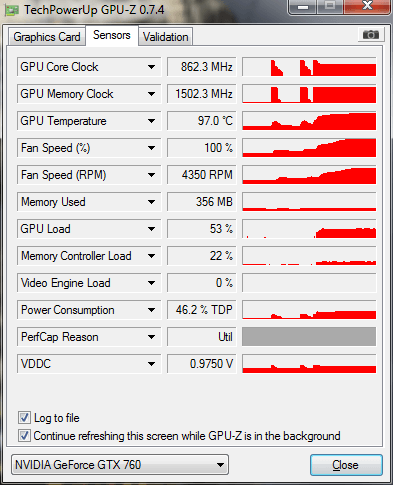
This computer is literally fresh out of the box 8 days ago, it has had that problem since I opened it. This is a screenshot of me sitting in the lobby of a video game, not even playing. It will crash if I play and the temps get any higher. Maybe you guys can make sense of this.
f4m.png


EDIT: 2 minutes later I rechecked and it was at 101C and not crashing. Jesus. It crashes at 102 though.
 

My Computer My Computer

Computer type
PC/Desktop
Computer Manufacturer/Model Number
Custom Build
OS
Windows 7 Ultimate 64 bit
CPU
Intel i5 quad core 3.4ghz
Motherboard
Gigabyte lg1150 GA-H87M-D3H
Memory
8gb ram
Graphics Card(s)
Nvidia Gtx 760
Hard Drives
2 TB
Browser
Chrome
Thats way to high. Check the video card whilst the side panel is removed - is the fan on the card still spinning?
 

My Computer My Computer

Computer type
PC/Desktop
Computer Manufacturer/Model Number
Golden Mk. I.4
OS
Windows 10 Pro x64 ; Xubuntu x64
CPU
Intel i7 860 @ 2.80 GHz O/C'ed to 4.0GHz
Motherboard
Gigabyte P55A-UD3R Rev.1. Award BIOS F13
Memory
16GB Corsair Vengance DDR3 @ 661 MHz Dual Channel (9-9-9-24)
Graphics Card(s)
EVGA NVidia GTX 560 1024MB
Sound Card
Realtek Integrated
Monitor(s) Displays
Dual Samsung SyncMaster 2494HS
Screen Resolution
1920*1080 and 1920*1080
Hard Drives
1*Samsung 840 EVO 120GB SSD;
1*OCZ Vertex 2 60GB SSD;
2*Samsung F3 SpinPoint 1TB in RAID0;
1*Samsung F1 SpinPoint 1TB;
2*Western Digital 1TB External USB 3.0
1*Western Digital 500GB External USB 3.0
1*Seagate 500GB External USB 2.0
PSU
Thermaltake ToughPower QFan 750W
Case
Thermaltake Element S VK60001W2Z
Cooling
Corsair H60 Water Cooling, 2*230mm and 2*80mm case fans
Keyboard
Logitech G110
Mouse
Logitech MX518
Thats way to high. Check the video card whilst the side panel is removed - is the fan on the card still spinning?

I think so but its hard to tell, the gpu is angled down and the computer is heavy and the case is on the ground, really hard to get the angle to see, but all the fans at 100% makes an impressively loud noise. Is it possible that improper seating of the video card could do this? I tried the same test with the case open and no difference in temps.

I'm grasping at straws here, thinking bout paying someone 50 bucks to replug and reseat all of my internal hardware.
 

My Computer My Computer

Computer type
PC/Desktop
Computer Manufacturer/Model Number
Custom Build
OS
Windows 7 Ultimate 64 bit
CPU
Intel i5 quad core 3.4ghz
Motherboard
Gigabyte lg1150 GA-H87M-D3H
Memory
8gb ram
Graphics Card(s)
Nvidia Gtx 760
Hard Drives
2 TB
Browser
Chrome
If it wasn't seated it wouldnt even show, so I don't think its that.

The only thing I can think of is that the fan on the card isn't operating properly - try and see if you can see that. Use a small hand held mirror to see underneath the card.
 

My Computer My Computer

Computer type
PC/Desktop
Computer Manufacturer/Model Number
Golden Mk. I.4
OS
Windows 10 Pro x64 ; Xubuntu x64
CPU
Intel i7 860 @ 2.80 GHz O/C'ed to 4.0GHz
Motherboard
Gigabyte P55A-UD3R Rev.1. Award BIOS F13
Memory
16GB Corsair Vengance DDR3 @ 661 MHz Dual Channel (9-9-9-24)
Graphics Card(s)
EVGA NVidia GTX 560 1024MB
Sound Card
Realtek Integrated
Monitor(s) Displays
Dual Samsung SyncMaster 2494HS
Screen Resolution
1920*1080 and 1920*1080
Hard Drives
1*Samsung 840 EVO 120GB SSD;
1*OCZ Vertex 2 60GB SSD;
2*Samsung F3 SpinPoint 1TB in RAID0;
1*Samsung F1 SpinPoint 1TB;
2*Western Digital 1TB External USB 3.0
1*Western Digital 500GB External USB 3.0
1*Seagate 500GB External USB 2.0
PSU
Thermaltake ToughPower QFan 750W
Case
Thermaltake Element S VK60001W2Z
Cooling
Corsair H60 Water Cooling, 2*230mm and 2*80mm case fans
Keyboard
Logitech G110
Mouse
Logitech MX518
Furmark crashed my gpu within literally 5 seconds with a gpu temp of 102 Celcius
Whereas the normal GPU temperature is ......

View attachment 306583

So drastic change within 5 seconds. The overall temps is not indicating any sort of overheating.

I would suggest you to replace the GPU. If it is still within warranty, RMA it. If not, and you get a new one, get one that is below 700 series.
 

My Computer My Computer

Computer type
PC/Desktop
Computer Manufacturer/Model Number
Self Assembled
OS
Microsoft Windows 10 Pro Insider Preview 64-bit
CPU
Intel(R) Core(TM) i3-4130 CPU @ 3.40GHz
Motherboard
Gigabyte Technology Co., Ltd. B85M-D3H
Memory
Corsair Vengence 4GB x2 (8.00GB Dual-Channel DDR3 @ 798MHz)
Graphics Card(s)
2047MB GeForce GTS 450 (ZOTAC International)
Sound Card
Onboard (Realtek High Definition Audio)
Monitor(s) Displays
LG Flatron E2040T
Screen Resolution
1600x900
Hard Drives
Western Digital 1 TB
Seagate 500 GB
PSU
Corsair VS550
Case
Cooler Master K380
Cooling
Cooler Master Seidon 120V Plus
Keyboard
Logitech MK260r
Mouse
Logitech MK260r
Internet Speed
PMPL Broadband
Antivirus
Windows Defender + MBAM
Browser
Firefox
Other Info
Dell Studio 15" Laptop
Furmark crashed my gpu within literally 5 seconds with a gpu temp of 102 Celcius
Whereas the normal GPU temperature is ......

View attachment 306583

So drastic change within 5 seconds. The overall temps is not indicating any sort of overheating.

I would suggest you to replace the GPU. If it is still within warranty, RMA it. If not, and you get a new one, get one that is below 700 series.

It's made by Gigabyte, so I'd have to contact them to try to do a RMA even though I ordered it through Directron?

EDIT: I'll try to check out the gpu fan later today, need to find a small mirror.
 

My Computer My Computer

Computer type
PC/Desktop
Computer Manufacturer/Model Number
Custom Build
OS
Windows 7 Ultimate 64 bit
CPU
Intel i5 quad core 3.4ghz
Motherboard
Gigabyte lg1150 GA-H87M-D3H
Memory
8gb ram
Graphics Card(s)
Nvidia Gtx 760
Hard Drives
2 TB
Browser
Chrome
I'm RMAing the card, thanks for trying to help everyone.
 

My Computer My Computer

Computer type
PC/Desktop
Computer Manufacturer/Model Number
Custom Build
OS
Windows 7 Ultimate 64 bit
CPU
Intel i5 quad core 3.4ghz
Motherboard
Gigabyte lg1150 GA-H87M-D3H
Memory
8gb ram
Graphics Card(s)
Nvidia Gtx 760
Hard Drives
2 TB
Browser
Chrome
Back
Top