bug: windows maximize behind taskbar

cmarrs

New member
Local time
2:29 AM
Messages
8
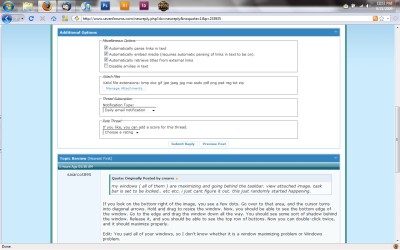
my windows ( all of them ) are maximizing and going behind the taskbar. view attached image. task bar is set to be locked.. etc etc. i just cant figure it out. this just randomly started happening.
 

Attachments

  • desktop_69.gif
    desktop_69.gif
    58.2 KB · Views: 6,370

My Computer

OS
windows 7
i have even tried restarting with no change
 

My Computer

OS
windows 7
i have even tried restarting with no change
That is weird..."Taskbar Always on Top" has been removed from Windows 7 yet yours still does it...
 

My Computer

Computer Manufacturer/Model Number
Compal JFT02 (Custom Build Laptop)
OS
Windows 7 Home Premium x64 - Mac OS X 10.6.4 x64
CPU
Intel Core 2 Duo T9300 2.5 GHz
Motherboard
JFT02
Memory
4GB Kingston DDR2-800
Graphics Card(s)
NVIDIA Geforce 8600M GT (512MB Model)
Sound Card
Realtek HD Audio
Monitor(s) Displays
WUXGA Standard Laptop Display
Screen Resolution
1680*1050
Hard Drives
Toshiba 320GB 5400RPM Laptop HD
PSU
Standard Laptop Power Supply
Case
Standard Laptop Case
Cooling
Standard Laptop Cooling
Keyboard
Standard Laptop 105 Key-Keyboard
Mouse
Synaptics Touchpad
Internet Speed
Verizion Online DSL 3360/864 kbs (dl/up)
my windows ( all of them ) are maximizing and going behind the taskbar. view attached image. task bar is set to be locked.. etc etc. i just cant figure it out. this just randomly started happening.

If you look on the bottom-right of the image, you see a few dots. Go over to that area, and the cursor turns into diagonal arrows. Hold and drag to resize the window. Now, you should be able to see the bottom edge of the window. Go to the edge and drag the window down all the way. You should see some sort of shadow behind the window. Release it, and you should be able to see the top row of buttons. Now you can double-click twice, and it should maximize properly.

Edit: You said all of your windows, so I don't know whether it is a window maximizing problem or Windows problem.
 

My Computer

Computer Manufacturer/Model Number
Toshiba Satellite M205-S4806
OS
Windows 7 Home Premium x64
CPU
Intel(R) Core(TM)2 Duo CPU T5450 @ 1.66GHz
Memory
4 GB Texas Instruments PCIxx12 Integrated FlashMedia Control
Graphics Card(s)
Mobile Intel(R) 965 Express Chipset Family
Sound Card
Realtek HD Audio
Monitor(s) Displays
Laptop Monitor
Screen Resolution
1280x800
Hard Drives
200 GB Hitachi HTS542520K9SA00 ATA Device
Keyboard
Laptop Keyboard
Mouse
Synaptics Touchpad
Internet Speed
Broadband, up to 1.2 MB/s
ALL of my windows are doing this. and i meant to say "Lock the taskbar" is checked.

Yes this even happens with mozilla thunderbird... photoshop.. all of my programs.

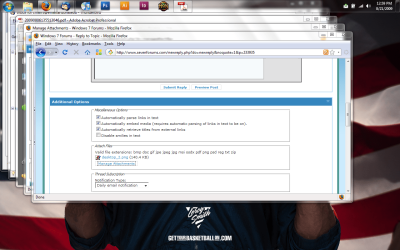
i'm not quite sure on your directions or what you're having me do. but here is a another screenshot (without the dots)... i imagine that last one i took the screen was not "maximized"... but just taking up full resolution.

these windows go behind the taskbar even when i tell windows to "cascade windows"

this is really bugging me! anyone have any ideas?
 

Attachments

  • desktop_2.png
    desktop_2.png
    44.5 KB · Views: 1,518
  • desktop_cascade.png
    desktop_cascade.png
    167.1 KB · Views: 1,228

My Computer

OS
windows 7
That is exactly what it would look like if your taskbar was set to autohide. I will assume that your taskbar is NOT set to autohide, so let's try this.

Move your taskbar to the bottom of the screen. Set taskbar to autohide. Boot.

Set taskbar to NOT autohide. Boot.

Move your taskbar back to the top.
 
yes this has been a bug for some time now....:(
the only thing you can do is resize the taskbar and that should reset the window to stay above the taskbar....

you are going to have to do this everytime this happens (this made me stop putting the taskbar there....)
 

My Computer

Computer Manufacturer/Model Number
Tx2500z Tablet Pc/Homemade Server
OS
Windows 7 Ult x64(x2), HomePrem x32(x4), Server 08 (+VM), 08 R2 (VM) , SuSe 11.2 (VM), XP 32 (VM)
CPU
Turion X2 ultra (oh well came with laptop)/P4 @3.2 (yes P4)
Motherboard
IDK HP Motherboard / Intel DG965SS
Memory
OCZ Dual Channel 4GB kit/ 1gb Dual Channel
Graphics Card(s)
HD 3200 graphics /GMA x3100 (yay for intergrated!!)
Sound Card
Realtek HD Audio(mic working, well sort of)/Siig IC-70012
Monitor(s) Displays
built-in Hp 12" laptop screen/ Acer 19"
Screen Resolution
1280x800 /1440x900
Cooling
All Air Cooled
Mouse
Logi MX Rev. /MS Wheel Optical 1.1A /Logitech Optical Mouse
Internet Speed
College baby but its still routed through vpn to 1536k...
Other Info
love my wacom pen and pressure sensitivity...
wished it worked in 7, SUSE for that matter though
..Move your taskbar to the bottom of the screen. Set taskbar to autohide. Boot. Set taskbar to NOT autohide. Boot. Move your taskbar back to the top.
Or, you could follow DarkAssain's TRIM'd advice. ;-)
 
thanks antman. fixed for now. ill repost if theres any more problems
 

My Computer

OS
windows 7
Or, you could follow DarkAssain's TRIM'd advice. ;-)

your advise is much better....;)
will be marked as solved if it does not happen again
 

My Computer

Computer Manufacturer/Model Number
Tx2500z Tablet Pc/Homemade Server
OS
Windows 7 Ult x64(x2), HomePrem x32(x4), Server 08 (+VM), 08 R2 (VM) , SuSe 11.2 (VM), XP 32 (VM)
CPU
Turion X2 ultra (oh well came with laptop)/P4 @3.2 (yes P4)
Motherboard
IDK HP Motherboard / Intel DG965SS
Memory
OCZ Dual Channel 4GB kit/ 1gb Dual Channel
Graphics Card(s)
HD 3200 graphics /GMA x3100 (yay for intergrated!!)
Sound Card
Realtek HD Audio(mic working, well sort of)/Siig IC-70012
Monitor(s) Displays
built-in Hp 12" laptop screen/ Acer 19"
Screen Resolution
1280x800 /1440x900
Cooling
All Air Cooled
Mouse
Logi MX Rev. /MS Wheel Optical 1.1A /Logitech Optical Mouse
Internet Speed
College baby but its still routed through vpn to 1536k...
Other Info
love my wacom pen and pressure sensitivity...
wished it worked in 7, SUSE for that matter though
yesterday noticed that mine was doing the same except my taskbar is at the bottom. so did a quick search on here and found this thread. Odd thing is that today on boot i checked it again just before posting and it was fixed !! v odd hope it dont happen again.
 

My Computer

Computer Manufacturer/Model Number
Me
OS
Windows 7 Ultimate Media Center Edition
CPU
AMD x64 duel core 5200+ 2.69GHz
Motherboard
Nvidia ALiveNF7G-FullHD.
Memory
3G DDR2-SDRAM PC2-6400 (399 MHz) - [DDR2-800]
Graphics Card(s)
NVIDIA GeForce 9500 GT & onboard NVIDIA GeForce 7
Sound Card
On Board MCP67 High Definition Audio
Monitor(s) Displays
DELL E771p & COMPAQ MV540
Screen Resolution
1280 x 1024 @ 60 Hz
Hard Drives
MAXTOR STM3500320AS ATA Device 500GB
Maxtor 6Y080L0 ATA Device 80GB
PSU
500w
Internet Speed
8Mb/s 500Kb/s
yesterday noticed that mine was doing the same except my taskbar is at the bottom. so did a quick search on here and found this thread. Odd thing is that today on boot i checked it again just before posting and it was fixed !! v odd hope it dont happen again.

You scared the bug right out of it!!!
 

My Computer

Computer type
PC/Desktop
Computer Manufacturer/Model Number
LENOVO K450 @3.0GHZ
OS
64-bit Windows 8.1 Pro
CPU
Core(TM) i5 CPU 4330 Haswell @ 3.20GHz
Motherboard
LENOVO
Memory
12.00 GB
Graphics Card(s)
Intel(R) HD Graphics
Sound Card
Intel HD integtrated
Monitor(s) Displays
HP 25' ISP Monitor
Screen Resolution
1900/1020
Hard Drives
(1) ST1000DM003-1CH162 (2) Generic STORAGE DEVICE USB Device (3) Generic STORAGE DEVICE USB Device
Internet Speed
100mb down/10mb up
I had a similar problem that showed up a few days ago. Strangely enough, none of the solutions worked from this thread-- and some other common solutions (starting/stopping the WDM with net stop uxsms) failed as well.

I went to change the theme, and then the problem disappeared. Changing back brought the problem back. So, having the taskbar always on top somehow became a setting in that specific theme.

Lesson: If none of the other solutions work, try changing the theme.

It seems that 'taskbar always on top', though no longer an option, can still manifest itself in the desktop settings. I'm going to try to track it down in the registry.
 

My Computer

OS
Windows 7 Ultimate
CPU
Phenom II 720 BE
Motherboard
Gigabyte MA-790X UD4P
Memory
8G OCZ Reaper 1066
Graphics Card(s)
Nvidia GTX 260
Just to add, I've had this problem to.

Was rather irritating to have it behind the taskbar as if it was suppose to be that way!
 

My Computer

Computer Manufacturer/Model Number
Custom | Whitebox
OS
Windows 7 Ultimate, OS X 10.7, Ubuntu 11.04
CPU
Intel E6750 @ 3.80GHz
Motherboard
Gigabyte GA-EP45-UD3L (Revision 1.1)
Memory
2x2GB & 2x1GB (6GB) OCZ Reaper 1066MHz @ 1080MHz
Graphics Card(s)
EVGA nVidia GTX 260 896mb (216 Core) FTW Edition
Sound Card
Realtek ALC888
Monitor(s) Displays
21" VIZIO TV
Screen Resolution
1680x1050 @ 60Hz
Hard Drives
Western Digital WD6401AALS - 640GB
Hitachi HDP725016GLA380 - 160GB
PSU
Corsair 750W
Case
NZXT Nemesis Elite
Cooling
Thermaltake SpinQ
Keyboard
Logitech Wireless S520
Mouse
Logitech Wireless S520 - Microsoft Wireless Arc Mouse
Internet Speed
Download: 20mbps, Upload: 3mbps
The OP reports that this works:

Move your taskbar to the bottom of the screen. Set taskbar to autohide. Boot.

Set taskbar to NOT autohide. Boot.

Move your taskbar back to the top.
 
The OP reports that this works:

Move your taskbar to the bottom of the screen. Set taskbar to autohide. Boot.

Set taskbar to NOT autohide. Boot.

Move your taskbar back to the top.

Well the issue hasn't effected me since I reinstalled but if it does I'll try that.

=P
 

My Computer

Computer Manufacturer/Model Number
Custom | Whitebox
OS
Windows 7 Ultimate, OS X 10.7, Ubuntu 11.04
CPU
Intel E6750 @ 3.80GHz
Motherboard
Gigabyte GA-EP45-UD3L (Revision 1.1)
Memory
2x2GB & 2x1GB (6GB) OCZ Reaper 1066MHz @ 1080MHz
Graphics Card(s)
EVGA nVidia GTX 260 896mb (216 Core) FTW Edition
Sound Card
Realtek ALC888
Monitor(s) Displays
21" VIZIO TV
Screen Resolution
1680x1050 @ 60Hz
Hard Drives
Western Digital WD6401AALS - 640GB
Hitachi HDP725016GLA380 - 160GB
PSU
Corsair 750W
Case
NZXT Nemesis Elite
Cooling
Thermaltake SpinQ
Keyboard
Logitech Wireless S520
Mouse
Logitech Wireless S520 - Microsoft Wireless Arc Mouse
Internet Speed
Download: 20mbps, Upload: 3mbps
The OP reports that this works:

Move your taskbar to the bottom of the screen. Set taskbar to autohide. Boot.

Set taskbar to NOT autohide. Boot.

Move your taskbar back to the top.

This method didn't work for me-- my problem started without moving the taskbar from the bottom (maybe a different problem altogether). Like I said, it became embedded in the theme.
 

My Computer

OS
Windows 7 Ultimate
CPU
Phenom II 720 BE
Motherboard
Gigabyte MA-790X UD4P
Memory
8G OCZ Reaper 1066
Graphics Card(s)
Nvidia GTX 260
If you can get registry mechanic, try doing a scan even though its for vista, but iit helped correct many of my bugs, on win 7.
 

My Computer

Computer Manufacturer/Model Number
Acer Aspire 8730-6951
OS
Windows 7 Build 7600 64bit/Ubuntu/Leopard
Memory
4 GB
Graphics Card(s)
NVidia Geforce 9600m GT
I don't know about you guys but...

... I only get this on my primary display when I'm using an external display to extend my desktop. I use the taskbar on the right to make the most of my laptop's wide display. I get this on both my netbook and my corporate's laptop. Also, sometimes it will work just fine as it's supposed to! Yesterday night I had the problem when 1st connecting an external display to my netbook (same problem has been happening on my corporate laptop while at work); I went to bed and when I woke up today I decided to do a search and found this thread, so I registered and posted. Then I connected the display again and it's working just fine. So it appears to be random but definitely related to using the taskbar on a different place than the default bottom side...
 
Last edited:

My Computer

Computer Manufacturer/Model Number
Acer AO751H
OS
Windows 7
CPU
Z520
Motherboard
Acer
Memory
2 GB
Graphics Card(s)
Intel GMA 500
Sound Card
Realtek
Monitor(s) Displays
Built-in 11.6" 1366x768, External 12.1" 1024x768
Hard Drives
160 GB
The autohide isn't a solution to why the windows go behind the taskbar upon maximization. I tried changing he theme and this wouldnt work.

This is just one of the random updates I think windows does automatically. Sorta like the clear taskbar and how windows are viewed in the highlight over the taskbar. Its just a random update and nothing you can do about it. The autohide is merely a scapegoat around the problem. But I guess you can say it rids you of the problem, since your task bar comes up only when you nee it instead of being stationary.
 

My Computer

OS
Windows 7
Back
Top