Solved Buggy used Evga Board BSOD's like crazy

JRockZ

New member
Member
VIP
Local time
9:57 AM
Messages
176
Ok so maybe someone here can help me,,, I purchased an older used Evga 680i SLI Motherboard and Core duo cpu for more than its worth,,, Installed a known working set of OCZ Drr2 Pc2 6400 and a Nvidia Geforce 8800 GTS 512mb card,,, I had one of these board before so I know its a tuff board to configure,,, I must have something set wrong somewhere or the board is just screwed!

I could not get win7 to complete an install it kept crashing on me so I moved it into another PC and then sysprepped the drive but then,,,
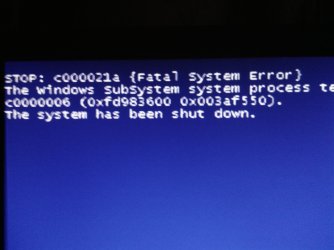
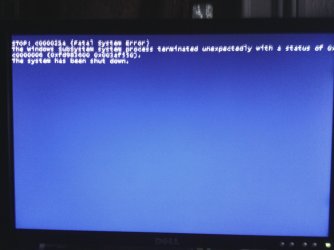
Everytime I run a windows update and it asks me to reboot it crashes on me to a blue screen that goes to fast for me to read,, Then on boot up it wont detect my OCZ Agility SSD drive unless I hit the reset button twice then it finally lets me get back into windows. I gave up yesterday because I spent 6+hrs messing with I Sys-prepped my SSD drive again dragged it over to another PC ran all updates and got windows exactly how I wanted it and then transferred it back to the EVGA board and all was good for about 30 mins then everything froze and all my icons went away and the shutting down screen came up for a quick splash then bam!! BSOD again! then it took another hour to get back to my desktop again because it kept either not finding the ide drives (even though its ssd I have it running in IDE mode since its a single drive) or it would get to the loading screen and freeze,,, so finally I got back to the desktop,, then I said ok what do I need to do next to make this thing useable,, I couldn't think of anything except I hadn't installed an anti virus on it yet,,, before i moved the mouse to click IE BSOD Hard!

So I took all the heat tubes and heat sinks off the board and scraped and cleaned and re-themal pasted everything on the board!! figuring maybe its an issue with heat,,,, great idea!! worked for about 3hrs got my A/V downloaded and a couple new updates that came through and reboots worked and all was well! Shut it down and went to bed, next day every start up gave me about 5 mins of use till bsod bsod bsod!! or that funky disappearing of the desktop and the shut down screen showing up then bsod!!

I gave up again, left it sit a day and then powered it up today and working great for the last 2hrs then bamn bsod,, did a reboot that went well got me right back on and now its been working again for 20-30mins no problem!!
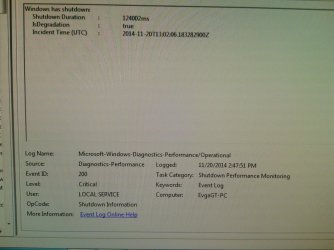
if I open the event logs its only showing me 2 critical errors one for boot up yesterday and one for shut down yesterday (attaching image for shutdown error).

So any thoughts or ideas what the problem might be? sorry so long but I wanted to be through, what if any more info would one need to help determine the problem??
 

Attachments
  • IMG_20141121_202605_085.jpg
    IMG_20141121_202605_085.jpg
    598.6 KB · Views: 0

My Computer My Computer

At a glance

Win 7 64 UltimateAMD 8350 Bulldozer 4ghz6gbATI Radeon HD 5770 X 2
Computer type
PC/Desktop
Computer Manufacturer/Model Number
JRockZ
OS
Win 7 64 Ultimate
CPU
AMD 8350 Bulldozer 4ghz
Motherboard
Asus M5a97 R2
Memory
6gb
Graphics Card(s)
ATI Radeon HD 5770 X 2
Sound Card
Board
Monitor(s) Displays
Dual Gateway 19" and 32" TV 3 displays at once :D
Screen Resolution
1440X900
Hard Drives
OCZ Agility SSD Patriot Blaze 120
PSU
750 Watt Thermaltake Tough Power
Case
Diablotek EVO Mid Tower Case CPA-6170 - 8X 120mm case fans
Cooling
Corsair Liquid Cooled
Antivirus
NAV
Browser
Always IE
Additional information is required.

1. Download the DM Log Collector application to your desktop by clicking the link below

DM Log Collector.exe

2. Run it by double-clicking the icon on your desktop, and follow the prompts.
3. Locate the .ZIP file that is created on your desktop, and upload it here in your next reply.

picture.php
 

My Computer My Computer

At a glance

Windows 10 Pro x64 ; Xubuntu x64Intel i7 860 @ 2.80 GHz O/C'ed to 4.0GHz16GB Corsair Vengance DDR3 @ 661 MHz Dual Cha...EVGA NVidia GTX 560 1024MB
Computer type
PC/Desktop
Computer Manufacturer/Model Number
Golden Mk. I.4
OS
Windows 10 Pro x64 ; Xubuntu x64
CPU
Intel i7 860 @ 2.80 GHz O/C'ed to 4.0GHz
Motherboard
Gigabyte P55A-UD3R Rev.1. Award BIOS F13
Memory
16GB Corsair Vengance DDR3 @ 661 MHz Dual Channel (9-9-9-24)
Graphics Card(s)
EVGA NVidia GTX 560 1024MB
Sound Card
Realtek Integrated
Monitor(s) Displays
Dual Samsung SyncMaster 2494HS
Screen Resolution
1920*1080 and 1920*1080
Hard Drives
1*Samsung 840 EVO 120GB SSD;
1*OCZ Vertex 2 60GB SSD;
2*Samsung F3 SpinPoint 1TB in RAID0;
1*Samsung F1 SpinPoint 1TB;
2*Western Digital 1TB External USB 3.0
1*Western Digital 500GB External USB 3.0
1*Seagate 500GB External USB 2.0
PSU
Thermaltake ToughPower QFan 750W
Case
Thermaltake Element S VK60001W2Z
Cooling
Corsair H60 Water Cooling, 2*230mm and 2*80mm case fans
Keyboard
Logitech G110
Mouse
Logitech MX518
Additional information is required.

1. Download the DM Log Collector application to your desktop by clicking the link below

DM Log Collector.exe

2. Run it by double-clicking the icon on your desktop, and follow the prompts.
3. Locate the .ZIP file that is created on your desktop, and upload it here in your next reply.

picture.php
Thank you Sir here you go!!
 

Attachments

My Computer My Computer

At a glance

Win 7 64 UltimateAMD 8350 Bulldozer 4ghz6gbATI Radeon HD 5770 X 2
Computer type
PC/Desktop
Computer Manufacturer/Model Number
JRockZ
OS
Win 7 64 Ultimate
CPU
AMD 8350 Bulldozer 4ghz
Motherboard
Asus M5a97 R2
Memory
6gb
Graphics Card(s)
ATI Radeon HD 5770 X 2
Sound Card
Board
Monitor(s) Displays
Dual Gateway 19" and 32" TV 3 displays at once :D
Screen Resolution
1440X900
Hard Drives
OCZ Agility SSD Patriot Blaze 120
PSU
750 Watt Thermaltake Tough Power
Case
Diablotek EVO Mid Tower Case CPA-6170 - 8X 120mm case fans
Cooling
Corsair Liquid Cooled
Antivirus
NAV
Browser
Always IE
Unfortunately the .zip file doesn't contain any .dmp files to analyse the BSOD.

Please do the following:
1. Ensure you have a pagefile on C:

2. Follow this:
http://www.sevenforums.com/tutorials/174459-dump-files-configure-windows-create-bsod.html

3. Now follow this:
http://www.sevenforums.com/tutorials/101379-driver-verifier-enable-disable.html

As soon as you get another BSOD, reboot and turn off Driver Verifier.Now check that you have a .dmp file in C:\Windows\Minidump.

If you do, then run the DM Log Collector Tool, and upload a fresh .zip file.
 

My Computer My Computer

At a glance

Windows 10 Pro x64 ; Xubuntu x64Intel i7 860 @ 2.80 GHz O/C'ed to 4.0GHz16GB Corsair Vengance DDR3 @ 661 MHz Dual Cha...EVGA NVidia GTX 560 1024MB
Computer type
PC/Desktop
Computer Manufacturer/Model Number
Golden Mk. I.4
OS
Windows 10 Pro x64 ; Xubuntu x64
CPU
Intel i7 860 @ 2.80 GHz O/C'ed to 4.0GHz
Motherboard
Gigabyte P55A-UD3R Rev.1. Award BIOS F13
Memory
16GB Corsair Vengance DDR3 @ 661 MHz Dual Channel (9-9-9-24)
Graphics Card(s)
EVGA NVidia GTX 560 1024MB
Sound Card
Realtek Integrated
Monitor(s) Displays
Dual Samsung SyncMaster 2494HS
Screen Resolution
1920*1080 and 1920*1080
Hard Drives
1*Samsung 840 EVO 120GB SSD;
1*OCZ Vertex 2 60GB SSD;
2*Samsung F3 SpinPoint 1TB in RAID0;
1*Samsung F1 SpinPoint 1TB;
2*Western Digital 1TB External USB 3.0
1*Western Digital 500GB External USB 3.0
1*Seagate 500GB External USB 2.0
PSU
Thermaltake ToughPower QFan 750W
Case
Thermaltake Element S VK60001W2Z
Cooling
Corsair H60 Water Cooling, 2*230mm and 2*80mm case fans
Keyboard
Logitech G110
Mouse
Logitech MX518
Unfortunately the .zip file doesn't contain any .dmp files to analyse the BSOD.

Please do the following:
1. Ensure you have a pagefile on C:

2. Follow this:
http://www.sevenforums.com/tutorials/174459-dump-files-configure-windows-create-bsod.html

3. Now follow this:
http://www.sevenforums.com/tutorials/101379-driver-verifier-enable-disable.html

As soon as you get another BSOD, reboot and turn off Driver Verifier.Now check that you have a .dmp file in C:\Windows\Minidump.

If you do, then run the DM Log Collector Tool, and upload a fresh .zip file.

Ok all set to go and what do you know so far most of the night this things been working good not sure what I changed but now I have everything re connected except and optical drive! im impressed with making a post and then things fixing themselves automatically! LOL when the nex bsod comes I will re post Thanks a lot!!
 

My Computer My Computer

At a glance

Win 7 64 UltimateAMD 8350 Bulldozer 4ghz6gbATI Radeon HD 5770 X 2
Computer type
PC/Desktop
Computer Manufacturer/Model Number
JRockZ
OS
Win 7 64 Ultimate
CPU
AMD 8350 Bulldozer 4ghz
Motherboard
Asus M5a97 R2
Memory
6gb
Graphics Card(s)
ATI Radeon HD 5770 X 2
Sound Card
Board
Monitor(s) Displays
Dual Gateway 19" and 32" TV 3 displays at once :D
Screen Resolution
1440X900
Hard Drives
OCZ Agility SSD Patriot Blaze 120
PSU
750 Watt Thermaltake Tough Power
Case
Diablotek EVO Mid Tower Case CPA-6170 - 8X 120mm case fans
Cooling
Corsair Liquid Cooled
Antivirus
NAV
Browser
Always IE
Unfortunately the .zip file doesn't contain any .dmp files to analyse the BSOD.

Please do the following:
1. Ensure you have a pagefile on C:

2. Follow this:
http://www.sevenforums.com/tutorials/174459-dump-files-configure-windows-create-bsod.html

3. Now follow this:
http://www.sevenforums.com/tutorials/101379-driver-verifier-enable-disable.html

As soon as you get another BSOD, reboot and turn off Driver Verifier.Now check that you have a .dmp file in C:\Windows\Minidump.

If you do, then run the DM Log Collector Tool, and upload a fresh .zip file.

Ok all set to go and what do you know so far most of the night this things been working good not sure what I changed but now I have everything re connected except and optical drive! im impressed with making a post and then things fixing themselves automatically! LOL when the nex bsod comes I will re post Thanks a lot!!
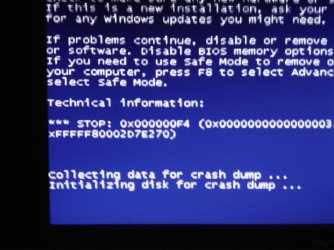
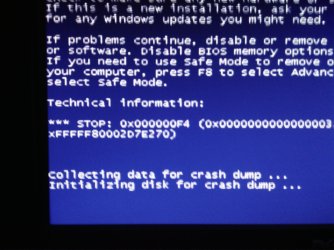
Whata mess! so this thing stayed on all night (6+hrs) and was fine when I got up I did a few things closed some browsing windows and then I did a re-boot and here comes the BSODs again,, 4-5 in a row before ever getting back to windows desktop,,, from what I can see what ever it is doing its not allowing the HDD to initialize (see bsod's below) So heres a few pics I did get if that helps any, I re ram the dm collector too but still no mini dump,,, Im guessing you are going to say the SSD is bad or the Sata ports are bad maybe,,, ive tried all 6 sata ports and still had bsods as well as this ssd drive just came form my pc of 3yrs and it was my main drive and working fine as well as it works fine in the old pc I used to install windows,,, so what do I have to do to get it to writhe the mini dump? Hmmmmm
Let me know if any of that tells you anything!! thanks!!
 

Attachments

  • IMG_20141122_070544_284.jpg
    IMG_20141122_070544_284.jpg
    312.9 KB · Views: 0
  • IMG_20141122_070605_144.jpg
    IMG_20141122_070605_144.jpg
    305.1 KB · Views: 0
  • IMG_20141122_065301_463.jpg
    IMG_20141122_065301_463.jpg
    368 KB · Views: 0

My Computer My Computer

At a glance

Win 7 64 UltimateAMD 8350 Bulldozer 4ghz6gbATI Radeon HD 5770 X 2
Computer type
PC/Desktop
Computer Manufacturer/Model Number
JRockZ
OS
Win 7 64 Ultimate
CPU
AMD 8350 Bulldozer 4ghz
Motherboard
Asus M5a97 R2
Memory
6gb
Graphics Card(s)
ATI Radeon HD 5770 X 2
Sound Card
Board
Monitor(s) Displays
Dual Gateway 19" and 32" TV 3 displays at once :D
Screen Resolution
1440X900
Hard Drives
OCZ Agility SSD Patriot Blaze 120
PSU
750 Watt Thermaltake Tough Power
Case
Diablotek EVO Mid Tower Case CPA-6170 - 8X 120mm case fans
Cooling
Corsair Liquid Cooled
Antivirus
NAV
Browser
Always IE
one more full BSOD

one more full BSOD
 

Attachments

  • IMG_20141122_065301_463.jpg
    IMG_20141122_065301_463.jpg
    368 KB · Views: 0

My Computer My Computer

At a glance

Win 7 64 UltimateAMD 8350 Bulldozer 4ghz6gbATI Radeon HD 5770 X 2
Computer type
PC/Desktop
Computer Manufacturer/Model Number
JRockZ
OS
Win 7 64 Ultimate
CPU
AMD 8350 Bulldozer 4ghz
Motherboard
Asus M5a97 R2
Memory
6gb
Graphics Card(s)
ATI Radeon HD 5770 X 2
Sound Card
Board
Monitor(s) Displays
Dual Gateway 19" and 32" TV 3 displays at once :D
Screen Resolution
1440X900
Hard Drives
OCZ Agility SSD Patriot Blaze 120
PSU
750 Watt Thermaltake Tough Power
Case
Diablotek EVO Mid Tower Case CPA-6170 - 8X 120mm case fans
Cooling
Corsair Liquid Cooled
Antivirus
NAV
Browser
Always IE
new report
 

Attachments

My Computer My Computer

At a glance

Win 7 64 UltimateAMD 8350 Bulldozer 4ghz6gbATI Radeon HD 5770 X 2
Computer type
PC/Desktop
Computer Manufacturer/Model Number
JRockZ
OS
Win 7 64 Ultimate
CPU
AMD 8350 Bulldozer 4ghz
Motherboard
Asus M5a97 R2
Memory
6gb
Graphics Card(s)
ATI Radeon HD 5770 X 2
Sound Card
Board
Monitor(s) Displays
Dual Gateway 19" and 32" TV 3 displays at once :D
Screen Resolution
1440X900
Hard Drives
OCZ Agility SSD Patriot Blaze 120
PSU
750 Watt Thermaltake Tough Power
Case
Diablotek EVO Mid Tower Case CPA-6170 - 8X 120mm case fans
Cooling
Corsair Liquid Cooled
Antivirus
NAV
Browser
Always IE
Disregard! it was a 20 dollar motherboard and cpu with 2gb ram and a GeForce 8800gts,,, it was worth taking a chance on I will just sell the left over parts and or find another 775 board to use for everything else or something already spent to much time on this thing,, yanked the board today and bought a NEW APU M/B Combo for 47 bucks today!11 Much better deal for all new rather than old used! lol
Thanks Gold!!
 

My Computer My Computer

At a glance

Win 7 64 UltimateAMD 8350 Bulldozer 4ghz6gbATI Radeon HD 5770 X 2
Computer type
PC/Desktop
Computer Manufacturer/Model Number
JRockZ
OS
Win 7 64 Ultimate
CPU
AMD 8350 Bulldozer 4ghz
Motherboard
Asus M5a97 R2
Memory
6gb
Graphics Card(s)
ATI Radeon HD 5770 X 2
Sound Card
Board
Monitor(s) Displays
Dual Gateway 19" and 32" TV 3 displays at once :D
Screen Resolution
1440X900
Hard Drives
OCZ Agility SSD Patriot Blaze 120
PSU
750 Watt Thermaltake Tough Power
Case
Diablotek EVO Mid Tower Case CPA-6170 - 8X 120mm case fans
Cooling
Corsair Liquid Cooled
Antivirus
NAV
Browser
Always IE
Back
Top