Building a Custom desktop PC.

In the highest of the high end they did tweak them to get decent price/performance out of them...

they are technically still the same core though, so the only problem I have with those is the same problem I have with some of the newest netburst based CPUs, they are built on (IMO) flawed technology, and at that point I admit my distaste for them is colored by my dislike of them being technically inferior...

I honestly wish they had stayed with and scaled up the old athlon64(K8) series... but I realize that is technically not really cost-effectively possible either.

However: the point still stands because the high end cpus don't seem to be what the original poster was after, which is what everything I have said in this thread has been within the context of.
 

My Computer

Computer Manufacturer/Model Number
Tifa (self built)
OS
Windows 7 Beta (and others, multiboot)
CPU
Intel e1500 (Conroe core2duo 2.2Ghz, 800Mhz FSB, 512KB L2)
Motherboard
Gigabyte GA-EP43-UD3L (P43/ICH10 chipset)
Memory
4x 2GB Kingston PC800 DDR2
Graphics Card(s)
BFG GeForce 7900GS/OCE 256MB PCIE 1.0 x16
Sound Card
Built in Realtek Azalia (192KHz @ 24 bit max)
Monitor(s) Displays
Acer AL2216W 22" 1680x1050 LCD, using DVI connector
Screen Resolution
1680x1050
Hard Drives
Seagate ST3320620AS 7200.10 320GB 16MB SATA2 HD
PSU
Silverstone ST400
Case
Ultra Wizard ATX (modded neg pressure single fan cooling)
Cooling
Scythe S-FLEX SFDB SFF21F 1500RPM 120MM (intel stock HSF)
Keyboard
Old IBM PS/2 104 key
Mouse
Microsoft Lasermouse 6000
Internet Speed
DSL 3Mbit/512kbit
Other Info
Intel PRO1000/GT PCI, 9K jumbo frames
RCA RT2500 Home Theatre Headunit for sound reproduction
Not to get into any processor argument, but I just got some replacement parts for just over 200 bucks from Tiger. It does have a lame onboard graphics.. (3.2 rating) but it will take a pci-x card if you need it.
Uhm.... that's pcie which is much much better then it being pci-x (a server only slot which is now being phased out)...

Yeah that looks like a decent little partial system if you toss in a good video card (and other necessary parts) :)
 

My Computer

Computer Manufacturer/Model Number
Tifa (self built)
OS
Windows 7 Beta (and others, multiboot)
CPU
Intel e1500 (Conroe core2duo 2.2Ghz, 800Mhz FSB, 512KB L2)
Motherboard
Gigabyte GA-EP43-UD3L (P43/ICH10 chipset)
Memory
4x 2GB Kingston PC800 DDR2
Graphics Card(s)
BFG GeForce 7900GS/OCE 256MB PCIE 1.0 x16
Sound Card
Built in Realtek Azalia (192KHz @ 24 bit max)
Monitor(s) Displays
Acer AL2216W 22" 1680x1050 LCD, using DVI connector
Screen Resolution
1680x1050
Hard Drives
Seagate ST3320620AS 7200.10 320GB 16MB SATA2 HD
PSU
Silverstone ST400
Case
Ultra Wizard ATX (modded neg pressure single fan cooling)
Cooling
Scythe S-FLEX SFDB SFF21F 1500RPM 120MM (intel stock HSF)
Keyboard
Old IBM PS/2 104 key
Mouse
Microsoft Lasermouse 6000
Internet Speed
DSL 3Mbit/512kbit
Other Info
Intel PRO1000/GT PCI, 9K jumbo frames
RCA RT2500 Home Theatre Headunit for sound reproduction
Well about the tri core (admitedly, I have not heard a lot). They are just not common and I really don't remember the specifics. Over all, you would be better off with a quad. My recommendation is to get a middle class Intel Quad, (Q8200 anyone?) for about $100, then OC it if you need the power. Mine is sitting at default 2.3 (Too lazy to OC right now) and I rarely get freezes, and barely any lag. I can open about 100 windows and close them all at once with no trouble. :) That may be the RAM though... (only 4 gigs :()

As for the Intel/AMD debate, here is my opinion (and a lot of others): AMD is cheaper and makes some good cores, and can even run a little cooler. They are good for gaming, and are awesome for a budget computer. However, Intel (for its slightly higher expense) is worth it. They last a bit longer, can take more OCing, and perform just a bit better over all.

Not going to argue about this with anyone just so you know. Not that I don't want to listen to other opinions, it is just that I think it is pointless. I respect your opinion, you respect mine. :) Keeps the peace better that way :D

~Lordbob
 

My Computer

Computer Manufacturer/Model Number
Hera
OS
Windows 7 Ultimate x64, Mint 9
CPU
Intel i5-2500k
Motherboard
ASUS P8P67 Pro
Memory
2x 4Gb Corsair VENGEANCE DDR3-1600
Graphics Card(s)
NVidia GeForce N260GTX Twin Frozr
Sound Card
Realtek HD OnBoard Audio
Monitor(s) Displays
ASUS 24" Monitor
Screen Resolution
1920x1080
Hard Drives
G.SKILL Phoenix Series 60GB SATA II MLC Internal Solid State Drive (SSD)
SAMSUNG Spinpoint F3R 1TB 7200 RPM 32MB Cache SATA II
PSU
Cooler Master Real Power Pro 750W
Case
Cooler Master Haf 932
Cooling
Fans
Keyboard
Razer Tarantula
Mouse
Razer Lachesis
Internet Speed
not fast enough
This is a bit of info that I think you should consider.

The best computer systems do not come cheap. With computers, like most things, you can spend an almost unlimited amount of money on more stuff.


However if you plan on keeping your computer for a while, it often pays to spend a little extra and get a really beefy system. It can be a real pain in the neck changing over to a new system when you upgrade, so getting a fast computer to start with means you do not have to worry about doing that for years.

The main drawback of buying the best computer system available is that sometimes you can pay through the nose for the latest and greatest parts. This is why I recommend getting a processor speed one down from the top.
 

My Computer

Computer Manufacturer/Model Number
Home Brew
OS
Windows 7 Ultimate Vista Ultimate x64
CPU
Core 2 Duo E8500 3.16Ghz @ 3.8Ghz
Motherboard
eVGA 750i FTW
Memory
2x2Gigs Patriot PC2-6400 LL
Graphics Card(s)
Inno3D GeForce GTX260 216 SP
Monitor(s) Displays
ASUS VW222U 22" 2ms Response time
Screen Resolution
1680x1050
Hard Drives
SATA 150GB
SATA II 250GB
USB IDE 750GB Ext.
PSU
HYTEC 600W & Thermaltake 650W Toughpower Power Exp
Case
Thermaltake Armor LCS (Liquid Cooling System)
Cooling
Liquid Cooling System
Keyboard
Logitech G15 Gaming Keyboard
Mouse
Logitech G9 Gaming Mouse
If you're going to be building/tweaking a box from the ground up you really cannot do without a second, working internet connected box for drivers, reading up, etc. Not to mention it's nice to have a netbook anyway!

1) Cheapest eeePC out there -- seems to be an endless supply of refurbs due to clueless Bestbuy customers but SSD is too slow and small for 7
mwave.com: ASUS EEEPC900A-WFBB01 Eee PC 900A white netbook intel Atom cpu/1gb/4gb SSD hdd/8.9" wsvga/4 cell battery/802.11bg wireless/Linux (refurbished product w/3 month warranty) $179.99

2) Fix the slow and small SSD problem above -- faster than ANY SATA spindle drive -- this one's 16GB but 32 and 64GB units are available for $87 and $144 respectively -- 7057 boots in just under 15 seconds and shuts down in 5.
Newegg.com - SUPER TALENT FPM16GRSE 16GB Mini PCIe Internal Solid state disk (SSD) - Solid State Disks $47.49

3) 2GB DDR2 800MHz -- always max out any box you build when RAM is this cheap -- also, the 800MHz rated clock allows a stable Atom N270 25% overclock to 2.0GHz when plugged in with eeeCtl or SetFSB (both free)
Newegg.com - Transcend 2GB 200-Pin DDR2 SO-DIMM DDR2 800 (PC2 6400) Laptop Memory - Laptop Memory $16.99

4) Optional but super handy for 7 installs and most everything else -- a big ole SDHC card -- the eee has a built in slot for it and the color even matches (aww how cute!) -- ASUS certified -- mine was way faster than advertised at about 19MB/s read and 13MB/s write
Newegg.com - A-DATA 16GB Secure Digital High-Capacity (SDHC) Flash Card Eee PC Edition Model TURBO SDHC 16G EeePC - Flash Memory $27.75

Now something for your *other* computer if you go with #4 above:

5) Floppies are dead right? Until you need to update a BIOS or a handful of other stuff -- this adds some memory card slots, and an extra front USB port in addition
Newegg.com - Nippon Labs ICR-EE All-in-one USB + FDD1.44" Card Reader w/ 3.5" FLOPPY DRIVE - Card Readers $24.99
-or- Without the floppy, still internal
Newegg.com - Rosewill RCR-102 52-in-1 USB 2.0 3.5" Internal Card Reader w/ USB port - Card Readers $11.99
-or- Cheap out all the way, get all the benefits of a giant USB stick and it's BOOTABLE
Newegg.com - SYBA CL-CRD20007 USB 2.0 Card Reader - Card Readers $5.99

So lay aside about $250 from your desktop budget and get all the benefits of mobility and a second new toy for the price of a video card -- you waste too much time gaming anyway! ;)
 
Last edited:

My Computer

Computer type
Laptop
Computer Manufacturer/Model Number
Apple
OS
El Capitan / Windows 10
CPU
i7-4980HQ
Memory
16GB
Graphics Card(s)
Iris 5200
So you’ve got $1000 to spend, and you want to experience Crysis in all its graphical glory? You want to know you can juice up Fallout 3 to max lushness. You want the comfort of knowing you’re not missing out on gaming candy by needing to turn the details down.

Impossible, right? Never! Here at gameplayer we work miracles then pass the benefits onto our loyal comrades.

Behold, the bang-for-buck gaming beast. Use this guide as a template to build it just as we recommend if your current rig is past the cobweb stage, or zero in on select items to upgrade your system as needed.

Even better, the prices we’re quoting today are ballpark RRPs. Shop around on staticICE :: Australia's comprehensive computer hardware and gadget price comparison search engine to find the cheapest prices on all the bits. Either way, it’s nothing but win for your gaming and more bucks in your pocket.

(and be sure to check our other two ultimate gaming PCs that are in different price brackets, plus our three tiers of ultimate gaming laptops).

CPU – Intel E8500
Price: ~$200
The Intel Core 2 range has been a massive success for gamers, delivering performance, popularity, and price. The E8500 sports a 3.16GHz clock speed with 6MB of L2 cache; perfect for demanding tasks. Its 9.5x multiplier is a blessing if you’re willing to overclock - 4GHz can often be obtained on stock cooling – now that’s impressive! The power of this dual core processor also frees the GPU to perform at its best so you’re minimising any bottlenecks, and at this price, it’s impossible to find a better performance to price ratio.

RAM – DDR2 4GB 800MHz RAM
Price: ~$100
The techies of yesteryear claimed that you should buy as much RAM as the budget would allow. These days, RAM is so cheap that if we were to take that advice we’d be hard pressed to find a capable motherboard to fit it all in. We recommend 4GB of 800MHz DDR2 RAM. 4GB has recently become standard for gaming rigs, and the 800MHz clock speed not only gives great performance, but also features enough grunt to allow decent overclocking of the CPU and FSB. You may have noticed that there’s no specified brand. This is because it doesn’t really matter; even generic is fine, get anything with good warrantee.

Expensive RAM may have tighter timings, but the performance gain is negligible unless you do some serious overclocking. 32-bit OSs won’t address the full 4GB – but should manage between 3 and 3.5GB. So you lose half a gig? So what, we say. 2GB is pissing on a bushfire, 3+ is where it’s at, baby.

Motherboard – Gigabyte GA-EP45-DS3
Price: ~$130
The P45 chipset continues Intel’s legacy of budget performance solutions. This Gigabyte offering provides two 16x PCI-e 2.0 expansion slots allowing you to insert another GPU into Crossfire configuration. Four RAM slots are provided allowing a massive 16GB to be installed if you ever feel the desire to do so. The inbuilt high definition Realtek sound chipset removes the need for an add-on APU (Audio Processing Unit – or ‘sound card’ in old-fashioned talk), unless of course, you have high quality speakers or headphones which demand the best. It’s LGA775 socket supports a wide range of Intel CPUs, including the E8500 above. The greatest element of this motherboard is that it’s cheap, yet still delivers the performance and bandwidth required by a gaming rig. Simply outstanding value.

GPU (Video Card) – ATI 4870
Price: ~$300
Nvidia held the crown for cheap (and expensive) performance until recently when ATI brought down the hammer with their 48xx series of cards. The 4870 in particular is a gaming powerhouse, a masterpiece of graphic processing glory. The 4870 was enough to force Nvidia to bring out refreshes of their current line of offerings and drop prices across the range, yet they still fall short of this DDR5, DirectX 10.1, Shader Model 4.1 driven performance solution. We’ve managed to squeeze this card into the budget, and as you can see, it’s worth a 3rd of the total build. But we’re gamers, we want need it.

PSU – Silverstone Strider ST50F 500W
Price: ~$80
There is common misconception regarding PSUs that higher wattages are better. This is not always so, it’s all to do with efficiency and the 12v rail. A better PSU will have a high efficiency of 80%+ (also known as 80 plus certification) and a large distribution of the current to the 12v rails. The Silverstone Strider ST50F 500W does both, and again, at a nifty little price tag. Rest assured that your new gaming machine will have enough juice to power through intensive gaming sessions. New graphics cards need 6 or 8 pin PCI-E connectors. Most Nvidia cards need 2 x 6-pin connectors, the 4870 needs 1 x 6-pin and 1 x 8-pin. Matching a PSU’s connectors with your current and future graphics card needs is critical – and catches many people out.

Case - Antec NSK4000
Price: ~$65
Antec are known for their quality budget cases. The NSK4000 combines elegance with a functional ATX design, perfect for this gaming system. The case has 8 drive bays, 3 of which are 5.25” for any optical drives, fan controllers, card readers and other gadgets you may be inclined to use. Yet another case (pun!) of cheap quality.

Optical Drive – Pioneer 215BK SATA
Price: ~$30
Pioneer is best known for producing the highest quality optical drives on the market. And their best consumer model DVD burner happens to be dirt cheap. It’s not uncommon for other brands to use re-branded Pioneer drives with nothing more than a price mark-up, useless bundled software, and outdated firmware. For these reasons, there’s no better choice than this display of optical omnipotence.

Storage – Western Digital 640GB
Price: ~$93
This 7200RPM HDD is one of the fastest on the market. Encased inside the black metal exterior are two 320GB platters - a wonderfully huge platter density - meaning extra performance without breaking the bank. If you were a fan of high speed (and high price) 10000RPM Raptor drives, you’d be happy to know that this drive exceeds them in performance. Can’t get much better than that!

Cooling – Stock
Price: Free!
Stock cooling sounds boring, but with a budget so low the coolers you’ll get bundled with the CPU do a decent job, there is really no need. Even overclocking is still feasible, just watch those temps.

Checkout

  • CPU: Intel E8500 - $200
  • RAM: DDR2 4GB 800MHz RAM - $100v
  • Motherboard: Gigabyte GA-EP45-DS3 - $130
  • GPU: ATI 4870 - $300
  • PSU: Silverstone Strider ST50F 500W - $80
  • Case: Antec NSK4000 - $65
  • Optical: Pioneer 215BK SATA - $30
  • HDD: Western Digital 640GB - $93
Total Price: $998

The Verdict
What can you expect from a PC of this calibre? Well it should play any game at high frames per second, with detail at the high end of the scale. Only large resolution monitors will slow this beast down – and we’re talking 1920 x 1200 or higher, and even at that res you can still expect fluid play with rich detail for many months or even years.

It’s quite amazing how far $1,000 can go in computing these days. Even the resource hog that is Crysis will run smoothly, depending on the settings and resolution used. As of now, you can’t get a better system for this price.

Gameplayer - Ultimate PC Gaming Machine < AU$1,000

 

My Computer

Computer Manufacturer/Model Number
Home Brew
OS
Windows 7 Ultimate Vista Ultimate x64
CPU
Core 2 Duo E8500 3.16Ghz @ 3.8Ghz
Motherboard
eVGA 750i FTW
Memory
2x2Gigs Patriot PC2-6400 LL
Graphics Card(s)
Inno3D GeForce GTX260 216 SP
Monitor(s) Displays
ASUS VW222U 22" 2ms Response time
Screen Resolution
1680x1050
Hard Drives
SATA 150GB
SATA II 250GB
USB IDE 750GB Ext.
PSU
HYTEC 600W & Thermaltake 650W Toughpower Power Exp
Case
Thermaltake Armor LCS (Liquid Cooling System)
Cooling
Liquid Cooling System
Keyboard
Logitech G15 Gaming Keyboard
Mouse
Logitech G9 Gaming Mouse
It is quite uncommon for prices for equivalent products to rise in the IT industry, but that’s exactly what has been happening of late. A combination of lower demand and a relatively weak Aussie dollar have conspired to make many items more expensive than they were the last time this list was compiled. Fear not, however! Gameplayer is still here to give you the lower-down on how to make the very most of your hard-earned cash (or someone else’s hard-earned cash, if you can manage it). Here we have a beauty of a box that will see you through the financial crisis, whatever your needs may be.

(Note: Be sure to check out our Intermediate and Extreme Options)

CPU: AMD Phenom X4 9550 ($200)
While Intel seems to have a lock on the upper end of the performance market, AMD is still pushing out some competitively priced lower end parts. Their 9550 gives you 4 cores of goodness to play around with, and gives you a good performance return on your dollar.

RAM: 2x2GB generic DDR800 ($70)
In the budget space, one RAM stick is much the same as another. Kingston, A-DATA, Apacer, Transcend – there’s a whole list of brands for you to choose from. 4 GB will be more than enough for most needs, and using two 2GB sticks will let you double your RAM when the need arises, while still giving that dual-channel speed boost.

Motherboard: Gigabyte MA790GP ($220)
While not exactly the cheapest board around, the 790 chipset does allow for a great deal of flexibility when planning out the future of your build. With relatively decent onboard graphics, this could theoretically see you through while you save up for something a little beefier; when you feel like upgrading, throw in a 4850 or a 4870 into the PCIe 16x slot and use Hybrid Crossfire to bring some pretty solid improvements. After that, drop the 16x slot down to 8x and slot in another 48x0 for a further boost.

GPU: Foxconn 9600GT ($150)
For the budget-conscious gamer, the 9600GT is an excellent performer for the price. You’ll be dialing the detail down a bit on the latest games, but you’ll be able to run anything out there right now. If you need a bit more oomph, a 9800 should just let you squeeze in under $1,000 if you shop around a bit.

HDD: WD 750GB HDD ($110)
At 14c/GB, this hard drive is damn good value. There’s plenty of room in this build to drop in another as the need arises.

Optical:
Pioneer 216 SATA DVD burner ($35)
Pioneer is still king when it comes to burner hardware. This one’s a no-brainer, and one of these little beauties should be an automatic inclusion in any build.

PSU: Silverstone Strider ST50F 500W ($90)
There hasn’t been a whole lot of movement of late when it comes to power supply development, so we’ll leave this right where it is. It gives you plenty of juice for the system we’ve outlined here, as well as leaving enough headroom should you decide to trade a few items up for something better.

Cooling: Thermalright Ultra 120 Extreme + Scythe Slipstream ($95)
Stock cooler not good enough? The Phenom listed above doesn’t run terribly hot so you could get away with leaving this one out altogether, but if you really feel the need to push you budget box as hard as you can then the Thermalright Ultra 120 Extreme + Scythe Slipstream combo from last quarter is still hard to beat for the price even though that price is now likely to be a good $10 more.

Total: $970

Gameplayer - The Best Budget PC Money can Buy
 

My Computer

Computer Manufacturer/Model Number
Home Brew
OS
Windows 7 Ultimate Vista Ultimate x64
CPU
Core 2 Duo E8500 3.16Ghz @ 3.8Ghz
Motherboard
eVGA 750i FTW
Memory
2x2Gigs Patriot PC2-6400 LL
Graphics Card(s)
Inno3D GeForce GTX260 216 SP
Monitor(s) Displays
ASUS VW222U 22" 2ms Response time
Screen Resolution
1680x1050
Hard Drives
SATA 150GB
SATA II 250GB
USB IDE 750GB Ext.
PSU
HYTEC 600W & Thermaltake 650W Toughpower Power Exp
Case
Thermaltake Armor LCS (Liquid Cooling System)
Cooling
Liquid Cooling System
Keyboard
Logitech G15 Gaming Keyboard
Mouse
Logitech G9 Gaming Mouse

My Computer

Computer Manufacturer/Model Number
Hera
OS
Windows 7 Ultimate x64, Mint 9
CPU
Intel i5-2500k
Motherboard
ASUS P8P67 Pro
Memory
2x 4Gb Corsair VENGEANCE DDR3-1600
Graphics Card(s)
NVidia GeForce N260GTX Twin Frozr
Sound Card
Realtek HD OnBoard Audio
Monitor(s) Displays
ASUS 24" Monitor
Screen Resolution
1920x1080
Hard Drives
G.SKILL Phoenix Series 60GB SATA II MLC Internal Solid State Drive (SSD)
SAMSUNG Spinpoint F3R 1TB 7200 RPM 32MB Cache SATA II
PSU
Cooler Master Real Power Pro 750W
Case
Cooler Master Haf 932
Cooling
Fans
Keyboard
Razer Tarantula
Mouse
Razer Lachesis
Internet Speed
not fast enough
Ahhh...at last, some are talking about the PSU as well.

How many times have people wanted to build a bargain PC and totally cheaped out on the PSU only to find their machine sucks, when it probably shouldn't. Cheap PSU's are cheap for a reason, they suck and most likely will never reach their posted specs, send dirty power to your nice new parts, and probably cause them to fail prematurely.

Always get a quality PSU. Do some research on these and remember...unlike other hardware, the PSU touches EVERYTHING in your system!
 

My Computer

Computer Manufacturer/Model Number
Personal Build
OS
Vista Ult 64bit - Windows 7 Ult 7264 64bit
CPU
Intel Core 2 Duo E6750
Motherboard
Asus Commando
Memory
4 G's Crucial Ballistix Tracer
Graphics Card(s)
BFG Nvidia 8800 GTS 340
Sound Card
Creative Sound Blaster X-FI Platinum FATAL1TY
Monitor(s) Displays
2-22" HP W2207 LCD
Screen Resolution
1920 x 1080
Hard Drives
3 x 500G WD Caviar SATA II
PSU
Enermax Noise Taker II 600W
Case
NZXT Lexa Classic (dual doored & windowed)
Cooling
Zalman 9700 CPU cooler - 4 x 120mm, 1 x 90mm fans
Keyboard
Logitech MX 5500
Mouse
Logitech MX Revolution
Internet Speed
Blazing...
Ahhh...at last, some are talking about the PSU as well.

How many times have people wanted to build a bargain PC and totally cheaped out on the PSU only to find their machine sucks, when it probably shouldn't. Cheap PSU's are cheap for a reason, they suck and most likely will never reach their posted specs, send dirty power to your nice new parts, and probably cause them to fail prematurely.

Always get a quality PSU. Do some research on these and remember...unlike other hardware, the PSU touches EVERYTHING in your system!

Oh so right, sir. I'm amused by folks who proclaim their hardware chops but don't own a multimeter or the faculty to use it...
 

My Computer

Computer type
Laptop
Computer Manufacturer/Model Number
Apple
OS
El Capitan / Windows 10
CPU
i7-4980HQ
Memory
16GB
Graphics Card(s)
Iris 5200
Mr Grim,

Those prices on the Gameplayer site are way out of date, unfortunately. :cry:Prices have increased as fast as the value of the Oz dollar has dropped, and are now much dearer than the prices they state.
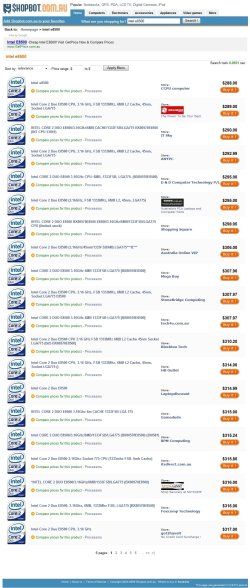
i.e They give the price of the E8500 as $200 . The cheapest i know of is nearly 50% more, at IT Estate who are selling them for $291, Umart have them for $295.

I'm not even thinking about upgrading my machine until the dollar gets back near parity with the U.S dollar.
 

My Computer

Computer Manufacturer/Model Number
Home made.
OS
7068 64 bit + XP Pro
CPU
[email protected]
Motherboard
Gigabyte GA-P35-DS3L
Memory
4x1Gb Geil Ultra 800Mhz
Graphics Card(s)
Gigabyte 9600GT
Sound Card
Onboard
Monitor(s) Displays
ViewSonic 22" 5000:1 2ms
Screen Resolution
1680x1050
Hard Drives
Samsung Sata 300, 320Gb,
Western Digital 200Gb IDE
PSU
Cheapo 430w Thermaltake
Case
Antec Performance2
Cooling
Standard Intel for CPU, various others for case+ Hardcano.
Keyboard
Microsoft , wired
Mouse
Microsoft, wired Optimouse
I'm not even thinking about upgrading my machine until the dollar gets back near parity with the U.S dollar.
The U.S. Dollar sucks right now....

~Lordbob
 

My Computer

Computer Manufacturer/Model Number
Hera
OS
Windows 7 Ultimate x64, Mint 9
CPU
Intel i5-2500k
Motherboard
ASUS P8P67 Pro
Memory
2x 4Gb Corsair VENGEANCE DDR3-1600
Graphics Card(s)
NVidia GeForce N260GTX Twin Frozr
Sound Card
Realtek HD OnBoard Audio
Monitor(s) Displays
ASUS 24" Monitor
Screen Resolution
1920x1080
Hard Drives
G.SKILL Phoenix Series 60GB SATA II MLC Internal Solid State Drive (SSD)
SAMSUNG Spinpoint F3R 1TB 7200 RPM 32MB Cache SATA II
PSU
Cooler Master Real Power Pro 750W
Case
Cooler Master Haf 932
Cooling
Fans
Keyboard
Razer Tarantula
Mouse
Razer Lachesis
Internet Speed
not fast enough
Mr Grim,

Those prices on the Gameplayer site are way out of date, unfortunately. :cry:Prices have increased as fast as the value of the Oz dollar has dropped, and are now much dearer than the prices they state.

i.e They give the price of the E8500 as $200 . The cheapest i know of is nearly 50% more, at IT Estate who are selling them for $291, Umart have them for $295.

I'm not even thinking about upgrading my machine until the dollar gets back near parity with the U.S dollar.

Yes unfortunately I know that prices have increased considerably but some of the information may still be relevant and may point him in the right direction.

Here are some of those prices today, just to depress you. :cry:

2009-03-27_151535.jpg
 

My Computer

Computer Manufacturer/Model Number
Home Brew
OS
Windows 7 Ultimate Vista Ultimate x64
CPU
Core 2 Duo E8500 3.16Ghz @ 3.8Ghz
Motherboard
eVGA 750i FTW
Memory
2x2Gigs Patriot PC2-6400 LL
Graphics Card(s)
Inno3D GeForce GTX260 216 SP
Monitor(s) Displays
ASUS VW222U 22" 2ms Response time
Screen Resolution
1680x1050
Hard Drives
SATA 150GB
SATA II 250GB
USB IDE 750GB Ext.
PSU
HYTEC 600W & Thermaltake 650W Toughpower Power Exp
Case
Thermaltake Armor LCS (Liquid Cooling System)
Cooling
Liquid Cooling System
Keyboard
Logitech G15 Gaming Keyboard
Mouse
Logitech G9 Gaming Mouse
Lots of really awesome advice here now, without a doubt.
The person/people talking about power supplies weren't blowing smoke either, that's why I recommended the silverstone ST400 for a budget build (rather just stated it as the one I use now)... and the idea of spending a bit more on a netbook is another good one... I personally got a lenovo S10 and that was money very well spent.

As for spending on the beefiest you can get now, I kinda did a little trick there... I got a motherboard that supports the newest 45nm LGA775 CPUs and a nice hunk of ram since its low right now, and just am making do with the little cpu and video card right now until it's not enough... by the time I'm ready to upgrade again core2 quads that are $250ish now will be down to $80 or $100, and the same with video cards... There is no such thing as future proofing but there is such a thing as buying in stages and being smart about it... this is why I recommended the parts I have now, and why I mentioned doing an incremental upgrade myself, early in the thread.
 

My Computer

Computer Manufacturer/Model Number
Tifa (self built)
OS
Windows 7 Beta (and others, multiboot)
CPU
Intel e1500 (Conroe core2duo 2.2Ghz, 800Mhz FSB, 512KB L2)
Motherboard
Gigabyte GA-EP43-UD3L (P43/ICH10 chipset)
Memory
4x 2GB Kingston PC800 DDR2
Graphics Card(s)
BFG GeForce 7900GS/OCE 256MB PCIE 1.0 x16
Sound Card
Built in Realtek Azalia (192KHz @ 24 bit max)
Monitor(s) Displays
Acer AL2216W 22" 1680x1050 LCD, using DVI connector
Screen Resolution
1680x1050
Hard Drives
Seagate ST3320620AS 7200.10 320GB 16MB SATA2 HD
PSU
Silverstone ST400
Case
Ultra Wizard ATX (modded neg pressure single fan cooling)
Cooling
Scythe S-FLEX SFDB SFF21F 1500RPM 120MM (intel stock HSF)
Keyboard
Old IBM PS/2 104 key
Mouse
Microsoft Lasermouse 6000
Internet Speed
DSL 3Mbit/512kbit
Other Info
Intel PRO1000/GT PCI, 9K jumbo frames
RCA RT2500 Home Theatre Headunit for sound reproduction
Newegg has the AMD Phenom 9850 2.5Ghz Quad Core Black Edition AM2+ Processor + Asus mATX 780G AM2+ Motherboard w/ HDMI = $159 with free shipping (code EMCLPNR34). That could be the basis for a killer HTPC. U dont even need a video card if you r not doing any major gaming and yes it will do full 1080p while playing a bluray movie and lite gaming with the built in card. the mobo also suports the new AM3 socket so u have an update path in the future. U can also overclock this cpu easily since it has an unlocked multiplier (a lot of ppl have done 3.0Ghz on air cooling with a good fan which u would need to buy, but YMMV). I have looked around a lot and have not found a better bang for my buck than this combo. Hope that helps :)
U can find cheap ram and HDs there as well. here is a link ( dont know when it ends but probably this weekend)
Newegg.com - Computer Parts, PC Components, Laptop Computers, Digital Cameras and more!
 
Last edited:

My Computer

OS
win 7
What about this as videocard?
489507.jpg


EVGA GeForce GTX 260 Core 216 - 55nm
(896 MB)
 
Good card,

I love EVGA also, they have a solid warrenty program and also let you "Step Up" within 90 days if you wish. Just register your card with EVGA and if you decide to upgrade in under 90 days they will give you what you spent on your original card as a credit on a new card. Only bummer is you have to send your card with original package (so keep all the contents) to them to verify so you would be out your video card for a bit, so make sure you have a back up if you do this. Great way to have a card now and use it's full value on an upgrade later. :D

As for the Core 216, it is a solid card. Has 216 processing cores vs the 240 processing cores of the more expensive 280 line. It keeps up very well and will give high performance at the 1680 x 1050 level and mid to high at the 1920 x 1200 level.

Also look to get the middle clocked version, if it is not too much more, and then just clock it up to the level of the "superclocked" version with it's included software. :)

Cheers!
 

My Computer

Computer Manufacturer/Model Number
Ground Up
OS
Windows 7 x64 build 7068
CPU
AMD Phenom II X3 720 @ 3.6 GHz
Motherboard
Gigabyte MA790XT-UD4P AM3
Memory
2x 2GB G.Skill DDR 3 1333
Graphics Card(s)
EVGA GTX 285 @ 702 core 1609 shader 2648 memory
Sound Card
Onboard Realtek ALC889A
Monitor(s) Displays
ViewSonic VX2640w
Screen Resolution
1900 1200
Hard Drives
SAMSUNG 7200 320GB (Boot)
Seagate 500GB (Games, Music, Files, Work)
WD 1TB X 2 (DVD's and Blu Rays)
PSU
Corsair TX850w (12v 70Amps), Backup: CyberPower 810watt UPS
Case
Antec 3000
Cooling
ZEROtherm 120mm Copper CPU, 4 X 120mm Case & 1 140mm Case
Keyboard
Microsoft Natual 4000
Mouse
Logitech G5
Internet Speed
Cable
Other Info
Work System: Win7 x64 7068, Phenom II X4 940 @ 3.6, ASRock K10N780SLI mb, EVGA GTS 250 512mb video, Corsair TX650 power, 2x 2GB G.Skill DDR2 6400, Seagate 250GB, and a lil 17" old LCD.
What about this as videocard?
489507.jpg


EVGA GeForce GTX 260 Core 216 - 55nm
(896 MB)

great card, great warranty......

if your gonna go for the 260 i'd go for the 65nm version...... it uses less power, & runs cooler than the 55nm..:sarc:, the cooler is also larger on the 65nm model.

if you were thinking of the 280 i'd say go with the 55nm 285 as that actually does what its supposed to & uses less power & runs cooler...;)


:)SK
 

My Computer

Computer Manufacturer/Model Number
myself
OS
SEVEN x64
CPU
Q9450 @ 3.6GHZ 1.34v
Motherboard
ASUS P5K PREMIUM P35
Memory
8GB 1066 buffalo firestix @ 1152mhz CL5
Graphics Card(s)
Sapphire HD 5970 + GTX260 (physX)
Sound Card
Creative X-FI Xtreme Gamer
Monitor(s) Displays
SAMSUNG 20'' & SAMSUNG 23'' (dual screens)
Screen Resolution
2048x1152 & 1680x1050
Hard Drives
1x seagate 160gb IDE & 1x seagate 160gb SATA
PSU
XCILIO 850w (78A)
Case
CM590 1x 120x38mm & 2x92x38mm / 4x 120x25mm
Cooling
AC7 PRO @ 92x38mm blower, Lamptron military bus bay controll
Keyboard
LOGITECH E110
Mouse
logitech NX5
Internet Speed
2MB
Other Info
its a continual ''work in progress''....
Try this:
ASUS MA378 MB
AMD 7750 Black CPU
ATI 3870 1GB PCIe
OCZ Fatality 4X1GB DDR2
Seagate SATA 500GB
LG Super Multi DVD RW SATA
Coolermaster Glite

Powerful, quiet and < $500 after rebates from Newegg.
 

My Computer

OS
Win 7 Beta
Aseries: the motherboard is unfortunately not avalible in my country :(
 
Back
Top