Building a gaming rig! Need assistance

Well I'm not home at my computer right now, so I will try when I do get home then.
 

My Computer My Computer

At a glance

Windows 7 x64 EnterpriseIntel Core i5 2500k @ 3.3GHz8GB Corsair VengeanceEVGA GeForce GTX 570 Superclocked
Computer Manufacturer/Model Number
Custom built by me
OS
Windows 7 x64 Enterprise
CPU
Intel Core i5 2500k @ 3.3GHz
Motherboard
ASRock p67 Extreme4
Memory
8GB Corsair Vengeance
Graphics Card(s)
EVGA GeForce GTX 570 Superclocked
Monitor(s) Displays
Sony Bravia 26" LCD HDTV
Screen Resolution
1360x768
Hard Drives
Intel 80GB SSD
Western Digital Caviar Black 1TB
PSU
Corsair 750W
Case
Antec DF-85
Cooling
Cooler Master Hyper 212+ CPU Cooler
Keyboard
i-rocks
Mouse
Logitech MX518 Gaming Mouse
Ya this should be simple man- again we can be telling ya to right click the wrong place. I would click all over it until I got the option. As long as you do not try and format the ssd or c:

I can click on my e any place and have the option- might be different because yours show unallocated space or because it has the reserve on it something- this should not be so hard tho. we are missing something.

When format pops up and then click quick format it will be a window [ or volume size might show as soon as you click format- not sure] and show the volume size etc you are trying to format or it thinks you are trying to format any way.

Just make sure it is not trying to let you only format just the 100mbs reserve. It should be showing as the rest of it 9999 gigs what ever it is. quick format takes lil time- my 320 gig drive was like 45 seconds maybe. It was fast I know that.

I will check back a lil laters- Maybe you can say how long before you will be home and ready to do it- I can check back about that time.

Ha ha I really want to see you happy and it going right- Ha ha I am ready to kick your drives butt for ya. Ha ha got me all worked up. This should be simple stuff. I know ssd are different tho. Never defrag that sucker either- best I know you are not supposed to any way and can ruin them or something like that.. I do not have one so I have not really read much about them- or yet any way.

Just do not go reinstalling your os until very last thing- take another day what ever it takes- You will not die if it takes a lil longer to add your music or what ever. It is something simple we are just missing it is all. I will bet you will thank me laters..
 

My Computer My Computer

At a glance

w7
OS
w7
I will be home anywhere between 9:30-10 EST

Yes I will try, and I will even post screenshots of everywhere I am right clicking!

I appreciate your help too :D
 

My Computer My Computer

At a glance

Windows 7 x64 EnterpriseIntel Core i5 2500k @ 3.3GHz8GB Corsair VengeanceEVGA GeForce GTX 570 Superclocked
Computer Manufacturer/Model Number
Custom built by me
OS
Windows 7 x64 Enterprise
CPU
Intel Core i5 2500k @ 3.3GHz
Motherboard
ASRock p67 Extreme4
Memory
8GB Corsair Vengeance
Graphics Card(s)
EVGA GeForce GTX 570 Superclocked
Monitor(s) Displays
Sony Bravia 26" LCD HDTV
Screen Resolution
1360x768
Hard Drives
Intel 80GB SSD
Western Digital Caviar Black 1TB
PSU
Corsair 750W
Case
Antec DF-85
Cooling
Cooler Master Hyper 212+ CPU Cooler
Keyboard
i-rocks
Mouse
Logitech MX518 Gaming Mouse
No probs man- Id guess you would help me to so.

I was not trying to give that other fella a hard time- but reinstall the os is the quick answer and he seems to not know for sure just like us- and might be a real waste of time and be right back where you are and have to install everything again.

If we can not get this working I have another idea- just waiting to see if we can get it and do not care to worry ya or confuse you more.. But ssd are weird man and not always easy. It is millions of threads and posts about them..

We will see.
 

My Computer My Computer

At a glance

w7
OS
w7
thiI nk your last sentence is your best move.

Disconnect the 1 TB drive before you begin.

I'd do things in this order:

1: set your PC BIOS to boot from the DVD drive first.
2: insert your Windows installation disc in the DVD drive.
3: shut down
4: disconnect the 1 TB drive completely
5: restart. The PC should boot from the installation disc
6: Continue with Windows install as you did before.
7: When Windows is back up and running on the single drive, reconnect the 1 TB and reformat it, wiping out the 2 partitions that are now on it.

^ This is what you are going to have to do. I made the mistake of having my 640GB drive (I was going to use for storage) connected when I installed 7 on my older rig with an 80GB drive. Funny thing was, it installed part of the OS on my storage drive and I could not format it (exact same situation). I disconnected the 640 and it would not boot. Do what ignat states above and you will be fine.
 

My Computer My Computer

At a glance

Windows 7 Home Premium x64 SP1Core i5 3570K 3.4GHz16GB Corsair Vengeance 1600MHzEVGA GTX 970 4GB
Computer type
PC/Desktop
Computer Manufacturer/Model Number
Self built
OS
Windows 7 Home Premium x64 SP1
CPU
Core i5 3570K 3.4GHz
Motherboard
Asus P8Z77-V
Memory
16GB Corsair Vengeance 1600MHz
Graphics Card(s)
EVGA GTX 970 4GB
Sound Card
Realtek High Definition Audio
Monitor(s) Displays
1. HP 2511X 2. Viewsonic VX2439wm
Screen Resolution
1. 1920x1080 2. 1920x1080
Hard Drives
1. Silicon Power S60 240GB 2. WD 1TB 3. WD 3TB 4. ESATA external 2TB
PSU
Corsair HXi HX850i
Case
ThermalTake Overseer RX-1 Full Tower
Cooling
Air
Keyboard
Corsair K70
Mouse
Logitech G9x
Internet Speed
Cable
You really should have the system partition with the OS.
Either as a partiton, or in the OS partition itself.


You have 2 options:

First:
Follow ignatzatsonic's suggestion, and disconnect the 1TB, and reinstall.

This will set the SSD as it should be, with a 100MB system partion, and a secondary partition for Windows with the remainder of the space.

((This method would be my suggestion as well, as it will make sure everything is setup and aligned properly.As well as far less probability of headaches in the future.))


Second:
Shutdown and Disconnet the 1TB drive.
Try to boot from the SSD, It will fail to boot. (or should)
Put in your Windows DVD, and run a system repair. It should fix the boot problem but your system/boot files will be with the OS itself.

Then format the 1TB drive.


If you choose to leave it as it is....
You can not format Unallocated Space. Youll need to right click the unallocated space, and create a Partition first. However many you want, Then format them.
Honestly, I wouldnt do this. Those system files really should be on the OS drive.
 

My Computer My Computer

At a glance

Windows 7 Home Premium 64bitIntel Core i7 2700k8GB Mushkin Redline Ridgebacks @1866EVGA GTX570 SC
Computer Manufacturer/Model Number
Custom (Self Build)
OS
Windows 7 Home Premium 64bit
CPU
Intel Core i7 2700k
Motherboard
eVGA P67 SLI
Memory
8GB Mushkin Redline Ridgebacks @1866
Graphics Card(s)
EVGA GTX570 SC
Sound Card
XiFi Titanium HD
Monitor(s) Displays
LG W2453V
Screen Resolution
1920x1080
Hard Drives
Intel 320 80GB -- Intel X25-V 40GB --WD Black 1TB x2 -- WD Blue 640GB
PSU
Seasonic x750
Case
Corsair 600T SE White
Cooling
eVGA Superclocked CPU Cooler
Keyboard
Saitek Cyborg
Antivirus
Kaspersky
Browser
IE
Other Info
LG BD/DVD
Cool my bad- the other fella was right. Maybe you should turn on AHCI support in the bios before you reinstall the os tho. It would be best. If you have not already done so during first build?

Ha ha now I really feel stupid or sad. As said tho- I was not trying to give him a hard time. Sorry man.

It sucks w7 did that tho. I really though or sounds like it would be natural maybe and to free up space on the ssd- I know they are different. Reinstall windows is the last thing I care to do. I have read it is not good to clone or image to a ssd- fresh install is best. I know a format should not have been so hard tho..

I learned something. I will never make this build mistake in the future.. Thanks for that..

Me kicks me self for trying so hard. Hope I did not upset the other fella- I am very sorry if so. I will run away now feeling like a true idiot. Kicking self- head up own butt--> stupid stupid stupid..
 

My Computer My Computer

At a glance

w7
OS
w7
Okay, I will reinstall windows on my SSD without my other 1TB drive connected.

And nah it's all good ezeht. What exactly is AHCI, as I am new to that term as well.
 

My Computer My Computer

At a glance

Windows 7 x64 EnterpriseIntel Core i5 2500k @ 3.3GHz8GB Corsair VengeanceEVGA GeForce GTX 570 Superclocked
Computer Manufacturer/Model Number
Custom built by me
OS
Windows 7 x64 Enterprise
CPU
Intel Core i5 2500k @ 3.3GHz
Motherboard
ASRock p67 Extreme4
Memory
8GB Corsair Vengeance
Graphics Card(s)
EVGA GeForce GTX 570 Superclocked
Monitor(s) Displays
Sony Bravia 26" LCD HDTV
Screen Resolution
1360x768
Hard Drives
Intel 80GB SSD
Western Digital Caviar Black 1TB
PSU
Corsair 750W
Case
Antec DF-85
Cooling
Cooler Master Hyper 212+ CPU Cooler
Keyboard
i-rocks
Mouse
Logitech MX518 Gaming Mouse

My Computer My Computer

At a glance

Windows 7 Home Premium SP1, 64-bitIntel Skylake i5-6600K, not overclocked8 GB HyperX DDR4-2666 (2 x 4 GB)none; graphics are integrated on CPU
Computer type
PC/Desktop
Computer Manufacturer/Model Number
Ignatz Special; 4 speed manual gearbox; factory air conditioning; one of one
OS
Windows 7 Home Premium SP1, 64-bit
CPU
Intel Skylake i5-6600K, not overclocked
Motherboard
AsRock Z170M Extreme 4, micro ATX
Memory
8 GB HyperX DDR4-2666 (2 x 4 GB)
Graphics Card(s)
none; graphics are integrated on CPU
Sound Card
onboard: Realtek ALC1150; external: USB Behringer UF0-202
Monitor(s) Displays
Dell S2340M 23 inch IPS
Screen Resolution
1600 x 900
Hard Drives
System: Crucial MX100 series SSD, 128 GB;
Data: Samsung Spinpoint 103SJ, 1 TB;
Backup: WD Caviar Green WD30EZRX-00D8PB0, 3 TB
PSU
Rosewill SilentNight 500 watt fanless, semi-modular
Case
Antec Solo II
Cooling
Noctua NH-U12S; Noctua F12 intake, Noctua S12A exhaust
Keyboard
Microsoft 200 6JH-00001 USB
Mouse
Dell or Microsoft optical wired; USB
Antivirus
Microsoft Security Essentials and Malwarebytes Premium
Browser
Pale Moon
Other Info
All fans PWM; speeds at idle: CPU circa 500 rpm; intake circa 600 rpm; exhaust circa 600 rpm; CPU temps 27 idle and 47 C load in a warm room (27 C/81 F) when running Intel Extreme Tuning Utility stress test.
Ya I was more saying sorry to sonic. Just seemed to me he was guessing like we others was. He was right though. I did not want you to waste your time- It was I wasting your time- again sorry.

AHCI support is the proper mode for sata and or ssd drives. You will not die with out it but some drives will not work at all or let you install them with out it. Even if you feel you do not need all the features ahci will insure they run at their fastest speeds possible and you do not need to set them up in raid either.

Mobos default to ide/ata mode and so folks can just pop in any hdd and get them going fast. AHCI is right for sata drives- just you have to manually turn it on in the bios- it is not hard- just different mobos bios is set up different- it has been a few months since I did it and my manual was no help- I think it is 2 places in the bios you need to check- 1 is integrated peripherals cant remember the other- you change ide/ata raid mode to ahci raid mode- and some wording can be different too- then save and exit- id go back to bios and check that it changed right etc. Then put your windows disc in your opti drive save and exit again it will boot to install disc- good to go.

You can always turn on ahci support after os install it is a easy guide here in the forums- you still need to know how to turn it on in your bios tho- maybe your manual has good instruction to do so- or others here can help or your mobos home site them folks can tell ya fast- it is not hard- I guess you know how to get around in your bios- you built the system and have to set time and date and maybe other things too so.. You can maybe live with out ahci support too- but your drives will not run as fast with out it..

I am hard on my self- and trying over hard I guess- my life is sad miserable and lonely- no friends etc. Guess I wish I could feel useful maybe. My heart is in the right place tho- I am trying to help - I am sure others would help me. It is a fella in my thread trying to help me now been at it for hours and hours and a few others have pop in ideas- I am not pressed on it tho- just did not care to high jack your thread here is all. It has been a post in my thread and I found some info that may help me. I just have not got to it yet and my system runs fine- just my marvel is not showing up in storage controllers like it did before but it all works. And feeling sorry for my self helps none either- so..

I am the first to admit when I am wrong- I do not choke to say I am sorry either.

I wish you all here the best and hope you get your rig up and going and how you like it soon and have fun gaming..

Take care..
 

My Computer My Computer

At a glance

w7
OS
w7
ezeht, you're missing a critical step on the UNALLOCATED SPACE. In order to format UNALLOCATED SPACE you need to create a partition TO ALLOCATE the space, THEN format. Right-click, create partition, format NTFS with default block size, DONE. The difference in your screenshot from his is that the space you right-clicked on contains a partition.

Now, you've sent this guy in a run-around for two pages on drive space allocation, either you're over-thinking this or you just don't know.
 

My Computer My Computer

At a glance

Windows 7 Home Premium x64Phenom II X4 955 BE8 GB OCZ BE 1667EVGA GeForce GTX470 SC
Computer Manufacturer/Model Number
Home built
OS
Windows 7 Home Premium x64
CPU
Phenom II X4 955 BE
Motherboard
Asus Sabertooth 990FX
Memory
8 GB OCZ BE 1667
Graphics Card(s)
EVGA GeForce GTX470 SC
Monitor(s) Displays
BenQ 19"
Screen Resolution
1280x1024
Hard Drives
256 GB OCZ Vertex 3 SSD
2x WD 1 TB
1x WD 2 TB
PSU
Thermaltake 850W
Case
Coolermaster Cosmos 1000
Cooling
Air
Keyboard
Logitech
Mouse
Cyborg R.A.T 7
Internet Speed
Standard RR
Everyone makes mistakes, and sometimes its not a mistake so much as just a different opinion.

But, the important thing to remember here is this (IMO) ..
Was anything learned or gained from the solution of the problem?

If so, then we all come out ahead as a community.
After all, isn't that why we all hang out here? To help each other with what we have experience with and/or debate other viewpoints and possiblities?
Sometimes you learn something new, other times you help others learn something new.

My 2c for what its worth.
 

My Computer My Computer

At a glance

Windows 7 Home Premium 64bitIntel Core i7 2700k8GB Mushkin Redline Ridgebacks @1866EVGA GTX570 SC
Computer Manufacturer/Model Number
Custom (Self Build)
OS
Windows 7 Home Premium 64bit
CPU
Intel Core i7 2700k
Motherboard
eVGA P67 SLI
Memory
8GB Mushkin Redline Ridgebacks @1866
Graphics Card(s)
EVGA GTX570 SC
Sound Card
XiFi Titanium HD
Monitor(s) Displays
LG W2453V
Screen Resolution
1920x1080
Hard Drives
Intel 320 80GB -- Intel X25-V 40GB --WD Black 1TB x2 -- WD Blue 640GB
PSU
Seasonic x750
Case
Corsair 600T SE White
Cooling
eVGA Superclocked CPU Cooler
Keyboard
Saitek Cyborg
Antivirus
Kaspersky
Browser
IE
Other Info
LG BD/DVD
1 I have humbled my self and gave up- other than maybe he should use ahci support

2 My photo was general trying to help

3 it is a partition 1 partition it is my e: drive my storage drive and already formatted and using it

4 I do not format drives everyday- I forget stuff or steps maybe.

5 I would run him around some more trying to help and if it saved him from a new os install.

6 I can be wrong about formatting in xp- been a few years now- You do not have to on macs.

7 He should be able to get it right now and is all that matters.

Have a great day..
 
Last edited:

My Computer My Computer

At a glance

w7
OS
w7
Yes wish

I did learn something and know not to make same mistakes when I go adding a ssd and make it my c: in the future. I hope to get 1 someday.

And yes argument or differences in opinion does not mean fighting or folks are upset or mad. I can try to hard maybe.

I know when I need help- I guess same for others- you need help right then and chomping at the bit. Some times it can be days or maybe never folks try and help. I try and jump in right away and help if I can or try to any way..

Out of all of this- I hope I did not upset sonic- I did not mean to if so.

And ya I like it here. Great folks here.
 
Last edited:

My Computer My Computer

At a glance

w7
OS
w7
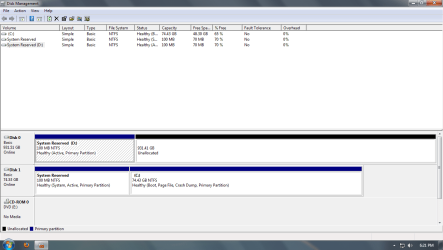
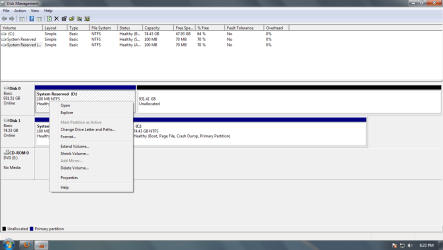
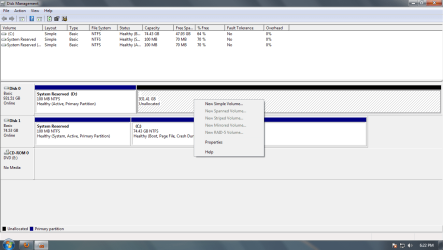
Okay, so I reformatted my SSD without my HDD connected. Everything went well. Now I just need to know how to delete the System Reserved Partition from my HDD then format it.

Here are screenshots:
 

Attachments

  • Untitled.png
    Untitled.png
    31.4 KB · Views: 6
  • Untitled1.png
    Untitled1.png
    33.6 KB · Views: 7
  • Untitled2.png
    Untitled2.png
    32.4 KB · Views: 6

My Computer My Computer

At a glance

Windows 7 x64 EnterpriseIntel Core i5 2500k @ 3.3GHz8GB Corsair VengeanceEVGA GeForce GTX 570 Superclocked
Computer Manufacturer/Model Number
Custom built by me
OS
Windows 7 x64 Enterprise
CPU
Intel Core i5 2500k @ 3.3GHz
Motherboard
ASRock p67 Extreme4
Memory
8GB Corsair Vengeance
Graphics Card(s)
EVGA GeForce GTX 570 Superclocked
Monitor(s) Displays
Sony Bravia 26" LCD HDTV
Screen Resolution
1360x768
Hard Drives
Intel 80GB SSD
Western Digital Caviar Black 1TB
PSU
Corsair 750W
Case
Antec DF-85
Cooling
Cooler Master Hyper 212+ CPU Cooler
Keyboard
i-rocks
Mouse
Logitech MX518 Gaming Mouse
You should be able to just Right click the Reserved on the spinning drive, and choose "Delete Volume".

Then, Right Click it again and create partitions ( "New Simple Volume" ) and format them.
make them whatever size you want, as many as you need .. or just one single volume.
 

My Computer My Computer

At a glance

Windows 7 Home Premium 64bitIntel Core i7 2700k8GB Mushkin Redline Ridgebacks @1866EVGA GTX570 SC
Computer Manufacturer/Model Number
Custom (Self Build)
OS
Windows 7 Home Premium 64bit
CPU
Intel Core i7 2700k
Motherboard
eVGA P67 SLI
Memory
8GB Mushkin Redline Ridgebacks @1866
Graphics Card(s)
EVGA GTX570 SC
Sound Card
XiFi Titanium HD
Monitor(s) Displays
LG W2453V
Screen Resolution
1920x1080
Hard Drives
Intel 320 80GB -- Intel X25-V 40GB --WD Black 1TB x2 -- WD Blue 640GB
PSU
Seasonic x750
Case
Corsair 600T SE White
Cooling
eVGA Superclocked CPU Cooler
Keyboard
Saitek Cyborg
Antivirus
Kaspersky
Browser
IE
Other Info
LG BD/DVD
Ok thank you sir! Got everything up and running good! Have to start getting everything setup how I want it, then do some gaming!

I would like to thank everyone! You all rock, and helped me A LOT!
 

My Computer My Computer

At a glance

Windows 7 x64 EnterpriseIntel Core i5 2500k @ 3.3GHz8GB Corsair VengeanceEVGA GeForce GTX 570 Superclocked
Computer Manufacturer/Model Number
Custom built by me
OS
Windows 7 x64 Enterprise
CPU
Intel Core i5 2500k @ 3.3GHz
Motherboard
ASRock p67 Extreme4
Memory
8GB Corsair Vengeance
Graphics Card(s)
EVGA GeForce GTX 570 Superclocked
Monitor(s) Displays
Sony Bravia 26" LCD HDTV
Screen Resolution
1360x768
Hard Drives
Intel 80GB SSD
Western Digital Caviar Black 1TB
PSU
Corsair 750W
Case
Antec DF-85
Cooling
Cooler Master Hyper 212+ CPU Cooler
Keyboard
i-rocks
Mouse
Logitech MX518 Gaming Mouse
Back
Top