Building a gaming rig! Need assistance

Thinking now. I think I had same prob with my e: drive in w7 until I formatted it. Just I had previous read about it and knew what to do.. That is why I read so much stuff in these forums and say at msi, just to learn and see what probs others have and how they are fixed and maybe I can help others down the road or if I have probs pop up I might can help my self and is not totally new to me.

Or what pit just said might fix ya up. I formatted mine and solved it If I remember right.. I think it will auto give it a letter if you format it. As a fact I think I did quick format took less than a minute it was good to go.
 

My Computer My Computer

At a glance

w7
OS
w7
Maybe what I see as multi partition is w7 made that space because I think your c is ssd drive and to free up the space for it. A quick format should fix ya up tho.

Ha ha you would think this os said the best thing since butter would auto do that stuff or prompt ya. I think xp would fix it right away- I know macs fix it right away- plug a new drive into a mac it works right away..
 

My Computer My Computer

At a glance

w7
OS
w7
You've always needed to partition and format a new HDD, this is nothing new.
 

My Computer My Computer

At a glance

Windows 7 Home Premium x64Phenom II X4 955 BE8 GB OCZ BE 1667EVGA GeForce GTX470 SC
Computer Manufacturer/Model Number
Home built
OS
Windows 7 Home Premium x64
CPU
Phenom II X4 955 BE
Motherboard
Asus Sabertooth 990FX
Memory
8 GB OCZ BE 1667
Graphics Card(s)
EVGA GeForce GTX470 SC
Monitor(s) Displays
BenQ 19"
Screen Resolution
1280x1024
Hard Drives
256 GB OCZ Vertex 3 SSD
2x WD 1 TB
1x WD 2 TB
PSU
Thermaltake 850W
Case
Coolermaster Cosmos 1000
Cooling
Air
Keyboard
Logitech
Mouse
Cyborg R.A.T 7
Internet Speed
Standard RR
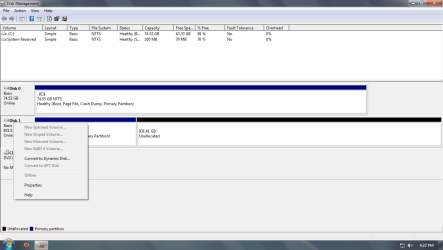
Do I have to convert it to a Dynamic Disk first? There is no option to format.
 

My Computer My Computer

At a glance

Windows 7 x64 EnterpriseIntel Core i5 2500k @ 3.3GHz8GB Corsair VengeanceEVGA GeForce GTX 570 Superclocked
Computer Manufacturer/Model Number
Custom built by me
OS
Windows 7 x64 Enterprise
CPU
Intel Core i5 2500k @ 3.3GHz
Motherboard
ASRock p67 Extreme4
Memory
8GB Corsair Vengeance
Graphics Card(s)
EVGA GeForce GTX 570 Superclocked
Monitor(s) Displays
Sony Bravia 26" LCD HDTV
Screen Resolution
1360x768
Hard Drives
Intel 80GB SSD
Western Digital Caviar Black 1TB
PSU
Corsair 750W
Case
Antec DF-85
Cooling
Cooler Master Hyper 212+ CPU Cooler
Keyboard
i-rocks
Mouse
Logitech MX518 Gaming Mouse
Avoid dynamic disks!

You cannot make more than 4 primary partitions.

To avoid dynamic disks, you may need to make an extended partition and then make a logical partition inside that extended partition.

Best thing you can do is post a picture of your Disk Management screen.
 

My Computer My Computer

At a glance

Windows 7 Home Premium SP1, 64-bitIntel Skylake i5-6600K, not overclocked8 GB HyperX DDR4-2666 (2 x 4 GB)none; graphics are integrated on CPU
Computer type
PC/Desktop
Computer Manufacturer/Model Number
Ignatz Special; 4 speed manual gearbox; factory air conditioning; one of one
OS
Windows 7 Home Premium SP1, 64-bit
CPU
Intel Skylake i5-6600K, not overclocked
Motherboard
AsRock Z170M Extreme 4, micro ATX
Memory
8 GB HyperX DDR4-2666 (2 x 4 GB)
Graphics Card(s)
none; graphics are integrated on CPU
Sound Card
onboard: Realtek ALC1150; external: USB Behringer UF0-202
Monitor(s) Displays
Dell S2340M 23 inch IPS
Screen Resolution
1600 x 900
Hard Drives
System: Crucial MX100 series SSD, 128 GB;
Data: Samsung Spinpoint 103SJ, 1 TB;
Backup: WD Caviar Green WD30EZRX-00D8PB0, 3 TB
PSU
Rosewill SilentNight 500 watt fanless, semi-modular
Case
Antec Solo II
Cooling
Noctua NH-U12S; Noctua F12 intake, Noctua S12A exhaust
Keyboard
Microsoft 200 6JH-00001 USB
Mouse
Dell or Microsoft optical wired; USB
Antivirus
Microsoft Security Essentials and Malwarebytes Premium
Browser
Pale Moon
Other Info
All fans PWM; speeds at idle: CPU circa 500 rpm; intake circa 600 rpm; exhaust circa 600 rpm; CPU temps 27 idle and 47 C load in a warm room (27 C/81 F) when running Intel Extreme Tuning Utility stress test.
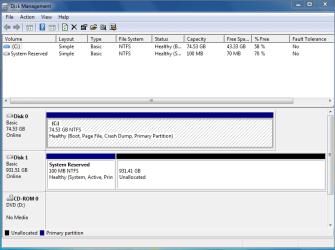
Here is two screenshots of my disk management. Also, I do not want multiple partitions on my drive. I am just using it for storage.
 

Attachments

  • DiskManagement.PNG
    DiskManagement.PNG
    19 KB · Views: 6
  • Untitled.png
    Untitled.png
    30.3 KB · Views: 5

My Computer My Computer

At a glance

Windows 7 x64 EnterpriseIntel Core i5 2500k @ 3.3GHz8GB Corsair VengeanceEVGA GeForce GTX 570 Superclocked
Computer Manufacturer/Model Number
Custom built by me
OS
Windows 7 x64 Enterprise
CPU
Intel Core i5 2500k @ 3.3GHz
Motherboard
ASRock p67 Extreme4
Memory
8GB Corsair Vengeance
Graphics Card(s)
EVGA GeForce GTX 570 Superclocked
Monitor(s) Displays
Sony Bravia 26" LCD HDTV
Screen Resolution
1360x768
Hard Drives
Intel 80GB SSD
Western Digital Caviar Black 1TB
PSU
Corsair 750W
Case
Antec DF-85
Cooling
Cooler Master Hyper 212+ CPU Cooler
Keyboard
i-rocks
Mouse
Logitech MX518 Gaming Mouse
Confession: I have not been following this thread closely, so I'm not sure of your intentions.

Do you want RAID?

I'm not sure how you ended up with the System Reserved partition and C on different physical drives. Normally, they are on the same drive.

Since they are on separate drives, that may be why you cannot format the 931 GB partition? I assume you have right clicked it and tried to create a simple volume.

Dynamic drives are generally a major complication to be avoided in most situations. They are not easy to undo.

I'd prefer to see something like this:

Disk 0 contains System Reserved partition and C partition

Disk 1 contains only 1 partition--the entire 1 TB drive.

But it's best that you explain what you want and why (if you know) the System Reserved and C are on different drives.
 

My Computer My Computer

At a glance

Windows 7 Home Premium SP1, 64-bitIntel Skylake i5-6600K, not overclocked8 GB HyperX DDR4-2666 (2 x 4 GB)none; graphics are integrated on CPU
Computer type
PC/Desktop
Computer Manufacturer/Model Number
Ignatz Special; 4 speed manual gearbox; factory air conditioning; one of one
OS
Windows 7 Home Premium SP1, 64-bit
CPU
Intel Skylake i5-6600K, not overclocked
Motherboard
AsRock Z170M Extreme 4, micro ATX
Memory
8 GB HyperX DDR4-2666 (2 x 4 GB)
Graphics Card(s)
none; graphics are integrated on CPU
Sound Card
onboard: Realtek ALC1150; external: USB Behringer UF0-202
Monitor(s) Displays
Dell S2340M 23 inch IPS
Screen Resolution
1600 x 900
Hard Drives
System: Crucial MX100 series SSD, 128 GB;
Data: Samsung Spinpoint 103SJ, 1 TB;
Backup: WD Caviar Green WD30EZRX-00D8PB0, 3 TB
PSU
Rosewill SilentNight 500 watt fanless, semi-modular
Case
Antec Solo II
Cooling
Noctua NH-U12S; Noctua F12 intake, Noctua S12A exhaust
Keyboard
Microsoft 200 6JH-00001 USB
Mouse
Dell or Microsoft optical wired; USB
Antivirus
Microsoft Security Essentials and Malwarebytes Premium
Browser
Pale Moon
Other Info
All fans PWM; speeds at idle: CPU circa 500 rpm; intake circa 600 rpm; exhaust circa 600 rpm; CPU temps 27 idle and 47 C load in a warm room (27 C/81 F) when running Intel Extreme Tuning Utility stress test.
I'm not even sure what RAID is. I can go research it I guess. I want my 1TB drive for my music and videos and other stuff. My SSD is just for my OS, games, and programs.

No I have no tried creating a new simple volume. Should I try that then? I've never ran two internal hard drives before so some of this stuff is relatively new to me.

I have no idea how the System Reserved and C got onto different drives.

I could always just wipe out my SSD and reformat the OS onto it, since I don't really mind as I won't be losing anything because I barely even have anything as of now.
 

My Computer My Computer

At a glance

Windows 7 x64 EnterpriseIntel Core i5 2500k @ 3.3GHz8GB Corsair VengeanceEVGA GeForce GTX 570 Superclocked
Computer Manufacturer/Model Number
Custom built by me
OS
Windows 7 x64 Enterprise
CPU
Intel Core i5 2500k @ 3.3GHz
Motherboard
ASRock p67 Extreme4
Memory
8GB Corsair Vengeance
Graphics Card(s)
EVGA GeForce GTX 570 Superclocked
Monitor(s) Displays
Sony Bravia 26" LCD HDTV
Screen Resolution
1360x768
Hard Drives
Intel 80GB SSD
Western Digital Caviar Black 1TB
PSU
Corsair 750W
Case
Antec DF-85
Cooling
Cooler Master Hyper 212+ CPU Cooler
Keyboard
i-rocks
Mouse
Logitech MX518 Gaming Mouse
Did you try to right click on the unallocated space [not the reserve]. You should get a format option click it and just click quick format

I think windows will have that 100mbs for system stuff but is not considered as multi partitions- Sorry it was first thing that pooped into my mind before.

Its just your ssd is small and or maybe is just normal for ssd and w7 and being you have a second drive it put the reserve on the larger drive. which is good for you and free up space on the ssd.

Try and right click that unallocated space see what happens- you should be able to format it- click quick format- should take 2 minutes or so and its done and will give it letter e: or should and good to go.

Not all of my drives show full space as usable. it is normal for windows to reserve some for its use. If right click and it lets ya format- after done reboot your system. It for sure should be showing up and as e: then and or being if you only have those 2 drives on the system. Main drive with os is c storage will be e.
 
Last edited:

My Computer My Computer

At a glance

w7
OS
w7
I'm not even sure what RAID is. I can go research it I guess. I want my 1TB drive for my music and videos and other stuff. My SSD is just for my OS, games, and programs.

No I have no tried creating a new simple volume. Should I try that then? I've never ran two internal hard drives before so some of this stuff is relatively new to me.

I have no idea how the System Reserved and C got onto different drives.

I could always just wipe out my SSD and reformat the OS onto it, since I don't really mind as I won't be losing anything because I barely even have anything as of now.

I think your last sentence is your best move.

Disconnect the 1 TB drive before you begin.

I'd do things in this order:

1: set your PC BIOS to boot from the DVD drive first.
2: insert your Windows installation disc in the DVD drive.
3: shut down
4: disconnect the 1 TB drive completely
5: restart. The PC should boot from the installation disc
6: Continue with Windows install as you did before.
7: When Windows is back up and running on the single drive, reconnect the 1 TB and reformat it, wiping out the 2 partitions that are now on it.

You don't need RAID. Forget about it.
 

My Computer My Computer

At a glance

Windows 7 Home Premium SP1, 64-bitIntel Skylake i5-6600K, not overclocked8 GB HyperX DDR4-2666 (2 x 4 GB)none; graphics are integrated on CPU
Computer type
PC/Desktop
Computer Manufacturer/Model Number
Ignatz Special; 4 speed manual gearbox; factory air conditioning; one of one
OS
Windows 7 Home Premium SP1, 64-bit
CPU
Intel Skylake i5-6600K, not overclocked
Motherboard
AsRock Z170M Extreme 4, micro ATX
Memory
8 GB HyperX DDR4-2666 (2 x 4 GB)
Graphics Card(s)
none; graphics are integrated on CPU
Sound Card
onboard: Realtek ALC1150; external: USB Behringer UF0-202
Monitor(s) Displays
Dell S2340M 23 inch IPS
Screen Resolution
1600 x 900
Hard Drives
System: Crucial MX100 series SSD, 128 GB;
Data: Samsung Spinpoint 103SJ, 1 TB;
Backup: WD Caviar Green WD30EZRX-00D8PB0, 3 TB
PSU
Rosewill SilentNight 500 watt fanless, semi-modular
Case
Antec Solo II
Cooling
Noctua NH-U12S; Noctua F12 intake, Noctua S12A exhaust
Keyboard
Microsoft 200 6JH-00001 USB
Mouse
Dell or Microsoft optical wired; USB
Antivirus
Microsoft Security Essentials and Malwarebytes Premium
Browser
Pale Moon
Other Info
All fans PWM; speeds at idle: CPU circa 500 rpm; intake circa 600 rpm; exhaust circa 600 rpm; CPU temps 27 idle and 47 C load in a warm room (27 C/81 F) when running Intel Extreme Tuning Utility stress test.
See here. Only w7 put the reserve on my c and was the only hdd on my system at the time.

I just right click on the e drive- in your case right click the unallocated space.. then format then quick format..>


Man you do not have to reinstall your os follow these simple instructions you will be good to go- 2 or 3 of us have told ya how to do it- this other guy is going to cost you a lot of time and you will be right back where you are now.

Your ssd or c drive is what 75 gigs or so. It makes common sense and being you have both drives installed for w7 to put the reserve on the larger second drive. And or might be a ssd thingy. Try these simple instructions before you go reinstalling the os or you will hate your self.

I had to go through a lot of head akes trying to install my sataIII and using my marvel port and is why I only had the 1 drive installed when I installed my os. Or w7 might have put the reserve on my second drive also. Not sure tho it is not a ssd drive and my c drive is larger than yours. I just did not care to add all this extra info and maybe confuse ya more than you already are.
 

My Computer My Computer

At a glance

w7
OS
w7
Did you try to right click on the unallocated space [not the reserve]. You should get a format option click it and just click quick format

I think windows will have that 100mbs for system stuff but is not considered as multi partitions- Sorry it was first thing that pooped into my mind before.

Its just your ssd is small and or maybe is just normal for ssd and w7 and being you have a second drive it put the reserve on the larger drive. which is good for you and free up space on the ssd.

Try and right click that unallocated space see what happens- you should be able to format it- click quick format- should take 2 minutes or so and its done and will give it letter e: or should and good to go.

None of my drives show full space as usable. it is normal for windows to reserve some for its use. If right click and it lets ya format- after done reboot your system. It for sure should be showing up and as e: then and or being if you only have those 2 drives on the system. Main drive with os is c storage will be e.

Yes I did try right clicking on the unallocated space. There was no option for format or quick format.

I'm not even sure what RAID is. I can go research it I guess. I want my 1TB drive for my music and videos and other stuff. My SSD is just for my OS, games, and programs.

No I have no tried creating a new simple volume. Should I try that then? I've never ran two internal hard drives before so some of this stuff is relatively new to me.

I have no idea how the System Reserved and C got onto different drives.

I could always just wipe out my SSD and reformat the OS onto it, since I don't really mind as I won't be losing anything because I barely even have anything as of now.

I think your last sentence is your best move.

Disconnect the 1 TB drive before you begin.

I'd do things in this order:

1: set your PC BIOS to boot from the DVD drive first.
2: insert your Windows installation disc in the DVD drive.
3: shut down
4: disconnect the 1 TB drive completely
5: restart. The PC should boot from the installation disc
6: Continue with Windows install as you did before.
7: When Windows is back up and running on the single drive, reconnect the 1 TB and reformat it, wiping out the 2 partitions that are now on it.

You don't need RAID. Forget about it.

Alright, I will do that tonight if I have time after class, if not I will do it tomorrow night and report back.

It only takes like 20 mins to do the OS and I have nothing important on the computer yet so it's not really a big deal.

Thanks
 

My Computer My Computer

At a glance

Windows 7 x64 EnterpriseIntel Core i5 2500k @ 3.3GHz8GB Corsair VengeanceEVGA GeForce GTX 570 Superclocked
Computer Manufacturer/Model Number
Custom built by me
OS
Windows 7 x64 Enterprise
CPU
Intel Core i5 2500k @ 3.3GHz
Motherboard
ASRock p67 Extreme4
Memory
8GB Corsair Vengeance
Graphics Card(s)
EVGA GeForce GTX 570 Superclocked
Monitor(s) Displays
Sony Bravia 26" LCD HDTV
Screen Resolution
1360x768
Hard Drives
Intel 80GB SSD
Western Digital Caviar Black 1TB
PSU
Corsair 750W
Case
Antec DF-85
Cooling
Cooler Master Hyper 212+ CPU Cooler
Keyboard
i-rocks
Mouse
Logitech MX518 Gaming Mouse
If you follow that last guys instructions and just have your ssd installed it will eat up that 100mbs and will be on your small ssd drive. You are just new to this. you have to format that 1t drive either way- you can do it right now if you follow the instructions.
 

My Computer My Computer

At a glance

w7
OS
w7
There is no option to format the unallocated space, so I don't know what to do.
 

My Computer My Computer

At a glance

Windows 7 x64 EnterpriseIntel Core i5 2500k @ 3.3GHz8GB Corsair VengeanceEVGA GeForce GTX 570 Superclocked
Computer Manufacturer/Model Number
Custom built by me
OS
Windows 7 x64 Enterprise
CPU
Intel Core i5 2500k @ 3.3GHz
Motherboard
ASRock p67 Extreme4
Memory
8GB Corsair Vengeance
Graphics Card(s)
EVGA GeForce GTX 570 Superclocked
Monitor(s) Displays
Sony Bravia 26" LCD HDTV
Screen Resolution
1360x768
Hard Drives
Intel 80GB SSD
Western Digital Caviar Black 1TB
PSU
Corsair 750W
Case
Antec DF-85
Cooling
Cooler Master Hyper 212+ CPU Cooler
Keyboard
i-rocks
Mouse
Logitech MX518 Gaming Mouse
That system reserved partition contains some of your boot files.

I don't think you can boot without it. Disconnect your 1 TB drive and see if you can boot just from the C drive alone. Probably not.

I'd want to correct that, even if I could format the 1 TB drive. I've never seen an installation that had C and the system reserved on separate physical drives. I don't know how it happened in your case.
 

My Computer My Computer

At a glance

Windows 7 Home Premium SP1, 64-bitIntel Skylake i5-6600K, not overclocked8 GB HyperX DDR4-2666 (2 x 4 GB)none; graphics are integrated on CPU
Computer type
PC/Desktop
Computer Manufacturer/Model Number
Ignatz Special; 4 speed manual gearbox; factory air conditioning; one of one
OS
Windows 7 Home Premium SP1, 64-bit
CPU
Intel Skylake i5-6600K, not overclocked
Motherboard
AsRock Z170M Extreme 4, micro ATX
Memory
8 GB HyperX DDR4-2666 (2 x 4 GB)
Graphics Card(s)
none; graphics are integrated on CPU
Sound Card
onboard: Realtek ALC1150; external: USB Behringer UF0-202
Monitor(s) Displays
Dell S2340M 23 inch IPS
Screen Resolution
1600 x 900
Hard Drives
System: Crucial MX100 series SSD, 128 GB;
Data: Samsung Spinpoint 103SJ, 1 TB;
Backup: WD Caviar Green WD30EZRX-00D8PB0, 3 TB
PSU
Rosewill SilentNight 500 watt fanless, semi-modular
Case
Antec Solo II
Cooling
Noctua NH-U12S; Noctua F12 intake, Noctua S12A exhaust
Keyboard
Microsoft 200 6JH-00001 USB
Mouse
Dell or Microsoft optical wired; USB
Antivirus
Microsoft Security Essentials and Malwarebytes Premium
Browser
Pale Moon
Other Info
All fans PWM; speeds at idle: CPU circa 500 rpm; intake circa 600 rpm; exhaust circa 600 rpm; CPU temps 27 idle and 47 C load in a warm room (27 C/81 F) when running Intel Extreme Tuning Utility stress test.
Are you sure you did not right click the reserve? Try it again- right click on the unallocated space. If it does not work I am sorry and we are confusing each other or something. If it does not work I do not know what to say.

And to add to last guys instructions it is best you turn on ahci support in your bios before you reinstall the os. I was going to ask you about that but after you got that drive formatted and working right. If you did not turn on ahci support it is no real matter but the drives will not run at full speeds or have all sata support but you could have fixed that in w7 with a reg tweak and reboot to bios and then turn on ahci support. As a fact it is possible that is the prob. I do not see why tho. You should be able to format that drive.

Have you ever tried to reboot the system- maybe try that first reboot and them back to disc man where you are now and then try and right click the drive and see if you can format it. Something is not right? You should reboot after each new hardware install or even after each new program install etc or can cause probs. Other than that- Sorry I do not know what else to say.
 
Last edited:

My Computer My Computer

At a glance

w7
OS
w7
I bet money is because it is a ssd and is small and he had both drives connected. SSD drives are not really like normal drives and they are built for speed- it makes common sense to put the reserve on his other drive.

I do not know. I tried.. No matter what he will have to format that 1t drive and it does have the system files on it the reserve. un connect it now it ssd or os may not work and he may very well have to reformat and install w7 again. If only the ssd installed it will for sure eat up 100mbs of his small drive.

Something is not right- he needs to reboot his system or something and then try and format that 1t drive. it should be simple.

I guess he has installed all drivers and has updated windows before he tried messing with his extra drive? To think now I guess he did not set up the system for ahci support- he does not have to re install the os for that he can do that now. The ssd is working and ahci is not needed for the 1t drive or should be no probs other than not running at full speeds and not full sata support. Being a new drive might be another story. I can be wrong maybe a new just out drive may need the ahci support but w7 put the reserve on it.

Did the ssd come with software? Maybe the disc utility for his 1t drive can fix it and format it if wd you can get it from its home site. I read them ssd can be funny and some have its own software or its home site may have it. You do not defrag ssd drives as best I know also. They are not really like normal drives they are a different animal and you treat them different than normal drives.

Should be simple- not rebooting the system can cause crazy probs and like this..

I hope you get it right- And please post how you fix it. I plan to get a ssd drive maybe I can learn something here.

Maybe before you go and mess up more you should post at the ssd home site forum or put in a support ticket. Or you might waste time and reinstall the os and be right back where you are now- and will fell bad about it and it still not working right. I would have did that first and if after a lil time and no help and still not working.

I wish ya the best- see ya..
 
Last edited:

My Computer My Computer

At a glance

w7
OS
w7
When I right click the system reserve there is a format option, but not when I right click the unallocated space. I've tried rebooting and nothing different.

I guess I will just resintall the OS without my 1TB drive connected. Then reconnect it and try to format it.

And the extra 100MB for system reserve won't bother me if it is on my SSD. You guys said it is supposed to be on the C drive, and I want everything to be correct and how it is supposed to be.
 

My Computer My Computer

At a glance

Windows 7 x64 EnterpriseIntel Core i5 2500k @ 3.3GHz8GB Corsair VengeanceEVGA GeForce GTX 570 Superclocked
Computer Manufacturer/Model Number
Custom built by me
OS
Windows 7 x64 Enterprise
CPU
Intel Core i5 2500k @ 3.3GHz
Motherboard
ASRock p67 Extreme4
Memory
8GB Corsair Vengeance
Graphics Card(s)
EVGA GeForce GTX 570 Superclocked
Monitor(s) Displays
Sony Bravia 26" LCD HDTV
Screen Resolution
1360x768
Hard Drives
Intel 80GB SSD
Western Digital Caviar Black 1TB
PSU
Corsair 750W
Case
Antec DF-85
Cooling
Cooler Master Hyper 212+ CPU Cooler
Keyboard
i-rocks
Mouse
Logitech MX518 Gaming Mouse
ok try 1 other thing. look to the far left side where you see the drive number count disc1 left of the reserved space and try and right click there and see if it let you see format- not the reserve or the unallocated spaces.

it is showing as disc0 in the box above it. Maybe we have been telling ya to right click wrong place- something is not right? I can right click on mine near any place it gives me the option.
 

My Computer My Computer

At a glance

w7
OS
w7
Well than that is it man it will hold the reserve part or should. I know you should be able to right click it some place and get the option to format it- click format then quick format should be 2 minutes or so and then reboot it should all be good.

When the format pops up double check tho make sure it ask you and the volume you are trying to format is the 9**** gigs and not 100mbs it should ask do you want to reformat quick for mat volume size 99999 gigs what ever it is- do not format just the 100mbs or it will wipe the system files. it will prompt ask etc. or should.

Not sure I do not do this every day. I guess you have made a restore point- if not I am sure windows has made one sometime. Even if it formats the whole drive and reboot windows will more than likely fix its self or say it can not start right and say it will search for answer and fix its self and should work- I guess so any way.
 

My Computer My Computer

At a glance

w7
OS
w7
Back
Top