Built-in microphone not working.

Cloa

New member
Local time
7:36 PM
Messages
3
Hello,

I have installed Windows 7 Professional from Home Basic in my laptop about 3 months ago. The problem is, I cannot record any sound from my internal microphone after the installation. I think I have installed all the right drivers in my notebook and I have searched for troubleshooting my microphone. But the result is still the same. I only hear a hissing sound whenever I record a video.

Please help.
 

My Computer

OS
Windows 7 Professional x32
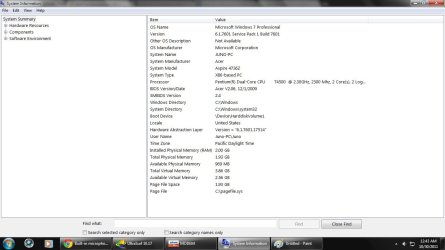
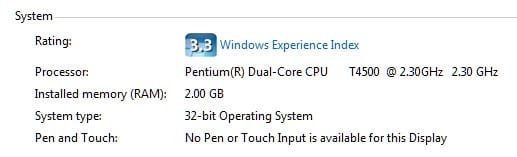
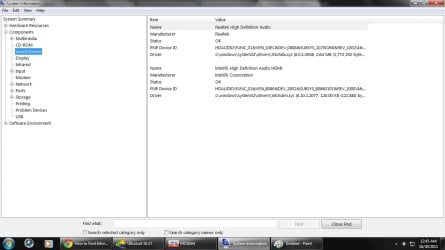
Can you add your hardware specs please? Laptop make and model, soundcard details etc.
 

My Computer

OS
Windows 7 Ultimate x64
CPU
Intel Core 2 Duo E8400
Motherboard
Gigabyte GA-EP45-UD3P
Memory
16GB OCZ Gold
Graphics Card(s)
NVidia 9600GT 1024MB
Sound Card
Focusrite Saffire Pro 40
Monitor(s) Displays
2x Samsung 2433BW
Screen Resolution
1920 x 1200
Hard Drives
Corsair Force 3 120GB SSD
PSU
BeQuiet Straightpower 600W White
Case
Lian Li Rack
Cooling
Arctic Freezer Pro
Keyboard
MS Wireless Keyboard 3000
Mouse
MS Wireless Mouse 5000
Internet Speed
8MB
make and model.jpg

specs.jpg

sound device.jpg


Tell me what more do you need sir. I can't fix my laptop microphone problem so please help me. Thanks.
 

My Computer

OS
Windows 7 Professional x32
do you know what kind of motherboard you have? if so, look up its website, support>drivers and download all its drivers for your particular board (be sure to get the bits and versions right). Do you have an internal microphone because you own a laptop?
 

My Computer

Computer type
PC/Desktop
Computer Manufacturer/Model Number
Custom Asus Build
OS
Microsoft Windows 8.1 Pro 64-bit
CPU
Intel(R) Core(TM) i3-4130 CPU @ 3.40GHz
Motherboard
B85M-E
Memory
8.00 GB
Graphics Card(s)
None
Sound Card
Realtek High Definition Audio
Monitor(s) Displays
Asus 23.6" Monitor
Screen Resolution
1920 x 1080 x 32 bits (4294967296 colors) @ 60 Hz
Hard Drives
INTEL SSDSC2BW180A4
Samsung SSD 840 PRO Series
PSU
Seasonic S12II-380Bronze
Case
Lian Li
Cooling
Fan, Passive
Keyboard
Logitech K120
Mouse
Microsoft Touch Mouse
Internet Speed
4ms Ping, 19.0 Mbps Download, 19.0 Mbps Upload
Antivirus
Eset Endpoint
Browser
Internet Explorer, Chrome
Thank you for your reply DustSailor. I downloaded all of the necessary drivers my laptop needed. And yes, my laptop has an internal mic that won't work. Any suggestions how can I fix this?
 

My Computer

OS
Windows 7 Professional x32
okay, you'll need to download the drivers/software for the camara (aren't they connected, mic and camara?)

is it only a particular application that you can't record your voice on, or does everything not work?

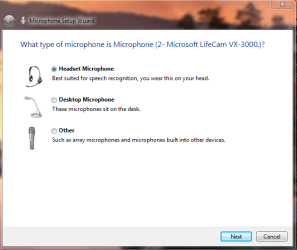
type, "Set up a microphone" into Windows search and you could try your hand at the wizard that pops up.
Capture.PNG
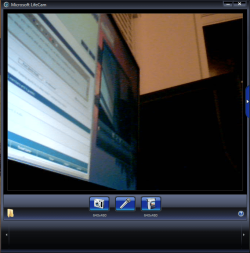
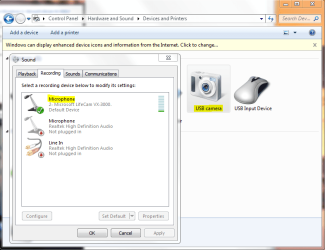
Look up your microphone and see if there are any settings you can play with. Here is mine (mic and camara)
Captured.PNG

Go into your sound and check recording devices and see if the bar moves when you make noise:
Captures.PNG

Let me know how it goes and I'll help you further depending on what you tell me
 

My Computer

Computer type
PC/Desktop
Computer Manufacturer/Model Number
Custom Asus Build
OS
Microsoft Windows 8.1 Pro 64-bit
CPU
Intel(R) Core(TM) i3-4130 CPU @ 3.40GHz
Motherboard
B85M-E
Memory
8.00 GB
Graphics Card(s)
None
Sound Card
Realtek High Definition Audio
Monitor(s) Displays
Asus 23.6" Monitor
Screen Resolution
1920 x 1080 x 32 bits (4294967296 colors) @ 60 Hz
Hard Drives
INTEL SSDSC2BW180A4
Samsung SSD 840 PRO Series
PSU
Seasonic S12II-380Bronze
Case
Lian Li
Cooling
Fan, Passive
Keyboard
Logitech K120
Mouse
Microsoft Touch Mouse
Internet Speed
4ms Ping, 19.0 Mbps Download, 19.0 Mbps Upload
Antivirus
Eset Endpoint
Browser
Internet Explorer, Chrome
Back
Top