Buying a quad core chip

rocketdescends

New member
Member
Local time
2:46 AM
Messages
36
Location
Boston
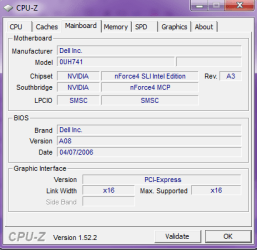
I am interested in buying an intel quad core chip since all I have is a single core Pentium D. Would I need a new motherboard? Anyone know how I would install it? Never done it before, but anyway below is a screenshot of what motherboard I am using.
 

Attachments

  • James6.png
    James6.png
    11.3 KB · Views: 34

My Computer

Computer Manufacturer/Model Number
Dell XP 600
OS
Windows 7 Home Premium 32 bit
CPU
Intel Pentium D
Memory
2 gig DRM
Graphics Card(s)
Radeon 1900XTX
Sound Card
Creative XFi Audio Processor (WDM)
Take another shot of CPU-Z showing the processor tab. Or give us a shot showing some other app that reveals as much detail as possible about your current processor. I suspect you are out of luck.

If you need a new board, you may run into difficulty on a Dell due to proprietary connectors. Dell used some of those in the past and may still.

If you need a new board and want to go to a quad, your path of least resistance is probably to start from the ground up with a new case, motherboard, RAM, and power supply. You may be able to reuse DVD drive, hard drive, monitor, keyboard, mouse, sound card, and maybe the video card.

But if you would be willing to pay for a quad, the better route may be to go to an i5 or i7 processor from Intel--socket 1366 or 1156, rather than 775. The i5 is particularly attractive and can use relatively inexpensive motherboards.
 

My Computer

Computer type
PC/Desktop
Computer Manufacturer/Model Number
Ignatz Special; 4 speed manual gearbox; factory air conditioning; one of one
OS
Windows 7 Home Premium SP1, 64-bit
CPU
Intel Skylake i5-6600K, not overclocked
Motherboard
AsRock Z170M Extreme 4, micro ATX
Memory
8 GB HyperX DDR4-2666 (2 x 4 GB)
Graphics Card(s)
none; graphics are integrated on CPU
Sound Card
onboard: Realtek ALC1150; external: USB Behringer UF0-202
Monitor(s) Displays
Dell S2340M 23 inch IPS
Screen Resolution
1600 x 900
Hard Drives
System: Crucial MX100 series SSD, 128 GB;
Data: Samsung Spinpoint 103SJ, 1 TB;
Backup: WD Caviar Green WD30EZRX-00D8PB0, 3 TB
PSU
Rosewill SilentNight 500 watt fanless, semi-modular
Case
Antec Solo II
Cooling
Noctua NH-U12S; Noctua F12 intake, Noctua S12A exhaust
Keyboard
Microsoft 200 6JH-00001 USB
Mouse
Dell or Microsoft optical wired; USB
Antivirus
Microsoft Security Essentials and Malwarebytes Premium
Browser
Pale Moon
Other Info
All fans PWM; speeds at idle: CPU circa 500 rpm; intake circa 600 rpm; exhaust circa 600 rpm; CPU temps 27 idle and 47 C load in a warm room (27 C/81 F) when running Intel Extreme Tuning Utility stress test.
Take another shot of CPU-Z showing the processor tab. Or give us a shot showing some other app that reveals as much detail as possible about your current processor. I suspect you are out of luck.

If you need a new board, you may run into difficulty on a Dell due to proprietary connectors. Dell used some of those in the past and may still.

If you need a new board and want to go to a quad, your path of least resistance is probably to start from the ground up with a new case, motherboard, RAM, and power supply. You may be able to reuse DVD drive, hard drive, monitor, keyboard, mouse, sound card, and maybe the video card.

But if you would be willing to pay for a quad, the better route may be to go to an i5 or i7 processor from Intel--socket 1366 or 1156, rather than 775. The i5 is particularly attractive and can use relatively inexpensive motherboards.

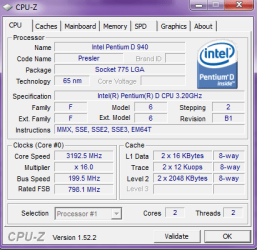
Yeah an i7 would be even better! OH Pentium D is a dual core not single like I said earlier. Here is the screenshot.
 

Attachments

  • james7.png
    james7.png
    15.5 KB · Views: 18

My Computer

Computer Manufacturer/Model Number
Dell XP 600
OS
Windows 7 Home Premium 32 bit
CPU
Intel Pentium D
Memory
2 gig DRM
Graphics Card(s)
Radeon 1900XTX
Sound Card
Creative XFi Audio Processor (WDM)
I can't confirm it quickly, but I think you are out of luck with that motherboard and anything from the Intel Core 2 Duo series or later. Core 2 Duo is socket 775 like Pentium D, but I don't think you can just drop it in.

Even if you could, that machine has to be 4 years old or so. That's an old chipset. I'd start over with a new mobo and RAM, keeping as many components as possible.
 

My Computer

Computer type
PC/Desktop
Computer Manufacturer/Model Number
Ignatz Special; 4 speed manual gearbox; factory air conditioning; one of one
OS
Windows 7 Home Premium SP1, 64-bit
CPU
Intel Skylake i5-6600K, not overclocked
Motherboard
AsRock Z170M Extreme 4, micro ATX
Memory
8 GB HyperX DDR4-2666 (2 x 4 GB)
Graphics Card(s)
none; graphics are integrated on CPU
Sound Card
onboard: Realtek ALC1150; external: USB Behringer UF0-202
Monitor(s) Displays
Dell S2340M 23 inch IPS
Screen Resolution
1600 x 900
Hard Drives
System: Crucial MX100 series SSD, 128 GB;
Data: Samsung Spinpoint 103SJ, 1 TB;
Backup: WD Caviar Green WD30EZRX-00D8PB0, 3 TB
PSU
Rosewill SilentNight 500 watt fanless, semi-modular
Case
Antec Solo II
Cooling
Noctua NH-U12S; Noctua F12 intake, Noctua S12A exhaust
Keyboard
Microsoft 200 6JH-00001 USB
Mouse
Dell or Microsoft optical wired; USB
Antivirus
Microsoft Security Essentials and Malwarebytes Premium
Browser
Pale Moon
Other Info
All fans PWM; speeds at idle: CPU circa 500 rpm; intake circa 600 rpm; exhaust circa 600 rpm; CPU temps 27 idle and 47 C load in a warm room (27 C/81 F) when running Intel Extreme Tuning Utility stress test.
I can't confirm it quickly, but I think you are out of luck with that motherboard and anything from the Intel Core 2 Duo series or later. Core 2 Duo is socket 775 like Pentium D, but I don't think you can just drop it in.

So I would need to buy a 1366 or 1156 motherboard then the i5 or i7?
 

My Computer

Computer Manufacturer/Model Number
Dell XP 600
OS
Windows 7 Home Premium 32 bit
CPU
Intel Pentium D
Memory
2 gig DRM
Graphics Card(s)
Radeon 1900XTX
Sound Card
Creative XFi Audio Processor (WDM)
Intel has recently become very confusing on their naming.

i7 is socket 1156 and socket 1366, quad core, uses triple channel DDR 3 memory, Hyperthreading
i5 is strictly 1156. both dual and quad core, dual channel DDR 3 memory, no Hyperthreading
i3 is strictly 1156, only dual core, no hyperthreading


best way to look at is the numbers assigned to the processors:

900 series will be i7, socket 1366; all are quadcore; hyperthreading; i don't think they have turbo
800 series will be i7, socket 1156; all are quadcore; hyperthreading and turbo
700 series will be i5, socket 1156; all are quadcore; hyperthreading, no turbo
600 series will be i5, socket 1156; all are dual core; hyperthreading and turbo
500 series will be i3, socket 1156; all are dual core; hyperthreading, no turbo

I'm not sure how many of the 600s and 500s are out yet.

Advantage of the 700s and 800s is that the socket 1156 motherboards are noticeably cheaper.

The i5 and i7 use DDR 3 memory. Not sure about i3.

Best bang for the buck: i5 series by most estimates.

If you are going to change boards, I would automatically ditch the Dell case and power supply.

Quad cores don't necessarily equate to a faster PC, depending on what you want to do with it. Many applications can't properly take advantage of all 4 cores and a dual core may be faster at any given price point, depending on your intended usage.
 

My Computer

Computer type
PC/Desktop
Computer Manufacturer/Model Number
Ignatz Special; 4 speed manual gearbox; factory air conditioning; one of one
OS
Windows 7 Home Premium SP1, 64-bit
CPU
Intel Skylake i5-6600K, not overclocked
Motherboard
AsRock Z170M Extreme 4, micro ATX
Memory
8 GB HyperX DDR4-2666 (2 x 4 GB)
Graphics Card(s)
none; graphics are integrated on CPU
Sound Card
onboard: Realtek ALC1150; external: USB Behringer UF0-202
Monitor(s) Displays
Dell S2340M 23 inch IPS
Screen Resolution
1600 x 900
Hard Drives
System: Crucial MX100 series SSD, 128 GB;
Data: Samsung Spinpoint 103SJ, 1 TB;
Backup: WD Caviar Green WD30EZRX-00D8PB0, 3 TB
PSU
Rosewill SilentNight 500 watt fanless, semi-modular
Case
Antec Solo II
Cooling
Noctua NH-U12S; Noctua F12 intake, Noctua S12A exhaust
Keyboard
Microsoft 200 6JH-00001 USB
Mouse
Dell or Microsoft optical wired; USB
Antivirus
Microsoft Security Essentials and Malwarebytes Premium
Browser
Pale Moon
Other Info
All fans PWM; speeds at idle: CPU circa 500 rpm; intake circa 600 rpm; exhaust circa 600 rpm; CPU temps 27 idle and 47 C load in a warm room (27 C/81 F) when running Intel Extreme Tuning Utility stress test.
You might post your Dell model number.

It's unlikely that it'd support any sort of quad core CPU, though. I don't belive that the nForce4 SLI chipset supports quad core CPUs. Even if it did, Dell may not offer a BIOS update that enabled it, unless they sold that configuration.

I don't know if Dell is still using nonstandard motherboards. They used to use proprietary power connections, and a ribbon connector for the front panel components (power switch, LEDs, etc.) I think that they have gone to industry standard PSU connections, but I'm not sure about the front panel stuff. You may be able to install a third-party motherboard in the system without heroic measures, but you want to look into it carefully before you risk any money.
 

My Computer

Computer Manufacturer/Model Number
homegrown
OS
Windows 7 Pro X64 SP1
CPU
Intel Core I7-3930k
Motherboard
Asus P9X79 Pro
Memory
16 GB Gskill DDR3-2133
Graphics Card(s)
eVGA GTX680
Sound Card
Creative X-Fi Titanium
Monitor(s) Displays
As PA246Q
Screen Resolution
1920 X 1200
Hard Drives
Corsair Force GT, 120 GB
WDC 1.5TB Caviar Black
PSU
PCP&C Silencer 750 Crossfire
Case
Silverstone FT02
Cooling
Noctua NH-D14
Keyboard
cheap Logitech USB
Mouse
Microsoft Intellimouse Explorer (old optical) USB
Internet Speed
6Mb cable
Other Info
Pioneer BDR-205
Samsung SH-203B
Monsoon 5.1 speakers
Intel has recently become very confusing on their naming.

i7 is socket 1156 and socket 1366, quad core, uses triple channel DDR 3 memory, Hyperthreading
i5 is strictly 1156. both dual and quad core, dual channel DDR 3 memory, no Hyperthreading
i3 is strictly 1156, only dual core, no hyperthreading


best way to look at is the numbers assigned to the processors:

900 series will be i7, socket 1366; all are quadcore; hyperthreading; i don't think they have turbo
800 series will be i7, socket 1156; all are quadcore; hyperthreading and turbo
700 series will be i5, socket 1156; all are quadcore; hyperthreading, no turbo
600 series will be i5, socket 1156; all are dual core; hyperthreading and turbo
500 series will be i3, socket 1156; all are dual core; hyperthreading, no turbo

I'm not sure how many of the 600s and 500s are out yet.

Advantage of the 700s and 800s is that the socket 1156 motherboards are noticeably cheaper.

The i5 and i7 use DDR 3 memory. Not sure about i3.

Best bang for the buck: i5 series by most estimates.

If you are going to change boards, I would automatically ditch the Dell case and power supply.

Quad cores don't necessarily equate to a faster PC, depending on what you want to do with it. Many applications can't properly take advantage of all 4 cores and a dual core may be faster at any given price point, depending on your intended usage.

Thanks. Rep +1. Yeah I have learned that I would never buy from Dell again. Any companies you recommend? HP? Falcon? I was thinking of Alienware, but now Dell owns them now.
 

My Computer

Computer Manufacturer/Model Number
Dell XP 600
OS
Windows 7 Home Premium 32 bit
CPU
Intel Pentium D
Memory
2 gig DRM
Graphics Card(s)
Radeon 1900XTX
Sound Card
Creative XFi Audio Processor (WDM)
You are not going to like this.

I would never give Dell another dime, but they are still probably the best choice if you aren't going to build yourself or if you don't have a RELIABLE local builder.

I bought a Dell monitor about 5 years ago, with a 3 year warranty. It went bad at 2.5 years. It took me 11 phone calls to India to get it replaced. I had to tell my complete story every time, as if they had no database at all. I was promised callbacks continually and never got one. Inexcusable. I will never give Dell another dime.

Having said that----I'd still tell most people to use them because I don't know of anyone else who is better. Your hardware can always go bad, just by bad luck. Nearly everyone has outsourced customer service. The profit margins on PCs are very small compared to what they were 10 or 15 years ago when the average PC sold for $2,000 or more. So they now cut corners and customer service gets the knife first.

Build it yourself if at all possible. You have 100% control of components and will learn a lot. Normally, you can't save any money any more, but because you have some components to carry over, you could save a few hundred bucks--maybe blow that on an SSD or a big monitor or a new set of tires.
 

My Computer

Computer type
PC/Desktop
Computer Manufacturer/Model Number
Ignatz Special; 4 speed manual gearbox; factory air conditioning; one of one
OS
Windows 7 Home Premium SP1, 64-bit
CPU
Intel Skylake i5-6600K, not overclocked
Motherboard
AsRock Z170M Extreme 4, micro ATX
Memory
8 GB HyperX DDR4-2666 (2 x 4 GB)
Graphics Card(s)
none; graphics are integrated on CPU
Sound Card
onboard: Realtek ALC1150; external: USB Behringer UF0-202
Monitor(s) Displays
Dell S2340M 23 inch IPS
Screen Resolution
1600 x 900
Hard Drives
System: Crucial MX100 series SSD, 128 GB;
Data: Samsung Spinpoint 103SJ, 1 TB;
Backup: WD Caviar Green WD30EZRX-00D8PB0, 3 TB
PSU
Rosewill SilentNight 500 watt fanless, semi-modular
Case
Antec Solo II
Cooling
Noctua NH-U12S; Noctua F12 intake, Noctua S12A exhaust
Keyboard
Microsoft 200 6JH-00001 USB
Mouse
Dell or Microsoft optical wired; USB
Antivirus
Microsoft Security Essentials and Malwarebytes Premium
Browser
Pale Moon
Other Info
All fans PWM; speeds at idle: CPU circa 500 rpm; intake circa 600 rpm; exhaust circa 600 rpm; CPU temps 27 idle and 47 C load in a warm room (27 C/81 F) when running Intel Extreme Tuning Utility stress test.
You are not going to like this.

I would never give Dell another dime, but they are still probably the best choice if you aren't going to build yourself or if you don't have a RELIABLE local builder.

I bought a Dell monitor about 5 years ago, with a 3 year warranty. It went bad at 2.5 years. It took me 11 phone calls to India to get it replaced. I had to tell my complete story every time, as if they had no database at all. I was promised callbacks continually and never got one. Inexcusable. I will never give Dell another dime.

Having said that----I'd still tell most people to use them because I don't know of anyone else who is better. Your hardware can always go bad, just by bad luck. Nearly everyone has outsourced customer service. The profit margins on PCs are very small compared to what they were 10 or 15 years ago when the average PC sold for $2,000 or more. So they now cut corners and customer service gets the knife first.

Build it yourself if at all possible. You have 100% control of components and will learn a lot. Normally, you can't save any money any more, but because you have some components to carry over, you could save a few hundred bucks--maybe blow that on an SSD or a big monitor or a new set of tires.

Yes I am definitely interested in building my own. Just don't know how to go about it. I have only moderate knowledge regarding building. I have installed graphics cards, memory etc, but never a whole motherboard etc. Any references you can provide would be helpful. I am ready to learn.
 

My Computer

Computer Manufacturer/Model Number
Dell XP 600
OS
Windows 7 Home Premium 32 bit
CPU
Intel Pentium D
Memory
2 gig DRM
Graphics Card(s)
Radeon 1900XTX
Sound Card
Creative XFi Audio Processor (WDM)
On the flip side, even though I am an experienced PC Builder(done about 12 for myself, 10+ for friends and family and about 10 for work)...I did purchase 2 pre-built machines and both were Dells. I had and used these machines from about 2001 to 2006. I did experience a problem with a video card once. I did have to speak on the phone for about 2 hours with tech support, but ended up with a free upgrade from an Nvidia 6800 to an ATI Radeon X800XT. That was a jump from a $200 card to a $500 card. Then, near the end of my warranty, the fan in my X800XT started acting up. They immediately sent me another X800XT. Finally, I had a power supply go outside of warranty on a Dimension 4550. I called them and got a new PSU for about $30. Piece of cake.

So, just wanted to share that not everybody who has owned a Dell in the past feels like they have had a horrible experience.
 

My Computer

Computer Manufacturer/Model Number
Self-Built in July 2009
OS
Windows 7 Ultimate x64
CPU
Intel Q9550 2.83Ghz OC'd to 3.40Ghz
Motherboard
Gigabyte GA-EP45-UD3R rev. 1.1, F12 BIOS
Memory
8GB G.Skill PI DDR2-800, 4-4-4-12 timings
Graphics Card(s)
EVGA 1280MB Nvidia GeForce GTX570
Sound Card
Realtek ALC899A 8 channel onboard audio
Monitor(s) Displays
23" Acer x233H
Screen Resolution
1920x1080
Hard Drives
Intel X25-M 80GB Gen 2 SSD
Western Digital 1TB Caviar Black, 32MB cache. WD1001FALS
PSU
Corsair 620HX modular
Case
Antec P182
Cooling
stock
Keyboard
ABS M1 Mechanical
Mouse
Logitech G9 Laser Mouse
Internet Speed
15/2 cable modem
Other Info
Windows and Linux enthusiast. Logitech G35 Headset.
Googling will reveal numerous guides. You could buy a book, but they are likely to be outdated due to rapidly changing tech, model numbers, etc.

General process:


Decide what your PC needs to be able to do, specifically. What tasks? How often? Are you impatient and want "speed"? Is PC noise an issue for you? Do you have any intention of overclocking?

Decide on your budget within $200 or so

Research and more research. The critical components are case, power supply, motherboard, RAM, and hard drives. Some brands have good reps, some don't. You aren't likely to need a fancy board with overclocking features galore. Identify the highly regarded brands.

Within those good brands, search for components in the mid to upper mid range price wise. You aren't likely to need a 600 watt power supply or a $250 motherboard. You wouldn't need to spend even $100 on a video card unless you are heavily into games.

Offhand:

Better motherboards: MSI, Gigabyte, Intel, Asus; Intel excellent if you won't overclock
Better RAM: Corsair, Crucial, Kingston; no need to get fancy here if you don't overclock
Better hard drives: Samsung, Western Digital, Seagate; all are a crapshoot and can be DOA
Better power supplies: Seasonic, Corsair, Antec
Better cases: Antec, Coolermaster

Just my opinions.
 

My Computer

Computer type
PC/Desktop
Computer Manufacturer/Model Number
Ignatz Special; 4 speed manual gearbox; factory air conditioning; one of one
OS
Windows 7 Home Premium SP1, 64-bit
CPU
Intel Skylake i5-6600K, not overclocked
Motherboard
AsRock Z170M Extreme 4, micro ATX
Memory
8 GB HyperX DDR4-2666 (2 x 4 GB)
Graphics Card(s)
none; graphics are integrated on CPU
Sound Card
onboard: Realtek ALC1150; external: USB Behringer UF0-202
Monitor(s) Displays
Dell S2340M 23 inch IPS
Screen Resolution
1600 x 900
Hard Drives
System: Crucial MX100 series SSD, 128 GB;
Data: Samsung Spinpoint 103SJ, 1 TB;
Backup: WD Caviar Green WD30EZRX-00D8PB0, 3 TB
PSU
Rosewill SilentNight 500 watt fanless, semi-modular
Case
Antec Solo II
Cooling
Noctua NH-U12S; Noctua F12 intake, Noctua S12A exhaust
Keyboard
Microsoft 200 6JH-00001 USB
Mouse
Dell or Microsoft optical wired; USB
Antivirus
Microsoft Security Essentials and Malwarebytes Premium
Browser
Pale Moon
Other Info
All fans PWM; speeds at idle: CPU circa 500 rpm; intake circa 600 rpm; exhaust circa 600 rpm; CPU temps 27 idle and 47 C load in a warm room (27 C/81 F) when running Intel Extreme Tuning Utility stress test.
Thanks!
 

My Computer

Computer Manufacturer/Model Number
Dell XP 600
OS
Windows 7 Home Premium 32 bit
CPU
Intel Pentium D
Memory
2 gig DRM
Graphics Card(s)
Radeon 1900XTX
Sound Card
Creative XFi Audio Processor (WDM)
Back
Top