RoronoaDSanji
New member
- Local time
- 9:58 PM
- Messages
- 20
====edit===================edit=====================edit===============
sorry, i was wrong. please ignore the title and everything below, skip to #5
====edit===================edit=====================edit===============
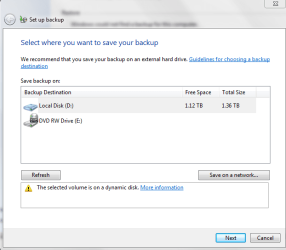
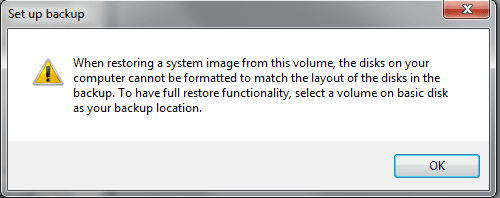
hi, I so just reinstalled my os a few days ago, and today, i finally finish installing all the basic programs, so i opened up windows back up and select my data drive to backup on (D: ) but under it, theres that yellow triangle notification saying that the selected partition is on a active drive.
for my understanding, active drive is only suppose to be my C: drive, so i opened up diskmanagement to check, and C: drive is actually inactive, but it is my system drive.
I tried marking D as inactive with diskpart, but it doesnt change anything, it still says it is active, and if i mark C as active in diskmanagement, the OS wont load. So i put my win7 disk back in and change it back to what it was. so, what is the problem here? why isnt my system drive active? and why is my data drive active?

sorry, i was wrong. please ignore the title and everything below, skip to #5
====edit===================edit=====================edit===============
hi, I so just reinstalled my os a few days ago, and today, i finally finish installing all the basic programs, so i opened up windows back up and select my data drive to backup on (D: ) but under it, theres that yellow triangle notification saying that the selected partition is on a active drive.
for my understanding, active drive is only suppose to be my C: drive, so i opened up diskmanagement to check, and C: drive is actually inactive, but it is my system drive.
I tried marking D as inactive with diskpart, but it doesnt change anything, it still says it is active, and if i mark C as active in diskmanagement, the OS wont load. So i put my win7 disk back in and change it back to what it was. so, what is the problem here? why isnt my system drive active? and why is my data drive active?
Last edited:
My Computer
- OS
- Windows 7 Ultimate 64bit
- CPU
- i7 920
- Motherboard
- asus p6t
- Memory
- G.skill 3x2gb ddr3
- Graphics Card(s)
- GTX 260 216
- Hard Drives
- Western Digital Black 640GB
Western Digital Green 1.5TB
- PSU
- Crosair 750W