Solved Camera and Printer Icon, pops up for half a second and disappears

synth

New member
Member
VIP
Local time
9:46 PM
Messages
100
Hi, I'm new in this forum and I really don't know where I should put this and I tried searching the forums via the Oh-so-helpful search button, but no luck. I'm getting this camera and printer icon popping up on my taskbar which causes games to minimize. At first I didn't know what that icon was, so I tried scanning my computer with MSE and found nothing. So I tried to screenshot the thing and got a decent screenie. I also found out that it pops up every minute, and it only appears for about half a second. Any tips on how to remove this and what caused this problem? Thanks.


Here's the screenie I took:

Untitled.jpg


Thanks in advance guys.
 

My Computer My Computer

At a glance

Windows 7 Ultimate x64
OS
Windows 7 Ultimate x64
already did that and found nothing very helpful online..
 

My Computer My Computer

At a glance

Windows 7 Ultimate x64
OS
Windows 7 Ultimate x64
surprisingly, system restore did not work....
 

My Computer My Computer

At a glance

Windows 7 Ultimate x64
OS
Windows 7 Ultimate x64
I have the same problem too, for quite while now. But I tryed it in a USB 2.0 Port, and before inserting it I opened my computer and waited for the icon to appear. Sometimes it failed, but after about 2 tries it works.... For me anyway.

My advice is, try putting it in the main USB port, (USB 2.0)
Thats how mine works,

Rowan
 

My Computer My Computer

At a glance

Windows 7 Proffesional 64 bit
OS
Windows 7 Proffesional 64 bit
Motherboard
Asus M2N MX SE Plus
Internet Speed
Virgin Media 10MB broadband
I have the same problem too, for quite while now. But I tryed it in a USB 2.0 Port, and before inserting it I opened my computer and waited for the icon to appear. Sometimes it failed, but after about 2 tries it works.... For me anyway.

My advice is, try putting it in the main USB port, (USB 2.0)
Thats how mine works,

Rowan

You tried putting a what in the main USB port? A printer or a webcam? The thing is the problem keeps popping up on my laptop that has a built-in webcam and that has no printers connected to it via USB or wifi or LAN or what not..
 

My Computer My Computer

At a glance

Windows 7 Ultimate x64
OS
Windows 7 Ultimate x64
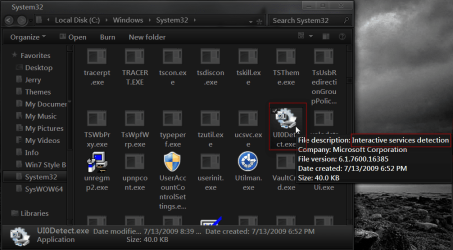
I do not know how to help with it popping up for you but I found the UI0Detect.exe in C:\Windows\System32 that look like it. It's a Interactive service detection but I do not know what it does.
Maybe that will help you.
Jerry
1.png
 

My Computer My Computer

At a glance

Win 7 Pro x64 / Win 10 ProIntel(R) Core(TM) i7-3630QM CPU @ 2.40GHz12 GB(1) Intel(R) HD Graphics 4000 (2) NVIDIA GeFo...
Computer type
Laptop
Computer Manufacturer/Model Number
Sager NP9170
OS
Win 7 Pro x64 / Win 10 Pro
CPU
Intel(R) Core(TM) i7-3630QM CPU @ 2.40GHz
Motherboard
CLEVO P170EM
Memory
12 GB
Graphics Card(s)
(1) Intel(R) HD Graphics 4000 (2) NVIDIA GeForce GTX 675M
Sound Card
(1) Realtek High Definition Audio (2) Intel(R) Display Aud
Monitor(s) Displays
17.3
Screen Resolution
1920x1080
Hard Drives
(1) Samsung 860 EVO 500GB(OS) (1) Samsung 860 EVO 500GB(Data)
Keyboard
Backlite
Antivirus
MSE, Malwarebytes Pro
Browser
Firefox
Other Info
DESKTOP: Custom-built.
OS: Win 10 Pro x64.
CASE: Rosewill R5.
CPU: Intel I5 4670K CPU @ 3.40GHz.
CPU COOLER: Cool Master Hyper 212 EVO.
MOTHERBOARD: Asus Z87-A.
MEMORY: Kingston HyperX 2x4 GB.
GPU: Nvidia Geforce 650 TI.
PSU: Corsair TX750.
DRIVES: (1) Samsung 840 120 GB SSD (2) Western Digital blue 500 GB 7200 RPM.
I do not know how to help with it popping up for you but I found the UI0Detect.exe in C:\Windows\System32 that look like it. It's a Interactive service detection but I do not know what it does.
Maybe that will help you.
Jerry
View attachment 183000

Definitely helpful! Now I know what the icon means, so now I can try and look for a solution or workaround for it popping up every minute. :) Thank you so much sir.
 

My Computer My Computer

At a glance

Windows 7 Ultimate x64
OS
Windows 7 Ultimate x64
Hmm.. I did some googling about that UI0Detect.exe and haven't really found anything helpful, aside from the fact that it was created by Microsoft and is Legit also that there are some malwares that do name themselves as the same. Aside from that, haven't seem any thing more useful..Haven't seen anyone that has the same problem that I have...
 

My Computer My Computer

At a glance

Windows 7 Ultimate x64
OS
Windows 7 Ultimate x64

My Computer My Computer

At a glance

Win 7 Pro x64 / Win 10 ProIntel(R) Core(TM) i7-3630QM CPU @ 2.40GHz12 GB(1) Intel(R) HD Graphics 4000 (2) NVIDIA GeFo...
Computer type
Laptop
Computer Manufacturer/Model Number
Sager NP9170
OS
Win 7 Pro x64 / Win 10 Pro
CPU
Intel(R) Core(TM) i7-3630QM CPU @ 2.40GHz
Motherboard
CLEVO P170EM
Memory
12 GB
Graphics Card(s)
(1) Intel(R) HD Graphics 4000 (2) NVIDIA GeForce GTX 675M
Sound Card
(1) Realtek High Definition Audio (2) Intel(R) Display Aud
Monitor(s) Displays
17.3
Screen Resolution
1920x1080
Hard Drives
(1) Samsung 860 EVO 500GB(OS) (1) Samsung 860 EVO 500GB(Data)
Keyboard
Backlite
Antivirus
MSE, Malwarebytes Pro
Browser
Firefox
Other Info
DESKTOP: Custom-built.
OS: Win 10 Pro x64.
CASE: Rosewill R5.
CPU: Intel I5 4670K CPU @ 3.40GHz.
CPU COOLER: Cool Master Hyper 212 EVO.
MOTHERBOARD: Asus Z87-A.
MEMORY: Kingston HyperX 2x4 GB.
GPU: Nvidia Geforce 650 TI.
PSU: Corsair TX750.
DRIVES: (1) Samsung 840 120 GB SSD (2) Western Digital blue 500 GB 7200 RPM.


No problem mate! You did good! By letting me know what that thing was I was able to find a way to disable the thing, the only thing is, I THINK, It messed with my laptop's bluetooth as I cannot pair my phone to it anymore which is fine by me since I can always connect my phone to my laptop via Data Cable. Now I'm a bit worried if disabling it affected other things. I guess I'll just find that out in time.

Thanks again man, you did good :)
 

My Computer My Computer

At a glance

Windows 7 Ultimate x64
OS
Windows 7 Ultimate x64
Back
Top