
Computer freezing randomly for half a second!

Well, the driver didn't work. Did I install the right driver?
asdasdasdasd.png

Or do you want me to get all of them? A bit confused.. :confused:
 

My Computer

Computer type
PC/Desktop
Computer Manufacturer/Model Number
Custom build
OS
Microsoft Windows 7 64-bit
CPU
Intel Core i5 2500K Quad Core 3.3 Ghz
Motherboard
Gigabyte GA-Z68X-UD3H-B3, Socket-1155
Memory
Corsair Vengeance 2x4GB
Graphics Card(s)
Asus Radeon HD 7950 3GB "DirectCU II TOP"
Sound Card
Realtek High Definition Audio (MOBO - DOLBY)
Monitor(s) Displays
Samsung 27" LED SyncMaster S27B350 & Asus 24" VW246H
Screen Resolution
1920x1080
Hard Drives
Seagate Barracuda 1TB 7200 RPM
Kingston HyperX 120GB 2.5" 555MB/510MB
PSU
Fractal Design Tesla 650W Standard
Case
Coolermaster Elite 430 Midi
Cooling
Stock
Keyboard
Razer Black Widow 2011
Mouse
Logitech G600
Internet Speed
60 / 60
Antivirus
Microsoft Security Essentials
Browser
Google Chrome
Other Info
Mousepad - Corsair Vengeance MM600
Headset - Astro A40 2014 w/ mixamp pro
Yes Hauk that is the right one and I am thinking maybe go onto update the SATA and chipset stuff.

Now I have been scratching around re the kernel 41 error an it seems to be linked with a temporary loss of power. I know we have done the PSU but I am also thinking maybe the problem lies within the device and after it has been running for a bit because there is circuitry in the PSU that does a self test and if everything as in the voltage is ok then there is a signal sent to pin 8 (grey cable on the 24 pin plug) that is known a the Power_Good signal if that is out of whack for any reason it will shut the machine down. see this
Voltage Rails - Power Supply 101: A Reference Of Specifications go to the Power_Good section and it will tell you what the operating voltage has to be high or low of those volts will cause a shut down. But if you are going to use a meter to measure make sure it is a digital one not the analogue as I think I previously described injects volts and it is typically 9v so in a 5v rail - not good.

It could be something as simple as just one bad capacitor in the unit.
 

My Computer

Computer type
PC/Desktop
Computer Manufacturer/Model Number
Own build (new) Desk1 / Asus ROG Win 7 / Desk2 1st build
OS
Desk1 7 Home Prem / Desk2 10 Pro / Main lap Asus ROG 10 Pro 2 laptop Toshiba 7 Pro Asus P2520 7 & 10
CPU
Desk1 i5 3750K / Laptop i7 GTX 860M / Desk2 i5 2500
Motherboard
Desk1 Asus P877-V / Desk2 Gigabyte H67 UD3H / Laptop ?
Memory
Desk1 8GB (1866) / Desk2 16GB (1333) / Laptop 8Gb DDR3
Graphics Card(s)
Desk 1& 2NVidia GTX 650 & Laptops on board Intel
Sound Card
Desk 1 & 2 -XONAR DG Realtek High Def audio Laptop
Monitor(s) Displays
Desk 1 Benq HD 2450 / Desk2 Philips 24" / Laptop 17.5"
Screen Resolution
1920x1080 D1 & D2 & Laptop 1
Hard Drives
Desk1 Samsung 120GB 830 SSD
Asus ROG 256GB 850 Pro SSD
Desk2 Samsung 840 256 SSD
Toshiba 120GB EVO
PSU
Desk 1 Corsair HX 1050/ Laptop ? / Desk 2 Corsair HX 650
Case
Desk 1 Cooler HAF XM ? Toshiba laptop / Desk2 Coolermaster
Cooling
Fans on all Desk1 -2 Desk2 - all Coolermasters 5 Laptop ?
Keyboard
Desk 1 MS Sidewinder X6 Desk 2 MS Sidewinder X 4
Mouse
Desk 1&2 - Gigabyte MS 900 gamer - laptop - Logitec wireless
Internet Speed
ADSL2+
Other Info
One other Desktop (tester) and spare Toshba laptop both with SSD's
Running Kaspersky 2016 ISS on all machines config'd identically
Logitec audio stereo systems on each machine (x3)
Canon MG5250MFC
Router/modem TP-Link running WPA2SK
So I guess I should consider getting a new PSU then? :)
 

My Computer

Computer type
PC/Desktop
Computer Manufacturer/Model Number
Custom build
OS
Microsoft Windows 7 64-bit
CPU
Intel Core i5 2500K Quad Core 3.3 Ghz
Motherboard
Gigabyte GA-Z68X-UD3H-B3, Socket-1155
Memory
Corsair Vengeance 2x4GB
Graphics Card(s)
Asus Radeon HD 7950 3GB "DirectCU II TOP"
Sound Card
Realtek High Definition Audio (MOBO - DOLBY)
Monitor(s) Displays
Samsung 27" LED SyncMaster S27B350 & Asus 24" VW246H
Screen Resolution
1920x1080
Hard Drives
Seagate Barracuda 1TB 7200 RPM
Kingston HyperX 120GB 2.5" 555MB/510MB
PSU
Fractal Design Tesla 650W Standard
Case
Coolermaster Elite 430 Midi
Cooling
Stock
Keyboard
Razer Black Widow 2011
Mouse
Logitech G600
Internet Speed
60 / 60
Antivirus
Microsoft Security Essentials
Browser
Google Chrome
Other Info
Mousepad - Corsair Vengeance MM600
Headset - Astro A40 2014 w/ mixamp pro
No wait and just try the PSU out with this

Using HW Info PSU

Download HW Info and pick the right bit version -
HWiNFO, HWiNFO32/64 -Download -(copy and paste thissite into the search bar) If you do not need the running information in thesmaller right hand panel close it. In the left hand window click on the + forthe individual device groupings and they will open out to the variouscomponents.

Go on opening out further until you get to the device itself. click on it andit will highlight. In the right hand window there will be a very detaileddescription of that device as in brand, speeds model number etc etc These arevery detailed and are just what is needed for searching for drivers etc.


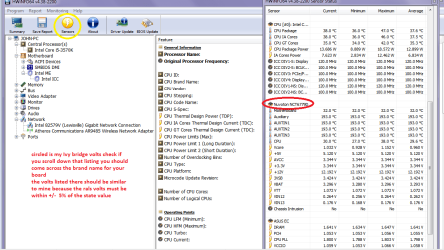
To get the PSU volts you need to select the Sensor buttoncircled in yellow in the pic

See my pic for an example - in this I have shown my power but it is a laptopand a desktop will show more details if you scroll down that listing. (see pic it is an Asus board and yours if different may have a different name for that section)

or this
http://www.sevenforums.com/tutorials/301799-psu-test-dc-output-voltage.html but use a digital meter not the old analogue type it injects typically 9v into a circuit to test it and would do no good in a 3.3v or 5v rail.


Attachments

  • HW Info PSU VOLTS DSEKTOP.PNG
    HW Info PSU VOLTS DSEKTOP.PNG
    51.7 KB · Views: 0

My Computer

Computer type
PC/Desktop
Computer Manufacturer/Model Number
Own build (new) Desk1 / Asus ROG Win 7 / Desk2 1st build
OS
Desk1 7 Home Prem / Desk2 10 Pro / Main lap Asus ROG 10 Pro 2 laptop Toshiba 7 Pro Asus P2520 7 & 10
CPU
Desk1 i5 3750K / Laptop i7 GTX 860M / Desk2 i5 2500
Motherboard
Desk1 Asus P877-V / Desk2 Gigabyte H67 UD3H / Laptop ?
Memory
Desk1 8GB (1866) / Desk2 16GB (1333) / Laptop 8Gb DDR3
Graphics Card(s)
Desk 1& 2NVidia GTX 650 & Laptops on board Intel
Sound Card
Desk 1 & 2 -XONAR DG Realtek High Def audio Laptop
Monitor(s) Displays
Desk 1 Benq HD 2450 / Desk2 Philips 24" / Laptop 17.5"
Screen Resolution
1920x1080 D1 & D2 & Laptop 1
Hard Drives
Desk1 Samsung 120GB 830 SSD
Asus ROG 256GB 850 Pro SSD
Desk2 Samsung 840 256 SSD
Toshiba 120GB EVO
PSU
Desk 1 Corsair HX 1050/ Laptop ? / Desk 2 Corsair HX 650
Case
Desk 1 Cooler HAF XM ? Toshiba laptop / Desk2 Coolermaster
Cooling
Fans on all Desk1 -2 Desk2 - all Coolermasters 5 Laptop ?
Keyboard
Desk 1 MS Sidewinder X6 Desk 2 MS Sidewinder X 4
Mouse
Desk 1&2 - Gigabyte MS 900 gamer - laptop - Logitec wireless
Internet Speed
ADSL2+
Other Info
One other Desktop (tester) and spare Toshba laptop both with SSD's
Running Kaspersky 2016 ISS on all machines config'd identically
Logitec audio stereo systems on each machine (x3)
Canon MG5250MFC
Router/modem TP-Link running WPA2SK
I don't think I have any meters to check the DC Output. :S
I'll see what I can do, but not sure if I'll be able to!
 

My Computer

Computer type
PC/Desktop
Computer Manufacturer/Model Number
Custom build
OS
Microsoft Windows 7 64-bit
CPU
Intel Core i5 2500K Quad Core 3.3 Ghz
Motherboard
Gigabyte GA-Z68X-UD3H-B3, Socket-1155
Memory
Corsair Vengeance 2x4GB
Graphics Card(s)
Asus Radeon HD 7950 3GB "DirectCU II TOP"
Sound Card
Realtek High Definition Audio (MOBO - DOLBY)
Monitor(s) Displays
Samsung 27" LED SyncMaster S27B350 & Asus 24" VW246H
Screen Resolution
1920x1080
Hard Drives
Seagate Barracuda 1TB 7200 RPM
Kingston HyperX 120GB 2.5" 555MB/510MB
PSU
Fractal Design Tesla 650W Standard
Case
Coolermaster Elite 430 Midi
Cooling
Stock
Keyboard
Razer Black Widow 2011
Mouse
Logitech G600
Internet Speed
60 / 60
Antivirus
Microsoft Security Essentials
Browser
Google Chrome
Other Info
Mousepad - Corsair Vengeance MM600
Headset - Astro A40 2014 w/ mixamp pro
There is a part pic of one on the tutorial and they are really very cheap these days I can pick an adequate one up for about $10 - some places even cheaper.

Pic of meter attached
 

Attachments

  • METER.PNG
    METER.PNG
    92.6 KB · Views: 22

My Computer

Computer type
PC/Desktop
Computer Manufacturer/Model Number
Own build (new) Desk1 / Asus ROG Win 7 / Desk2 1st build
OS
Desk1 7 Home Prem / Desk2 10 Pro / Main lap Asus ROG 10 Pro 2 laptop Toshiba 7 Pro Asus P2520 7 & 10
CPU
Desk1 i5 3750K / Laptop i7 GTX 860M / Desk2 i5 2500
Motherboard
Desk1 Asus P877-V / Desk2 Gigabyte H67 UD3H / Laptop ?
Memory
Desk1 8GB (1866) / Desk2 16GB (1333) / Laptop 8Gb DDR3
Graphics Card(s)
Desk 1& 2NVidia GTX 650 & Laptops on board Intel
Sound Card
Desk 1 & 2 -XONAR DG Realtek High Def audio Laptop
Monitor(s) Displays
Desk 1 Benq HD 2450 / Desk2 Philips 24" / Laptop 17.5"
Screen Resolution
1920x1080 D1 & D2 & Laptop 1
Hard Drives
Desk1 Samsung 120GB 830 SSD
Asus ROG 256GB 850 Pro SSD
Desk2 Samsung 840 256 SSD
Toshiba 120GB EVO
PSU
Desk 1 Corsair HX 1050/ Laptop ? / Desk 2 Corsair HX 650
Case
Desk 1 Cooler HAF XM ? Toshiba laptop / Desk2 Coolermaster
Cooling
Fans on all Desk1 -2 Desk2 - all Coolermasters 5 Laptop ?
Keyboard
Desk 1 MS Sidewinder X6 Desk 2 MS Sidewinder X 4
Mouse
Desk 1&2 - Gigabyte MS 900 gamer - laptop - Logitec wireless
Internet Speed
ADSL2+
Other Info
One other Desktop (tester) and spare Toshba laptop both with SSD's
Running Kaspersky 2016 ISS on all machines config'd identically
Logitec audio stereo systems on each machine (x3)
Canon MG5250MFC
Router/modem TP-Link running WPA2SK
I haven't been able to get one of those tools yet. But something I just realized while playing a game is that my GPU got really hot! It made the monitors go black for a second when it hit 81 degrees C, and the fans were suddenly making loads of noise, probably going full throttle.
Since the monitors went black, it reminded me of that rare crash I've had a few times, as mentioned in #1.
Does the GPU have anything to do with the freezes?

Edit; Under no stress, surfing the web, it is around 40 degrees C.

Edit 2; Thank you! :D
 
Last edited:

My Computer

Computer type
PC/Desktop
Computer Manufacturer/Model Number
Custom build
OS
Microsoft Windows 7 64-bit
CPU
Intel Core i5 2500K Quad Core 3.3 Ghz
Motherboard
Gigabyte GA-Z68X-UD3H-B3, Socket-1155
Memory
Corsair Vengeance 2x4GB
Graphics Card(s)
Asus Radeon HD 7950 3GB "DirectCU II TOP"
Sound Card
Realtek High Definition Audio (MOBO - DOLBY)
Monitor(s) Displays
Samsung 27" LED SyncMaster S27B350 & Asus 24" VW246H
Screen Resolution
1920x1080
Hard Drives
Seagate Barracuda 1TB 7200 RPM
Kingston HyperX 120GB 2.5" 555MB/510MB
PSU
Fractal Design Tesla 650W Standard
Case
Coolermaster Elite 430 Midi
Cooling
Stock
Keyboard
Razer Black Widow 2011
Mouse
Logitech G600
Internet Speed
60 / 60
Antivirus
Microsoft Security Essentials
Browser
Google Chrome
Other Info
Mousepad - Corsair Vengeance MM600
Headset - Astro A40 2014 w/ mixamp pro
Hauk it sounds very much like the GPU is not quite right with the temps like that. Now I know the others can advise you better really how to check that card with some stress tests. I know of them but not enough about them.
I might throw this back to more help before going any further.

Now on editing all you need to do is go to the Edit on the return post and it will go back and let you change text etc and then click on save and it will repost the original with your added stuff:)
 

My Computer

Computer type
PC/Desktop
Computer Manufacturer/Model Number
Own build (new) Desk1 / Asus ROG Win 7 / Desk2 1st build
OS
Desk1 7 Home Prem / Desk2 10 Pro / Main lap Asus ROG 10 Pro 2 laptop Toshiba 7 Pro Asus P2520 7 & 10
CPU
Desk1 i5 3750K / Laptop i7 GTX 860M / Desk2 i5 2500
Motherboard
Desk1 Asus P877-V / Desk2 Gigabyte H67 UD3H / Laptop ?
Memory
Desk1 8GB (1866) / Desk2 16GB (1333) / Laptop 8Gb DDR3
Graphics Card(s)
Desk 1& 2NVidia GTX 650 & Laptops on board Intel
Sound Card
Desk 1 & 2 -XONAR DG Realtek High Def audio Laptop
Monitor(s) Displays
Desk 1 Benq HD 2450 / Desk2 Philips 24" / Laptop 17.5"
Screen Resolution
1920x1080 D1 & D2 & Laptop 1
Hard Drives
Desk1 Samsung 120GB 830 SSD
Asus ROG 256GB 850 Pro SSD
Desk2 Samsung 840 256 SSD
Toshiba 120GB EVO
PSU
Desk 1 Corsair HX 1050/ Laptop ? / Desk 2 Corsair HX 650
Case
Desk 1 Cooler HAF XM ? Toshiba laptop / Desk2 Coolermaster
Cooling
Fans on all Desk1 -2 Desk2 - all Coolermasters 5 Laptop ?
Keyboard
Desk 1 MS Sidewinder X6 Desk 2 MS Sidewinder X 4
Mouse
Desk 1&2 - Gigabyte MS 900 gamer - laptop - Logitec wireless
Internet Speed
ADSL2+
Other Info
One other Desktop (tester) and spare Toshba laptop both with SSD's
Running Kaspersky 2016 ISS on all machines config'd identically
Logitec audio stereo systems on each machine (x3)
Canon MG5250MFC
Router/modem TP-Link running WPA2SK
Hauk, do you use a utility to monitor temps? Obviously you do to know the temp your GPU was during gaming. Which one do you use? Most have the capability to use a custom fan profile to keep the catd from getting that hot. Use a pretty aggressive profile if you do it, I do. Once a card gets very hot, it's difficult to cool it doen, but if you use the fan profile to keep it from getting that hot, it will work much better. I set mine to run 40% until 40C, after that I have the fan go up 1% for every 1C the temp increases. I will have it at 100% around 70-75C. Just a suggestion. does your utility have that capability? If not, try MSI Afterburner, MSI Afterburner
 

My Computers

System One System Two

  • Computer type
    PC/Desktop
    Computer Manufacturer/Model Number
    ALWAYS UNDER CONSTRUCTION
    OS
    Windows 11 Pro
    CPU
    Ryzen 9 5900X
    Motherboard
    Asus X570 Crosshair Viii Hero
    Memory
    32GB G Skill DDR4-3600
    Graphics Card(s)
    EVGA RTX 3080 FTW 3 Ultra
    Sound Card
    On Board/Sennheiser PC37X Headset
    Monitor(s) Displays
    3 X Asus 27"
    Screen Resolution
    2560x1440
    Hard Drives
    2 X 1 TB NVME drives
    PSU
    EVGA 850
    Case
    Phanteks Eclipse P400A
    Cooling
    EVGA 280 AIO
    Keyboard
    Logitech G510s/ Logitech G13
    Mouse
    Logitech G502
    Internet Speed
    24/1
    Antivirus
    ESET/MBAM Pro/SAS Pro
    Browser
    Chrome/ Firefox/ Edge
  • Computer type
    Laptop
    System Manufacturer/Model Number
    Dell 16 Plus
    OS
    Windows 11 Pro
    CPU
    Intel Ultra 9 288V
    Memory
    32 GB LPDDR5X 8533
    Monitor(s) Displays
    16" Mini-LED HDR600 Touch 90 Hz
    Screen Resolution
    2560X1600
    Hard Drives
    1 TB NVME
Sounds like a plan Essenbe, I'll check it out.
While I was playing the fans suddenly decided to go full throttle and became really loud, I thought it was obvious that SOMETHING was happening, so I jumped on Speccy to check the temps. Then I downloaded a program called SpeedFan which allowed me to manually control fans and whatnot, but I guess MSI Afterburner is better :)
 

My Computer

Computer type
PC/Desktop
Computer Manufacturer/Model Number
Custom build
OS
Microsoft Windows 7 64-bit
CPU
Intel Core i5 2500K Quad Core 3.3 Ghz
Motherboard
Gigabyte GA-Z68X-UD3H-B3, Socket-1155
Memory
Corsair Vengeance 2x4GB
Graphics Card(s)
Asus Radeon HD 7950 3GB "DirectCU II TOP"
Sound Card
Realtek High Definition Audio (MOBO - DOLBY)
Monitor(s) Displays
Samsung 27" LED SyncMaster S27B350 & Asus 24" VW246H
Screen Resolution
1920x1080
Hard Drives
Seagate Barracuda 1TB 7200 RPM
Kingston HyperX 120GB 2.5" 555MB/510MB
PSU
Fractal Design Tesla 650W Standard
Case
Coolermaster Elite 430 Midi
Cooling
Stock
Keyboard
Razer Black Widow 2011
Mouse
Logitech G600
Internet Speed
60 / 60
Antivirus
Microsoft Security Essentials
Browser
Google Chrome
Other Info
Mousepad - Corsair Vengeance MM600
Headset - Astro A40 2014 w/ mixamp pro
Afterburner is widely used and many GPU utilities are based on it. Afterburner is basically an overclocking tool, but has some excellent monitoring tools incorporated into it, complete with on screen displays of most anything you could want as well as capability to set customized fan profiles and such. I would strongly suggest you not move the overclocking sliders on the front page though. Go into the settings for on screen display and fans and set up a profile where it shows what you want on screen during a game and set a custom fan profile to help keep the heat down. It could also be helpful to add a couple of good intake fans to your case if possible, to bring in more cool air. After all, it's the air inside the case that your graphics card is using to cool itself. The cooler that air is, the better off all your components will be.
 

My Computers

System One System Two

  • Computer type
    PC/Desktop
    Computer Manufacturer/Model Number
    ALWAYS UNDER CONSTRUCTION
    OS
    Windows 11 Pro
    CPU
    Ryzen 9 5900X
    Motherboard
    Asus X570 Crosshair Viii Hero
    Memory
    32GB G Skill DDR4-3600
    Graphics Card(s)
    EVGA RTX 3080 FTW 3 Ultra
    Sound Card
    On Board/Sennheiser PC37X Headset
    Monitor(s) Displays
    3 X Asus 27"
    Screen Resolution
    2560x1440
    Hard Drives
    2 X 1 TB NVME drives
    PSU
    EVGA 850
    Case
    Phanteks Eclipse P400A
    Cooling
    EVGA 280 AIO
    Keyboard
    Logitech G510s/ Logitech G13
    Mouse
    Logitech G502
    Internet Speed
    24/1
    Antivirus
    ESET/MBAM Pro/SAS Pro
    Browser
    Chrome/ Firefox/ Edge
  • Computer type
    Laptop
    System Manufacturer/Model Number
    Dell 16 Plus
    OS
    Windows 11 Pro
    CPU
    Intel Ultra 9 288V
    Memory
    32 GB LPDDR5X 8533
    Monitor(s) Displays
    16" Mini-LED HDR600 Touch 90 Hz
    Screen Resolution
    2560X1600
    Hard Drives
    1 TB NVME

My Computer

Computer type
PC/Desktop
Computer Manufacturer/Model Number
Custom Build
OS
Windows 7 Ultimate 64-bit
CPU
Intel G3420 3.2GHZ Dual Core
Motherboard
Gigabyte H87-HD3
Memory
Kingson 8GB 1600mhz
Graphics Card(s)
MSI R7970 TF 3GD5/OC BE
Monitor(s) Displays
21" LG & "19 Vertical Samsung
Hard Drives
120GB SSD - Boot
1TB WD
350GB External
2TB External (Wireless)
PSU
Corsair CX 500 modular
Case
Zalman Z11 Plus (modified)
Cooling
Corsair H55, 2x 120mm SP Corsair, 1x 140 Coolermaster
Keyboard
Corsair K50
Mouse
CSL Gaming
Internet Speed
164Mbps
Antivirus
Avast, Malwarebytes
Browser
Google Chrome, IE, Firefox
Let's see how well we can control temps before running Furmark. Temps seem to be the issue at this point. Furmark will send them through the roof. Once we get temps down, then run Furmark is what I think I would do.
 

My Computers

System One System Two

  • Computer type
    PC/Desktop
    Computer Manufacturer/Model Number
    ALWAYS UNDER CONSTRUCTION
    OS
    Windows 11 Pro
    CPU
    Ryzen 9 5900X
    Motherboard
    Asus X570 Crosshair Viii Hero
    Memory
    32GB G Skill DDR4-3600
    Graphics Card(s)
    EVGA RTX 3080 FTW 3 Ultra
    Sound Card
    On Board/Sennheiser PC37X Headset
    Monitor(s) Displays
    3 X Asus 27"
    Screen Resolution
    2560x1440
    Hard Drives
    2 X 1 TB NVME drives
    PSU
    EVGA 850
    Case
    Phanteks Eclipse P400A
    Cooling
    EVGA 280 AIO
    Keyboard
    Logitech G510s/ Logitech G13
    Mouse
    Logitech G502
    Internet Speed
    24/1
    Antivirus
    ESET/MBAM Pro/SAS Pro
    Browser
    Chrome/ Firefox/ Edge
  • Computer type
    Laptop
    System Manufacturer/Model Number
    Dell 16 Plus
    OS
    Windows 11 Pro
    CPU
    Intel Ultra 9 288V
    Memory
    32 GB LPDDR5X 8533
    Monitor(s) Displays
    16" Mini-LED HDR600 Touch 90 Hz
    Screen Resolution
    2560X1600
    Hard Drives
    1 TB NVME
Good point, Im begin to ambitious at the moment.
 

My Computer

Computer type
PC/Desktop
Computer Manufacturer/Model Number
Custom Build
OS
Windows 7 Ultimate 64-bit
CPU
Intel G3420 3.2GHZ Dual Core
Motherboard
Gigabyte H87-HD3
Memory
Kingson 8GB 1600mhz
Graphics Card(s)
MSI R7970 TF 3GD5/OC BE
Monitor(s) Displays
21" LG & "19 Vertical Samsung
Hard Drives
120GB SSD - Boot
1TB WD
350GB External
2TB External (Wireless)
PSU
Corsair CX 500 modular
Case
Zalman Z11 Plus (modified)
Cooling
Corsair H55, 2x 120mm SP Corsair, 1x 140 Coolermaster
Keyboard
Corsair K50
Mouse
CSL Gaming
Internet Speed
164Mbps
Antivirus
Avast, Malwarebytes
Browser
Google Chrome, IE, Firefox
I made a custom fan-profile using MSI Afterburner and will continue playing games or whatever to see if the temps are under control. I did play earlier today though, after getting 81 degrees, and still find it weird that it would go THAT high.

I'd love to get some new fans, or maybe even water cool it. I think I'll have to get a new case before I'll do any of that though, and that wont happen in a while since I'm a poor student at the moment.. :(
 

My Computer

Computer type
PC/Desktop
Computer Manufacturer/Model Number
Custom build
OS
Microsoft Windows 7 64-bit
CPU
Intel Core i5 2500K Quad Core 3.3 Ghz
Motherboard
Gigabyte GA-Z68X-UD3H-B3, Socket-1155
Memory
Corsair Vengeance 2x4GB
Graphics Card(s)
Asus Radeon HD 7950 3GB "DirectCU II TOP"
Sound Card
Realtek High Definition Audio (MOBO - DOLBY)
Monitor(s) Displays
Samsung 27" LED SyncMaster S27B350 & Asus 24" VW246H
Screen Resolution
1920x1080
Hard Drives
Seagate Barracuda 1TB 7200 RPM
Kingston HyperX 120GB 2.5" 555MB/510MB
PSU
Fractal Design Tesla 650W Standard
Case
Coolermaster Elite 430 Midi
Cooling
Stock
Keyboard
Razer Black Widow 2011
Mouse
Logitech G600
Internet Speed
60 / 60
Antivirus
Microsoft Security Essentials
Browser
Google Chrome
Other Info
Mousepad - Corsair Vengeance MM600
Headset - Astro A40 2014 w/ mixamp pro
You can clean the dust from the inside with a can of compressed air (don't use an air compressor) and make sure the wiring is tied out of the way so it does not obstruct air flow. That can help a lot. Zip ties are your friend. :D But, seriously, 80C should not make it BSOD. Most cards can take that temp. It isn't desirable, but they can take it normally.
 

My Computers

System One System Two

  • Computer type
    PC/Desktop
    Computer Manufacturer/Model Number
    ALWAYS UNDER CONSTRUCTION
    OS
    Windows 11 Pro
    CPU
    Ryzen 9 5900X
    Motherboard
    Asus X570 Crosshair Viii Hero
    Memory
    32GB G Skill DDR4-3600
    Graphics Card(s)
    EVGA RTX 3080 FTW 3 Ultra
    Sound Card
    On Board/Sennheiser PC37X Headset
    Monitor(s) Displays
    3 X Asus 27"
    Screen Resolution
    2560x1440
    Hard Drives
    2 X 1 TB NVME drives
    PSU
    EVGA 850
    Case
    Phanteks Eclipse P400A
    Cooling
    EVGA 280 AIO
    Keyboard
    Logitech G510s/ Logitech G13
    Mouse
    Logitech G502
    Internet Speed
    24/1
    Antivirus
    ESET/MBAM Pro/SAS Pro
    Browser
    Chrome/ Firefox/ Edge
  • Computer type
    Laptop
    System Manufacturer/Model Number
    Dell 16 Plus
    OS
    Windows 11 Pro
    CPU
    Intel Ultra 9 288V
    Memory
    32 GB LPDDR5X 8533
    Monitor(s) Displays
    16" Mini-LED HDR600 Touch 90 Hz
    Screen Resolution
    2560X1600
    Hard Drives
    1 TB NVME
I'm not sure if it was a BSOD, but definitively a crash of sorts. Since it did make me have to hard-reset it using the power-button. Not sure if I mentioned it, but when it reached 81C my monitors went black, exactly as when it "BSOD'ed".

I've just played for an hour, and it did reach 70 degrees at some point, although it normally sat at 66 to 68. I don't really know much about temps and so on, so you decide if it's acceptable or not! :)

My current PSU is a standard one, so there's a TON of cables, I think I might get a PSU and a case as soon as I can, although that can be up to a month, easily.. :(
 

My Computer

Computer type
PC/Desktop
Computer Manufacturer/Model Number
Custom build
OS
Microsoft Windows 7 64-bit
CPU
Intel Core i5 2500K Quad Core 3.3 Ghz
Motherboard
Gigabyte GA-Z68X-UD3H-B3, Socket-1155
Memory
Corsair Vengeance 2x4GB
Graphics Card(s)
Asus Radeon HD 7950 3GB "DirectCU II TOP"
Sound Card
Realtek High Definition Audio (MOBO - DOLBY)
Monitor(s) Displays
Samsung 27" LED SyncMaster S27B350 & Asus 24" VW246H
Screen Resolution
1920x1080
Hard Drives
Seagate Barracuda 1TB 7200 RPM
Kingston HyperX 120GB 2.5" 555MB/510MB
PSU
Fractal Design Tesla 650W Standard
Case
Coolermaster Elite 430 Midi
Cooling
Stock
Keyboard
Razer Black Widow 2011
Mouse
Logitech G600
Internet Speed
60 / 60
Antivirus
Microsoft Security Essentials
Browser
Google Chrome
Other Info
Mousepad - Corsair Vengeance MM600
Headset - Astro A40 2014 w/ mixamp pro
70 is acceptable, depending on what game you're playing. You can always take the side panel off the computer and blow a house fan directly in it.
 

My Computers

System One System Two

  • Computer type
    PC/Desktop
    Computer Manufacturer/Model Number
    ALWAYS UNDER CONSTRUCTION
    OS
    Windows 11 Pro
    CPU
    Ryzen 9 5900X
    Motherboard
    Asus X570 Crosshair Viii Hero
    Memory
    32GB G Skill DDR4-3600
    Graphics Card(s)
    EVGA RTX 3080 FTW 3 Ultra
    Sound Card
    On Board/Sennheiser PC37X Headset
    Monitor(s) Displays
    3 X Asus 27"
    Screen Resolution
    2560x1440
    Hard Drives
    2 X 1 TB NVME drives
    PSU
    EVGA 850
    Case
    Phanteks Eclipse P400A
    Cooling
    EVGA 280 AIO
    Keyboard
    Logitech G510s/ Logitech G13
    Mouse
    Logitech G502
    Internet Speed
    24/1
    Antivirus
    ESET/MBAM Pro/SAS Pro
    Browser
    Chrome/ Firefox/ Edge
  • Computer type
    Laptop
    System Manufacturer/Model Number
    Dell 16 Plus
    OS
    Windows 11 Pro
    CPU
    Intel Ultra 9 288V
    Memory
    32 GB LPDDR5X 8533
    Monitor(s) Displays
    16" Mini-LED HDR600 Touch 90 Hz
    Screen Resolution
    2560X1600
    Hard Drives
    1 TB NVME
Hauk essenbe and Harry have some good material there to work and I agree the ambient temp is also very important ie if the room is at 78C it is going to hard to get it much lower than that.
Personally I have a thing about case fans and install as many as I can and the bigger the better.
An example is my Ivy Bridge has 4x200mm 4x140mm:geek:
 

My Computer

Computer type
PC/Desktop
Computer Manufacturer/Model Number
Own build (new) Desk1 / Asus ROG Win 7 / Desk2 1st build
OS
Desk1 7 Home Prem / Desk2 10 Pro / Main lap Asus ROG 10 Pro 2 laptop Toshiba 7 Pro Asus P2520 7 & 10
CPU
Desk1 i5 3750K / Laptop i7 GTX 860M / Desk2 i5 2500
Motherboard
Desk1 Asus P877-V / Desk2 Gigabyte H67 UD3H / Laptop ?
Memory
Desk1 8GB (1866) / Desk2 16GB (1333) / Laptop 8Gb DDR3
Graphics Card(s)
Desk 1& 2NVidia GTX 650 & Laptops on board Intel
Sound Card
Desk 1 & 2 -XONAR DG Realtek High Def audio Laptop
Monitor(s) Displays
Desk 1 Benq HD 2450 / Desk2 Philips 24" / Laptop 17.5"
Screen Resolution
1920x1080 D1 & D2 & Laptop 1
Hard Drives
Desk1 Samsung 120GB 830 SSD
Asus ROG 256GB 850 Pro SSD
Desk2 Samsung 840 256 SSD
Toshiba 120GB EVO
PSU
Desk 1 Corsair HX 1050/ Laptop ? / Desk 2 Corsair HX 650
Case
Desk 1 Cooler HAF XM ? Toshiba laptop / Desk2 Coolermaster
Cooling
Fans on all Desk1 -2 Desk2 - all Coolermasters 5 Laptop ?
Keyboard
Desk 1 MS Sidewinder X6 Desk 2 MS Sidewinder X 4
Mouse
Desk 1&2 - Gigabyte MS 900 gamer - laptop - Logitec wireless
Internet Speed
ADSL2+
Other Info
One other Desktop (tester) and spare Toshba laptop both with SSD's
Running Kaspersky 2016 ISS on all machines config'd identically
Logitec audio stereo systems on each machine (x3)
Canon MG5250MFC
Router/modem TP-Link running WPA2SK
It's usually pretty cold in my room, sadly.. :p
Is it a good idea to try Furmark now and see what happens, or is it anything else I should do? :)
 

My Computer

Computer type
PC/Desktop
Computer Manufacturer/Model Number
Custom build
OS
Microsoft Windows 7 64-bit
CPU
Intel Core i5 2500K Quad Core 3.3 Ghz
Motherboard
Gigabyte GA-Z68X-UD3H-B3, Socket-1155
Memory
Corsair Vengeance 2x4GB
Graphics Card(s)
Asus Radeon HD 7950 3GB "DirectCU II TOP"
Sound Card
Realtek High Definition Audio (MOBO - DOLBY)
Monitor(s) Displays
Samsung 27" LED SyncMaster S27B350 & Asus 24" VW246H
Screen Resolution
1920x1080
Hard Drives
Seagate Barracuda 1TB 7200 RPM
Kingston HyperX 120GB 2.5" 555MB/510MB
PSU
Fractal Design Tesla 650W Standard
Case
Coolermaster Elite 430 Midi
Cooling
Stock
Keyboard
Razer Black Widow 2011
Mouse
Logitech G600
Internet Speed
60 / 60
Antivirus
Microsoft Security Essentials
Browser
Google Chrome
Other Info
Mousepad - Corsair Vengeance MM600
Headset - Astro A40 2014 w/ mixamp pro
Back
Top